
Sales & CRM


Customer Service Scorecard Excel Template
Track CSAT, FCR, response times, QA scores, and agent performance with this practical customer service scorecard Excel template.
2026-08-11
342 downloads
4.8/5
Download template
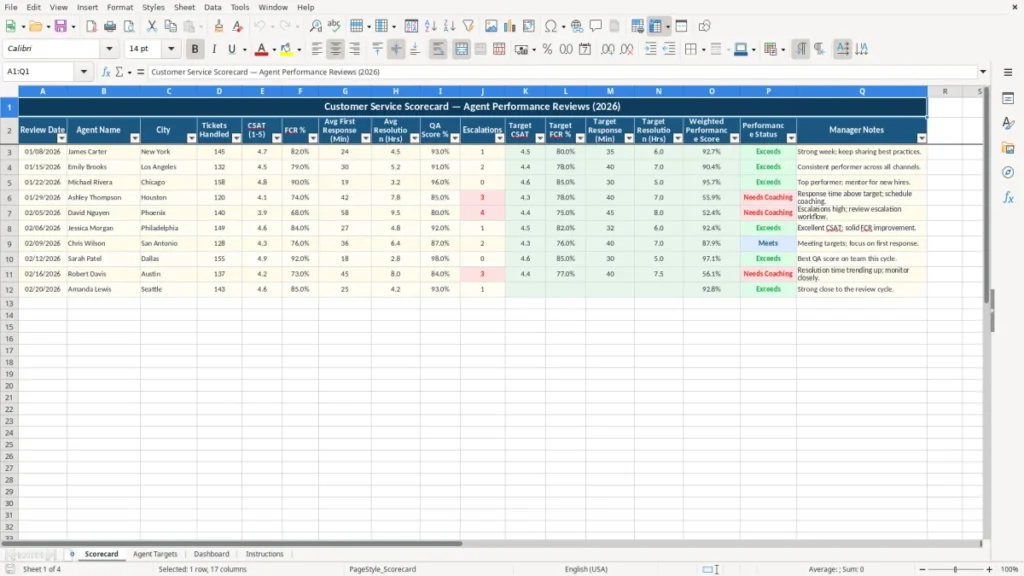
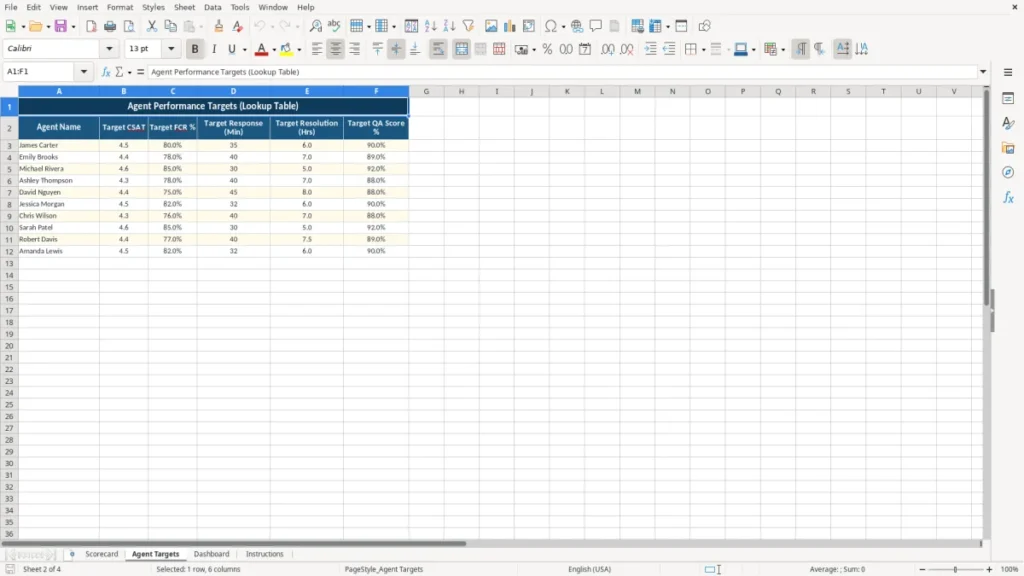
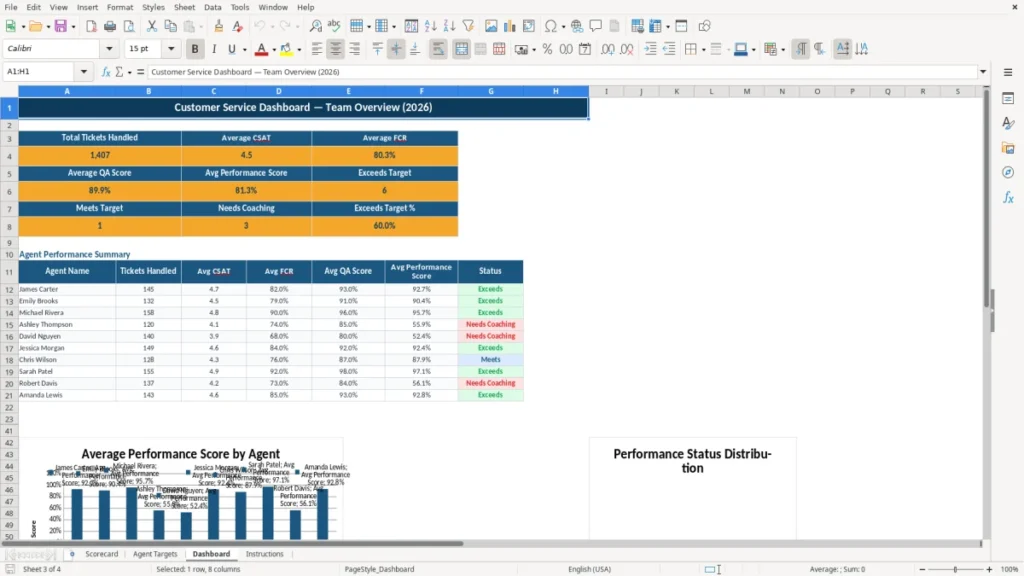
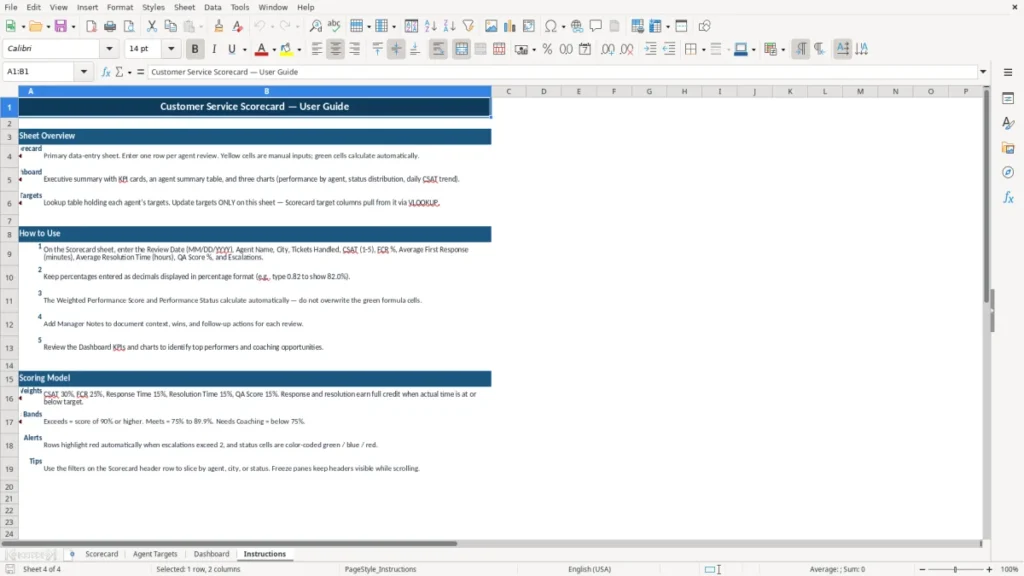
Measure support performance with a structured Excel scorecard designed for customer service managers, call centers, help desks, and support teams. Record agent activity, compare results with targets, calculate weighted performance scores, identify coaching opportunities, and keep manager notes in one practical worksheet.
The template brings important service indicators together so reviews are more consistent, measurable, and actionable.
The main benefits of this Excel template
- Create a consistent process for reviewing customer service agent performance.
- Compare CSAT, FCR, response times, resolution times, QA scores, and escalations with defined targets.
- Use a weighted performance score to evaluate overall results across multiple service indicators.
- Identify high-performing agents and areas that may require coaching or additional support.
- Keep performance data, review dates, targets, status results, and manager notes together.
- Save time compared with building a customer service scorecard from scratch.
Step-by-step guide
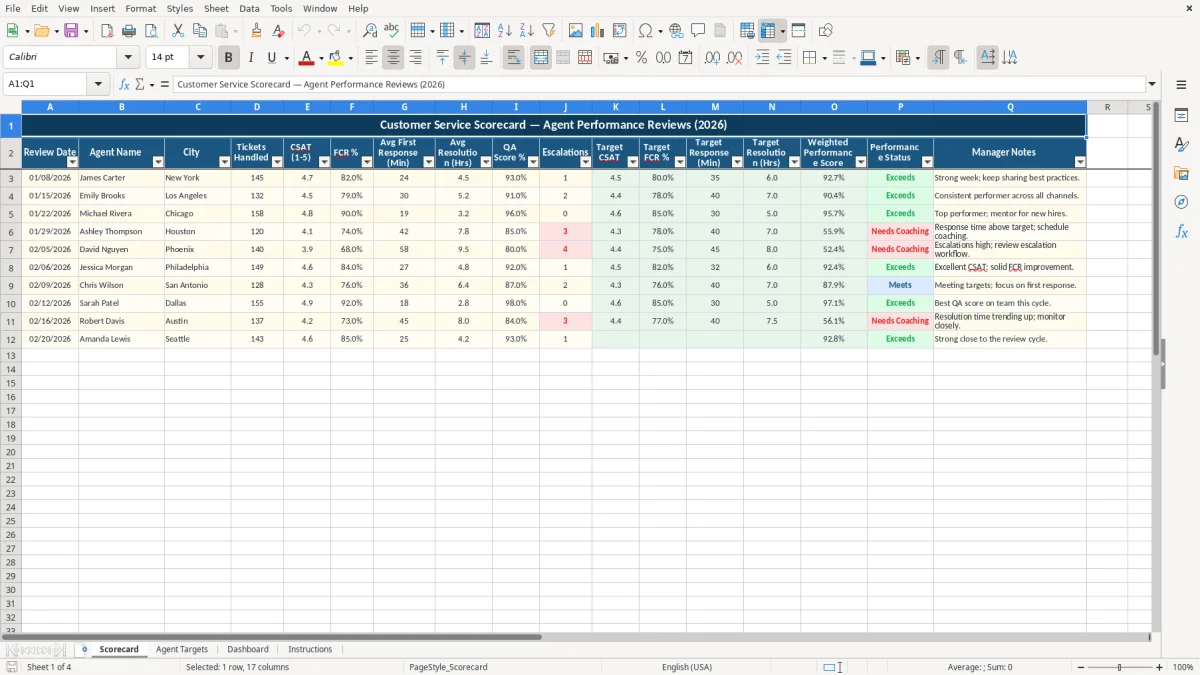
Start by entering the review date, agent name, city or team location, and the number of tickets handled. Add each agent’s CSAT score, FCR percentage, average first response time, average resolution time, QA score, and escalations. Enter the applicable targets for customer satisfaction, first-contact resolution, response time, and resolution time.
Review the weighted performance score and performance status to understand how results compare with expectations. Use the manager notes field to record strengths, coaching priorities, recognition, action items, and follow-up dates.
Update the worksheet weekly for operational monitoring, monthly for one-on-one reviews, or quarterly for broader performance reporting. You can customize targets and scoring priorities to match your service-level agreements, internal benchmarks, or department goals.
What is included
Review date and agent identification fields
Ticket volume tracking for each customer service agent
CSAT and FCR performance tracking
Average first response and resolution time measurements
QA score and escalation monitoring
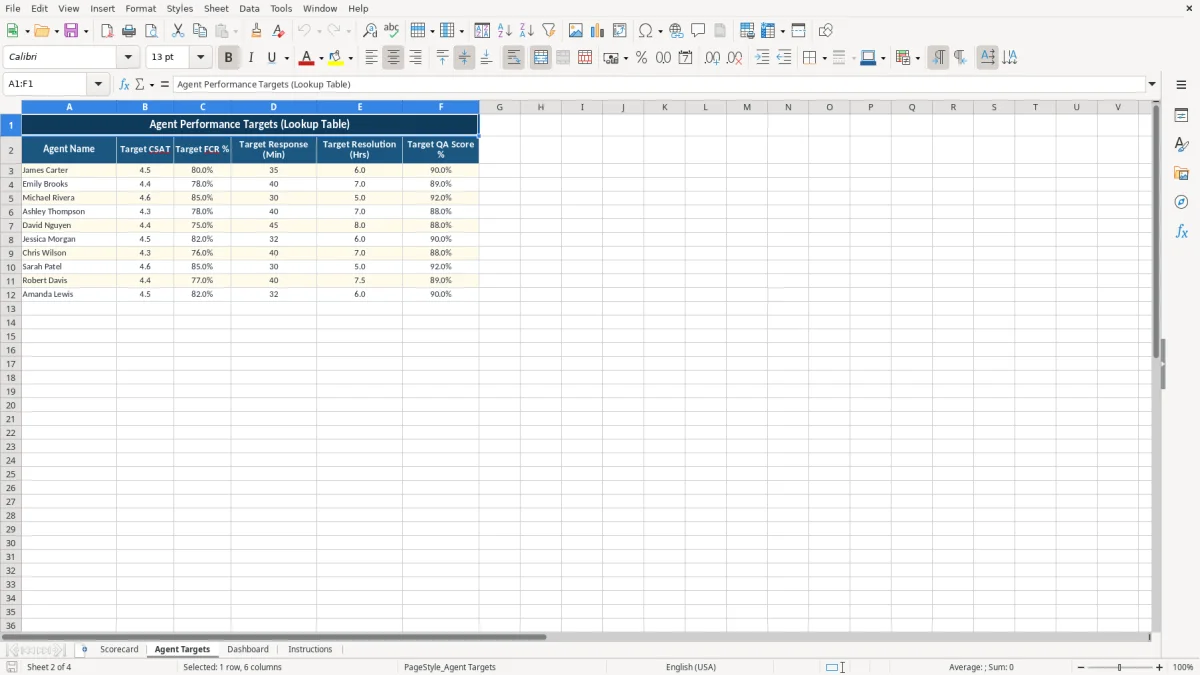
Target fields for comparing actual results with service expectations
Weighted performance score, performance status, and manager notes
What Is a Customer Service Scorecard?
A customer service scorecard is a structured way to evaluate how effectively an agent or support team serves customers. Instead of relying on a single number, the scorecard brings together several indicators that describe productivity, speed, quality, and customer experience.
Common measures include tickets handled, customer satisfaction, first-contact resolution, first response time, resolution time, quality assurance results, and escalations. By reviewing these measures together, managers can see a more complete picture of service performance.
A customer service scorecard Excel template makes this process easier to organize. Managers can enter results for a specific review period, compare actual performance with targets, and use a weighted performance score to summarize the results. The performance status provides a quick way to identify whether an agent is meeting expectations, while manager notes create space for recognition, coaching, and follow-up actions.
This type of scorecard is useful for call centers, email support teams, live chat operations, technical help desks, and customer success departments. It can support monthly reviews, regular one-on-one conversations, quality programs, and performance improvement plans. Because the template keeps operational results and review comments in one place, it helps create a more consistent evaluation process.
Teams can also adjust target values and scoring priorities as service standards change. The result is a practical, data-driven foundation for improving customer support without making the review process unnecessarily complicated.
Important Customer Service Metrics to Track
Effective customer service management depends on tracking metrics that reflect both customer experience and operational performance. Customer Satisfaction, or CSAT, shows how customers rate their interactions with the support team.
First Contact Resolution, or FCR, measures how often an issue is resolved during the first interaction, without a repeat contact. These measures help managers understand whether agents are delivering helpful, efficient service.
Speed-related metrics are also important. Average first response time shows how quickly an agent initially responds to a customer, while average resolution time shows how long it takes to close an issue. Faster results can improve the customer experience, but speed should be considered alongside quality.
A high QA score can indicate that an agent follows procedures, communicates clearly, documents interactions properly, and provides accurate solutions. Ticket volume shows workload and productivity, while escalation counts can highlight complex cases, training needs, or process problems.
The customer service scorecard Excel template includes fields for these core measures and provides target columns for comparison. Looking at actual results beside target values makes it easier to spot meaningful gaps. For example, an agent may handle many tickets but have a lower QA score, or achieve excellent CSAT while needing support with response times.
Reviewing several metrics together prevents managers from overemphasizing one result. It also supports more balanced conversations about performance, workload, customer outcomes, and the resources an agent needs to succeed.
How to Use the Excel Scorecard for Agent Reviews
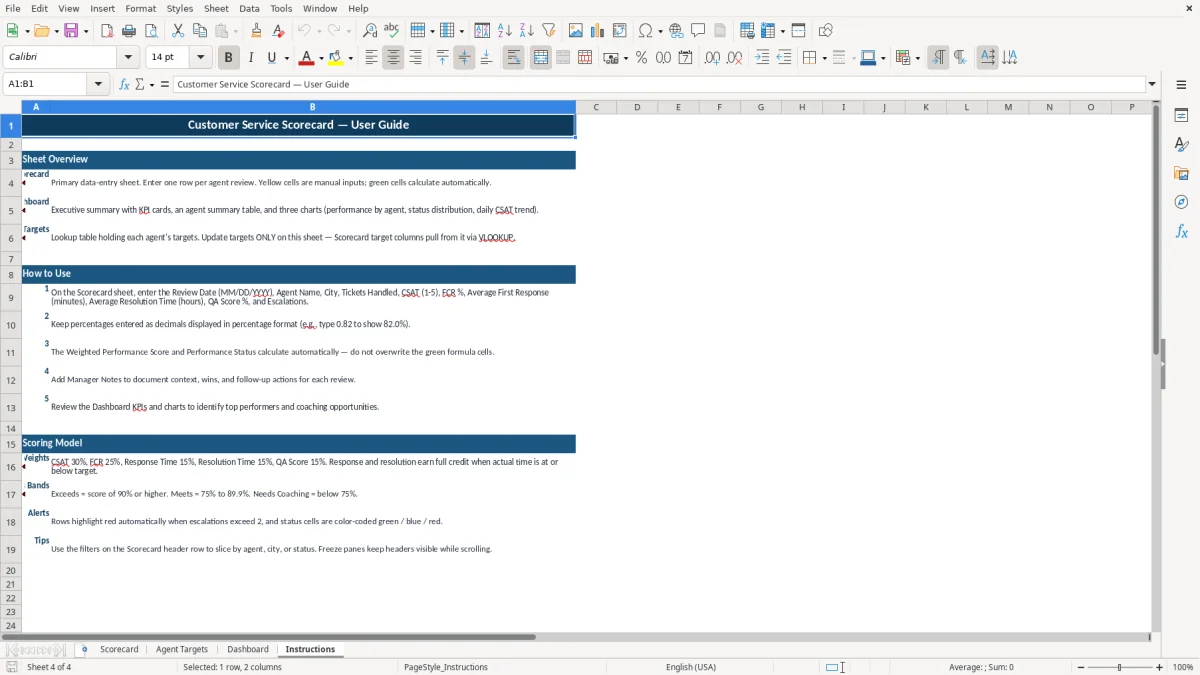
Begin each review by defining the period being evaluated and entering the review date. Add the agent’s name, city or location, tickets handled, and the measured results for each service indicator.
Use consistent data sources whenever possible, such as help desk reports, customer surveys, quality evaluations, and escalation logs. Consistent inputs make comparisons more reliable and help managers identify real trends rather than isolated events.
Next, enter the targets used by your organization. Targets may come from service-level agreements, department benchmarks, customer experience goals, or leadership expectations. The template includes target fields for CSAT, FCR, first response time, and resolution time.
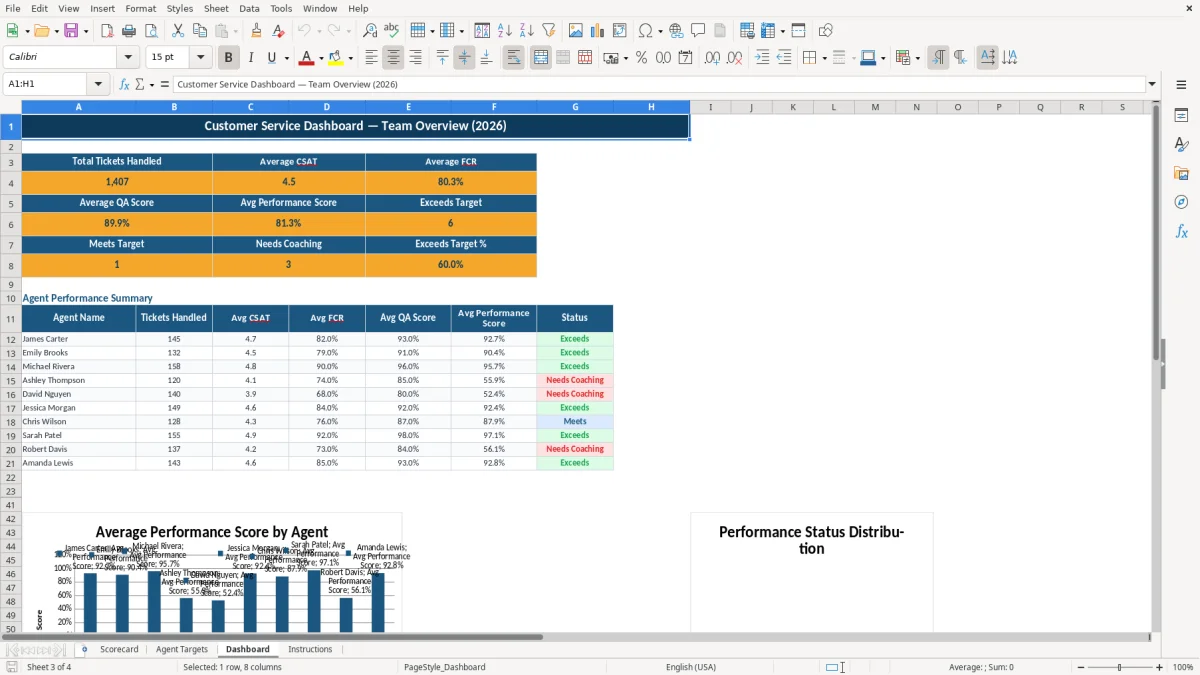
After the data is entered, review the weighted performance score and performance status. These summary fields provide a convenient starting point, but they should be considered alongside the underlying metrics and the type of work handled by the agent.
Complete the review by adding manager notes. Record notable strengths, examples of excellent customer care, performance barriers, coaching topics, and agreed next steps. Notes can make future conversations more focused and help document progress over time.
For the best results, use the scorecard on a regular schedule. Weekly updates support daily management, monthly entries work well for one-on-one reviews, and quarterly records help reveal broader patterns. You can also customize the template by changing targets, adding fields, or adjusting the weighting approach to fit your team’s operating model.
Improve Customer Support with Consistent Reporting
A consistent reporting process helps customer service leaders move from reactive problem solving to ongoing performance improvement. When results are recorded in the same format for every agent, managers can compare trends, recognize progress, and identify recurring issues earlier.
The customer service scorecard Excel template provides a straightforward structure for doing this without requiring a complex reporting system. It can serve as a working tool for team leaders and a clear reference during performance discussions.
The scorecard is especially useful when a team needs to balance competing priorities. High ticket volume may show productivity, but it does not necessarily indicate strong customer outcomes. A quick response may be valuable, but not if the resolution is incomplete.
CSAT, FCR, QA, response time, resolution time, and escalations each provide a different perspective. Reviewing them together encourages managers to consider the full service experience and avoid making decisions based on one isolated metric.
The template can also support recognition and development. Strong results may help identify agents who can share best practices or mentor colleagues. Lower results can point to targeted coaching, additional product training, workflow changes, or workload adjustments.
Manager notes make these decisions easier to document and revisit. Over time, the scorecard can become a useful historical record of performance and improvement. Whether your team supports customers by phone, email, chat, or a service desk, regular scorecard reviews can create clearer expectations, better coaching conversations, and more dependable customer service outcomes.
Frequently asked questions about this template
The template includes fields for review date, agent name, city, tickets handled, CSAT, FCR, first response time, resolution time, QA score, escalations, targets, weighted performance score, performance status, and manager notes.
Customer service managers, call center supervisors, help desk leaders, quality analysts, and support team leads can use the scorecard to review individual or team performance.
Yes. Update the target fields to match your service-level agreements, internal benchmarks, customer experience standards, or department goals.
Use weekly updates for operational monitoring, monthly updates for regular agent reviews, or quarterly updates for broader performance and trend analysis.
The weighted performance score summarizes results across multiple service indicators, helping managers review overall performance rather than relying on a single KPI.
Yes. The manager notes field can be used for recognition, coaching priorities, action items, performance barriers, and follow-up details.
Meet the makers