
Personal Finance


Home Buying Excel - Free Template
Track listings, mortgage costs, closing expenses, and offer status for a home purchase in one Excel workbook.
2026-07-06
154 downloads
4.8/5
Download template
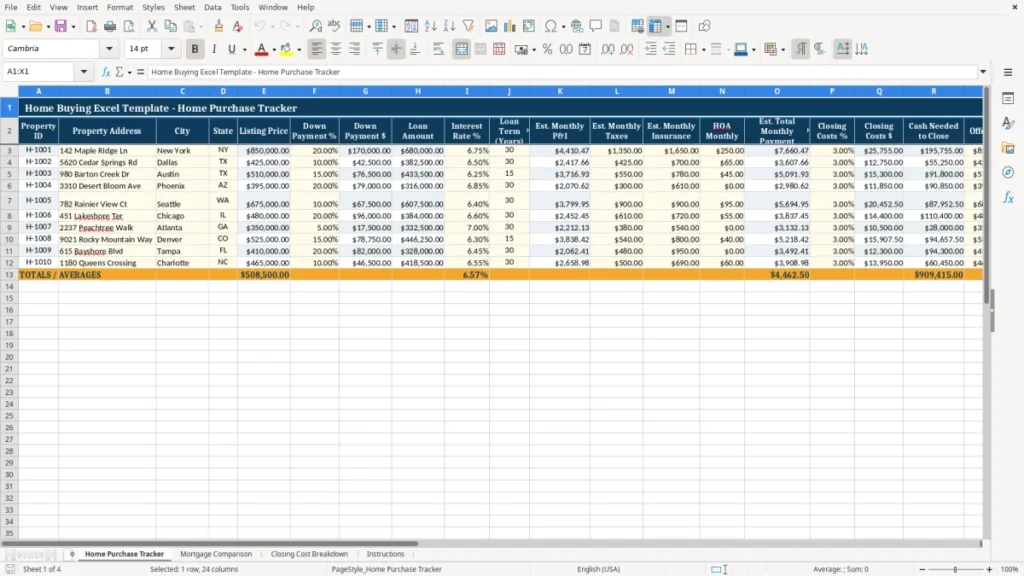
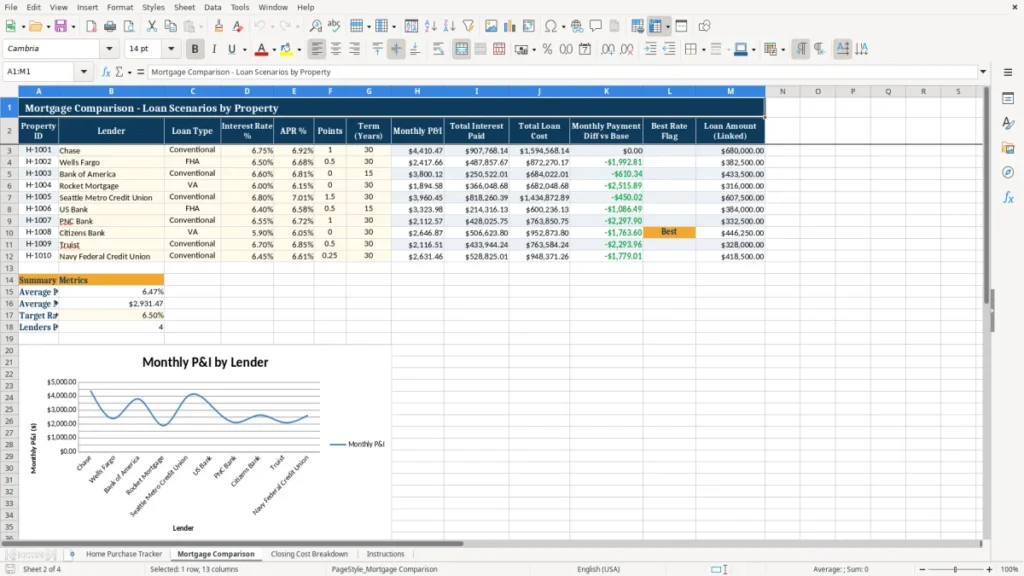
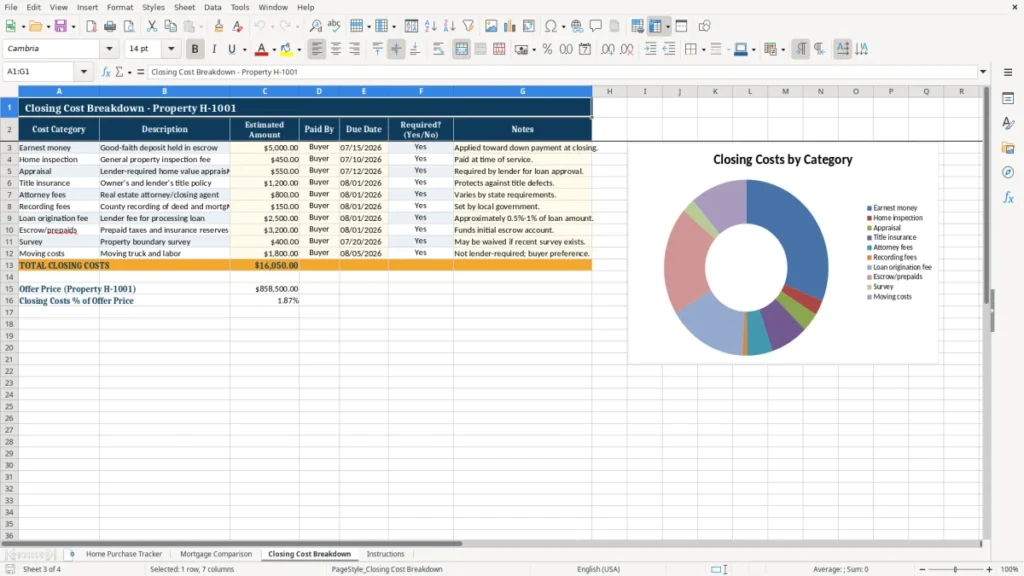
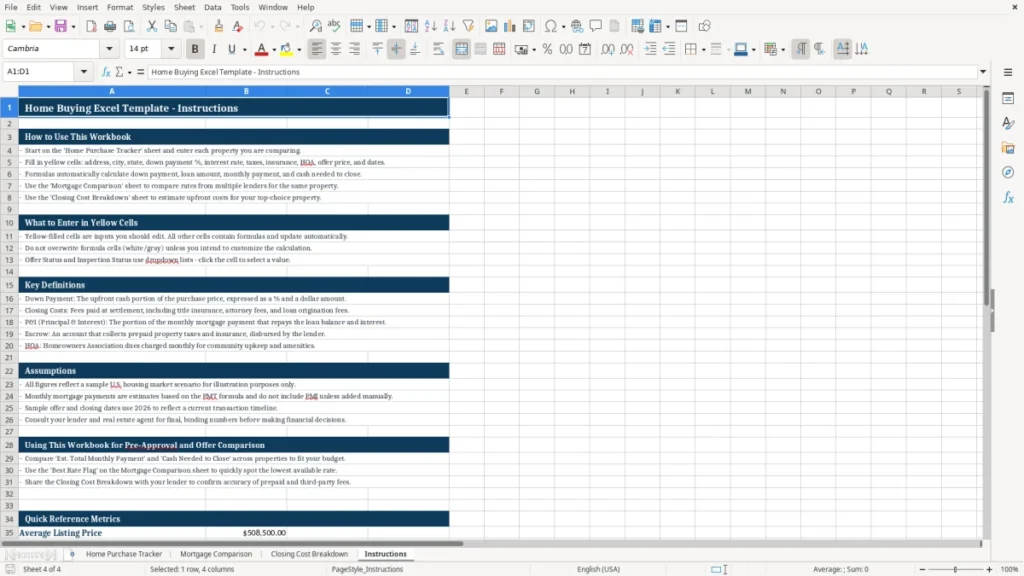
This home buying Excel template helps you compare listings, estimate monthly housing costs, and track your offer through closing. It includes a Home Purchase Tracker, Mortgage Comparison, Closing Cost Breakdown, and Instructions sheet.
Use it when you are shopping for a primary home, a second home, or an investment property and want a clear view of price, financing, and cash needed to close. The workbook is built to keep the numbers in one place instead of scattered across lender emails, notes, and calculator screenshots.
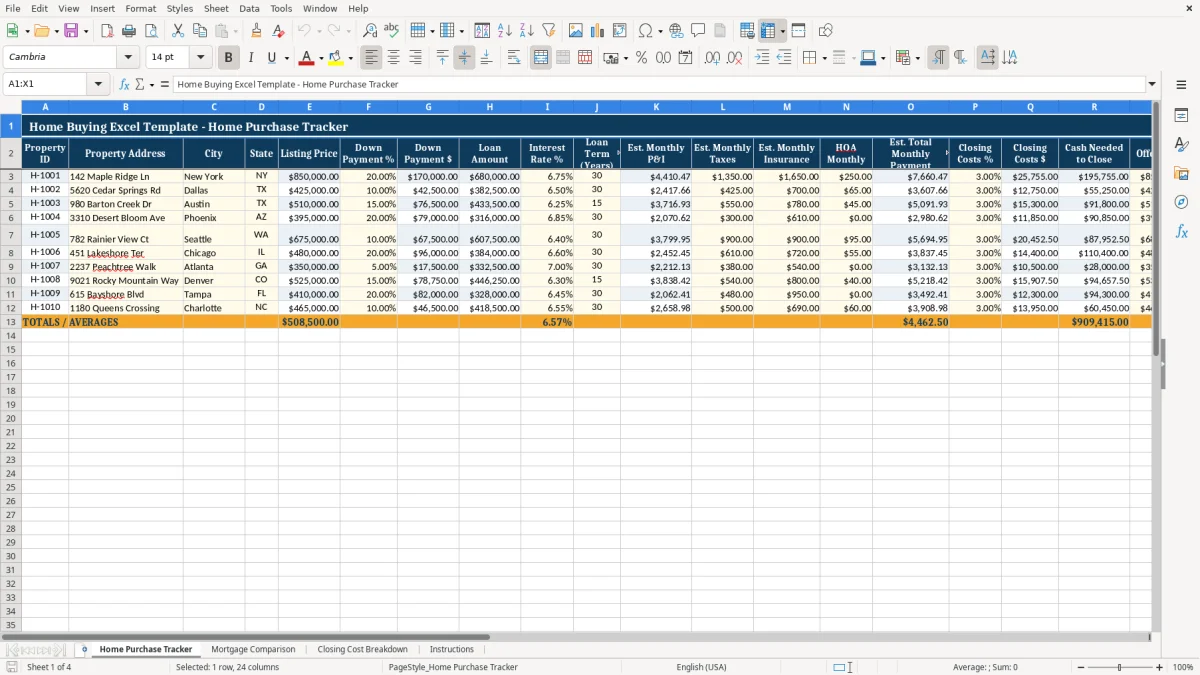
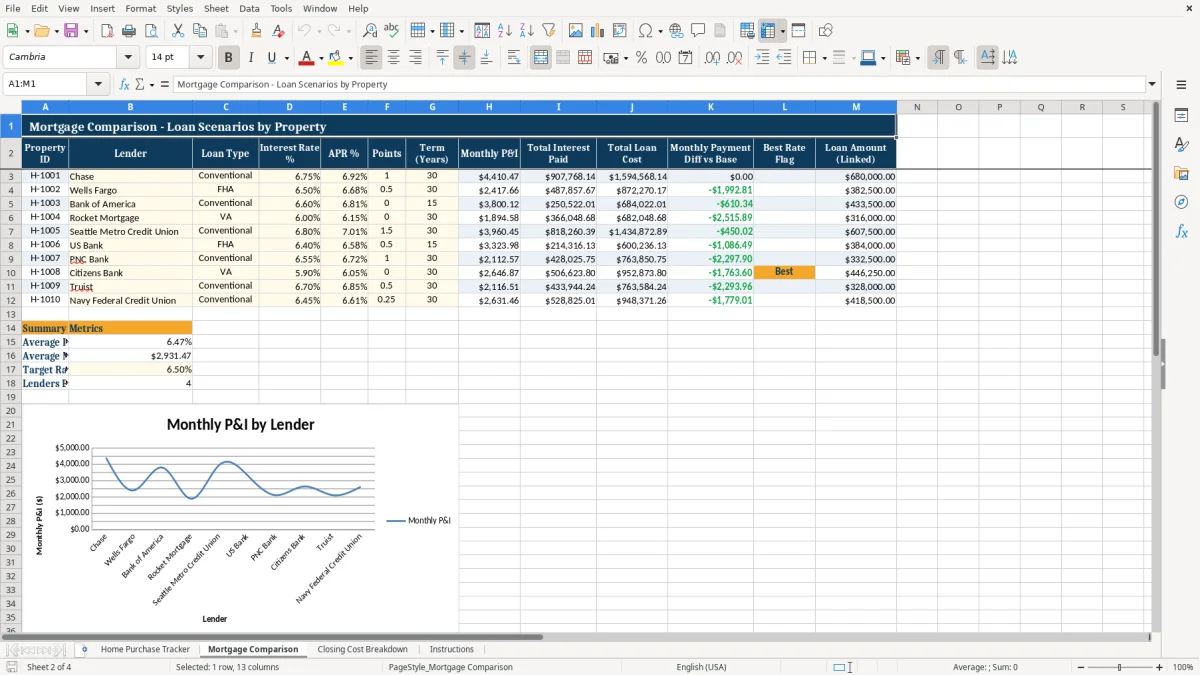
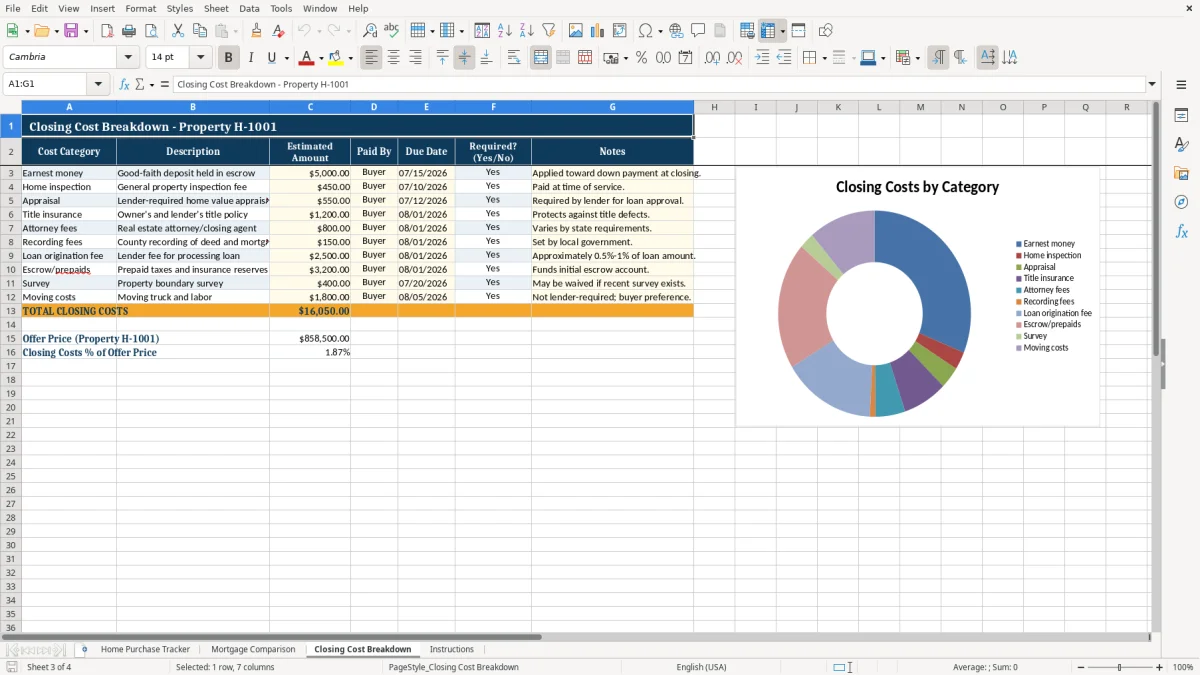
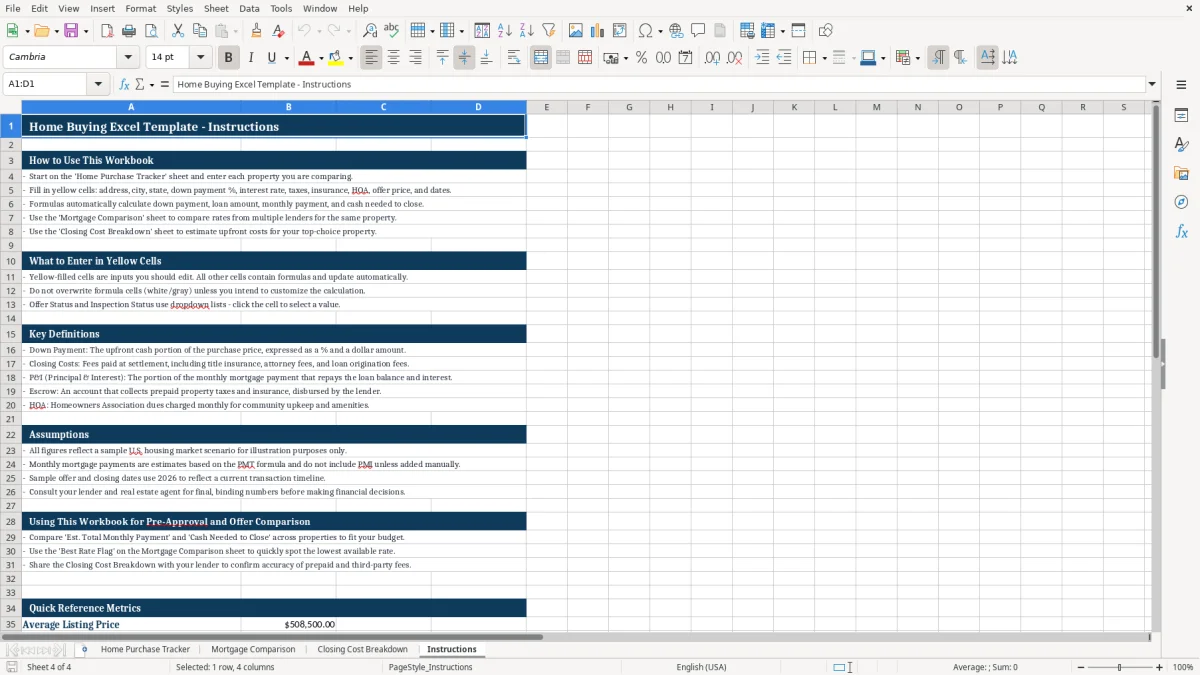
Image 1 shows the Home Purchase Tracker with columns for property details, down payment, loan amount, monthly payment, offer status, and closing date. Image 2 shows the mortgage comparison view, Image 3 shows closing costs, and Image 4 gives you the instructions tab.
The main benefits of this Excel template
- Compare multiple homes side by side with one row per property and a clear cash-to-close estimate.
- See your estimated monthly payment before you make an offer, including principal, interest, taxes, insurance, and HOA.
- Work out the down payment in dollars and as a percentage so you can test different scenarios fast.
- Track offer status, inspection status, and closing date without losing the paper trail.
- Estimate closing costs at the same time as the offer price, which helps you avoid a last-minute cash shortfall.
- Use the workbook to compare financing options and spot the loan that fits your monthly budget.
- Keep all property notes, addresses, and pricing details in one file you can update as listings change.
Step-by-step guide
- Enter each property on the Home Purchase Tracker sheet. Use one row per home so you can compare several listings at once.
- Fill in the listing price, down payment, interest rate, loan term, taxes, insurance, and HOA amount. The sheet estimates your monthly payment and cash needed to close.
- Update the offer price and status as you move through the process. This lets you see whether a home is still under review, accepted, or closed.
- Use the Mortgage Comparison sheet to test different loan amounts or rates. A small rate change, like 6.50% versus 7.00%, can move a $500,000 mortgage by hundreds of dollars a month.
- Review the Closing Cost Breakdown sheet before you commit to a purchase. Add lender fees, title charges, appraisal costs, and prepaid items so you do not underbudget your cash.
- Check the Instructions sheet if you need a quick refresher on what each field means or how the workbook is organized.
What is included
Home Purchase Tracker with columns for Property ID, address, city, state, listing price, offer price, status, and notes.
Down payment and loan calculations that convert percentages into dollar amounts.
Monthly payment estimate that combines principal and interest with taxes, insurance, and HOA.
Closing cost fields for both percentage and dollar amount, plus cash needed to close.
Mortgage comparison layout for testing different rate and term combinations.
Closing cost breakdown for planning the upfront cash you need before settlement.
Instruction sheet that explains how to enter data and read the workbook.
How buyers use an Excel template during the house hunt
You use this workbook when you are serious about a purchase and need to compare more than one home at a time. A first-time buyer looking at three condos at $425,000, $460,000, and $510,000 can see the monthly payment gap before making an offer.
The Home Purchase Tracker sheet is the main working tab. It gives you a place for property address, listing price, down payment %, loan amount, interest rate, loan term, estimated monthly payment, cash needed to close, and status fields like offer and inspection.
Useful when the numbers start moving fast
This is especially useful during spring and summer home shopping, when listings change weekly and you are comparing lender quotes at the same time. If your lender changes the rate from 6.875% to 7.125% on a $480,000 loan, the payment difference is not small after 30 years.
Better than doing it in notes or a calculator
A notes app can hold addresses, but it will not keep your payment math tied to the property. A spreadsheet is the better choice once you are comparing 2 to 10 homes, because you can line up the down payment, monthly taxes, and closing costs in one place.
What mortgage and closing cost rules matter in 2026
This template is built for the costs that actually hit your bank account at closing. The monthly payment usually includes principal and interest, plus property taxes, homeowners insurance, and sometimes HOA dues.
On a $500,000 home with 20% down, your loan amount is $400,000. At 7.00% over 30 years, principal and interest alone are about $2,661 per month, before taxes, insurance, and HOA.
Keep the tax and financing assumptions realistic
For federal tax reporting, mortgage interest may be deductible if the loan fits the IRS home mortgage interest rules, but the deduction is limited by the loan balance and how you use the home. Property tax treatment also depends on whether you itemize on Schedule A instead of taking the standard deduction.
The IRS recordkeeping rule is simple: keep closing documents, lender statements, and settlement paperwork for at least 3 years, and longer if the home is sold later or depreciation applies to a rental. If you buy through an LLC, a rental use case may also involve a balance sheet, depreciation, and a different tax setup than a personal residence.
Where home buying spreadsheets usually go wrong
The biggest mistake is underestimating cash needed to close. If you plan for a 5% down payment on a $420,000 home, that is $21,000, but a 3% closing-cost estimate adds another $12,600 before inspection, appraisal, and prepaid items.
Another common miss is using only principal and interest. A $3,000 mortgage payment can become $3,750 once you add $500 in taxes, $150 in insurance, and $100 in HOA dues, which changes what you can afford by a lot.
Why offer tracking matters
People also lose track of the offer timeline. If you are managing three offers at once and one inspection repair request takes $1,200, you need to know which property is moving toward closing and which one is stalling.
Simple math errors cost real money
If you enter the down payment as a dollar amount but the sheet expects a percentage, your loan amount can be off by tens of thousands of dollars. That mistake can make a house look affordable when it is not, and it can lead to a lender conversation you should have avoided before writing the offer.
How to turn the workbook into a weekly home search routine
Use the template on the same day each week, ideally after you review new listings or after a lender call. If you update it every Saturday morning with fresh prices, rate quotes, and offer status, it stays useful instead of becoming dead file clutter.
Three habits that keep it current
- Copy the previous week’s property list and replace only the changed fields, so you do not rebuild the sheet from scratch.
- Check the closing cost estimate whenever the lender changes the rate or points, because even a 0.25% rate shift can change the payment on a $450,000 loan.
- Use the status columns to mark accepted, under contract, inspection scheduled, or closed, so you always know where each home stands.
If you are shopping alone, this spreadsheet is enough. Once you are managing a rental portfolio, multiple agents, or more than 20 active deals, real estate software and a lender portal will be faster than a manual workbook.
Frequently asked questions about this template
The workbook includes four sheets: Home Purchase Tracker, Mortgage Comparison, Closing Cost Breakdown, and Instructions. That gives you one place to compare homes, test financing, estimate closing cash, and follow the setup steps.
Yes. For a primary home, you will usually focus on monthly payment and cash needed to close. For an investment property, you may also want to track expected rent, cash flow, and whether depreciation will matter for tax reporting.
Enter principal and interest, property taxes, homeowners insurance, and HOA dues if they apply. On a $600,000 home with a $480,000 loan, even $400 in taxes and insurance can change the real monthly cost by enough to affect your budget.
A practical starting point is 2% to 5% of the purchase price. On a $400,000 purchase, that means roughly $8,000 to $20,000 in closing costs before moving expenses and any repairs you agree to cover.
Yes. Keep the closing disclosure, mortgage statements, property tax bills, and improvement records. The IRS recordkeeping rule is generally 3 years, but home sale basis records should be kept longer because they affect gain or loss when you sell.
A calculator gives you one answer for one scenario. This template lets you compare several homes, track offer status, and see how the loan, taxes, insurance, HOA, and closing costs fit together in one workbook.
Meet the makers