
Inventory & Procurement


Preventive Maintenance Excel - Free Template
Track PM tasks, due dates, costs, and status across assets with a schedule sheet, dashboard, and instructions.
2026-07-06
176 downloads
4.8/5
Download template
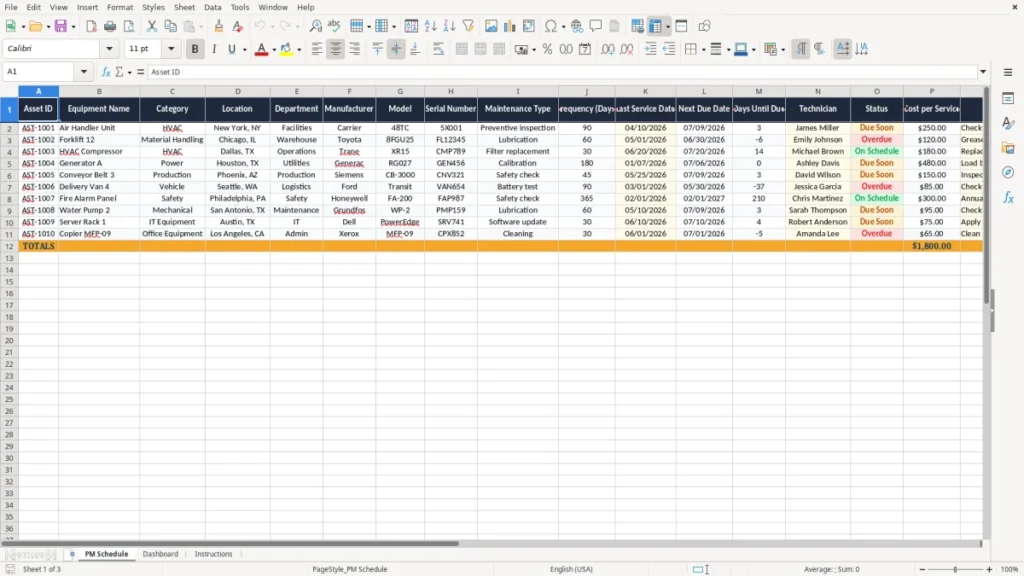
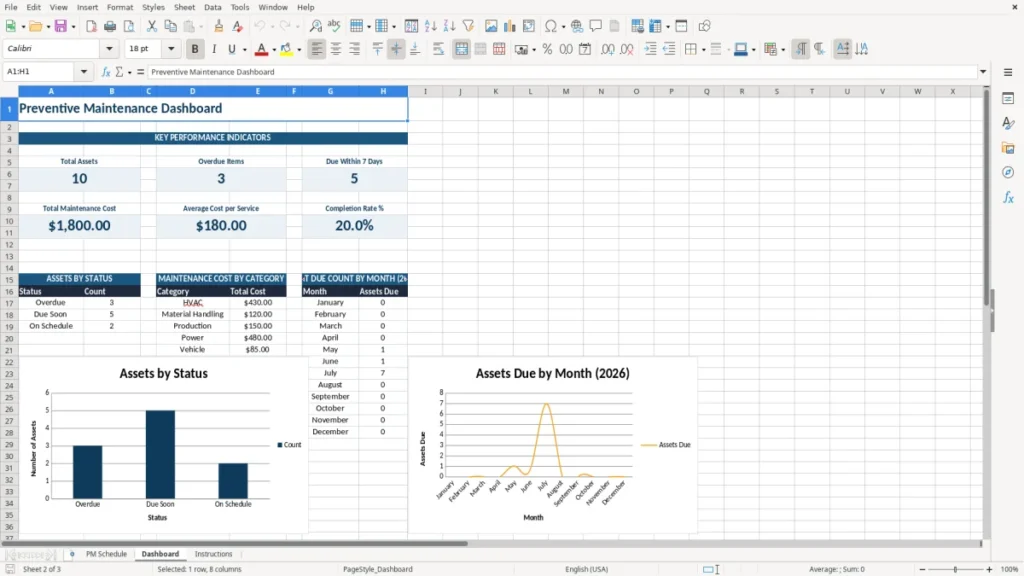
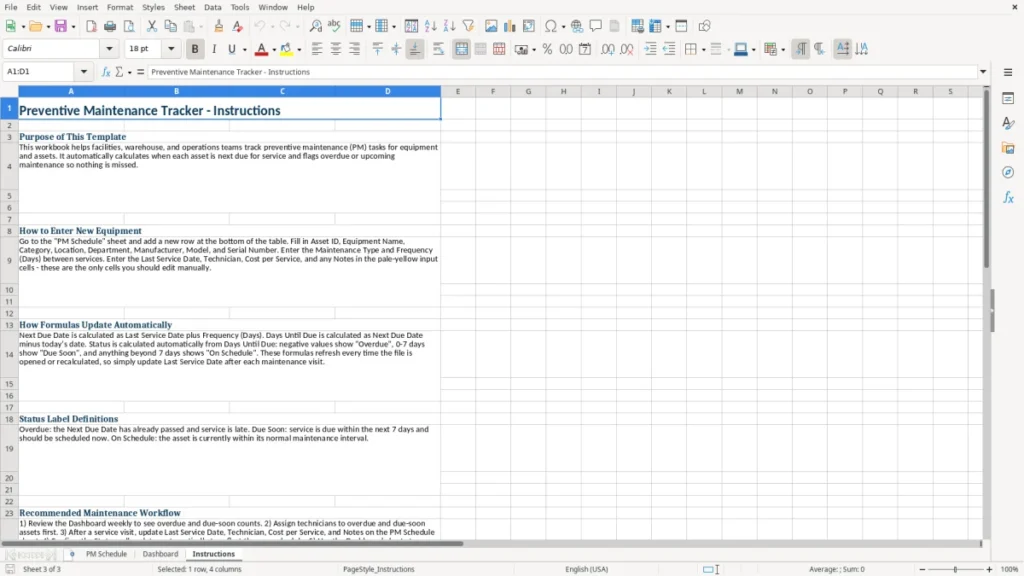
This preventive maintenance Excel template tracks assets, service intervals, due dates, technician assignments, and service cost in one file. It gives you a PM Schedule sheet, a Dashboard, and an Instructions sheet so you can keep equipment from slipping past its next service date.
Use it when you manage HVAC units, forklifts, shop tools, or facility equipment and need a simple way to see what is due next. The template is built for day-to-day maintenance tracking, not theory, so you can update it during the week and hand it to the next shift without confusion.
The PM Schedule sheet holds the asset list, the Dashboard turns the data into quick status visuals, and the Instructions sheet explains the setup. If you are balancing 15 assets or 150, the workbook gives you one place to see what is due, overdue, and already completed.
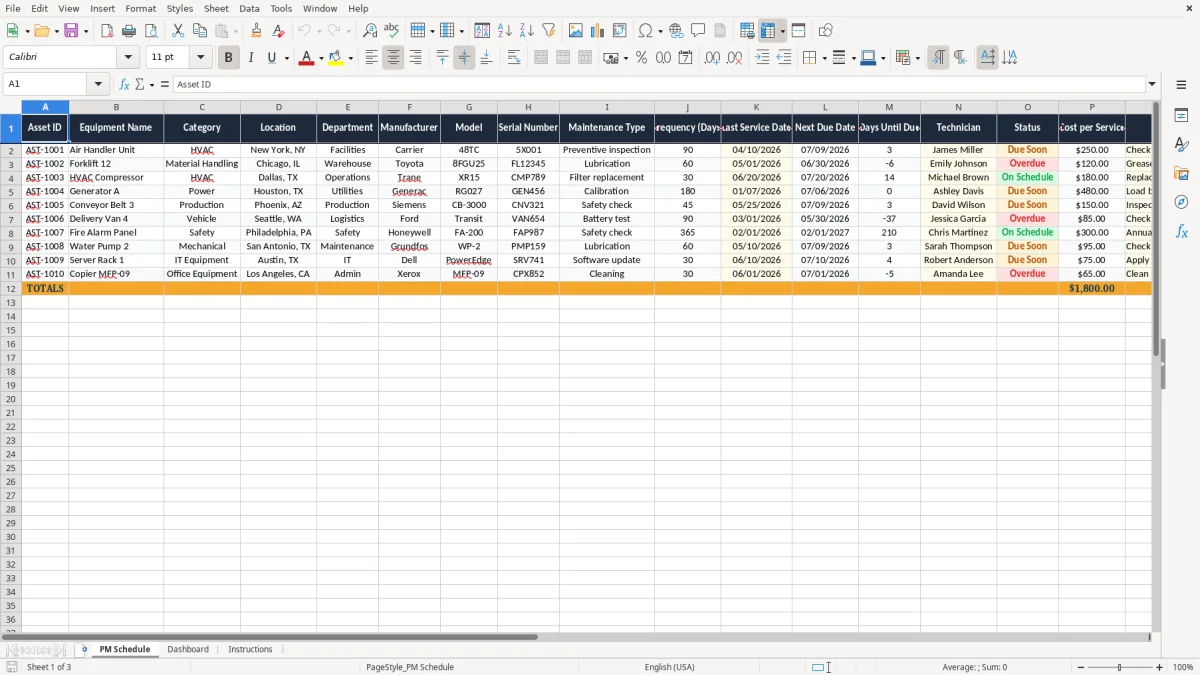
The main benefits of this Excel template
- Tracks asset ID, equipment name, location, technician, and service history in one place.
- Shows next due dates and days until due so you can spot overdue work before it turns into downtime.
- Helps you budget maintenance with a visible cost per service for each asset.
- Supports multi-site operations with fields for location and department.
- Makes handoff easier between shifts, admins, and maintenance techs with consistent columns.
- Cuts missed services on repeat intervals like every 30, 60, or 90 days.
- Gives you a dashboard view so you can review the whole PM load in minutes, not hours.
Step-by-step guide
- Open the PM Schedule sheet and review the columns before you enter data. The first row is set up for asset details, service timing, and status.
- Add each asset one line at a time. Include the frequency in days, the last service date, and the technician so the next due date stays readable.
- Update the status after each service. Mark items as completed, due soon, or overdue so the list reflects the current week.
- Enter the service cost when you know the actual amount. That gives you a quick maintenance spend view for month-end or quarter-end review.
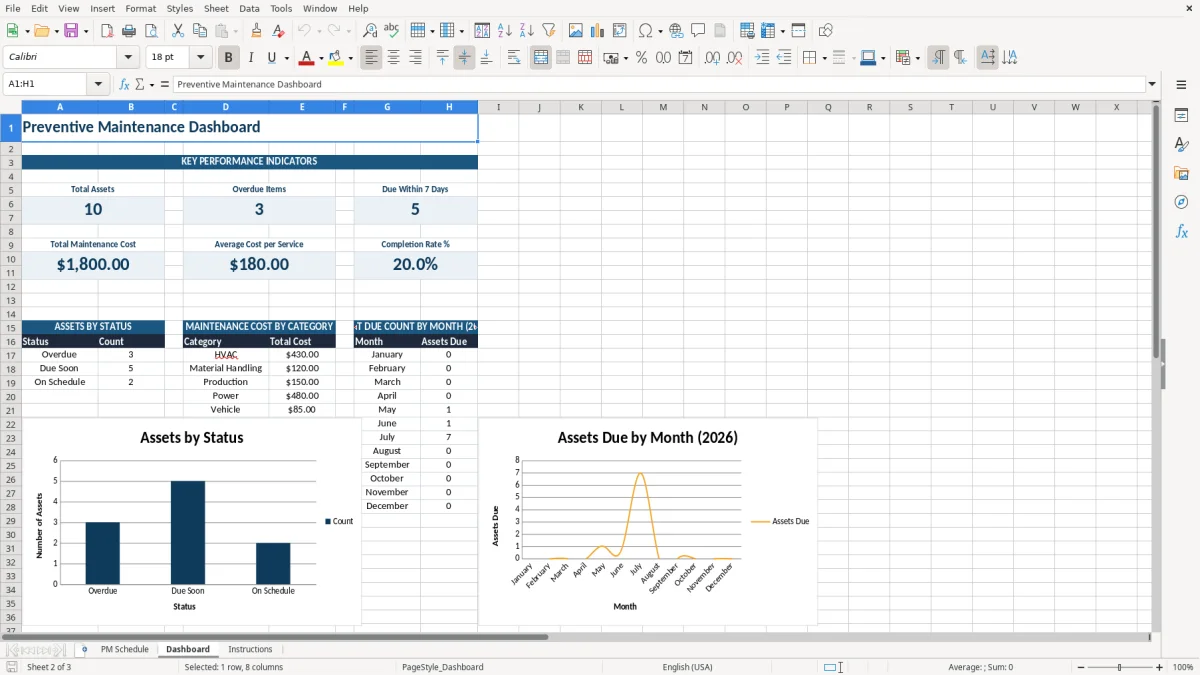
- Check the Dashboard sheet after updates. Use it to see which assets need attention first and where the PM workload is concentrated.
- Follow the Instructions sheet if you want a clean setup for a new site, a new department, or a fresh annual cycle.
What is included
17-column PM Schedule for asset tracking, from Asset ID through Notes.
Fields for Frequency (Days), Last Service Date, and Next Due Date to keep the cycle clear.
A Days Until Due column for quick prioritizing.
Status tracking for maintenance workflow, not just raw dates.
Cost per service field formatted as currency, so the numbers are easy to review.
Dashboard sheet for a visual summary of the maintenance load.
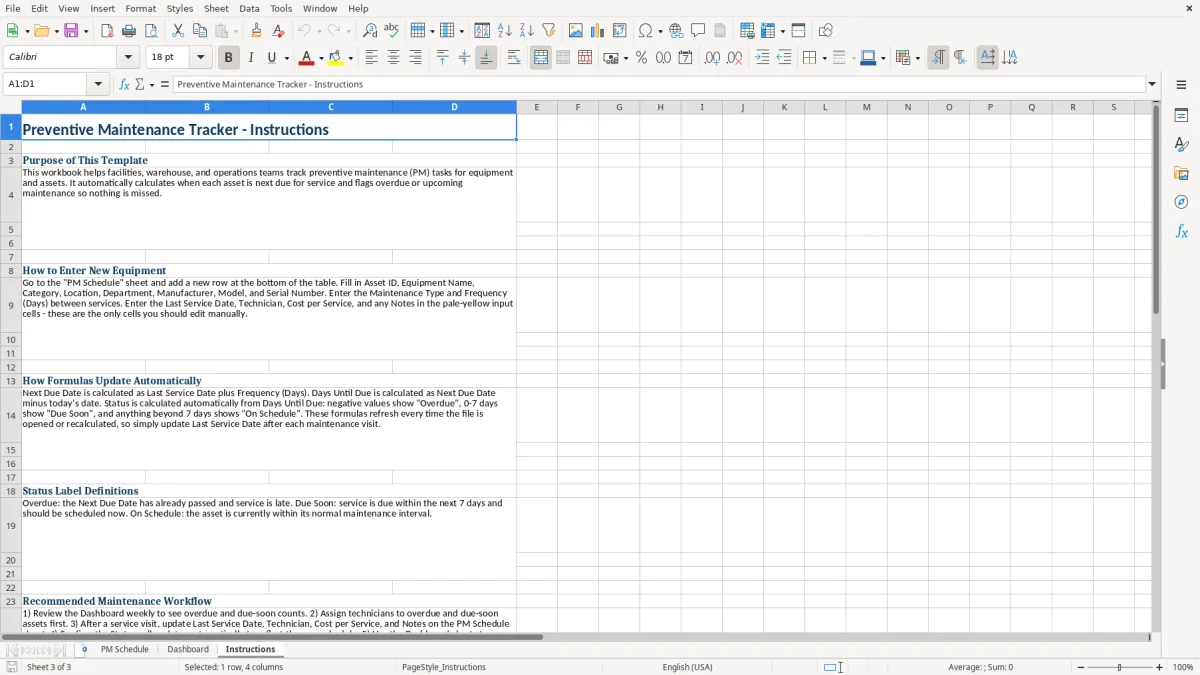
Instructions sheet for fast setup and consistent use across the team.
How maintenance teams use this Excel sheet in the field
This workbook fits the people who actually keep assets running: a facilities coordinator watching 12 rooftop units, a warehouse lead managing 4 forklifts, or a contractor with a few service vans and shop tools. The PM Schedule sheet gives you one line per asset, with columns for frequency, last service date, next due date, days until due, technician, status, and cost.
Image 1 shows the PM Schedule layout. You enter assets like an air handler every 90 days or a forklift every 60 days, then scan the list for work due this week instead of digging through emails or sticky notes.
When the list becomes operational
Use this when a site has enough equipment that one missed inspection can create real cost. If a compressor service runs $250 and two units slip a month, that is $500 in preventable spend before you count downtime or emergency callout fees.
Who benefits most from the structure
A bookkeeper at an LLC can use the cost column for month-end review, while an office manager can see who owns each task before the week starts. For a smaller shop with 20 assets, this beats a whiteboard; for a larger shop with 200 assets, it becomes the basic control sheet that keeps the work visible.
The recordkeeping rules behind preventive maintenance costs
Maintenance logs matter because service records support deductible repairs, depreciation decisions, and asset history. For tax and bookkeeping purposes, keep invoices, work orders, and PM logs for at least 3 years, and longer when the record supports property basis, a casualty loss, or a fixed asset that is still on the books.
The cost per service field helps you separate routine maintenance from capital improvements. A $180 belt-and-filter change on an HVAC unit is usually a repair expense, while a $4,800 compressor replacement may need depreciation treatment or Section 179 review depending on the facts.
Why the date fields matter
The date columns are there for control, not decoration. If you service a machine on 04/10/2026 and the cycle is 90 days, the next review point is 07/09/2026; without that math on the sheet, the task tends to disappear until someone complains.
Why a spreadsheet still works here
For a small operation, a spreadsheet is the right level of control before you move to a CMMS. If you are tracking 30 to 80 assets and updating them once a week, an Excel file is usually faster and cheaper than software that needs a full setup and a subscription.
Where PM tracking breaks down and what it costs
The biggest failure is simple: someone enters the asset once and never comes back to it. That is how a $120 lubrication task turns into a $1,500 bearing failure or an HVAC unit misses filter service and starts pulling higher power for weeks.
Another common problem is date drift. If the last service date is wrong by even 30 days on a 60-day cycle, the next due date is wrong by the same amount, and the schedule quietly turns into a guess.
What missed upkeep looks like in dollars
Say you manage 4 forklifts and each one needs a $120 monthly service. If two services are missed for a quarter, that is $720 in direct maintenance plus the risk of a breakdown during a busy shipping week, which usually costs far more in labor and delay.
Why messy status fields cause trouble
If one person writes “done,” another writes “complete,” and a third leaves the cell blank, the dashboard stops telling the truth. Clean status choices matter because the whole point is to see what is overdue, what is due soon, and what is already closed.
How to make preventive maintenance part of the weekly routine
The spreadsheet works best when it lives next to a fixed routine, not as a separate chore. Tie the update to payroll Friday, the Monday morning production meeting, or the last day of the month so the list gets touched on a schedule you already follow.
If you manage 25 assets, spend 10 minutes each week updating the last service date and cost entries. That small habit prevents a month-end scramble where you are trying to reconstruct 8 work orders from memory and old emails.
Simple habits that keep the file useful
- Copy the prior month’s review cadence and update only the changed rows.
- Use data validation for status choices so “due,” “overdue,” and “completed” stay consistent.
- Sort by next due date every week so the oldest items rise to the top.
- Use conditional formatting to flag overdue assets in red before they get missed again.
When to move beyond Excel
If you are tracking work orders, spare parts, labor hours, and approval workflows for hundreds of assets, a CMMS is the better tool. For a smaller team, though, this workbook is usually enough to keep the PM cycle organized without buying software you do not need yet.
For a smaller team, though, this workbook is usually enough to keep the PM cycle organized without buying software you do not need yet, while a maintenance KPI dashboard can summarize overdue work and completion rates at a glance.
Frequently asked questions about this template
It tracks the asset list, maintenance type, frequency in days, last service date, next due date, days until due, technician, status, cost per service, and notes. That gives you a practical PM register instead of a loose list of repairs.
Update it as soon as a service is completed, then review the file at least once a week. If you run a 60-day or 90-day cycle, a weekly check keeps the next due date from drifting and helps you catch overdue work early.
Yes. The sheet is built for asset-based maintenance, so you can use it for HVAC units, forklifts, pumps, generators, shop tools, and facility equipment. A 90-day HVAC inspection and a 60-day forklift lubrication cycle both fit the same structure.
Yes. The cost per service field lets you total recurring spend and compare assets. If one machine costs $250 each quarter and another costs $120 every month, you can see which asset is driving the heavier maintenance load.
Keep work orders, invoices, dates, and any notes that support repair expense or asset basis. In practice, many businesses keep these records for at least 3 years, and longer for major equipment, property improvements, or loss-related support.
Excel is enough when you have a manageable list of assets, a simple service cycle, and one person or a small team updating the file. If you need labor tracking, approvals, parts inventory, and mobile work orders across many technicians, a CMMS is the better fit.
Meet the makers