
Project & Planning


Residential Construction Budget Excel - Free Template
Track budgeted vs actual costs, invoice status, and budget variance for a home build with summary and dashboard sheets.
2026-07-08
164 downloads
4.8/5
Download template
This residential construction budget Excel template tracks budgeted cost, actual cost, variance, due dates, paid dates, and status for a home build. It includes Budget Detail, Budget Summary, Dashboard, and Instructions sheets.
You can use it to manage a custom build, major remodel, or small development project where every draw, invoice, and change order affects cash flow. The layout makes it easier to spot overruns early instead of finding them at year-end close.
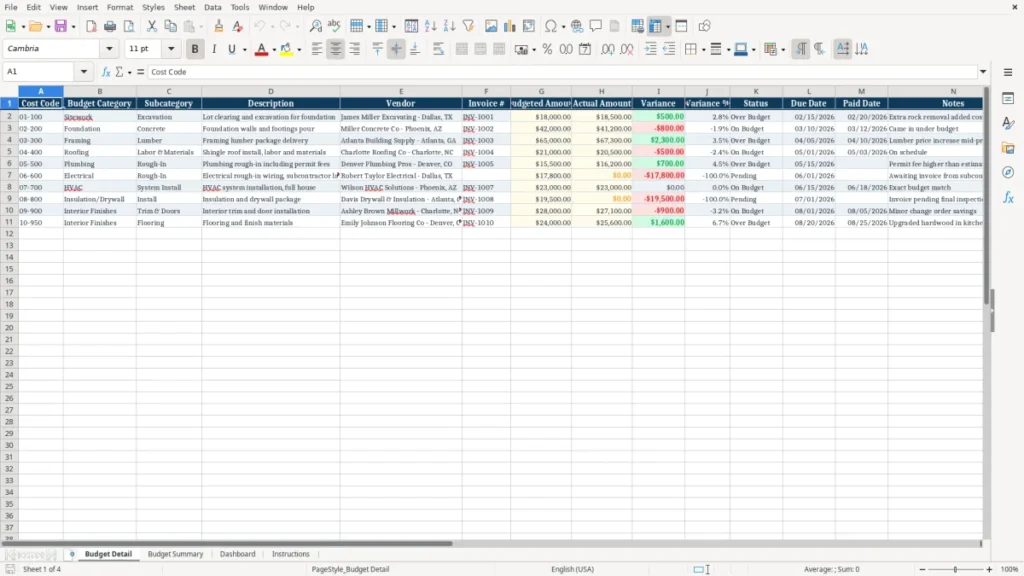
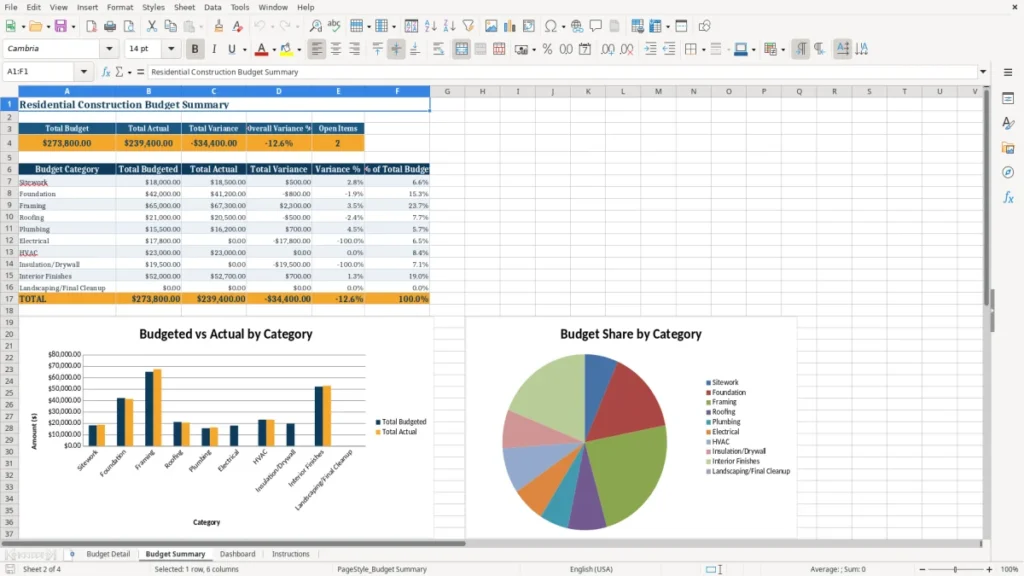
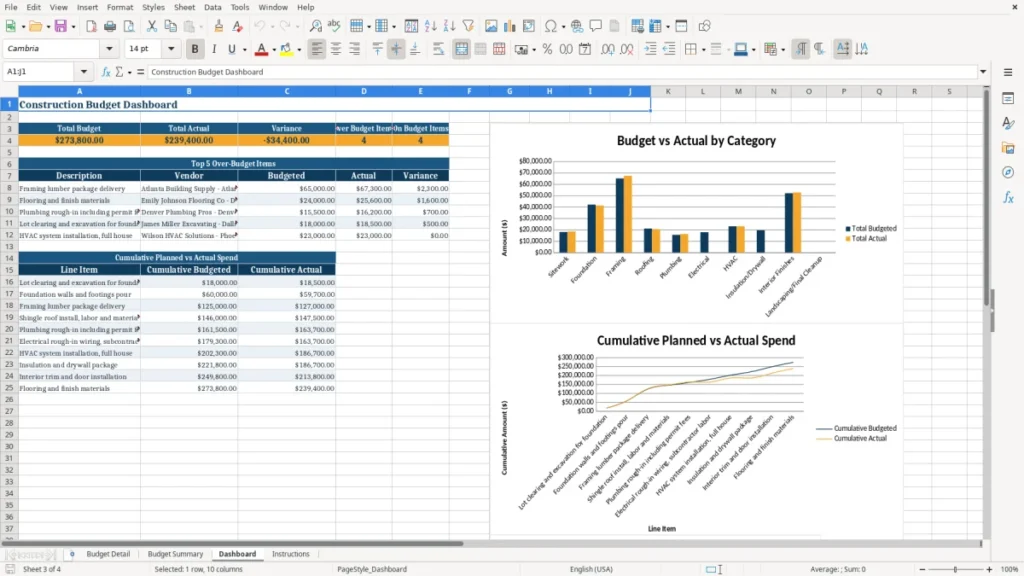
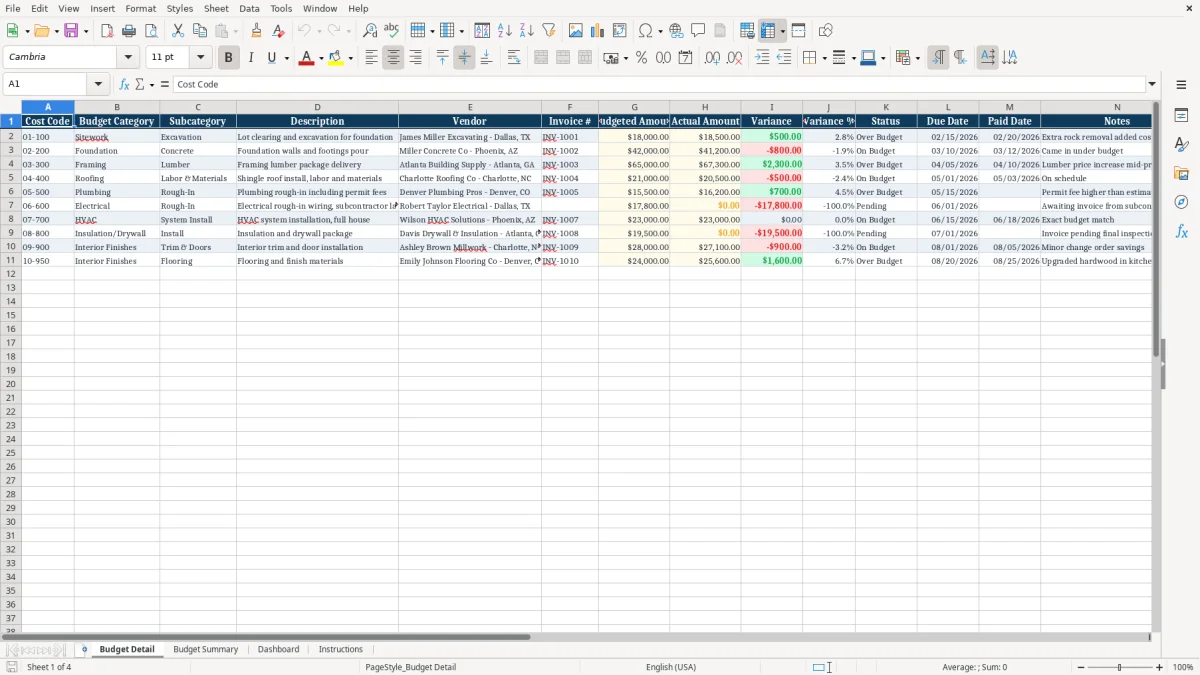
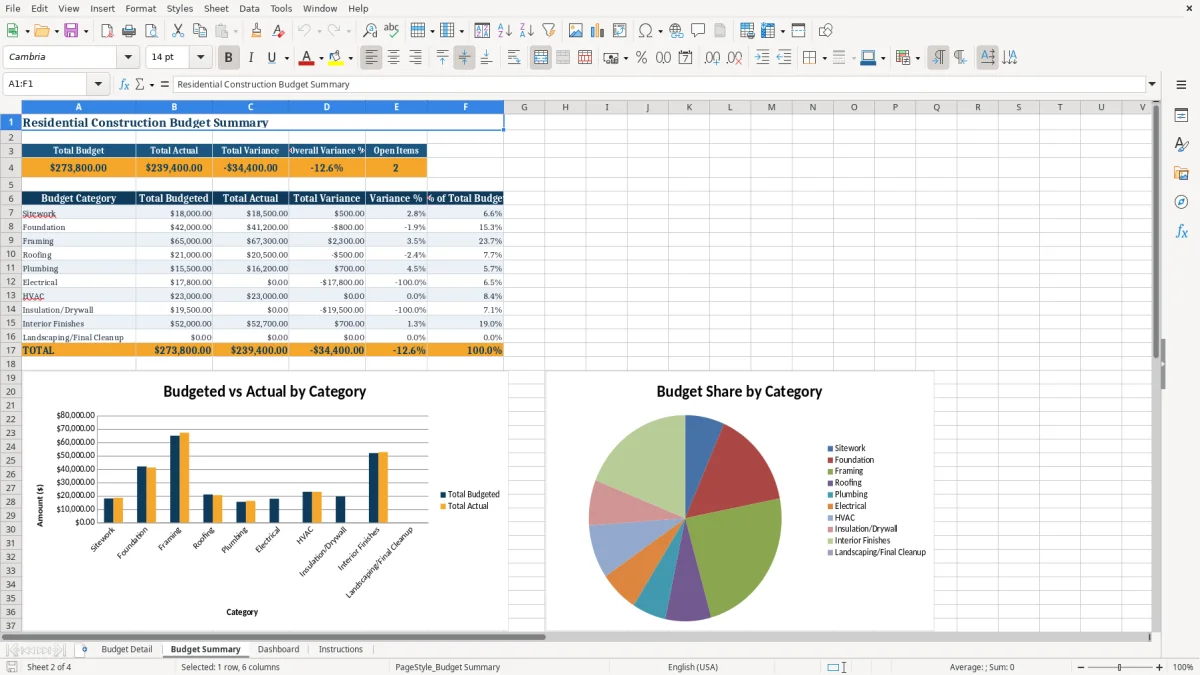
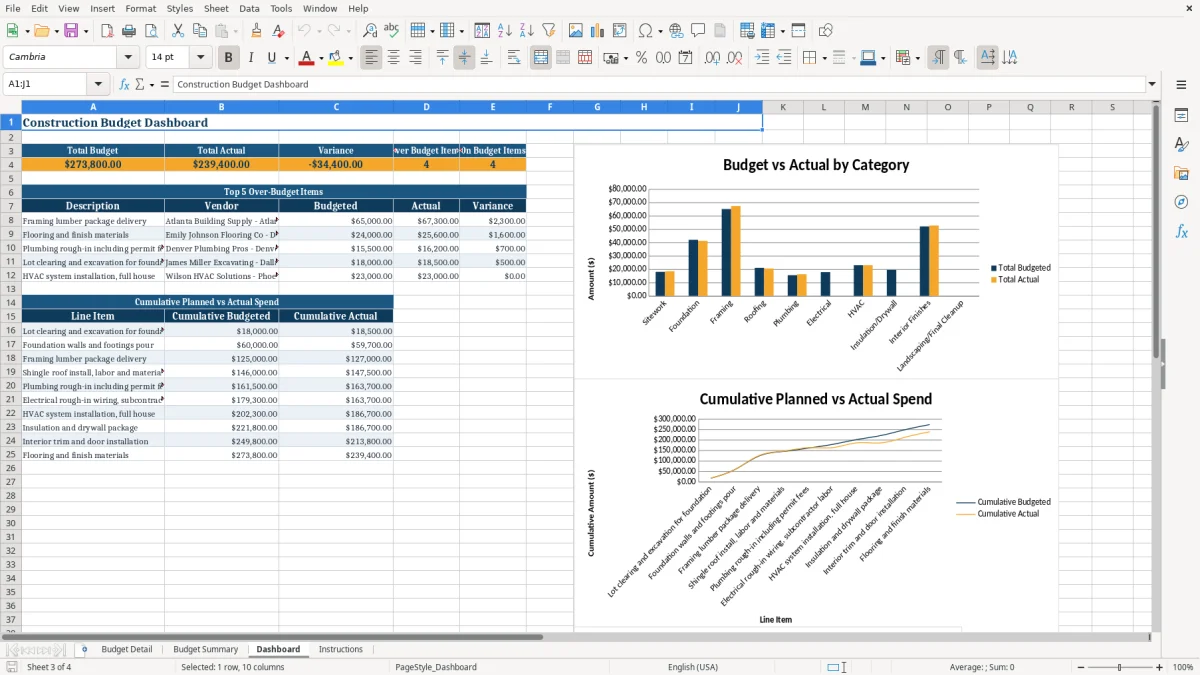
Image 1 shows the Budget Detail sheet with line-item cost codes, vendors, invoice numbers, and notes. Image 2 shows the Budget Summary with category totals, and image 3 presents a dashboard-style view of budget performance.
The main benefits of this Excel template
- Tracks each cost line against budget so you can see overruns before they spread across the project.
- Shows variance and variance % for every line item, making a $2,300 lumber overage easy to spot.
- Helps you manage draw timing by recording due dates, paid dates, and invoice numbers in one place.
- Gives you a clean split between sitework, foundation, framing, roofing, and other trade categories.
- Summarizes project totals on the Budget Summary sheet so you do not have to add every invoice by hand.
- Supports contractor-style job costing for a single build or a portfolio of 2-3 active projects.
- Provides a dashboard view that is easier to read than a long vendor list when you are checking progress mid-month.
Step-by-step guide
- Open the Budget Detail sheet and enter each cost line with the right cost code, category, vendor, and invoice number. Use one row per invoice or committed cost.
- Fill in the budgeted amount and actual amount for each line. If a framing package was budgeted at $65,000 and landed at $67,300, the variance should show the $2,300 difference.
- Update due dates, paid dates, and notes as bills move through the job. This is the fastest way to keep the accounting file aligned with the jobsite.
- Review the Budget Summary sheet to compare total budget by category against total actuals. That is where you see whether foundation, roofing, or finishes are pushing the total over plan.
- Check the Dashboard sheet after each pay application or weekly vendor run. Use it to answer the simple question: are you still inside the budget, or not?
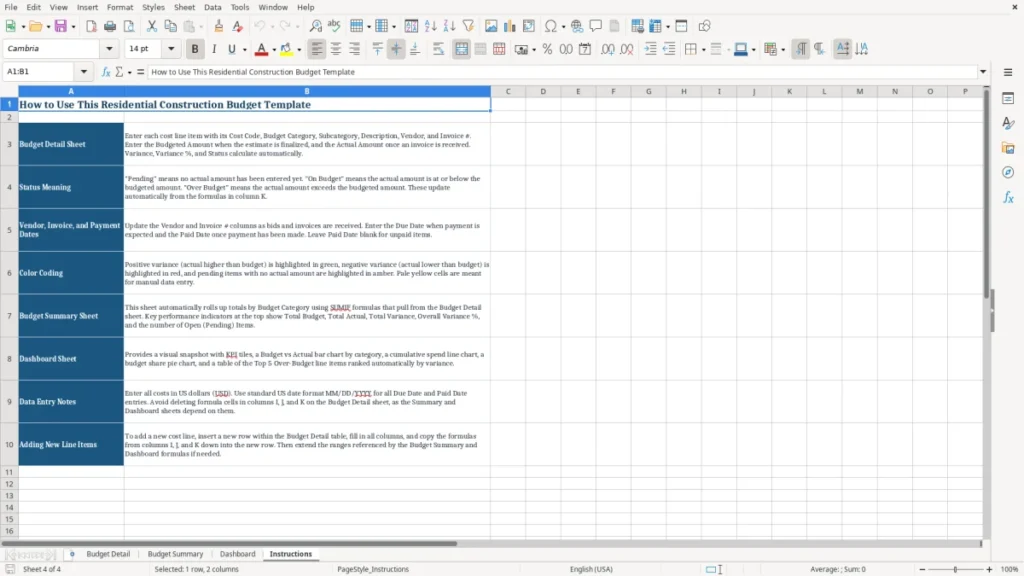
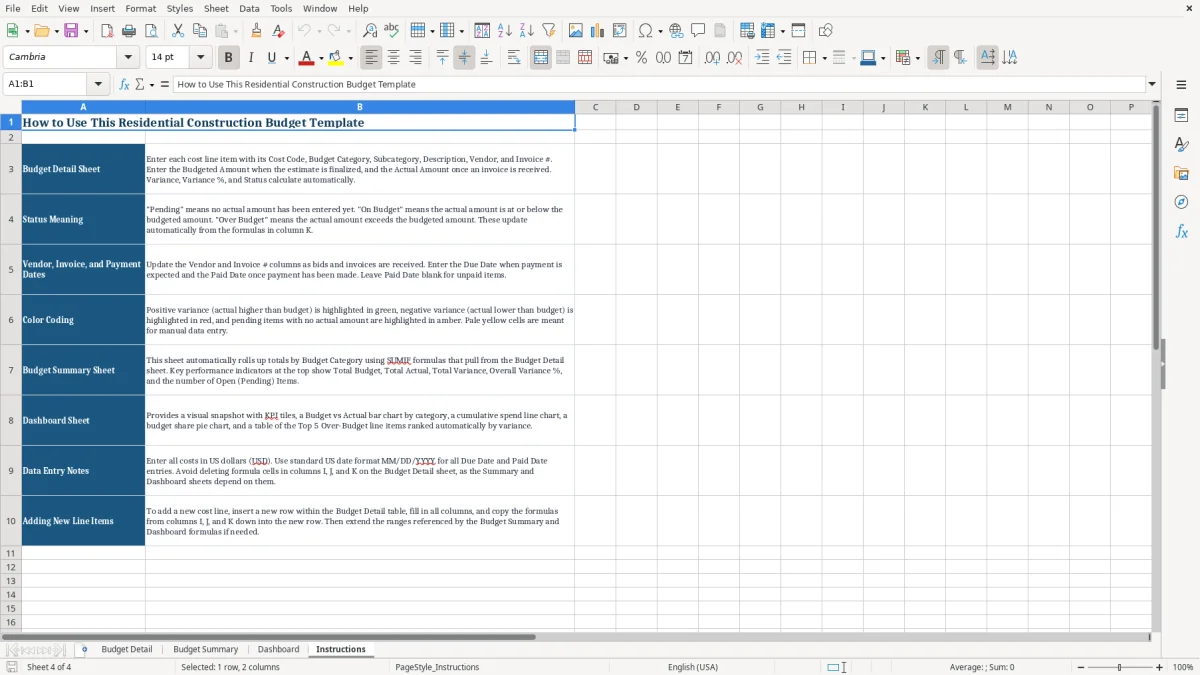
- Follow the Instructions sheet if you need a quick refresher on how the workbook is set up. It is useful when you hand the file to a project manager or office admin.
What is included
Budget Detail sheet with columns for Cost Code, Budget Category, Subcategory, Description, Vendor, Invoice #, Budgeted Amount, Actual Amount, Variance, Variance %, Status, Due Date, Paid Date, and Notes.
Budget Summary sheet that rolls up project totals by construction category for faster review.
Dashboard sheet for a visual snapshot of budget performance and cost movement.
Freeze panes on the detail sheet so the header row stays visible while you scroll through invoices.
Currency and percentage formatting that makes dollar overruns and margin drift easy to read at a glance.
Color-coded input and result styling that separates editable amounts from calculated fields.
Instructions sheet that gives a quick operating guide without forcing you to dig through every tab.
How contractors and homeowners use a residential construction budget Excel file
What the IRS recordkeeping standard means for job costs
For tax support, keep construction records for at least 3 years, and longer if the file supports property basis, depreciation, or a loss year. If you are using the numbers on Schedule C for a sole proprietorship or inside a construction LLC, the invoice trail in this workbook helps you substantiate expenses.
A good rule in practice is simple: if a $12,400 framing bill or a $7,850 roofing invoice affects your profit and loss, keep the backup with the spreadsheet row. The IRS does not care that the project moved fast; it cares that the cost can be traced.
Why clean invoice fields matter
Invoice number, vendor name, and paid date are not optional bookkeeping clutter. They help you match the job ledger to the bank feed and to the vendor statement when a $1,500 discrepancy shows up at closing.
Cash basis versus accrual for small builders
For a small residential builder, cash basis is usually simpler if you are tracking a handful of jobs and want the tax file to follow money in and out. Once you carry larger receivables, retainage, or work-in-progress across months, accrual becomes the better operational view even if your tax return still follows cash.
Where construction budgets usually break and what it costs
The most common problem is not a math error; it is failing to update the sheet when a change order lands. If framing was budgeted at $65,000 and the actual total finishes at $67,300, that extra $2,300 is easy to miss until several more overruns stack up.
Small misses become real money fast
On a 10-item budget, three line items running 5% over can add up to more than $8,000 on a $160,000 cost package. That is the difference between holding contingency and dipping into profit.
Bad tracking creates payment mistakes
If you skip paid dates or invoice numbers, you can double-pay a vendor or leave a bill unpaid long enough to trigger late fees. A 1.5% monthly finance charge on a $9,000 unpaid invoice costs $135 for just one month.
Why mixed categories cause trouble
Putting sitework, foundation, and finishes into one bucket hides where the overrun is happening. A contractor with 4 employees cannot manage the job from a single bank total; you need category-level totals to see whether labor, materials, or subcontractors are the issue.
How to make this budget sheet part of your weekly routine
Use the workbook on the same day you review vendor bills or release draws. For most small builders, that means Friday afternoon or the first morning after payroll, when invoices are already on the desk.
Simple habits that keep the file alive
- Enter every new invoice the day it arrives, even if you only know the estimated actual amount.
- Copy the prior month’s structure instead of rebuilding the budget from scratch for each project.
- Use status and notes to flag items that are approved, paid, disputed, or waiting on a lien waiver.
- Apply the same cost codes every month so the summary and dashboard stay comparable.
When spreadsheet tracking is no longer enough
If you are running 5 or more active jobs, managing retainage, and reconciling change orders across multiple project managers, you may outgrow a spreadsheet. At that point, job-costing software or an accounting system with construction modules becomes the better fit.
Until then, this file is a strong middle ground: faster than manual notebooks, simpler than full software, and good enough for a project that needs clean numbers before the next draw.
Frequently asked questions about this template
Use it if you are a homeowner managing a remodel, a general contractor running a custom build, or an office admin tracking vendor bills for a construction LLC. It is especially useful when the job has multiple trades and repeated invoices.
The Budget Detail sheet includes Cost Code, Budget Category, Subcategory, Description, Vendor, Invoice #, Budgeted Amount, Actual Amount, Variance, Variance %, Status, Due Date, Paid Date, and Notes. That gives you a full job-costing view on each invoice line.
It compares budgeted amount to actual amount for each line, then shows the dollar variance and variance %. If a $42,000 foundation package ends at $43,850, the sheet makes the $1,850 overage obvious right away.
Yes. The invoice numbers, vendors, dates, and notes give you the support you need for bookkeeping and tax backup. Keep the records at least 3 years, and longer if the project affects basis, depreciation, or a loss year.
Yes. You enter both figures on the same row, which makes it easy to compare plan versus reality without flipping between tabs or separate files. That is better than keeping one sheet for estimates and another for paid bills.
Move on when you are juggling multiple active jobs, retainage, change orders, and more than a few dozen open invoices at once. A spreadsheet works well for a single build or a small set of projects, but it starts to slow you down when the job count and billing volume keep growing.
Meet the makers