
Project & Planning


PSG Excel - Free Template
Track McKinsey PSG candidates, interview rounds, scores, and dashboard KPIs in one Excel file.
2026-07-14
192 downloads
4.8/5
Download template
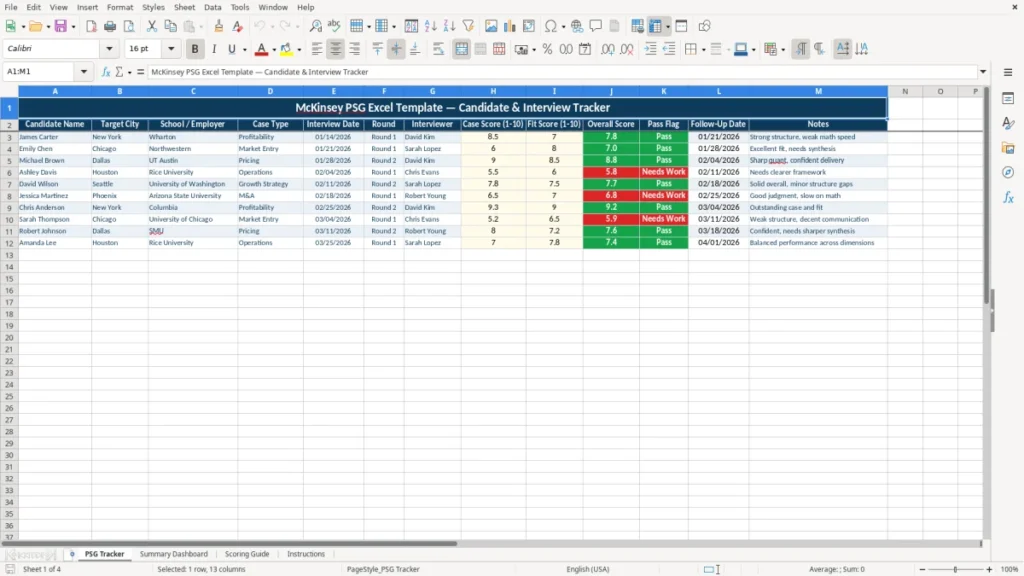
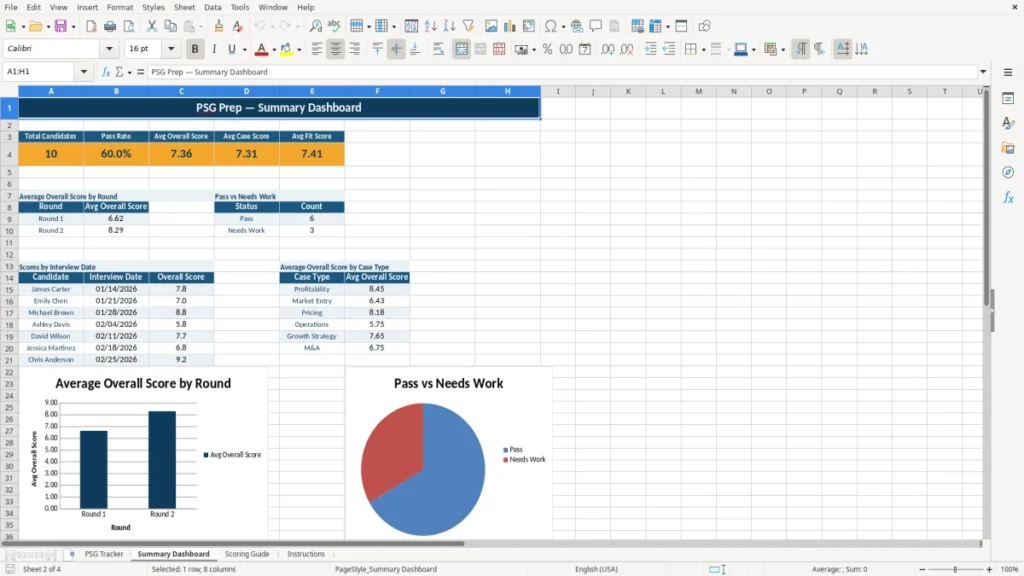
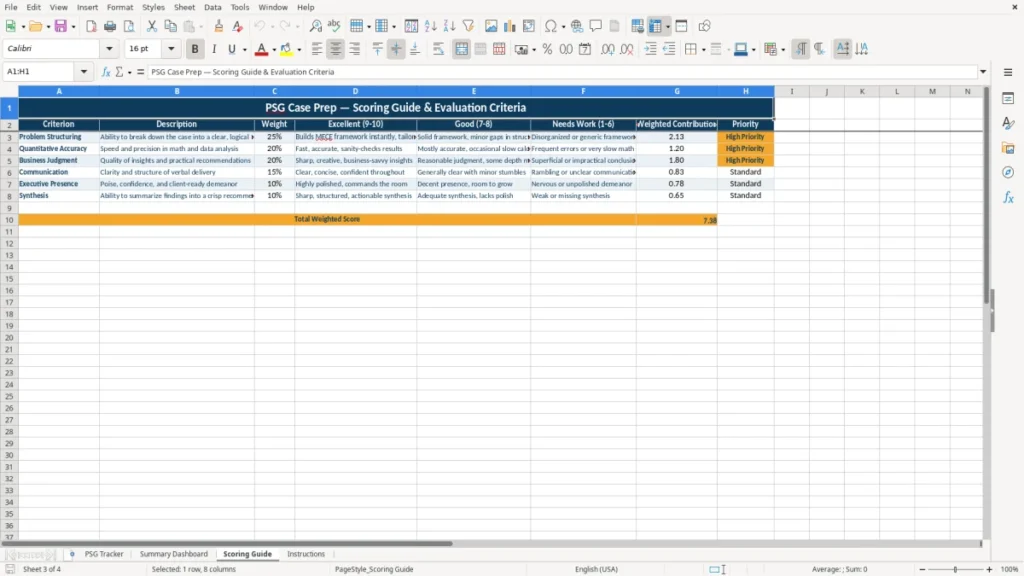
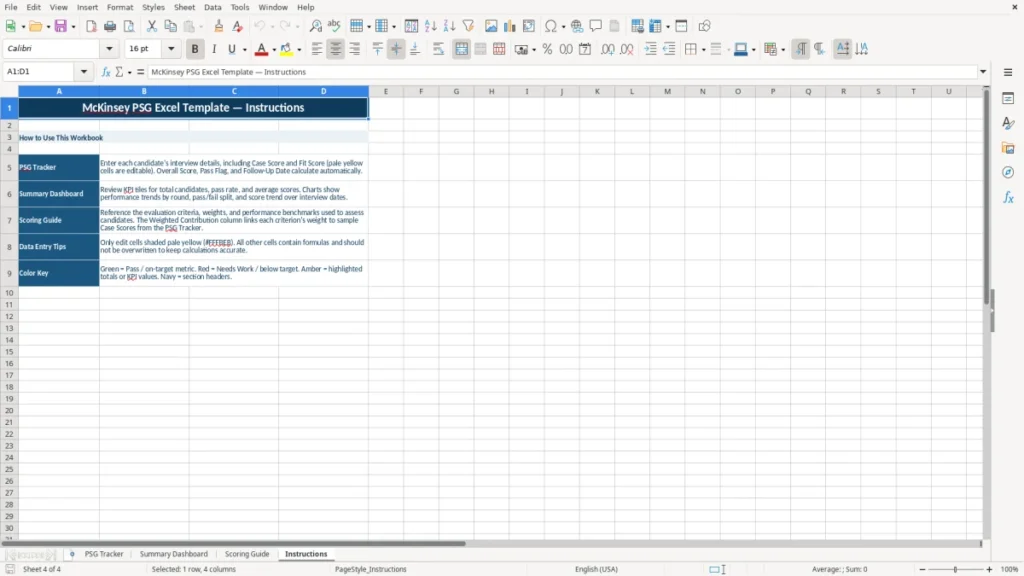
This McKinsey PSG Excel template is a candidate and interview tracker with four sheets: PSG Tracker, Summary Dashboard, Scoring Guide, and Instructions. It helps you log interview rounds, case and fit scores, follow-up dates, and overall pass status in one place.
Use it when you are coordinating recruiting or prepping for a consulting interview process with multiple candidates and reviewers. The workbook gives you a clean input table, a dashboard view, and a scoring guide so the ratings stay consistent from one round to the next.
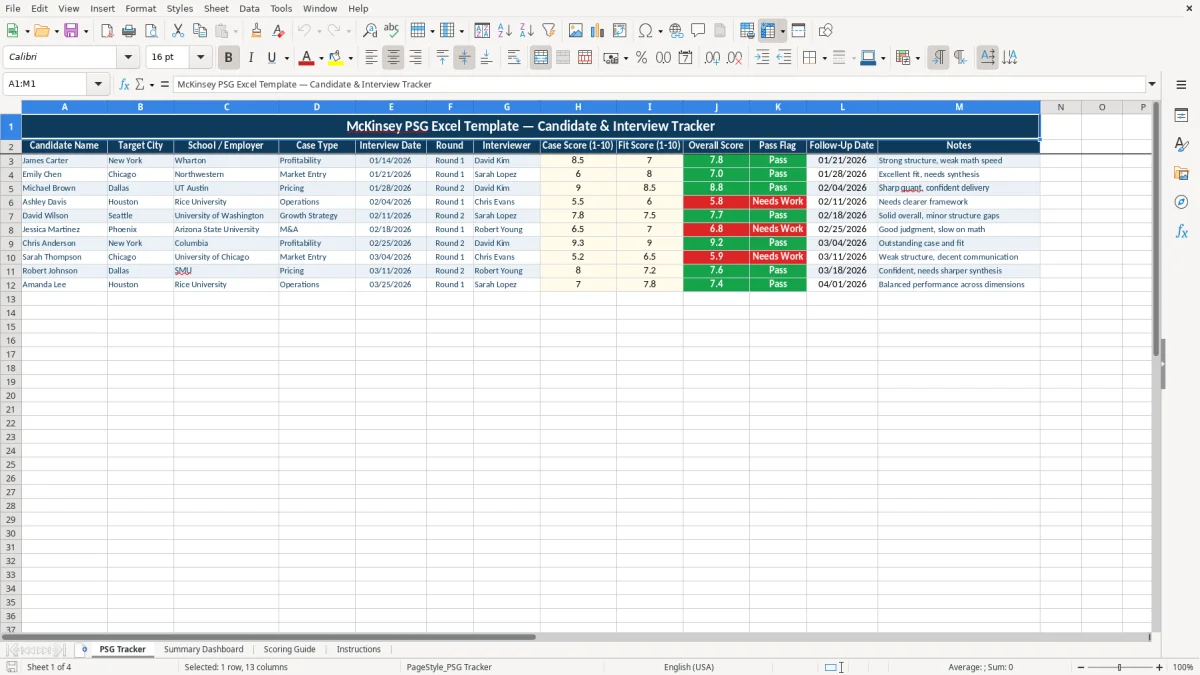
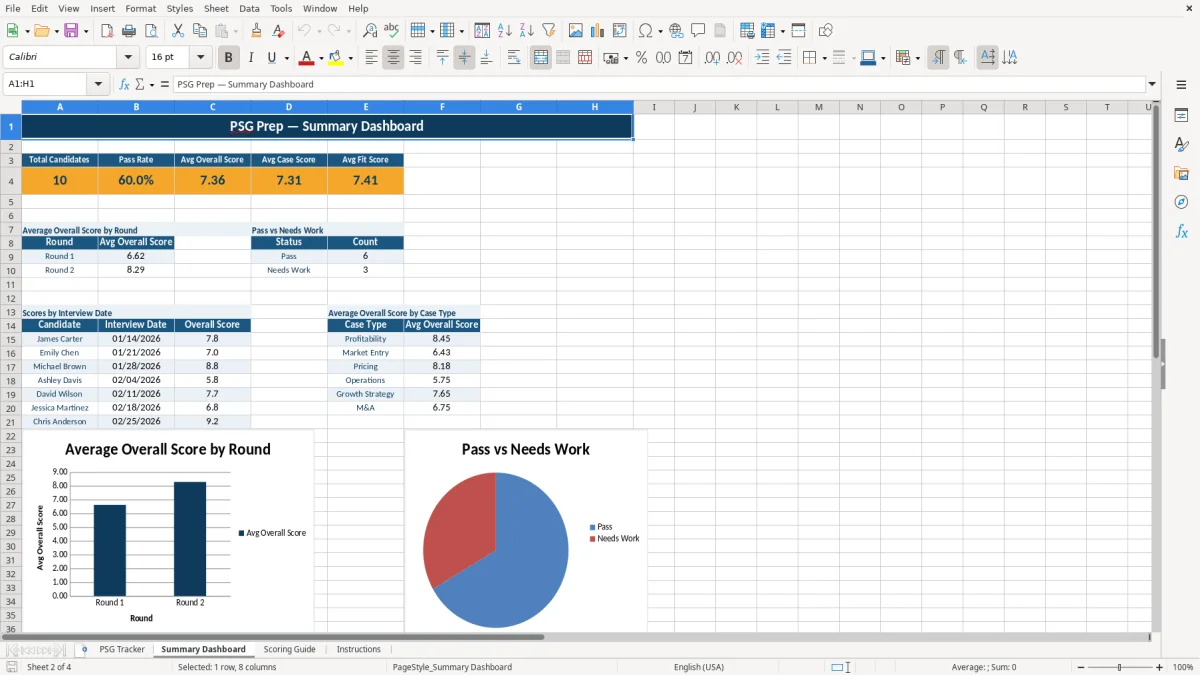
Image 1 shows the PSG Tracker sheet with candidate rows and score columns. Image 2 shows the Summary Dashboard with KPI tiles and charts.
The main benefits of this Excel template
- Tracks candidate data, interview date, round, interviewer, and notes in one table instead of scattered email threads.
- Calculates an overall score from case and fit ratings so you can compare candidates faster.
- Flags pass status clearly, which helps you sort strong candidates before the next interview day.
- Keeps follow-up dates visible so you do not miss the next touchpoint with a candidate.
- Gives you a dashboard view of average scores and pass rates without manual reporting.
- Supports a repeatable scoring process across multiple interviewers, which cuts down on inconsistent ratings.
- Makes it easier to manage 10, 20, or 50 candidates at once during a recruiting cycle.
Step-by-step guide
- Start on PSG Tracker and enter each candidate on its own row. Add the city, school or employer, case type, interview date, round, and interviewer.
- Enter the case and fit scores using the workbook’s 1-10 scale. If your process uses 8 candidates and 3 interviewers, this keeps the review list aligned fast.
- Check the overall score and pass flag after each round. Use the notes field to capture issues like slow math, weak synthesis, or strong communication.
- Review Summary Dashboard for the big picture. The charts help you see whether average scores are trending up or down across the pipeline.
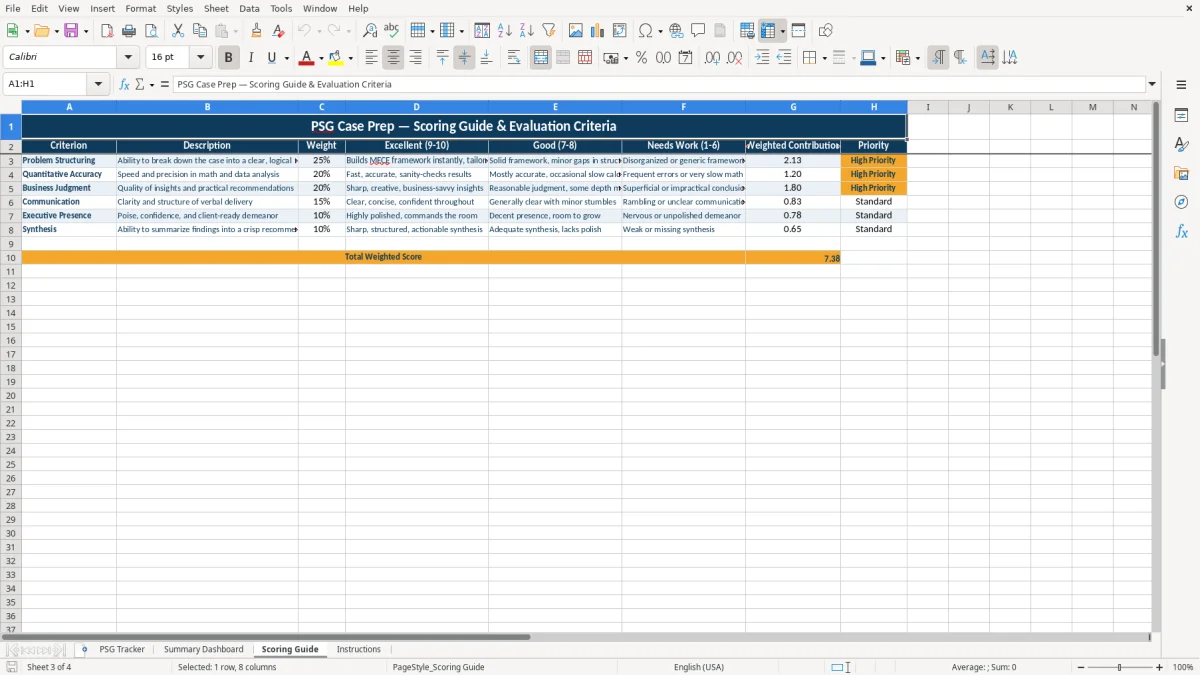
- Use Scoring Guide before the interviews begin so everyone applies the same standard. That matters when one reviewer is harsh and another gives mostly 9s.
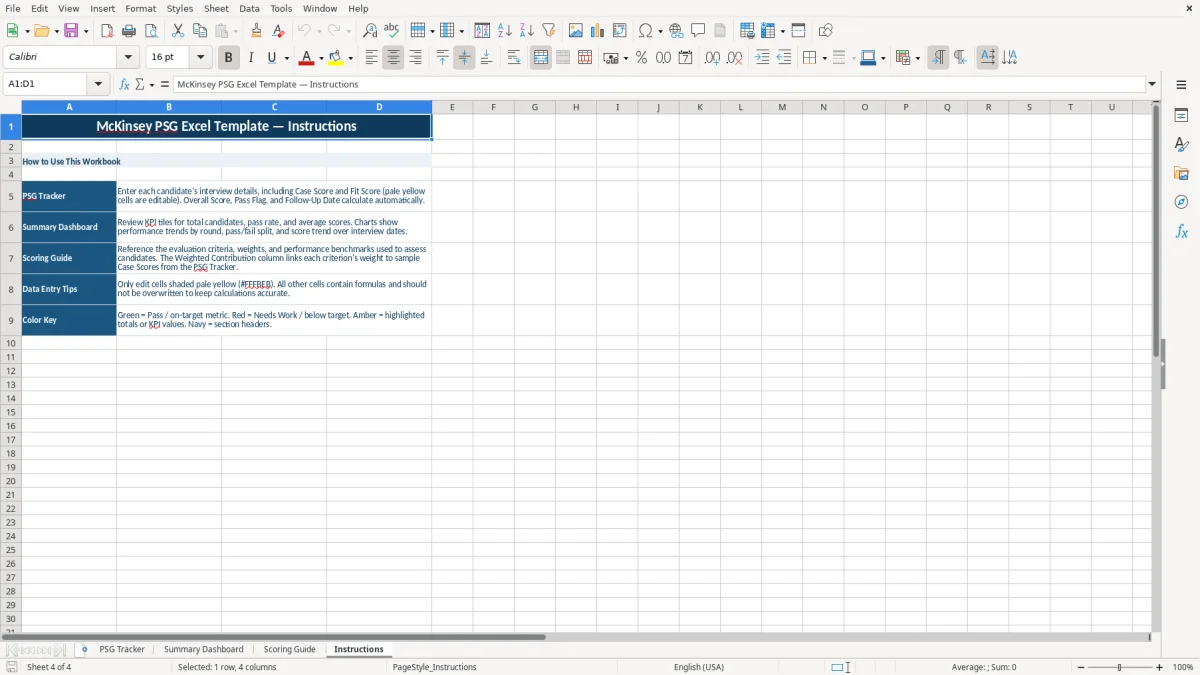
- Keep Instructions handy if you hand the file to a new recruiter or case team member. A 5-minute handoff is usually enough when the layout stays simple.
What is included
PSG Tracker sheet with 13 columns for candidate, interview, scoring, and follow-up data.
Summary Dashboard sheet with KPI blocks and chart-based visual tracking.
Scoring Guide sheet to standardize what a 1, 5, or 10 means before interview scoring starts.
Instructions sheet for quick onboarding and file use.
Clean input formatting that separates data entry cells from summary views.
Built for round-by-round tracking, so you can compare Round 1 against later interviews.
Suitable for small recruiting teams that need a simple Excel workflow instead of a full applicant tracking system.
How consultants and recruiters use a PSG tracker in Excel
In practice, this file is useful when you are managing a consulting recruiting pipeline with more than a few candidates. A campus recruiter, case coach, or office admin can enter 12 candidates, 3 interviewers, and 2 rounds without losing track of who still needs a follow-up.
On the PSG Tracker sheet, you can record candidate name, target city, school or employer, case type, interview date, round, interviewer, case score, fit score, overall score, pass flag, follow-up date, and notes. That is enough detail to compare a Wharton candidate in New York against a Northwestern candidate in Chicago without flipping through separate spreadsheets.
Why this matters during live interview cycles
The pressure point is usually the week of interviews or the afternoon after a round ends. If 8 interviews happen on Tuesday and each interviewer sends feedback in a different format, the tracker keeps the numbers in one row per candidate.
A simple example from the field
Say you have 10 candidates, each with a case score and fit score on a 1-10 scale. If 4 people score 8.5 or higher and 3 candidates need follow-up by Friday, the tracker lets you sort those rows in seconds instead of rebuilding the list by hand.
What to watch for when scoring candidates in 2026
This is not a tax or payroll file, but the same discipline that matters in accounting still applies: use a fixed scale and keep the notes readable. A 1-10 scoring system only works if everyone knows what a 7 means versus a 9, which is exactly why the Scoring Guide sheet belongs in the workbook.
For a consulting process, consistency matters more than a fancy formula. If one interviewer grades harshly and another gives every strong answer a 9, your average score becomes noise, not a decision tool.
Use the guide before the interviews start
Set the standard before you collect the first row. For example, if a candidate gets a case score of 6.0 and a fit score of 8.0, you can still make a reasoned call based on the overall pattern instead of arguing about one impression in Slack.
Keep the file simple enough to maintain
In small recruiting teams, a workbook usually beats a complex system when you are handling 5 to 25 active candidates. Once you start layering in offer approvals, interview calibration, and recruiter assignments across multiple offices, a spreadsheet may still work — but only if the scoring rules stay strict and the notes stay short.
Where PSG trackers break down and what that costs
The most common failure is inconsistent input. One person writes “strong fit” in Notes, another writes “great personality,” and a third forgets to enter the follow-up date, which means the next action gets missed and the candidate sits idle for a week.
Another problem is score inflation. If 6 candidates all get case scores between 8.5 and 9.5, the spreadsheet stops helping you distinguish who should move on, and you end up making the decision from memory instead of data.
Bad data creates slow decisions
Imagine a process with 15 candidates and 4 interviewers. If each reviewer spends just 10 extra minutes searching email for the right notes, that is 40 minutes of wasted time per cycle, and it can easily become 2 to 3 hours once feedback is disputed.
Small mistakes have real recruiting costs
A missed follow-up can hurt response rates, especially when candidates are interviewing elsewhere. If you lose one strong finalist because the next-round date was not entered, the cost is not theoretical — it can mean reopening the search or extending the process by 1 to 2 weeks.
How to make the PSG sheet part of your recruiting routine
The best way to keep this workbook alive is to tie it to a fixed event, like the end of each interview day or the Friday debrief. If you update it at the same time every week, it becomes part of the process instead of a file you only open when something goes wrong.
Three habits that keep the tracker useful
- Copy the prior round’s structure before the next batch of interviews so the column order never drifts.
- Enter scores the same day while the interview is fresh; a 24-hour delay usually makes notes weaker and less specific.
- Use the dashboard as your review checkpoint, not as a decoration. If the pass rate looks off, check the source rows before the meeting starts.
When a spreadsheet is no longer enough
If your recruiting pipeline grows to dozens of candidates across multiple offices, you may need an applicant tracking system or shared database. The workbook still works well for a lean team, but once 30 to 50 active records are being edited by several people at once, version control becomes the real problem.
Once 30 to 50 active records are being edited by several people at once, version control becomes the real problem, and the same workload is easier to visualize in a labor planning chart.
Frequently asked questions about this template
It is used to track candidates, interview rounds, case and fit scores, follow-up dates, and notes in one workbook. That makes it easier to compare candidates during a consulting recruiting process.
The workbook includes PSG Tracker, Summary Dashboard, Scoring Guide, and Instructions. The first sheet is for data entry, and the dashboard gives you a quick summary view.
You can track a handful of candidates or a much larger recruiting batch. In practice, this kind of file works well for 10 to 30 active candidates before version control becomes harder.
The tracker uses a 1-10 scale for case score and fit score. That makes it easier to compare reviewers and calculate an overall score consistently.
Yes. The notes, pass flag, and follow-up date fields are useful for debrief meetings because you can sort candidates by outcome and see what still needs action.
Move on when several people are editing the file at the same time and the process starts breaking from version conflicts. If you are managing 30 to 50 active candidates across teams, software is usually safer.
Meet the makers