
Project & Planning


Decision Log Excel Template
Track business decisions, owners, rationale, costs, deadlines, status, and outcomes with this organized Decision Log Excel Template.
2026-07-31
306 downloads
4.8/5
Download template
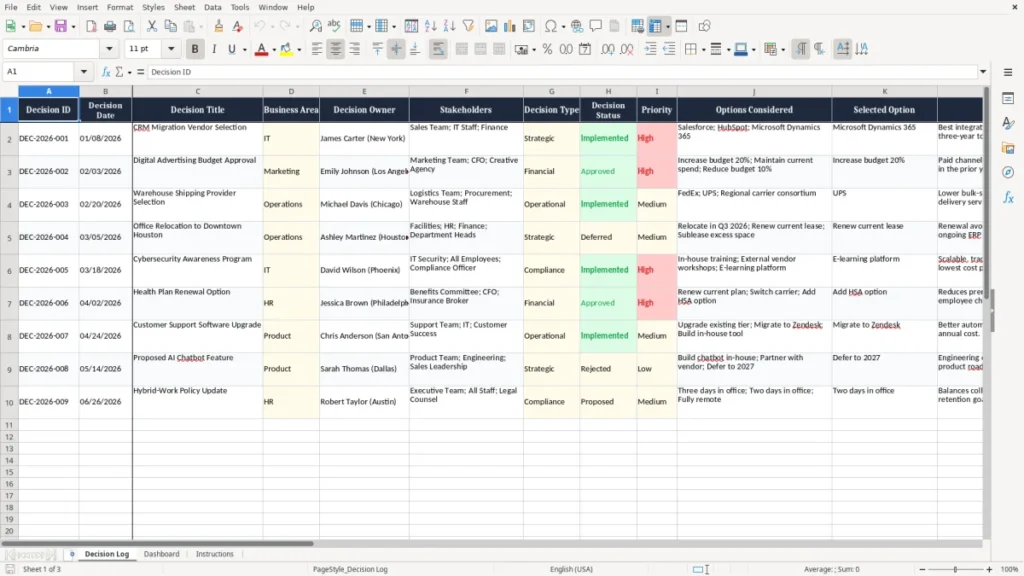
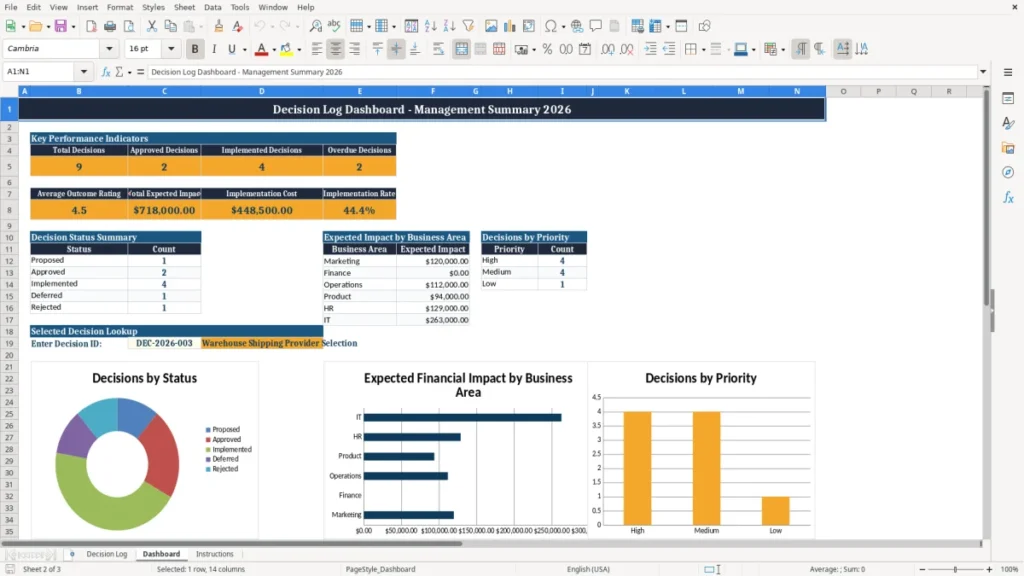
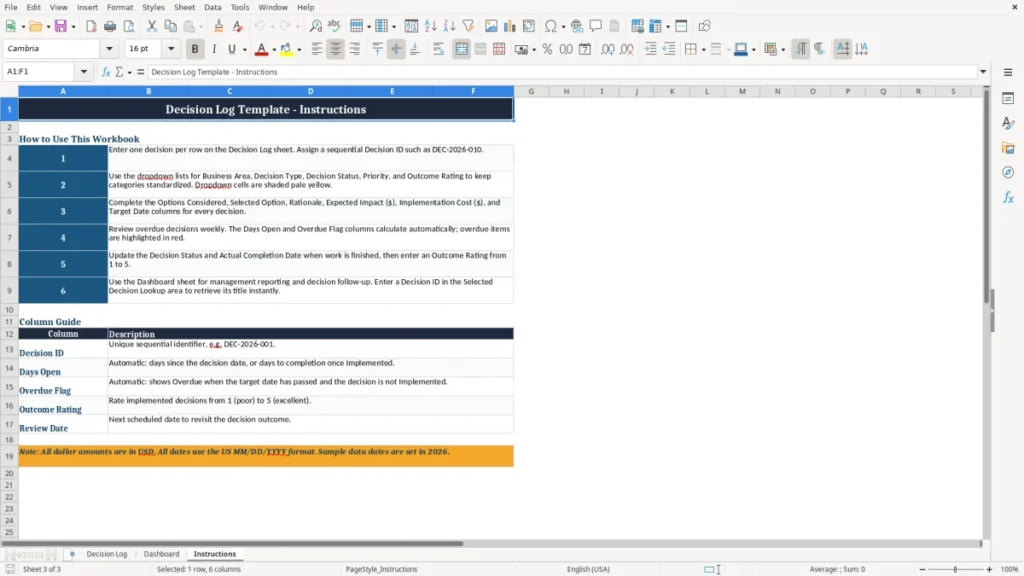
Make important business decisions easier to track, explain, and review with this practical Decision Log Excel Template. It provides one organized place to record the date, title, business area, decision owner, stakeholders, decision type, priority, options considered, selected option, rationale, expected impact, implementation cost, target date, completion date, outcome rating, and follow-up notes.
Whether you manage strategic initiatives, technology projects, budgets, vendors, or operational changes, a decision log creates a clear record of what was decided and why. Use the template to improve accountability, preserve institutional knowledge, identify overdue decisions, and help teams learn from completed work.
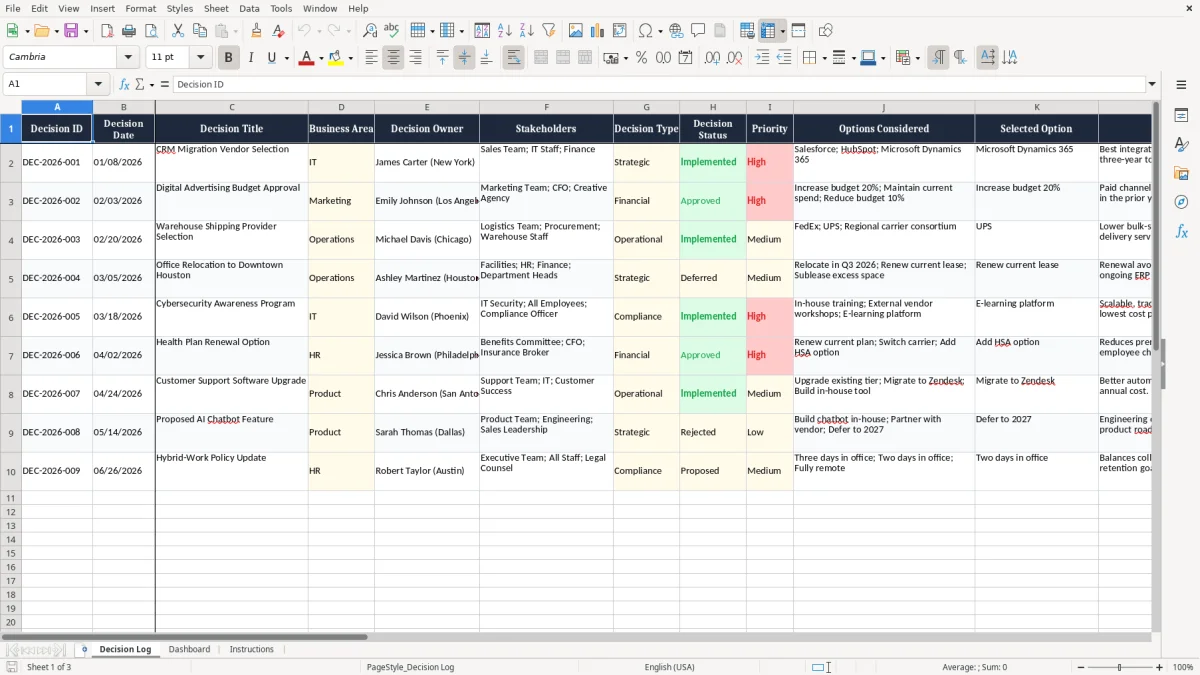
The main benefits of this Excel template
- Centralize important strategic, operational, financial, technical, and project decisions in one searchable worksheet.
- Document the rationale and options behind each decision so teams can understand the context later.
- Clarify ownership and stakeholder involvement for better accountability and communication.
- Track priorities, target dates, completion dates, and overdue items throughout implementation.
- Compare expected financial impact with implementation cost to support informed reviews.
- Capture outcome ratings and notes to turn past decisions into useful organizational learning.
Step-by-step guide
Start by assigning each decision a unique Decision ID and entering the decision date, title, business area, and owner. Add the stakeholders who contributed to or are affected by the decision, then select the appropriate decision type, status, and priority. Record the options considered, identify the selected option, and explain the rationale in enough detail that someone outside the original discussion can understand it.
Enter the expected impact, implementation cost, target date, and review date when applicable. As work progresses, update the status, actual completion date, overdue information, and notes.
After implementation, add an outcome rating and describe what worked, what changed, and what should be considered in future decisions. Review the log regularly during project meetings, leadership reviews, governance sessions, or post-implementation assessments.
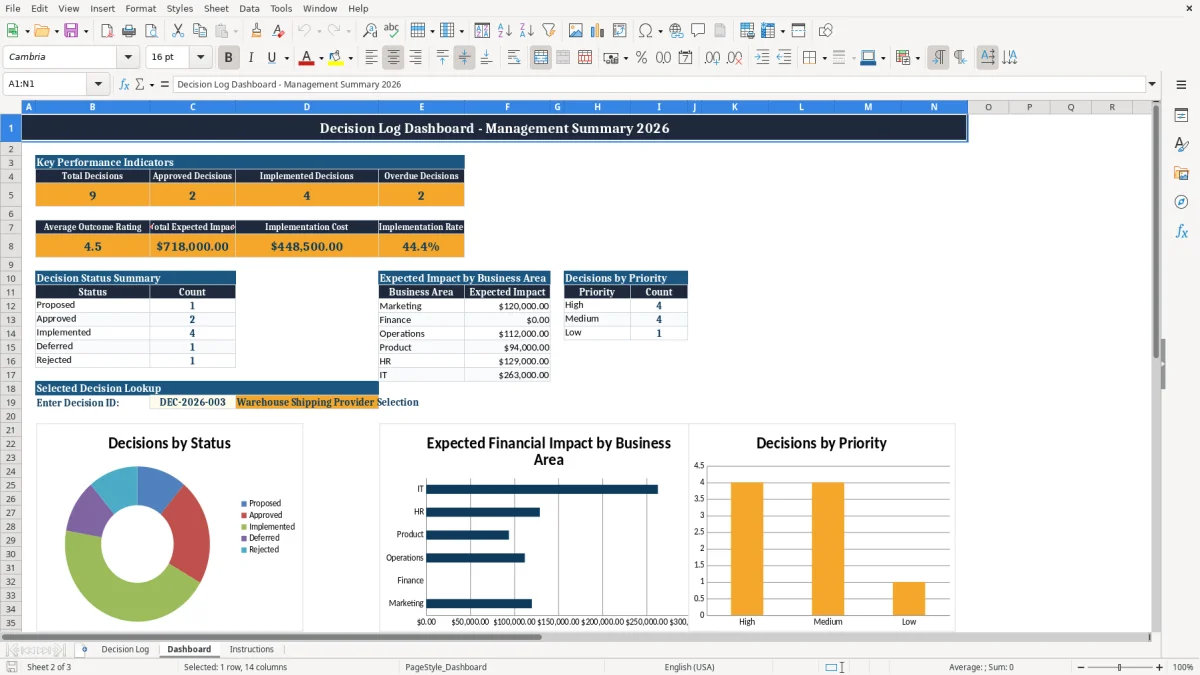
What is included
Professional navy, blue, amber, and neutral formatting for a clear business-ready presentation.
Dedicated fields for decision ownership, stakeholders, business area, type, status, and priority.
Structured sections for options considered, selected option, rationale, and supporting notes.
Financial tracking fields for expected impact and implementation cost.
Date fields for decision, target, completion, and follow-up review milestones.
Outcome rating and implementation notes for post-decision evaluation.
Example records that demonstrate how common business decisions can be documented.
What Is a Decision Log Excel Template?
A Decision Log Excel Template is a structured spreadsheet for recording important choices made by a team, department, project group, or organization. Instead of relying on scattered meeting notes, email threads, chat messages, or individual memory, a decision log creates a consistent record that can be reviewed whenever context is needed.
Each row represents a decision and includes practical fields such as the decision date, title, business area, owner, stakeholders, decision type, status, priority, options considered, selected option, rationale, costs, deadlines, and outcome.
This Decision Log Excel Template is designed for real business use. It can support strategic planning, vendor selection, technology implementations, budget approvals, process changes, risk responses, and project governance.
The rationale field helps explain why an option was selected, while the options field preserves alternatives that were evaluated but not chosen. Financial fields allow teams to compare expected impact with implementation cost, and date fields make it easier to monitor delivery.
A decision log is especially valuable when projects involve multiple stakeholders or when decisions may need to be revisited later. New team members can understand the history without recreating old discussions. Leaders can see who owns an action, which decisions remain open, and whether implementation is progressing as planned.
The outcome rating and notes also create a feedback loop. Once a decision is implemented, the team can record what happened and use that information to improve future choices. By keeping the record in Excel, organizations can begin quickly, customize the columns, filter records, and incorporate the log into familiar review routines.
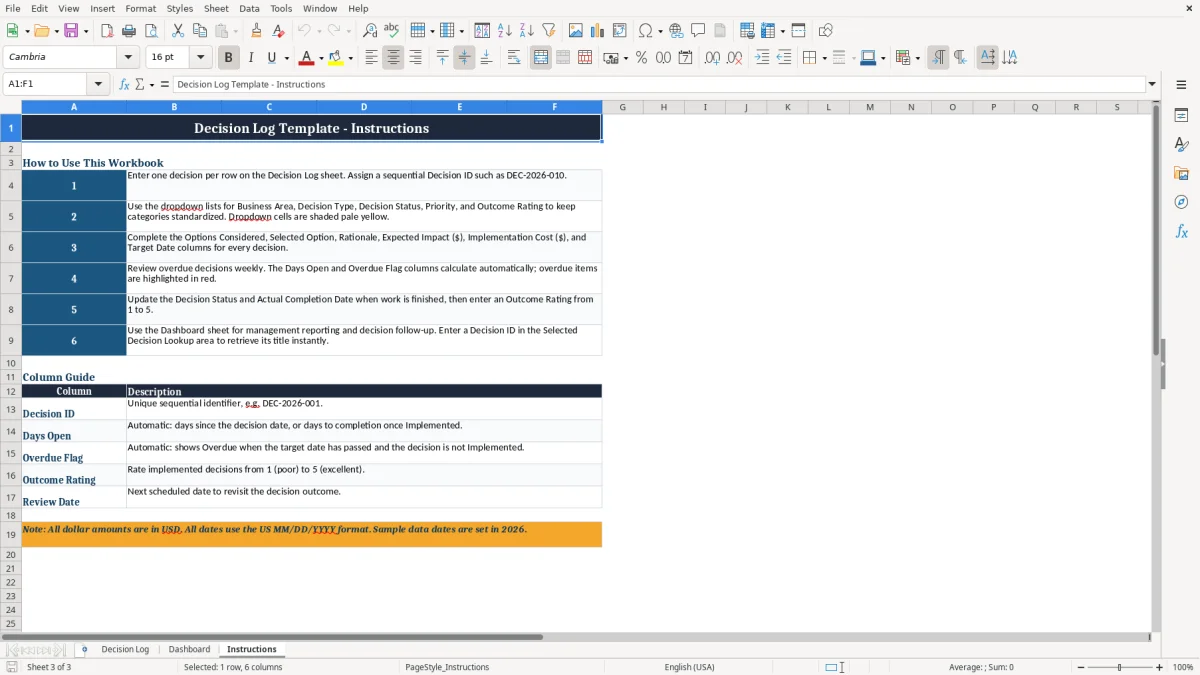
Why Track Business Decisions in Excel?
Tracking business decisions in Excel gives teams a simple and accessible way to improve visibility and accountability. Important decisions often affect budgets, customers, employees, systems, schedules, and strategic goals.
When the supporting information is spread across presentations, emails, meeting minutes, and project tools, it becomes difficult to confirm what was approved, who made the decision, which alternatives were considered, or what should happen next. A centralized Excel decision log brings those details together in a format that most teams already understand.
The template helps distinguish a decision from a general task or discussion. It records the selected option and the reasoning behind it, not just the final result. This distinction matters because outcomes cannot always be judged fairly without understanding the information available at the time.
Documenting the rationale also reduces repeated debates and helps stakeholders align on the original intent. Owners and target dates provide a clear basis for follow-up, while status and overdue tracking help managers focus attention where it is needed.
Excel is also useful for teams that want flexibility without a complex implementation. The worksheet can be filtered by business area, owner, priority, type, status, or date. Additional columns can be added for risks, approval references, links, dependencies, or action items.
Organizations can use the log during weekly project meetings, monthly leadership reviews, steering committee sessions, or post-implementation retrospectives. Because the template includes expected impact and implementation cost fields, it can support both qualitative and financial conversations. Used consistently, a decision log becomes more than an archive: it becomes a practical management tool for maintaining momentum, explaining choices, and learning from results.
How to Use the Decision Log Template
Begin by creating a unique identifier for every decision, such as DEC-2026-001, and enter the date on which the decision was made or formally recorded. Give the decision a concise title that makes the subject easy to recognize in a filtered list. Select the relevant business area and identify one accountable decision owner.
Add stakeholders who participated in the evaluation or will be affected by the result. These fields establish the basic context before the decision details are documented.
Next, classify the record by decision type, status, and priority. Common types include strategic, operational, financial, technical, project, and policy decisions. The options considered field should summarize meaningful alternatives, while the selected option field should state exactly what was approved.
Use the rationale field to explain the important criteria, evidence, constraints, assumptions, or trade-offs behind the selection. A clear rationale is more useful than a short statement that simply says an option was chosen because it was best.
Complete the implementation details by entering expected impact, implementation cost, target date, and review date. When the work is finished, add the actual completion date and update the status. Review open and overdue records regularly so owners can resolve blockers or revise dates transparently.
Finally, return to completed decisions after enough time has passed to assess the outcome. Add a rating and notes describing whether the expected benefits were achieved, what changed, and what the team learned.
Keep the log current, use consistent terminology, and avoid deleting historical records unless your governance process requires it. A dependable update routine makes the template useful for both daily coordination and long-term organizational memory.
A dependable update routine makes the template useful for both daily coordination and long-term organizational memory, and those retrospective notes can feed a continuous improvement log for tracking recurring fixes and lessons learned.
Who Should Use a Decision Log?
A Decision Log Excel Template can benefit any team that makes choices with meaningful consequences, dependencies, costs, or stakeholder impact. Project managers can use it to record scope decisions, schedule trade-offs, resource allocations, and changes to delivery plans. IT teams can document architecture choices, software selections, security responses, system migrations, and implementation approvals.
Operations leaders can track process changes, supplier decisions, service improvements, and responses to recurring issues. Marketing teams can use the log for campaign budgets, channel selection, positioning, and customer initiatives.
Finance and leadership teams can use a decision log to preserve approval context for investments, spending requests, forecasts, and strategic priorities. Human resources and department managers may find it useful for organizational changes, policy updates, workforce planning, and vendor arrangements.
Governance, risk, and compliance groups can use the record to show who approved an action, when it was approved, what alternatives were reviewed, and when the result should be reassessed. Cross-functional teams benefit particularly because a shared log reduces ambiguity between departments.
The template is appropriate for both small and large organizations. A small business can use it as a lightweight management record without purchasing specialized software. A larger organization can use it as a team-level register or adapt it to complement project management, portfolio management, or governance systems.
It works best when the team agrees on definitions for status, priority, decision type, and outcome rating. Assigning an owner for each row prevents the log from becoming a passive list.
Scheduling periodic reviews keeps open items visible and ensures that completed decisions are evaluated. Whether the need is a simple record of leadership choices or a detailed governance trail, this Excel template provides a flexible starting point.
Frequently asked questions about this template
A decision log is a central record of important decisions, including the owner, stakeholders, alternatives, selected option, rationale, implementation details, and outcome.
Project managers, business leaders, operations teams, IT departments, marketing and finance groups, and governance teams can all use the template.
Useful information includes the decision date, title, owner, stakeholders, type, status, priority, options considered, selected option, rationale, costs, dates, and notes.
It assigns a decision owner, identifies stakeholders, records target and completion dates, and makes open or overdue decisions easier to review.
Yes. You can add columns for risks, approvals, links, dependencies, action items, or other information required by your organization.
An outcome rating and follow-up notes show whether expectations were met and help the team apply lessons from completed decisions to future work.
Meet the makers