
Project & Planning


Holiday Planner Excel - Free Template
Plan holiday events, track budgets, dates, times, locations, and status in one workbook for family, office, or group use.
2026-07-09
190 downloads
4.8/5
Download template
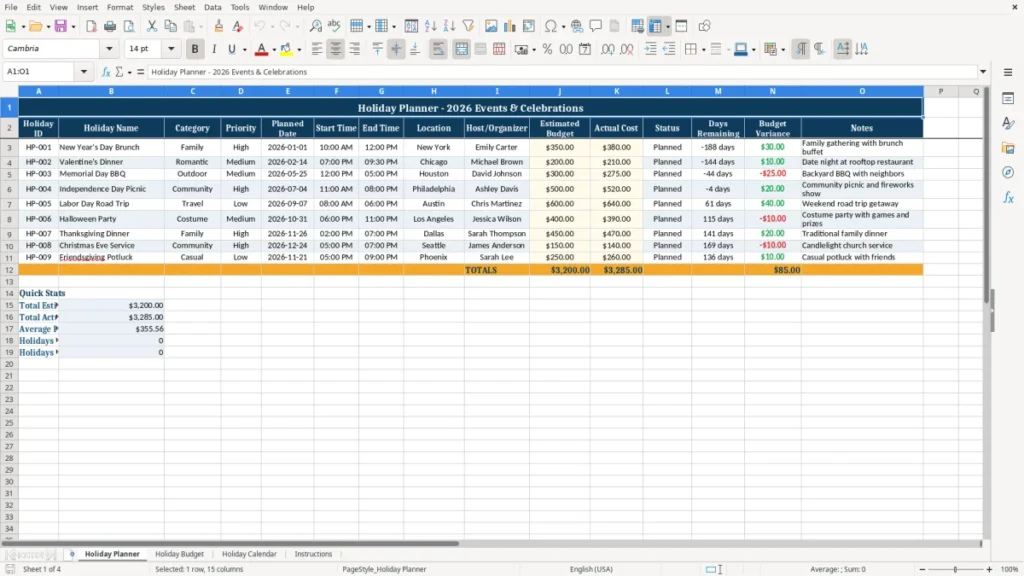
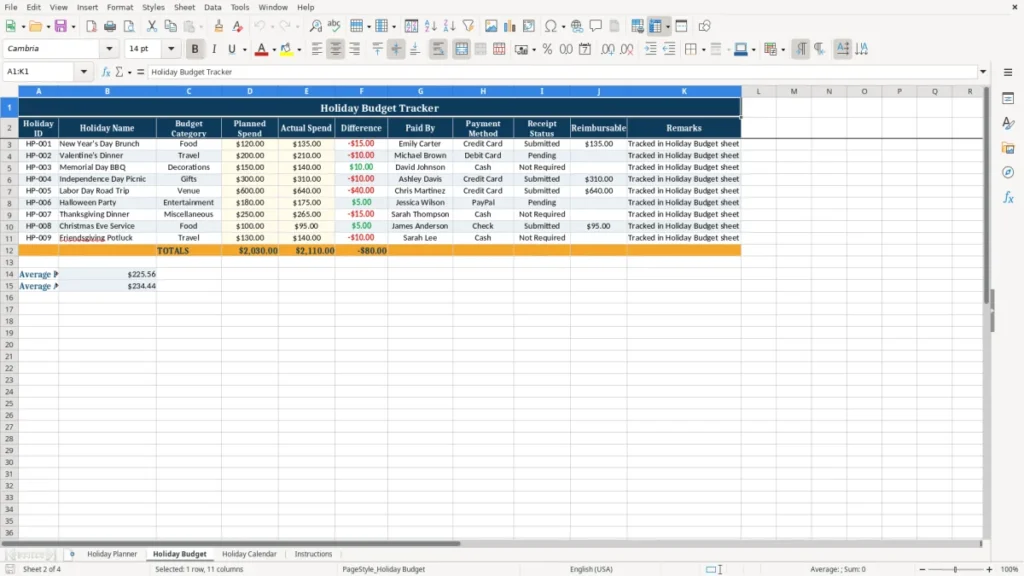
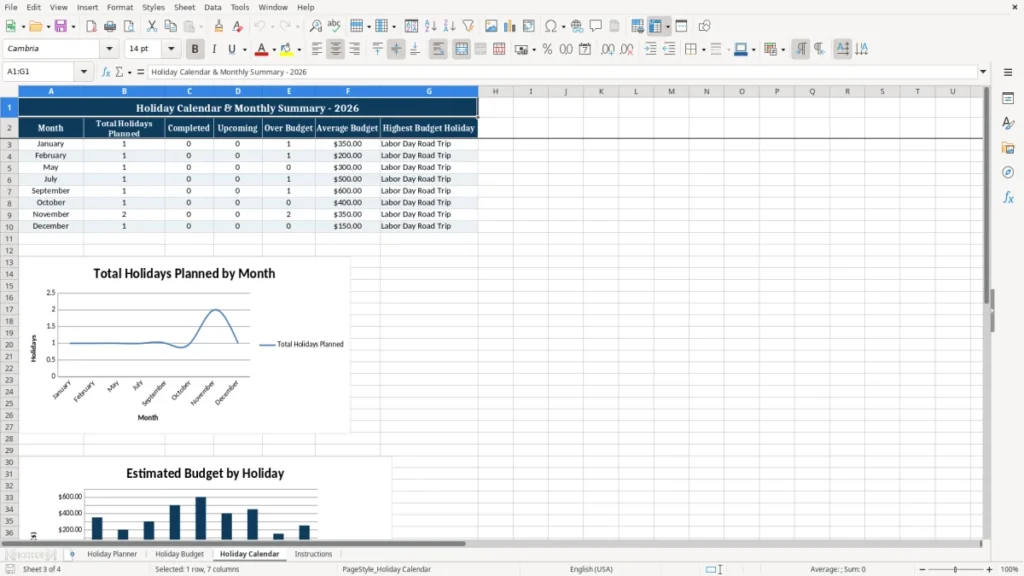
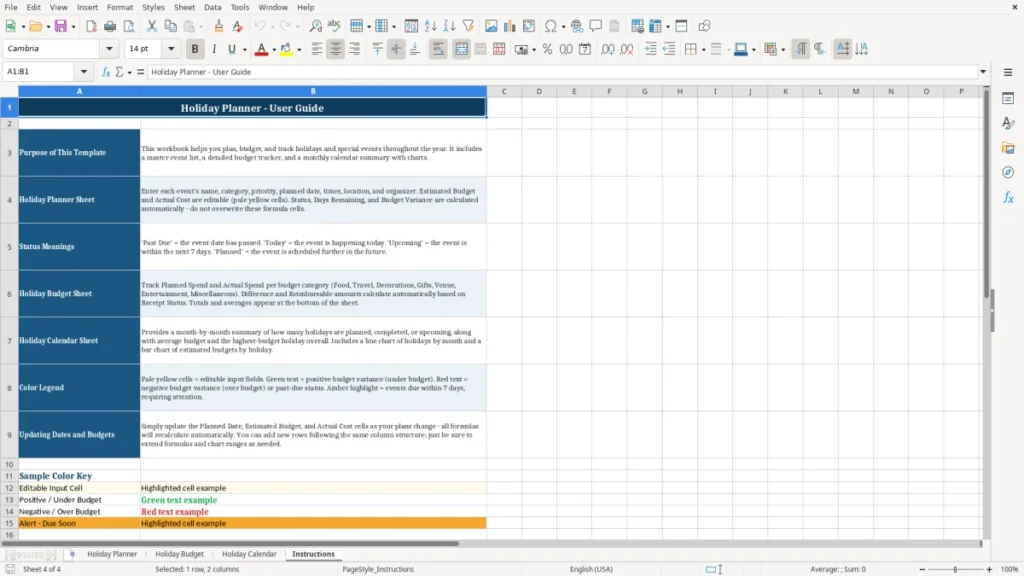
This Holiday Planner Excel template lets you track holiday events in one workbook with dates, times, locations, organizers, budgets, and status. It includes Holiday Planner, Holiday Budget, Holiday Calendar, and Instructions sheets for planning 2026 events.
Use it for family gatherings, office parties, neighborhood events, or nonprofit celebrations. You can compare estimated budget to actual cost, see what is coming up next, and keep the schedule clear when several holidays stack up in the same month.
The planner sheet holds each event on its own row. The budget and calendar sheets make it easier to spot overlaps, watch spending, and keep the whole season under control.
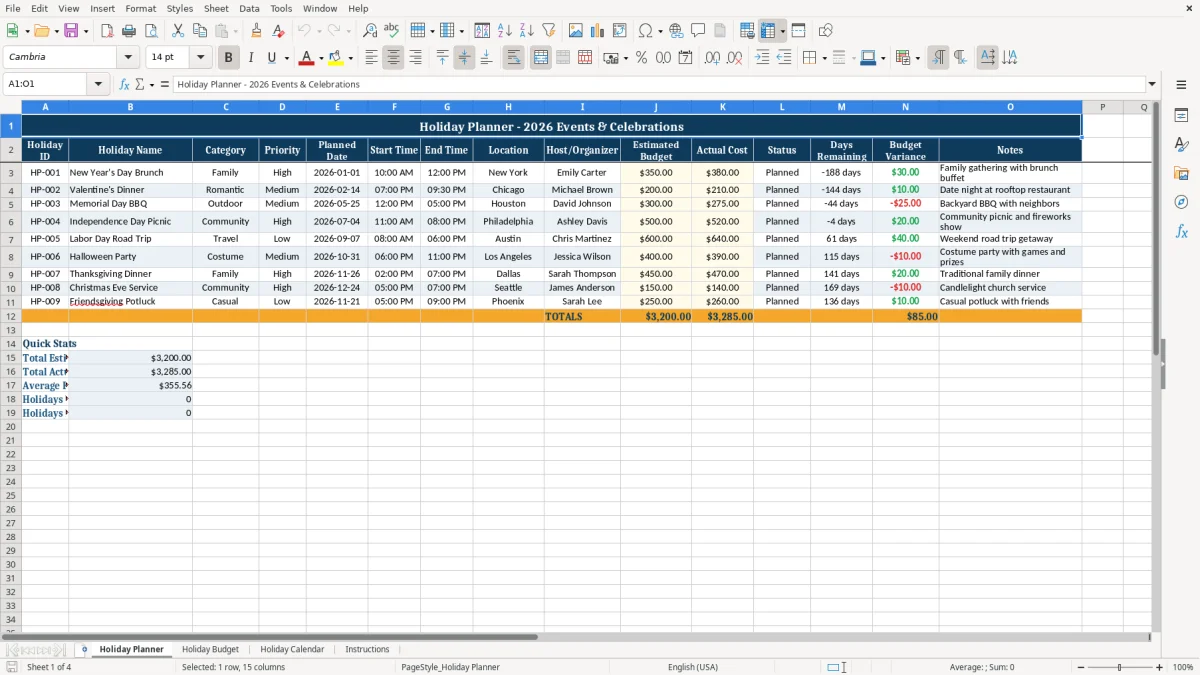
The main benefits of this Excel template
- Track each event with fields for holiday name, date, time, location, organizer, budget, and notes.
- Compare estimated budget to actual cost and spot overruns like a $350 plan that lands at $380.
- See days remaining so you know when to book food, travel, or decorations.
- Use one workbook for family, office, school, church, or neighborhood holiday planning.
- Avoid double-booking by checking the calendar view before you commit to two events on the same weekend.
- Keep status visible for planned, confirmed, and completed events.
- Review spending across several celebrations, such as three $200 events instead of one vague holiday total.
Step-by-step guide
- Step 1 — Open the Holiday Planner sheet and enter each event on its own row. Start with the holiday name, date, time, and location.
- Step 2 — Add the organizer, priority, and budget numbers. If a dinner should cost $250 but you expect $275, enter the realistic number.
- Step 3 — Update the status as plans change. Mark events as planned, confirmed, or completed so you can see what still needs work.
- Step 4 — Check the Budget Variance and Days Remaining columns before each holiday. That helps you catch a $40 overspend or a deadline that is only 5 days away.
- Step 5 — Use the Holiday Budget sheet to review totals by event or category. That is the fastest way to see whether food, gifts, or travel is driving costs.
- Step 6 — Review the Holiday Calendar sheet to spot overlaps and crowded weekends. It is easier to fix a conflict on the screen than after you have already paid deposits.
- Step 7 — Read the Instructions sheet if you are sharing the file with someone else. It gives a quick summary of how the workbook is organized.
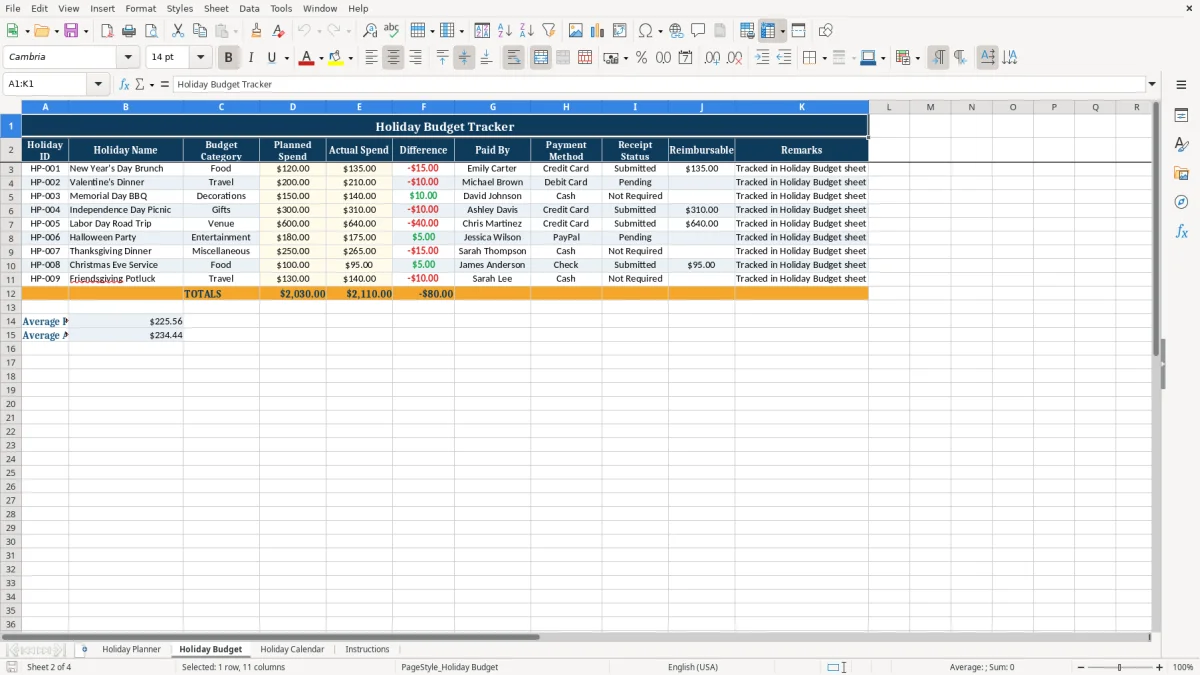
What is included
Holiday ID field for unique event tracking like HP-001.
Planned Date, Start Time, and End Time columns for clear scheduling.
Estimated Budget and Actual Cost columns with budget variance tracking.
Status field for monitoring progress from draft to completed.
Days Remaining field for countdown-based planning.
Notes column for menus, guest lists, vendor contacts, or reminders.
Separate sheets for planning, budgeting, calendar view, and instructions.
How people use a holiday planner Excel template
This template fits the people who actually end up running holiday plans: a family member handling Thanksgiving dinner, an office manager booking a December lunch, a nonprofit treasurer tracking a gift drive, or a contractor’s admin lining up a year-end party for 4 employees. When 3 events land in the same 7-day stretch, a spreadsheet is faster than text messages and paper notes.
The Holiday Planner sheet gives you one row per event, which works better than a scattered list when you need to compare dates, locations, and budgets at a glance. If one brunch is on 12/24/2026 at 10:00 AM and another dinner is on 12/25/2026 at 6:00 PM, you can see the conflict before you buy food twice.
For households and family hosts
A two-income household may be balancing travel, gifts, and meals at the same time. If you budget $300 for dinner, $120 for gifts, and $80 for decorations, you can see the full cost instead of guessing from memory.
For small business and group organizers
A bookkeeper at an LLC or an office admin at a contractor can use the file to keep the holiday lunch, gift cards, and closure notices in one place. That matters when the plan changes twice in a week and you need the current version without chasing 10 separate messages.
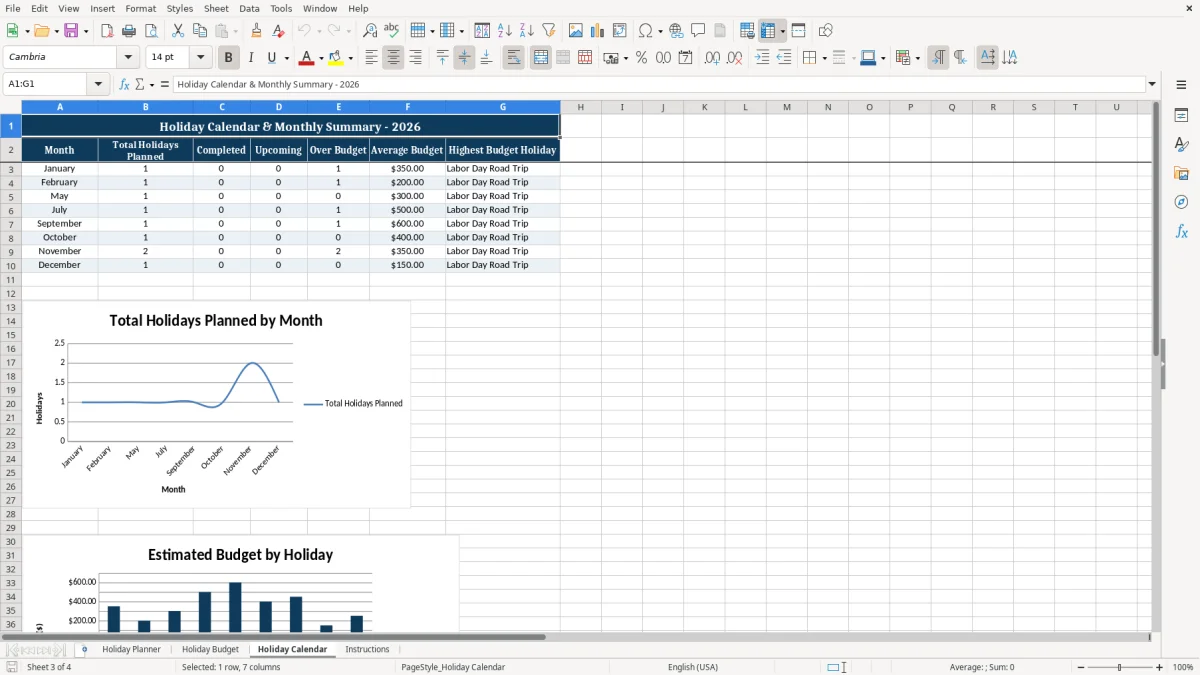
What the holiday budget and calendar sheets help you control
The budget side of the workbook is useful because holiday spending creeps up fast. A $250 event that finishes at $325 is a 30% increase, and if you have 4 similar events you are suddenly looking at $300 of extra cash out the door.
The calendar sheet is the better view when timing matters more than details. If your busiest week already has 2 dinners, a school concert, and one office party, the calendar helps you see where the pressure is before you commit to another invite.
Budget control in plain numbers
The estimated budget and actual cost columns let you compare planned spending to what really happened. That is the simplest way to keep a $1,000 holiday season from turning into $1,250 without anyone noticing.
Why the date fields matter
The planned date, start time, and end time columns are the difference between a clean schedule and a scramble. If a gift exchange starts at 3:00 PM and dinner starts at 5:30 PM, you can see whether the gap is enough for travel, setup, or cleanup.
When a spreadsheet is enough
For 5 to 20 holiday events a year, this workbook is usually enough. Once you are managing dozens of RSVPs, vendor deposits, and shared attendance lists, dedicated event software may be the better choice.
Where holiday planning breaks down and what it costs
The biggest problem is waiting too long to enter the plan. If you only update the spreadsheet after money is already spent, you lose the chance to correct course before the credit card bill arrives.
A holiday dinner budgeted at $200 can quietly become $275 once you add drinks, dessert, and last-minute decor. That $75 gap is small on its own, but 4 events with the same problem can push the season $300 over budget.
Missing dates and double bookings
If you skip the planned date or start time, conflicts are easy to miss. One missed overlap can mean paying for extra food, extra rides, or a rushed venue change, which is the kind of mistake that costs both money and time.
Letting notes replace structure
A notes-only approach is weak because it hides the fields you need to sort and filter. You need separate columns for organizer, budget, actual cost, status, and variance so the one event that still needs a venue or a gift order does not get buried.
Ignoring the running total
Holiday plans often fail at the total, not the individual line item. If 6 events average just $20 over budget, that is $120 lost, and nobody notices until the month-end close on your personal checking account.
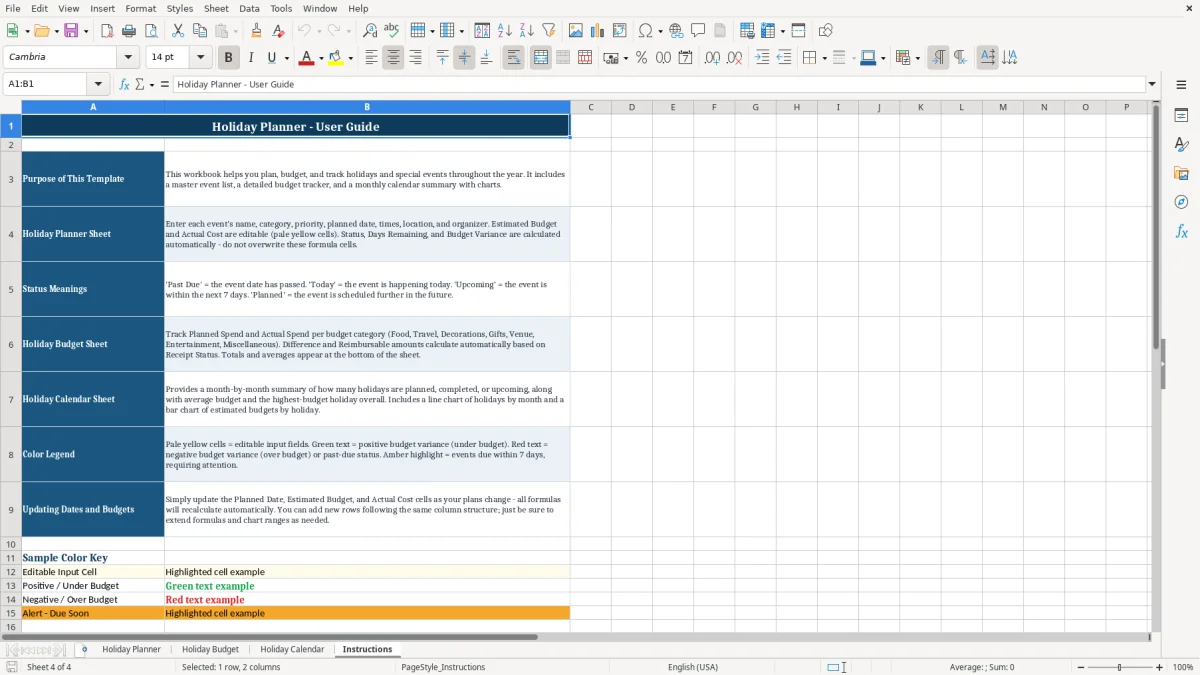
How to turn the workbook into a holiday routine
The best routine is to update the workbook the moment a holiday plan gets confirmed. If you enter the event while it is fresh, you avoid the common end-of-month cleanup where 8 receipts and 3 text threads have to be reconstructed later.
Set one weekly review point
Pick a fixed time, such as Friday afternoon or the payroll run if you use the file for an office event. A 10-minute review each week is usually enough to update budgets, confirm dates, and close out completed events.
Use the same process every time
- Copy last year’s entries if you reuse the same holiday events.
- Keep status values consistent, such as planned, confirmed, or completed.
- Enter actual costs as soon as you pay them so variance stays current.
When the workbook grows beyond 25 events, multiple vendors, or shared RSVP tracking, it may start to feel cramped. At that point, a dedicated event platform or shared database is usually a better fit.
Frequently asked questions about this template
The workbook includes four sheets: Holiday Planner, Holiday Budget, Holiday Calendar, and Instructions. The planner sheet tracks holiday ID, name, category, priority, planned date, time, location, organizer, budget, actual cost, status, days remaining, variance, and notes.
Yes. It works for family gatherings, workplace parties, neighborhood events, school functions, and nonprofit celebrations because the layout is simple and the same fields fit each use.
You enter an estimated budget and then update the actual cost after you spend the money. If a $300 event ends at $342, the variance shows the overspend right away instead of hiding it in receipts.
It shows how many days are left before each planned date, which helps you time shopping, booking, and reminders. That is useful when an event is only 7 or 10 days away and you still need to confirm food or travel.
They serve different jobs. The planner sheet is better for entering details row by row, while the calendar sheet is better for seeing how events line up across the month or holiday week.
When the plan grows into dozens of guests, multiple deposits, shared RSVPs, or repeated vendor coordination, a spreadsheet starts to feel crowded. For smaller holiday planning jobs, though, this workbook is usually faster and easier than a separate app.
Meet the makers