
HR & Payroll


Performance Review Excel - Free Template
Track employee review scores, ratings, merit increases, and review status with a summary dashboard and instructions sheet.
2026-07-06
186 downloads
4.8/5
Download template
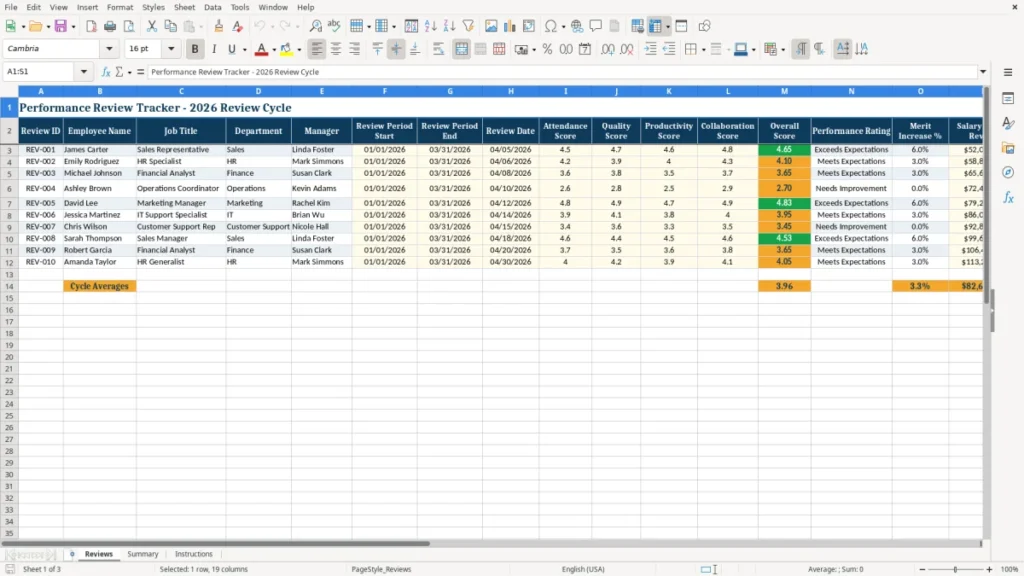
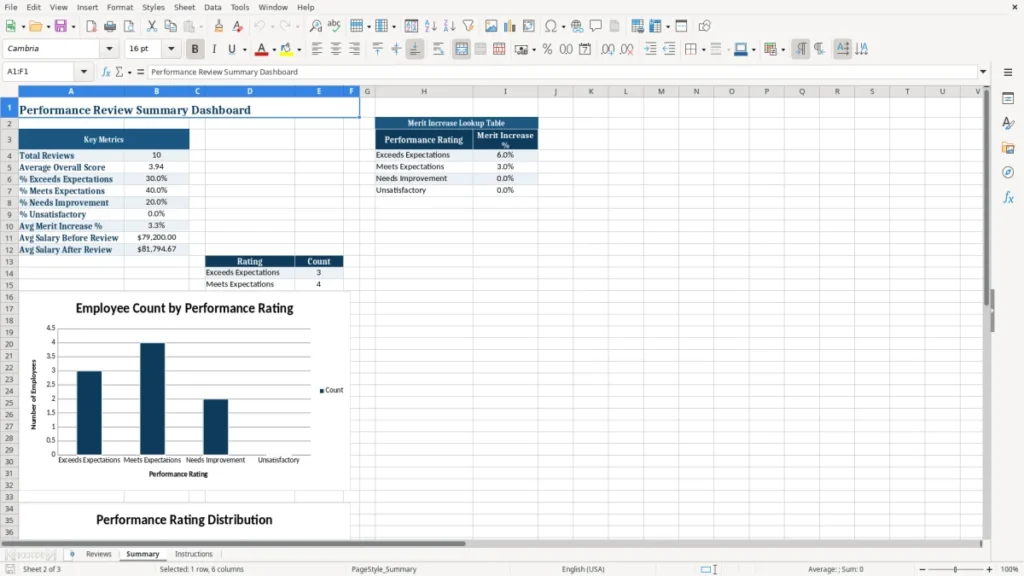
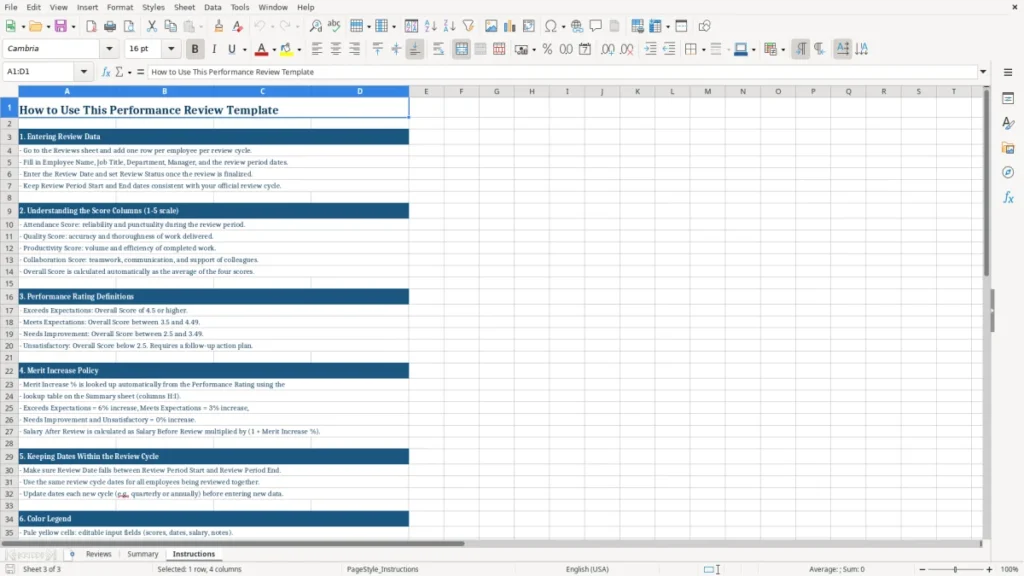
This performance review Excel template tracks employee scores, ratings, merit increases, and review status in one workbook. It includes a Reviews sheet for each employee, a Summary sheet for quick totals and charts, and an Instructions sheet for setup.
Use it to run a quarterly or annual review cycle without juggling notes in separate files. The template is built for a manager, HR specialist, or business owner who needs a clean record of who was reviewed, when, and what increase was approved.
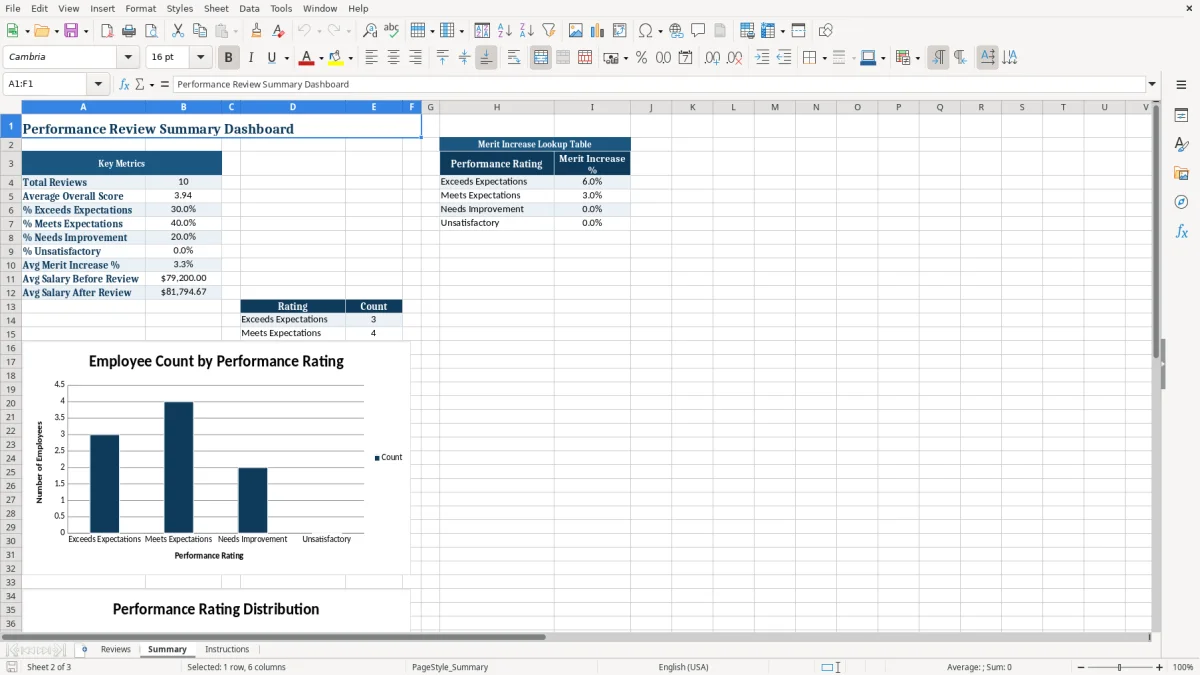
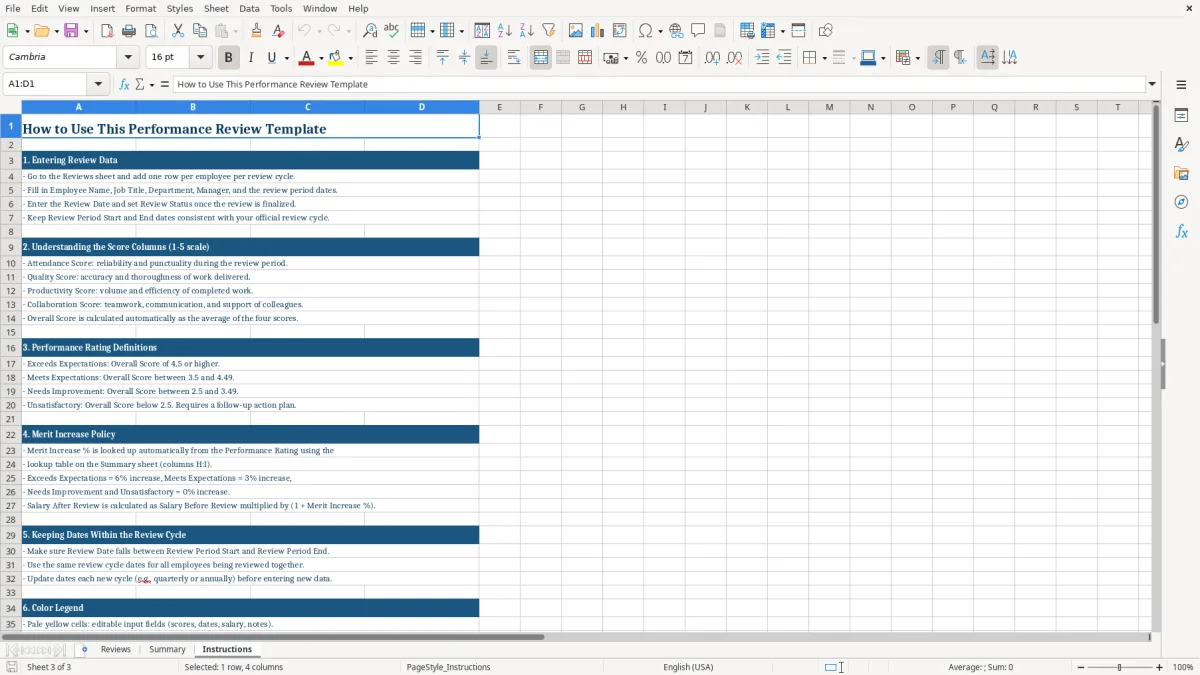
The workbook shown in image 1 lists each employee review with IDs, dates, scores, salary fields, status, and notes. Image 2 shows the Summary dashboard, and image 3 contains the Instructions sheet with setup guidance.
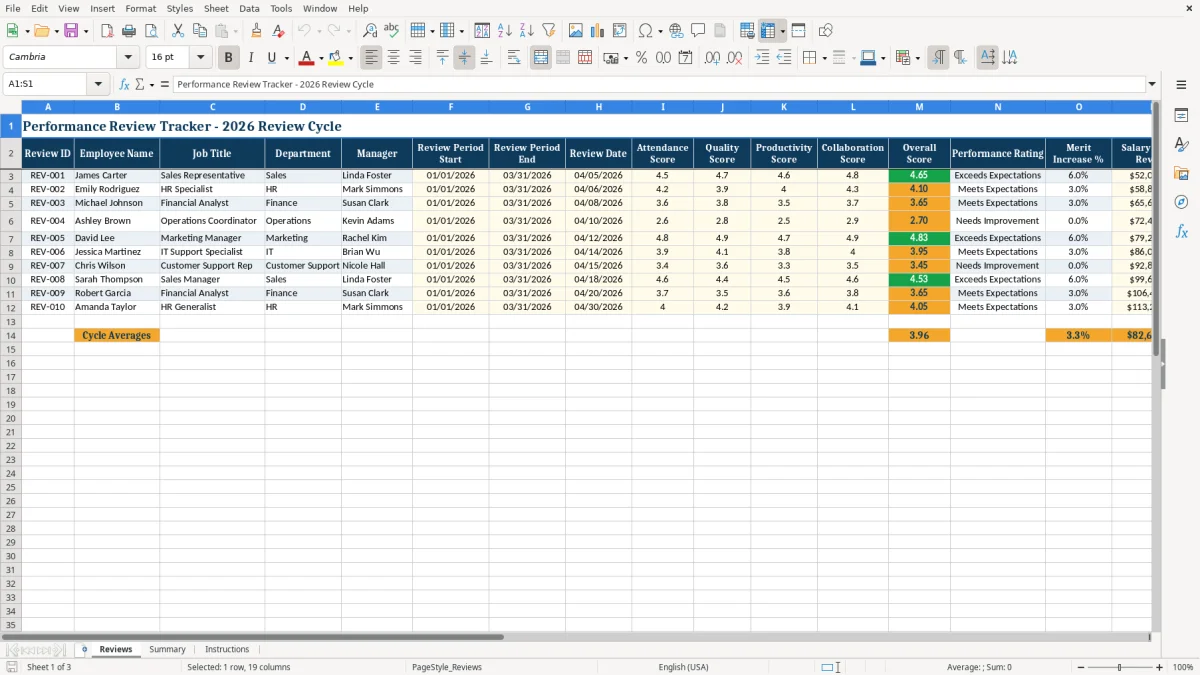
The main benefits of this Excel template
- Tracks review periods, scores, and outcomes for each employee in one file.
- Shows overall score and performance rating across multiple review criteria.
- Helps you document merit increases from 0.0% to the approved percentage.
- Keeps salary before and after review side by side for a fast audit check.
- Makes it easier to compare employees in the same quarter or annual cycle.
- Reduces missing follow-up by marking review status and notes in each row.
- Gives you a summary view for leadership without rebuilding the data every cycle.
Step-by-step guide
- Step 1 — Open the Reviews sheet and enter each employee’s name, job title, department, and manager. Fill in the review period start, end, and review date in MM/DD/YYYY format.
- Step 2 — Enter the score fields for attendance, quality, productivity, and collaboration. Use the same scale for every employee, such as 1.0 to 5.0, so the comparisons stay fair.
- Step 3 — Review the overall score, rating, and merit increase before you save the final result. For example, a 4.6 average can justify a larger increase than a 2.8 score.
- Step 4 — Update salary before review and salary after review once the increase is approved. A $52,000 salary with a 3.0% raise becomes $53,560.00.
- Step 5 — Mark the review status so you can see which employees are draft, complete, or still waiting on approval. Add short notes for coaching points or follow-up items.
- Step 6 — Check the Summary sheet for totals and charts after you finish the cycle. Use it to spot patterns, such as one department averaging 4.4 while another sits at 3.1.
What is included
Reviews sheet with columns for employee details, dates, scores, salary, status, and notes.
Summary sheet with dashboard-style counts and visuals for the current review cycle.
Instructions sheet that explains how to use the workbook.
Formatted score columns for consistent review tracking.
Salary fields that make raise approvals easy to verify.
Clean table layout that supports quick filtering and sorting.
Built for 2026 review cycles with ready-to-use sample entries.
How managers use a performance review spreadsheet in 2026
A performance review spreadsheet is useful when you need to score employees in a repeatable way and keep a written trail for each cycle. A small company with 12 employees can finish a quarterly round in one workbook instead of collecting 12 separate notes, email threads, and raise requests.
This template fits the people who actually handle reviews: an HR specialist at an LLC, an office manager at a contractor with 4 field workers, or a business owner reviewing a 1099-to-W-2 conversion before year-end. The Reviews sheet holds one row per employee, so you can compare a sales rep at 4.7 with an operations coordinator at 2.8 without rebuilding the file.
When the workbook saves time
It helps most at the end of a quarter, after a payroll run, or before bonus approvals. If 8 employees each take 15 minutes to review, you are already at 2 hours of admin time before you even write the summary.
What the summary sheet is for
The Summary sheet turns the input rows into a quick management view. If 5 employees are marked complete and 2 are still pending, you can see the status gap immediately instead of hunting through separate files.
What the 2026 review cycle needs from your records
A review file like this is not an IRS form, but it still supports the same kind of disciplined recordkeeping you need for payroll and compensation decisions. Keep the final version with the employee’s name, review date, rating, and approved salary change, and store it for at least 3 years as part of your business records.
If a raise changes annual pay from $48,000 to $49,440, that $1,440 difference needs to match the approved review outcome. That matters for budgeting, payroll setup, and later questions about why one employee received a 3.0% merit increase while another received 0.0%.
Why the score fields matter
Using separate attendance, quality, productivity, and collaboration scores gives you a cleaner performance review than a single vague rating. A 4.8 in productivity but a 2.6 in attendance tells a different story than a flat 3.7 across every category, and the spreadsheet makes that visible.
Why salary fields belong in the same file
When compensation is linked to the review, the decision becomes easier to document. A manager can approve a $2,000 increase on a $60,000 salary and see the new annual amount instantly, instead of sending the number back and forth in email.
Where performance review files usually break down
The biggest mistake is using free-form notes without scores, which makes every employee look comparable until you try to justify the raise amounts. If one manager writes “good work” and another writes “exceeds expectations,” you cannot defend why one employee got 4.6 and another got 3.1.
Another common problem is stale data. If you forget to update the review date and period end, a March review can sit in the file with a June salary change, and that mismatch creates confusion during budget review.
What bad tracking costs
A missed approval on a 2.5% raise for a $58,000 employee is $1,450 for the year. If that mistake happens across 6 employees, the budget difference is $8,700, and you may have to explain it during month-end close or year-end planning.
Why status tracking matters
The Review Status column prevents half-finished files from being mistaken for final results. In a team of 10, even 2 missing statuses can leave leadership thinking the cycle is complete when two raises still need sign-off.
The same status discipline carries over to maintenance KPIs, where incomplete updates can make a review cycle look finished before the numbers are actually settled.
How to make the review sheet part of your regular routine
The easiest way to keep this spreadsheet alive is to tie it to an existing event, such as the payroll run, the quarter close, or the annual compensation meeting. If you review 6 employees every 3 months, set one fixed calendar reminder and reuse the same file instead of starting over.
Copy last cycle’s tab or workbook, clear the old notes, and keep the structure the same so people do not have to relearn the process every time. That is faster than building a new file from scratch and usually cleaner than collecting scores in email.
Practical habits that keep it current
- Use the same rating scale every cycle, such as 1.0 to 5.0, so scores stay comparable.
- Lock in one review date per quarter or year and update only the employee-specific fields.
- Keep short notes, not essays, so you can finish 8 reviews in one sitting.
- Move to HR or payroll software once you have 25+ employees, multiple approval layers, or separate compensation bands.
If your process needs automated reminders, approval routing, or employee self-evaluations, a spreadsheet is no longer enough. At that point, the file should support the system, not replace it.
That same shift from manual tracking to a supporting file also applies to maintenance scheduling, where reminders and approval steps need a structured system behind them.
Frequently asked questions about this template
It gives you one place to record employee review dates, scores, ratings, salary changes, and status. That makes it easier to compare reviews across a quarter or year without relying on scattered notes.
The workbook includes Reviews, Summary, and Instructions. Reviews is where you enter each employee’s data, Summary shows the high-level results, and Instructions explains how to use the file.
You can track as many employees as the sheet has room for, and you can add rows as needed. A small team of 5 or 10 is easy to manage, and a department of 25 still works well in Excel.
Yes. The review period start, review period end, and review date fields let you use the same file for a quarterly cycle, an annual cycle, or a special mid-year review.
Use the same scale for everyone, such as 1.0 to 5.0, so the results stay consistent. If you give one employee a 4.5 for quality, another employee should be measured against the same standard.
Yes. The salary before review, merit increase percentage, and salary after review columns help you see the dollar impact of each approval. For example, a 3.0% raise on $50,000 adds $1,500 for the year.
Meet the makers