
Inventory & Procurement


HACCP Excel - Free Template
HACCP Excel workbook with hazard analysis, CCP monitoring, dashboard, and instructions for food manufacturers, kitchens, and processors.
2026-07-20
228 downloads
4.8/5
Download template
This HACCP Excel template documents food-safety hazards, critical control points, critical limits, and monitoring activities in one workbook. It contains a CCP Hazard Analysis sheet, Monitoring Log, Dashboard, and Instructions sheet for building a practical plan at a food facility.
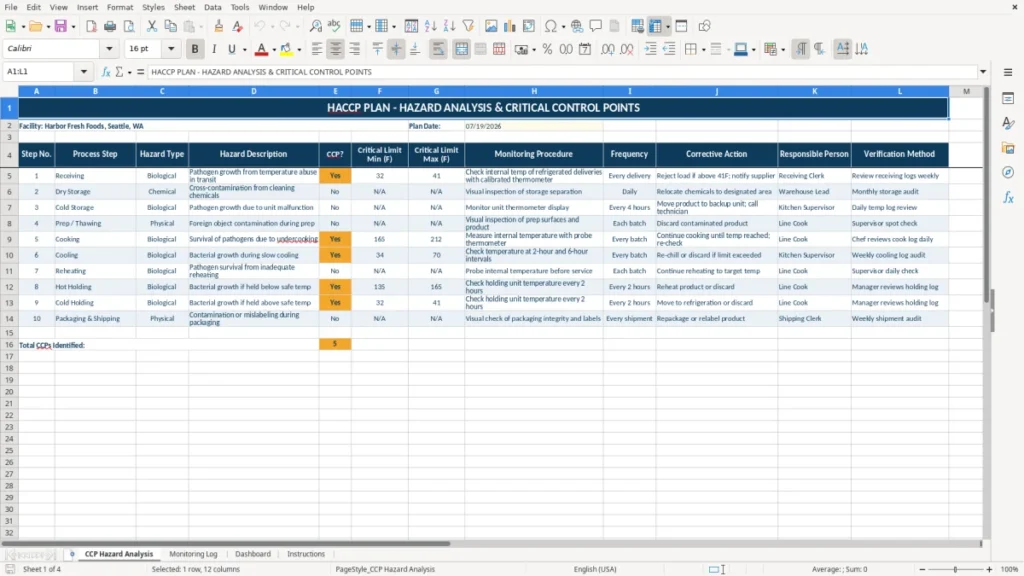
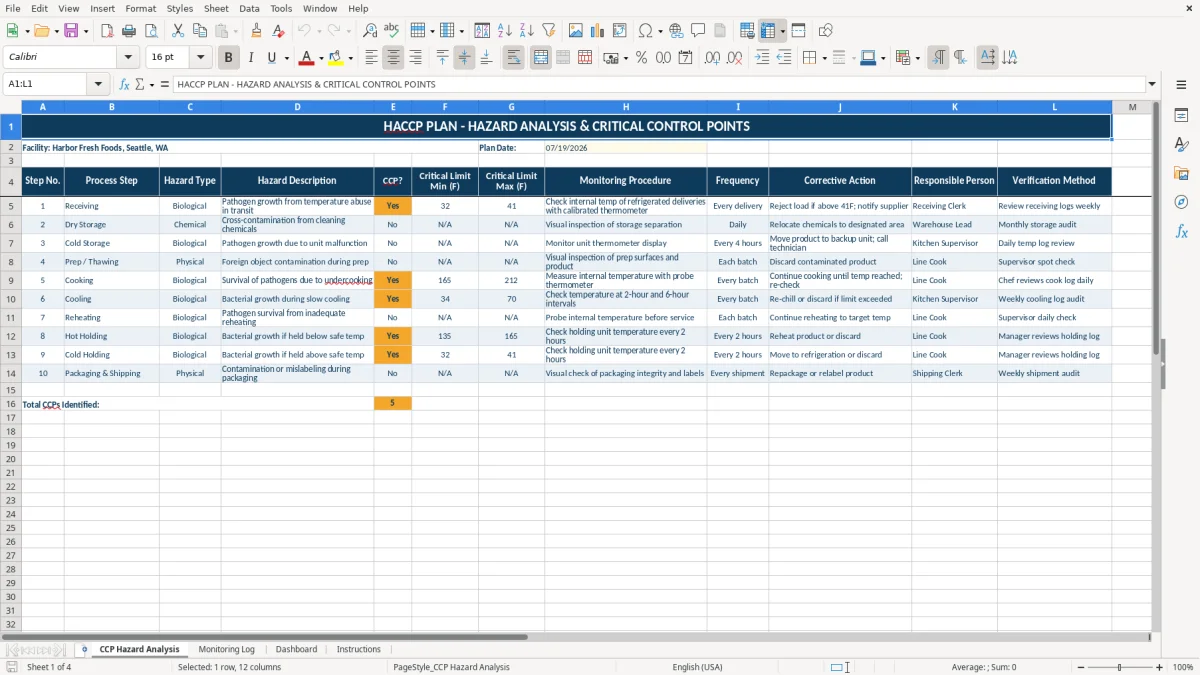
Use the CCP Hazard Analysis sheet to map process steps and identify biological, chemical, or physical hazards. The workbook uses clearly formatted input cells, a plan date field, temperature limit columns in degrees Fahrenheit, and a navy-and-amber layout that is easy to review during production or an audit.
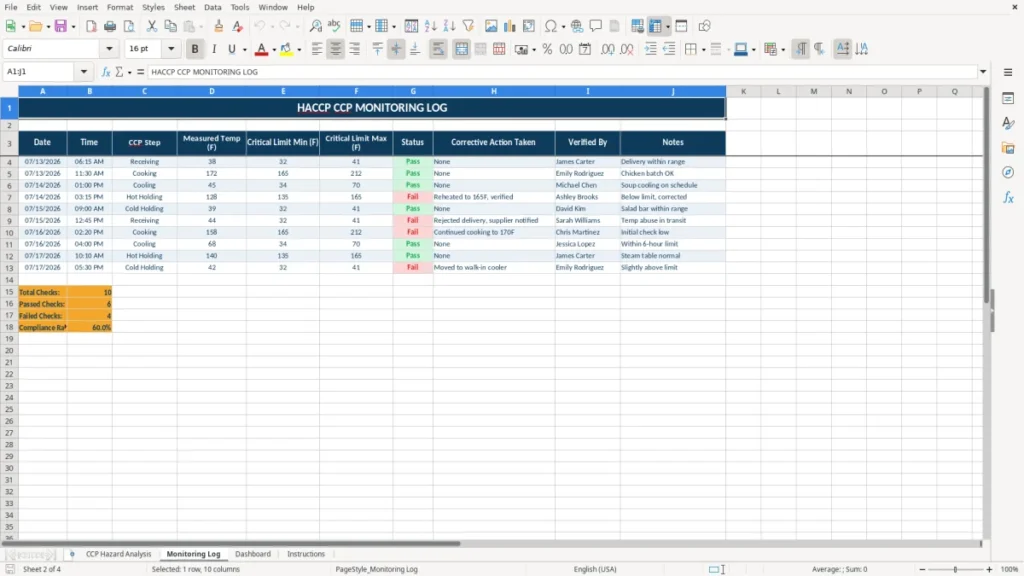
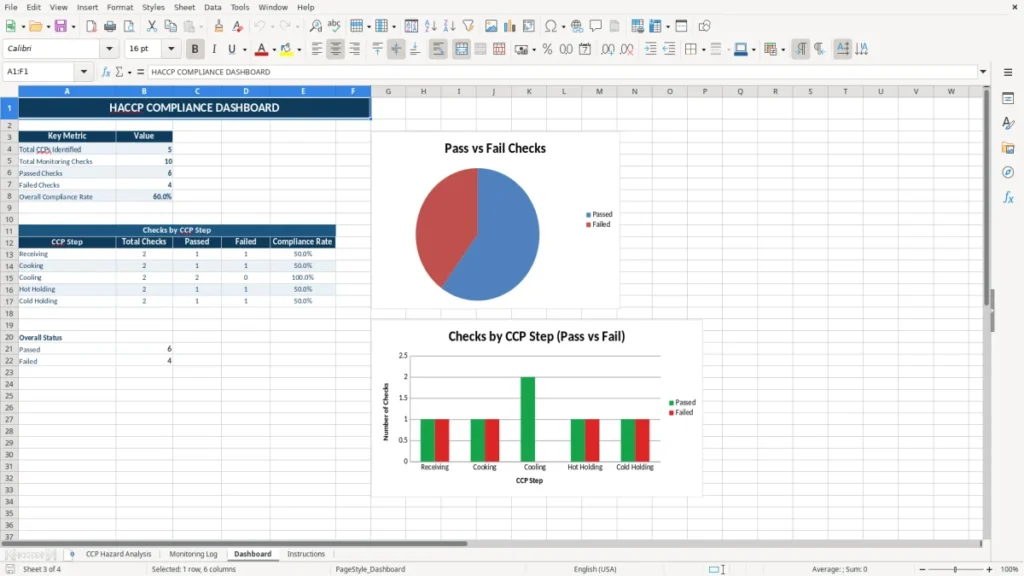
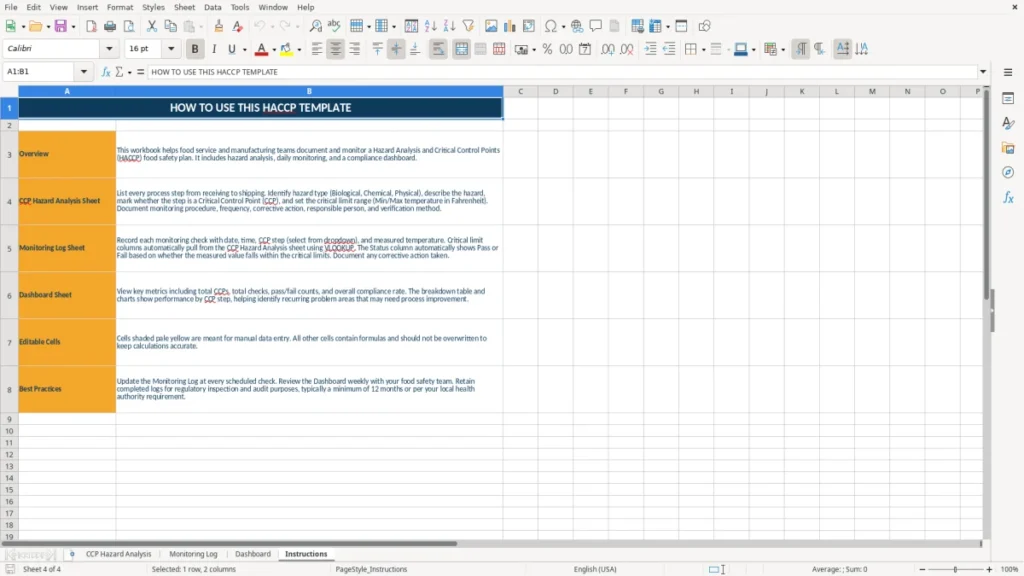
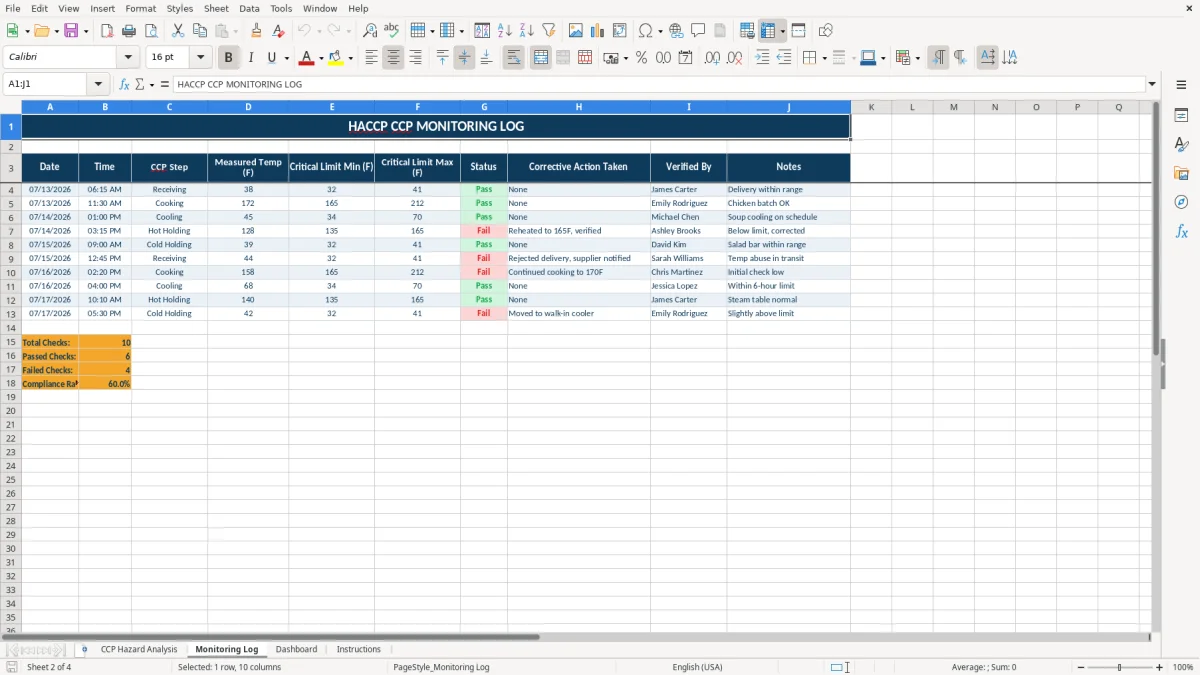
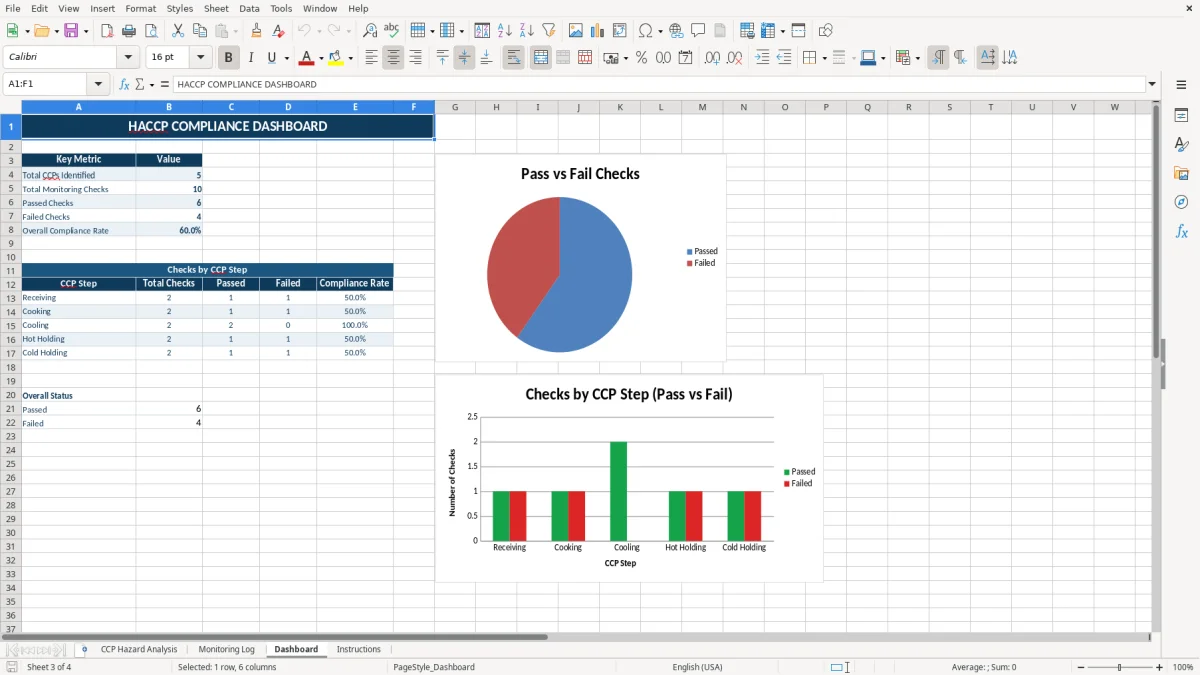
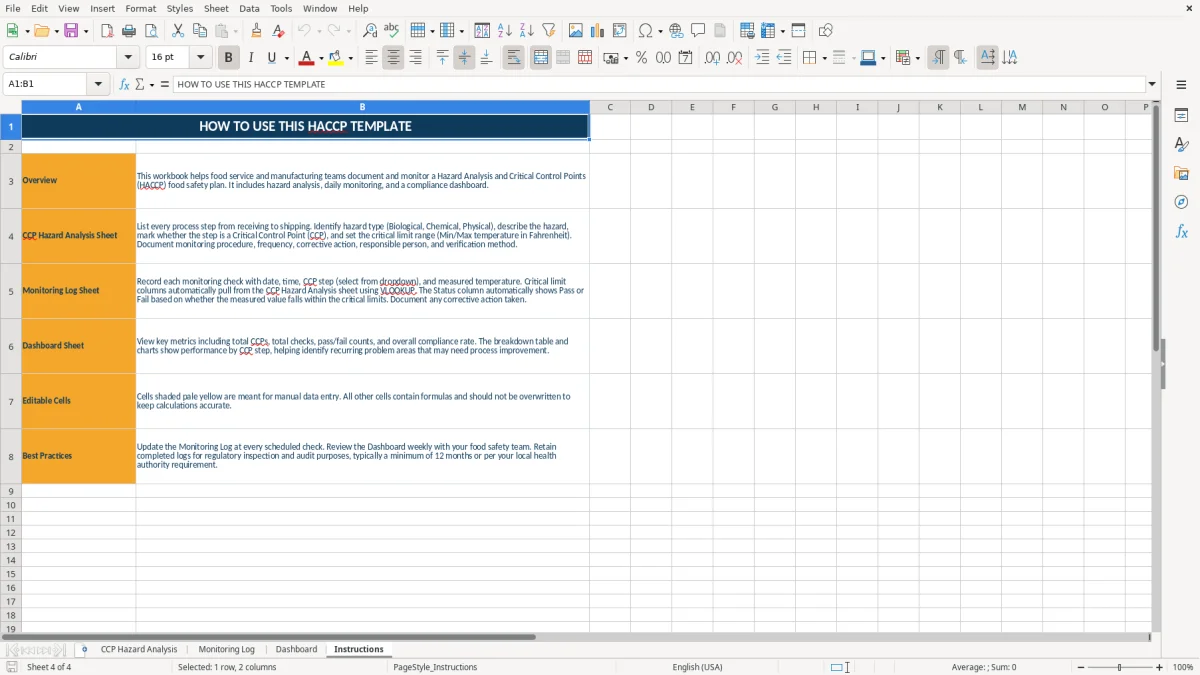
Image 1 shows the hazard-analysis layout, while images 2 through 4 show the monitoring log, dashboard, and instructions pages. Replace the sample facility information with your own operation before relying on the workbook for production controls.
The main benefits of this Excel template
- Records each process step, hazard type, hazard description, and CCP decision in one structured analysis.
- Captures minimum and maximum critical limits in degrees Fahrenheit for temperature-controlled steps.
- Gives production staff a dedicated Monitoring Log instead of forcing observations into the hazard-analysis table.
- Provides a Dashboard sheet for a quick management view of monitoring activity and results.
- Keeps the plan date and facility information visible at the top of the analysis sheet for document control.
- Uses color-coded headers, bordered cells, wrapped text, and highlighted input areas so staff can distinguish instructions from entries.
- Creates a repeatable starting point for reviewing hazards, documenting controls, and preparing records for an FDA or state inspection.
Step-by-step guide
- Open the workbook and review the Instructions sheet before entering production data. Confirm that the terminology and monitoring approach fit your product, process, and facility.
- On the CCP Hazard Analysis sheet, replace the sample facility name and enter your plan date in the highlighted date cell. Use MM/DD/YYYY format, such as 07/19/2026.
- List the process in sequence under Step No. and Process Step. Describe the biological, chemical, or physical hazard under Hazard Type and Hazard Description.
- Mark the CCP? field for steps that require control at a critical control point. Enter the applicable minimum and maximum temperature limits in the Fahrenheit columns.
- Describe who checks the limit, what instrument or record they use, and how often the check occurs in Monitoring Procedure and Frequency.
- Record actual production observations and any exceptions on the Monitoring Log. Do not overwrite the critical limits when documenting a result that falls outside them.
- Review the Dashboard after entries are made, then use the Instructions sheet and your establishment's approved procedures to complete corrective-action and verification work that the workbook does not replace.
What is included
CCP Hazard Analysis sheet with a merged plan title and fields for facility, plan date, process step, hazard classification, and CCP status.
Separate Critical Limit Min (F) and Critical Limit Max (F) columns for temperature-based controls.
Monitoring Procedure and Frequency columns that connect each critical limit to an operational check.
Dedicated Monitoring Log sheet for entering observations as production takes place.
Dashboard sheet for reviewing the workbook's monitoring information visually.
Instructions sheet that provides a place for user guidance within the same file.
Readable Calibri formatting with navy headers, amber-highlighted entry cells, wrapped text, centered headings, and borders around the working area.
Who uses a HACCP Excel plan during production
A HACCP spreadsheet is useful when a food business needs to connect its written hazard analysis to what employees actually check during a shift. A small bakery, refrigerated meal producer, seafood processor, commissary kitchen, or contract manufacturer can use the workbook as a working document while developing and maintaining its food-safety plan.
The person entering the information may be a quality manager, plant supervisor, kitchen manager, owner, or trained line employee. A four-employee catering kitchen may review receiving, cold storage, cooking, cooling, and holding every production day. A larger facility may assign the Monitoring Log to a lead while the QA manager reviews exceptions and signs off on verification separately.
Start with the actual process flow
Use the CCP Hazard Analysis sheet in the same order that product moves through the facility. For example, a ready-to-eat chicken operation might list receiving, refrigerated storage, cooking, cooling, packaging, and finished-product storage. The critical question is not whether a step sounds important; it is whether a hazard is controlled there and whether loss of control could produce unsafe food.
Image 1 shows the wide analysis table with Step No., Process Step, Hazard Type, Hazard Description, CCP?, minimum and maximum Fahrenheit limits, Monitoring Procedure, and Frequency. That layout is practical for a manager reviewing the entire process on one screen or printed page.
Match the record to the person doing the check
Suppose a line employee checks a cooler three times during a 10-hour shift. The procedure should say what thermometer is used, where the reading is taken, and where the result is recorded. The manager should not leave a vague instruction such as check cooler; a specific entry such as record the product-zone temperature at 7:00 a.m., 11:00 a.m., and 3:00 p.m. gives the employee a usable standard.
Images 2, 3, and 4 show the separate Monitoring Log, Dashboard, and Instructions sheets. Keep the analysis stable and use the log for day-to-day evidence; changing a critical limit in the middle of a run should require documented review, not an informal edit.
That kind of controlled review fits naturally into ongoing improvement tracking, where each change is documented before the next run begins.
What FDA HACCP principles require you to document
The FDA's HACCP framework is built around seven principles: conduct a hazard analysis; identify critical control points; establish critical limits; establish monitoring procedures; establish corrective actions; establish verification procedures; and establish recordkeeping procedures. This Excel workbook supports the analysis, limit, monitoring, and recordkeeping portions, but it does not by itself prove that your plan satisfies every regulatory or customer requirement.
For seafood, juice, and certain other sectors, specific FDA regulations may apply. For example, seafood processors operate under 21 CFR Part 123, while juice processors are covered by 21 CFR Part 120. Many food facilities also operate under the FSMA preventive-controls rule in 21 CFR Part 117. A HACCP plan and a FSMA food-safety plan are related but are not interchangeable documents.
Critical limits must be measurable
A critical limit needs an objective boundary, such as a time, temperature, pH, water activity, or concentration. The template's Critical Limit Min (F) and Critical Limit Max (F) columns are designed for Fahrenheit temperature ranges. Do not enter a convenient target unless you can support it with the applicable regulation, process authority, validated study, product specification, or other defensible basis.
For a hypothetical cooking step with a validated minimum of 165°F, a reading of 164°F is not a passing result merely because it is close. The record should show the actual 164°F observation, the deviation, the product disposition, and the corrective action required by the approved plan. The workbook's cells do not make that judgment automatically.
Records need traceability
Each monitoring entry should be tied to a date, time or production lot, responsible employee, measured result, and review. Calibration records for thermometers, verification checks, corrective-action documentation, and the approved plan should be retained with the monitoring records according to your regulatory and customer requirements.
Do not treat the displayed plan date of 07/19/2026 as an approval date. Update it when the plan is formally reviewed, document the reviewer and verification outside the fields shown in the workbook, and follow the record-retention rule that applies to your facility and product category.
That same retention discipline applies to equipment upkeep, so the maintenance log keeps inspections, corrective actions, and review dates aligned with the records you already maintain.
Where HACCP records break down during an inspection
The most expensive HACCP failures are usually not caused by an unattractive spreadsheet. They happen when the written limit, the employee's observation, and the response to a deviation do not agree. A facility can have a polished analysis sheet and still receive a serious finding if its monitoring records show repeated out-of-limit readings with no documented disposition.
Limits get copied without a process basis
A common mistake is copying a cooking temperature or cooling target from another product. Imagine a facility producing 200 trays of prepared food and entering 165°F as a generic limit for every step. If the actual validated process requires a different time-temperature combination, the copied value can create either unsafe processing or unnecessary product holds. Critical limits should be tied to the specific product and process, not to a familiar number.
Another problem is entering a range that is too broad to control the hazard. If a cooler is intended to stay at or below 41°F but the sheet shows a maximum of 50°F, an employee may record a passing result that does not protect the product. The spreadsheet preserves what you enter; it cannot correct a scientifically unsupported limit.
Employees record the result but not the exception
Suppose a thermometer reads 46°F when the maximum is 41°F. Writing 46°F in the Monitoring Log is only the observation. The record also needs the immediate action, such as moving product to a verified cooler, evaluating exposure time, checking the instrument, notifying the supervisor, and documenting the final disposition under the approved procedure.
Blank cells create a different audit problem. If a shift has 12 required checks and only 9 appear, a reviewer cannot tell whether three checks were missed, the product was not made, or the employee forgot to record them. A missing entry can cost hours of reconstruction and may require a product hold while the facility determines what happened.
The plan is not verified after changes
New equipment, a different ingredient supplier, altered batch size, or a longer production run can change the hazard analysis. A four-employee kitchen that adds a blast chiller should not continue using an old cooling procedure without reviewing the process flow, limits, monitoring frequency, and verification evidence. Treat the workbook as a controlled document, not as permission to skip validation, employee training, calibration, or management review.
How to make the HACCP workbook part of your routine
The best way to keep a HACCP Excel file alive is to attach it to an activity that already happens. Have the lead employee open the Monitoring Log at the start of the production shift, enter each observation as it occurs, and give the supervisor a fixed review point before the lot leaves the facility.
Use a short review cycle
Set a 10-minute review after each shift for a small operation. The reviewer should compare the required checks with the entries, inspect out-of-limit values, and confirm that deviations were handled under the approved corrective-action procedure. At the end of the week, review recurring results; five cooler readings of 40°F followed by one at 47°F may indicate a failing door seal or overloaded unit rather than a one-time clerical mistake.
Keep entries consistent
Use the same temperature unit, time convention, lot identifier, and employee naming method every day. A practical routine includes these checks:
- Keep the approved critical limits on the analysis sheet and enter actual measurements in the Monitoring Log.
- Use one calibrated thermometer for the designated check and retain its calibration evidence with the food-safety records.
- Review the Dashboard after the log is updated, then investigate any result that does not match the expected range.
- Save a dated copy after formal review, such as HACCP_Plan_2026-07-19.xlsx, while keeping the working file protected from casual overwrites.
Know when Excel is no longer enough
Excel is a reasonable fit for one facility with a manageable number of checks. If three shifts create 100 observations per day, that becomes about 36,500 rows in a year; at that volume, user permissions, electronic signatures, audit trails, and automated escalation are stronger reasons to move to a food-safety management system than adding more worksheet tabs.
Until then, make one person responsible for the weekly review and one person responsible for controlled plan changes. The Instructions sheet should explain your local process, while the approved HACCP plan and regulatory requirements remain the authority for what must be monitored.
Frequently asked questions about this template
This workbook contains four sheets: CCP Hazard Analysis, Monitoring Log, Dashboard, and Instructions. The analysis sheet includes process steps, hazard type, hazard description, CCP status, Fahrenheit critical-limit fields, monitoring procedure, and frequency.
No. It provides a structured recordkeeping and planning format, but it does not validate your process, establish scientifically supported critical limits, or replace required corrective actions and verification. You must adapt it to your product, facility, applicable FDA rule, state requirements, and approved food-safety procedures.
Enter the process in sequence, identify biological, chemical, or physical hazards, decide whether each step is a critical control point, and document the applicable minimum and maximum temperature limits in Fahrenheit. Then describe exactly how and how often the employee performs the check.
Enter production observations on the Monitoring Log rather than changing the critical limits on the CCP Hazard Analysis sheet. If a result is outside the approved limit, record the deviation and follow your documented corrective-action and product-disposition procedure.
No. HACCP uses seven established principles, while an FSMA food-safety plan under 21 CFR Part 117 includes hazard analysis and preventive controls for covered facilities. Some operations may need one, the other, or both, depending on the products and regulatory coverage.
Review monitoring entries at the end of each production shift and review the plan whenever a product, ingredient, process, equipment item, or facility layout changes. Also perform the verification and record review required by your approved plan rather than relying only on the Dashboard.
Meet the makers