
Project & Planning


5 Whys Excel - Free Template
Trace recurring problems to root causes with issue details, five why prompts, corrective actions, owners, dates, status, and priority tracking.
2026-07-21
227 downloads
4.8/5
Download template
The 5 Whys Excel Template is a root cause analysis workbook for recording a problem, asking why it happened up to five times, and assigning the corrective action. It contains a 5 Whys Analysis sheet with 16 tracking columns, a Dashboard sheet, and an Instructions sheet.
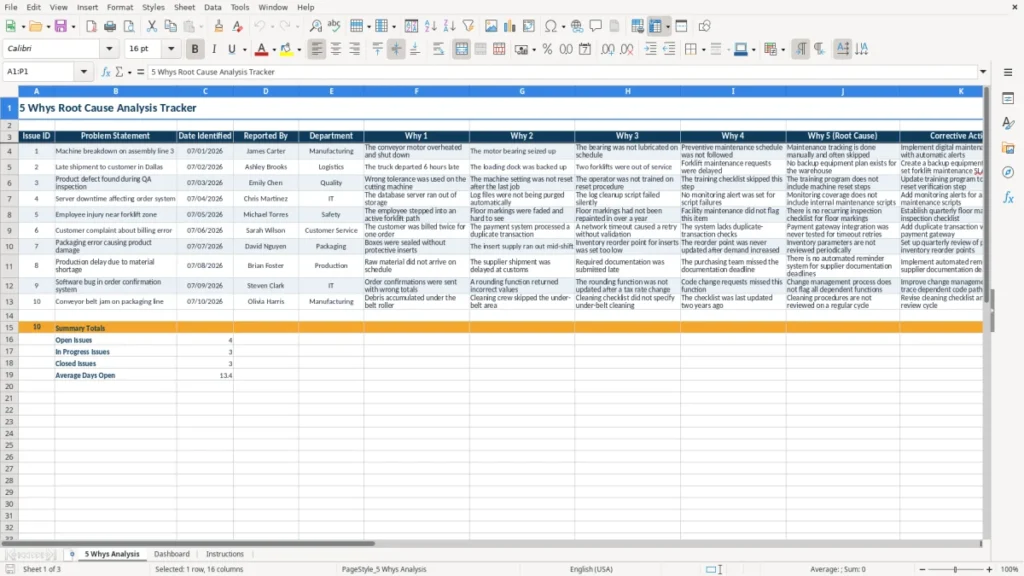
Use it when a machine stops, an order ships late, a safety process is missed, or a quality defect repeats. The first sheet (image 1) gives you one row per issue, with fields for the problem statement, five why responses, owner, target date, status, priority, and days open.
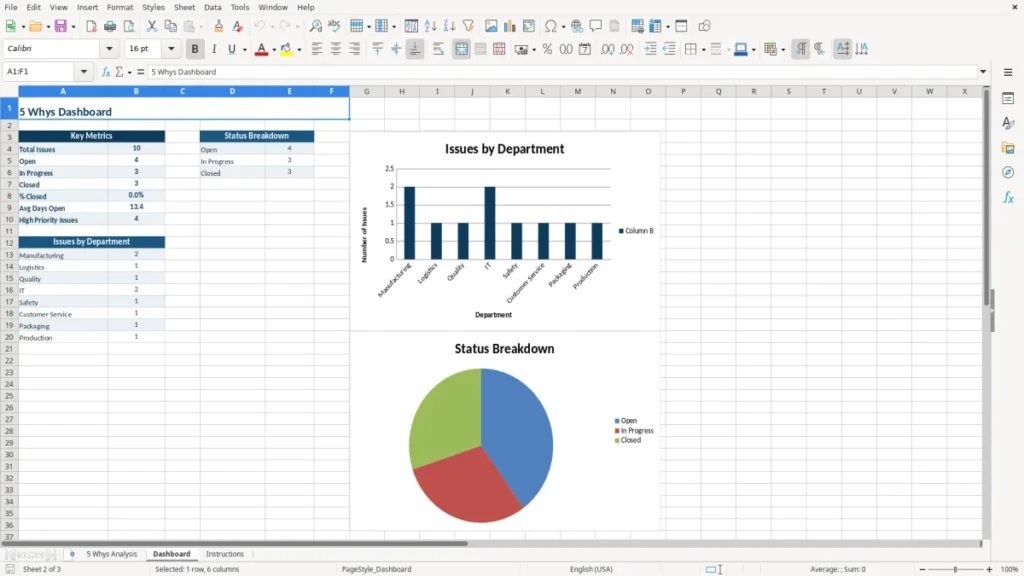
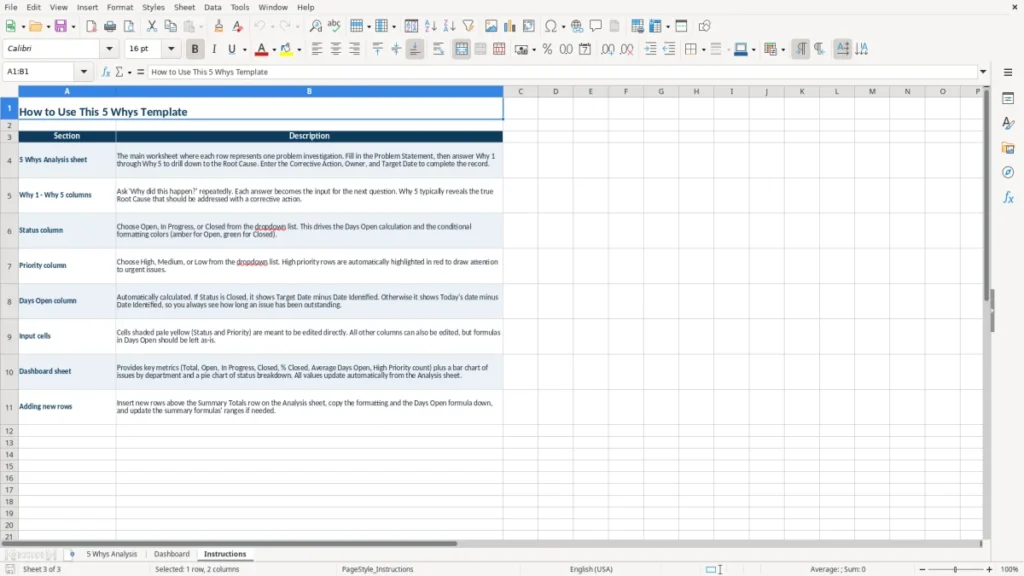
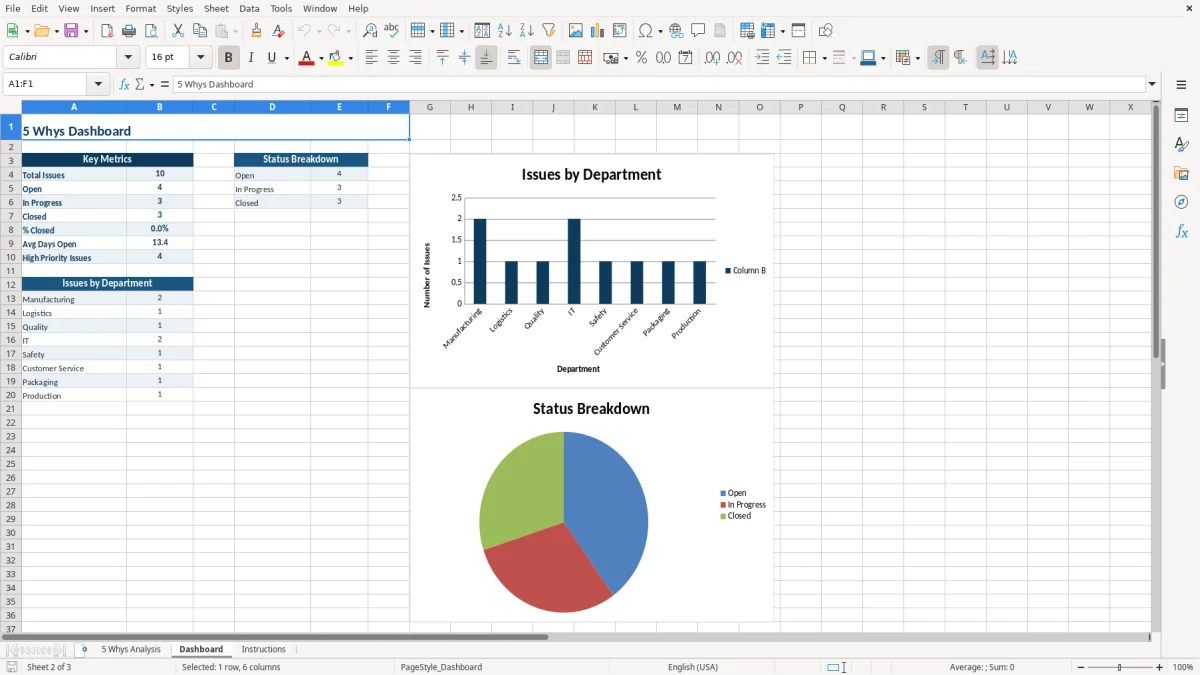
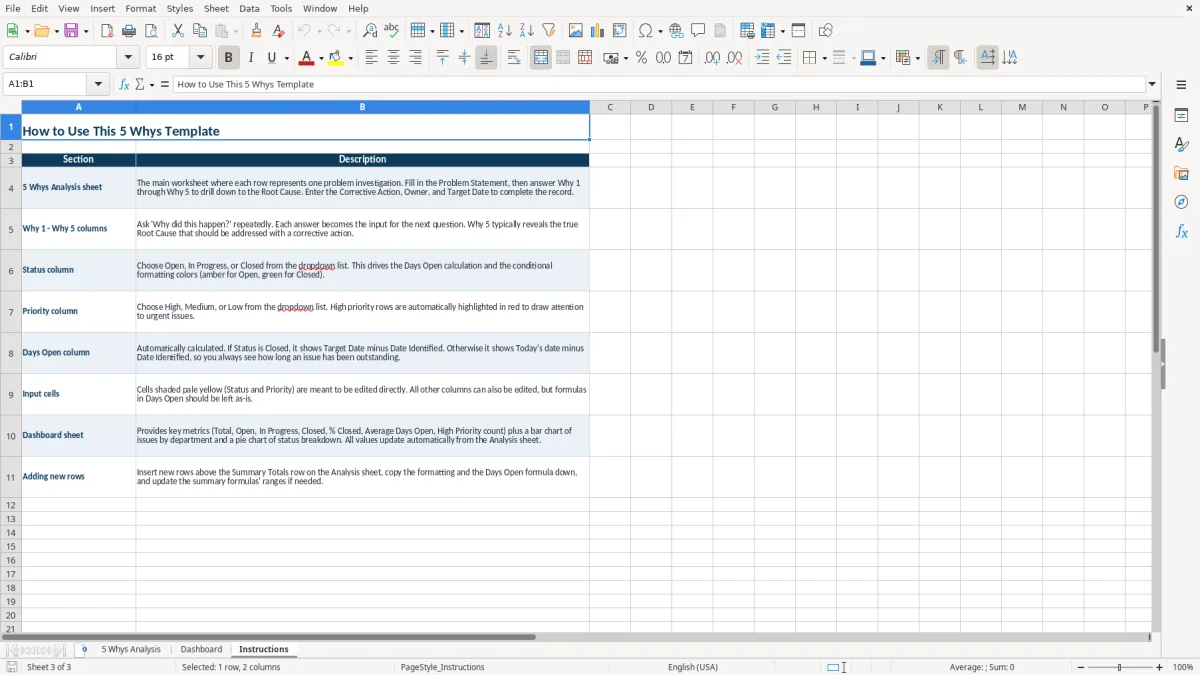
The Dashboard sheet (image 2) gives you a separate view of the recorded analysis, while the Instructions sheet (image 3) explains the workbook's intended workflow. The navy headers, amber title accents, pale-yellow input areas, wrapped text, and bordered cells make the file usable during a team review rather than just after it.
The main benefits of this Excel template
- Capture 16 useful fields for each incident, from Issue ID and date identified through corrective action, owner, status, priority, and Days Open.
- Keep all five cause questions in one row so a team can follow the chain from the original problem to the likely root cause.
- Assign a named owner and target date instead of leaving corrective work as an untracked meeting decision.
- Compare issues across departments such as manufacturing, logistics, quality, and maintenance without maintaining separate files.
- Use the Status and Priority fields to focus a weekly review on open high-priority problems first.
- Create a dated record of what was reported, who reported it, and how the team reached its conclusion.
- Separate investigation data from the Dashboard and Instructions sheets, keeping the working analysis organized.
Step-by-step guide
- Open the 5 Whys Analysis sheet and give the event a unique Issue ID, such as 17. Use one row for one distinct problem.
- Write a specific Problem Statement with an observable result, such as a shipment leaving six hours late or a production line stopping for 45 minutes.
- Enter the Date Identified, Reported By, and Department. These fields preserve who raised the issue and where the failure occurred.
- Answer Why 1 through Why 4 with factual cause-and-effect statements. Avoid blaming a person; move from the immediate event toward a process, equipment, training, or control failure.
- Use Why 5 (Root Cause) for the underlying condition your team can actually address. If the answer is still vague, continue testing it with evidence before closing the analysis.
- Record the Corrective Action, assign an Owner, and enter a Target Date. Select the appropriate Status and Priority so the issue can be reviewed with the rest of the open work.
- Review the Dashboard sheet (image 2) during your recurring meeting and consult the Instructions sheet (image 3) when a new user needs the workbook workflow explained.
What is included
A dedicated 5 Whys Analysis worksheet with columns for Issue ID, Problem Statement, Date Identified, Reported By, and Department.
Five separate why fields, ending with Why 5 (Root Cause), so the investigation does not collapse multiple reasoning steps into one note.
Corrective Action, Owner, and Target Date columns that connect the finding to accountable follow-up.
Status and Priority fields for sorting open work and identifying urgent issues during operational reviews.
A Days Open field for monitoring how long an issue remains unresolved.
Structured formatting with navy headers, amber title styling, pale-yellow input cells, wrapped text, and thin borders.
Separate Dashboard and Instructions sheets for reviewing the workbook and orienting people who did not build the analysis.
Who uses a 5 Whys workbook in American workplaces
A 5 Whys workbook fits the moment after an operational problem is contained but before everyone forgets what happened. A quality manager at a 40-person manufacturer may open it after a rejected batch; an office manager at a contractor may use it after a missed inspection; a warehouse supervisor may use it after a customer receives the wrong part. The point is to turn a verbal explanation into a traceable cause chain.
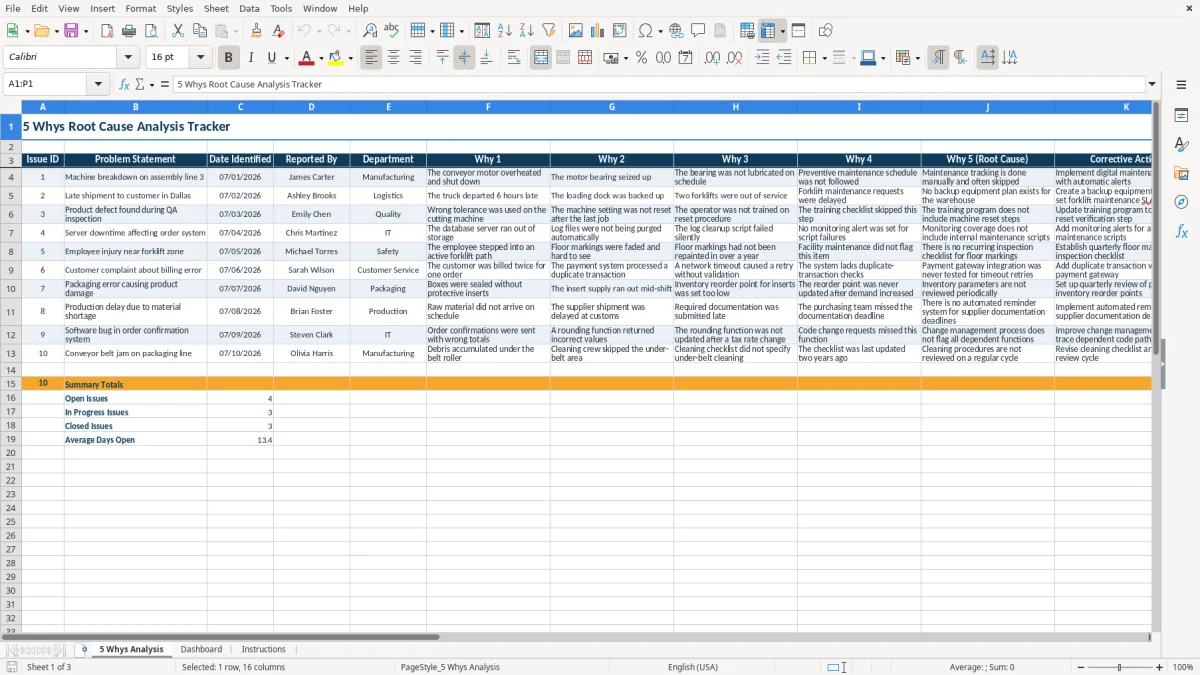
The 5 Whys Analysis sheet (image 1) is arranged as a wide tracker. Its first five columns identify the event: Issue ID, Problem Statement, Date Identified, Reported By, and Department. Columns six through ten hold Why 1, Why 2, Why 3, Why 4, and Why 5 (Root Cause), followed by Corrective Action, Owner, Target Date, Status, Priority, and Days Open.
When the review should happen
Run the analysis after the immediate risk is controlled, ideally within 24 to 48 hours for a production stoppage, customer complaint, or safety near miss. Waiting a month encourages guesses. For example, if a four-person repair crew loses 6 hours to a missing part, the direct labor at $32 per hour is $768 before the customer delay is counted. A short review can show whether the real cause was purchasing, inventory labeling, or a planning handoff.
Who should be in the room
Include the person who saw the failure and the person who owns the process. If a machine stops because a bearing seized, the maintenance lead can supply technical facts while the production supervisor explains the missed preventive-maintenance step. The Reported By and Owner fields should not automatically contain the same name; one documents the source of the alert, and the other accepts responsibility for the fix.
The Dashboard sheet (image 2) is useful for a supervisor or operations director who needs a broader review, while the Instructions sheet (image 3) helps a new participant understand where to enter the investigation. For a small business, this is more practical than creating a separate document for every incident.
The root cause method behind this Excel analysis
The 5 Whys method is a structured questioning technique, not an IRS form, OSHA filing, or substitute for a formal regulatory investigation. It asks why an observed problem occurred and uses each answer as the subject of the next question. Five is a useful prompt, not a legal minimum: some failures reach a defensible cause in three questions, while a complex equipment or software failure may require more evidence.
Write evidence instead of blame
A strong chain states what happened. For example: a conveyor stopped for 45 minutes; the motor overheated; the bearing seized; lubrication was missed; the preventive-maintenance schedule was not followed; maintenance tracking was manual and often skipped. That final statement is more actionable than saying an employee was careless. The corrective action should change the control, such as a digital maintenance alert, a revised checklist, or a required sign-off.
Keep cause and correction separate. If a shipment left Dallas 6 hours late because the loading queue was not visible, the root cause may be a scheduling control rather than simply a late driver. Writing the corrective action in its own column lets you compare the proposed fix with the cause instead of treating an explanation as a completed remedy.
Where other US rules may enter
If the issue involves a workplace injury, use the 5 Whys as an internal learning tool alongside required OSHA records; it does not replace an OSHA 300 Log entry or incident report. If payroll, customer data, or a product defect is involved, limit access to the workbook and avoid putting an employee's SSN, medical details, or unnecessary customer PII into the Problem Statement.
For a documented quality system, retain the completed row with supporting evidence according to your company policy and any applicable contract or standard. A practical position is to attach the evidence to your controlled quality record, not to bury screenshots and emails in the Excel cell. A $2,500 recurring defect should receive a more formal corrective-action record than a one-time $20 office-supply discrepancy.
The recurring-defect example naturally moves into continuous improvement tracking, where the same evidence is carried forward into corrective actions and prevention of repeat issues.
Where root cause reviews break down and what it costs
The most expensive failure is stopping at the first visible symptom. A manufacturer may write motor failure, replace a $900 motor, and restart the line. If the missed lubrication schedule remains untouched, a second outage can add 6 hours of labor, expedited freight, and lost production—easily more than $3,000 for the same underlying problem.
The answer that ends the investigation too soon
People often fill every why with a variation of employee error: someone forgot, someone entered it wrong, or someone did not follow instructions. That wording does not identify a control that can be repaired. If an online store processes 300 orders a month and 3% ship with the wrong item, 9 customers are affected every month; blaming the picker will not tell you whether the barcode, bin label, or final scan failed.
Use the separate fields in image 1 to make each step earn its place. A good answer describes a mechanism, record, or observed condition. If Why 2 says the truck departed late, Why 3 should identify the loading or dispatch event that caused the delay—not simply repeat late shipment in different words.
The action that has no owner
A corrective action without an Owner and Target Date is a suggestion, not a control. A $1,200 customer credit caused by a late delivery can recur because the team agreed to improve scheduling but never assigned the change. Put the person who can complete or authorize the fix in Owner, and use Status to distinguish an idea from work that is actually underway.
Another common breakdown is treating a high-priority issue as closed when the action was only announced. Keep it open until you have evidence: a completed maintenance record, a revised inspection result, or 30 days of clean shipments. The Days Open field makes delay visible; an issue sitting at 62 days deserves a different escalation than one opened yesterday.
A 62-day delay often means the next step is to map the response against known absences and deadlines, using a leave and coverage planner to spot gaps before they turn into another missed shipment.
How to make the root cause tracker a weekly habit
A spreadsheet becomes useful when it is tied to a meeting that already happens. Add new incidents before the Friday operations review, spend the first 10 minutes on high-priority open rows, and finish by confirming one Owner and one Target Date for each action. For a small contractor, that routine can cover the week's missed deliveries, rework, equipment downtime, and customer callbacks in one file.
Use a fixed review sequence
- On the day of the event, enter the Issue ID, problem, date, reporter, and department while the facts are fresh.
- Within 48 hours, complete the five why fields with the people closest to the process.
- At the weekly review, filter or scan Status and Priority, then update the corrective action and Days Open.
- At month-end, check whether completed actions changed the result instead of closing them because the due date passed.
Keep entries consistent
Use the same wording for departments and statuses every time. If one row says Maintenance and another says maintenance, a summary can treat them as different categories. Enter dates as MM/DD/YYYY, keep Issue IDs unique, and write one issue per row; combining three causes in one row makes ownership and aging difficult to interpret.
Do not overwrite old findings when the situation changes. Save a dated copy at month-end or use your organization's controlled-record process so you can show what was known and assigned at the time. The Dashboard sheet (image 2) can support the review, while the Instructions sheet (image 3) gives occasional users a place to confirm the intended entry process.
Move to quality-management or maintenance software when you need approval history, attachments, email alerts, permissions, audit trails, or hundreds of concurrent users. Excel is a strong fit for a small team reviewing 10 to 50 active issues; it becomes risky when several people edit different copies and no one can identify the authoritative record.
Frequently asked questions about this template
It is a structured root cause analysis workbook. This file includes a 5 Whys Analysis sheet with 16 columns, plus separate Dashboard and Instructions sheets, so you can record the issue, work through five cause questions, and assign corrective follow-up.
The sheet includes Issue ID, Problem Statement, Date Identified, Reported By, Department, Why 1 through Why 5 (Root Cause), Corrective Action, Owner, Target Date, Status, Priority, and Days Open.
This template provides five why fields, but five is a working discipline rather than a statutory requirement. Stop when you have a specific, evidence-based cause that your organization can correct; continue beyond five if the cause is still only a symptom.
Yes, you can use it for internal learning after an incident or near miss. It does not replace required OSHA records, an OSHA 300 Log entry, an incident report, or any investigation required by your company, insurer, contract, or regulator.
Enter the underlying process, equipment, training, or control failure that explains the preceding answers. For example, if a bearing seized because lubrication was missed and the schedule was not followed, manual maintenance tracking that is often skipped may be the root cause.
Excel works well for a small team with roughly 10 to 50 active issues. Consider dedicated software when you need approval history, automatic alerts, attachments, role-based permissions, audit trails, or one controlled record for many simultaneous editors.
Meet the makers