
Project & Planning


Indian Wedding Planner Excel - Free Template
Plan tasks, vendors, deadlines, and budget for an Indian wedding in four sheets built for tracking and coordination.
2026-07-23
246 downloads
4.8/5
Download template
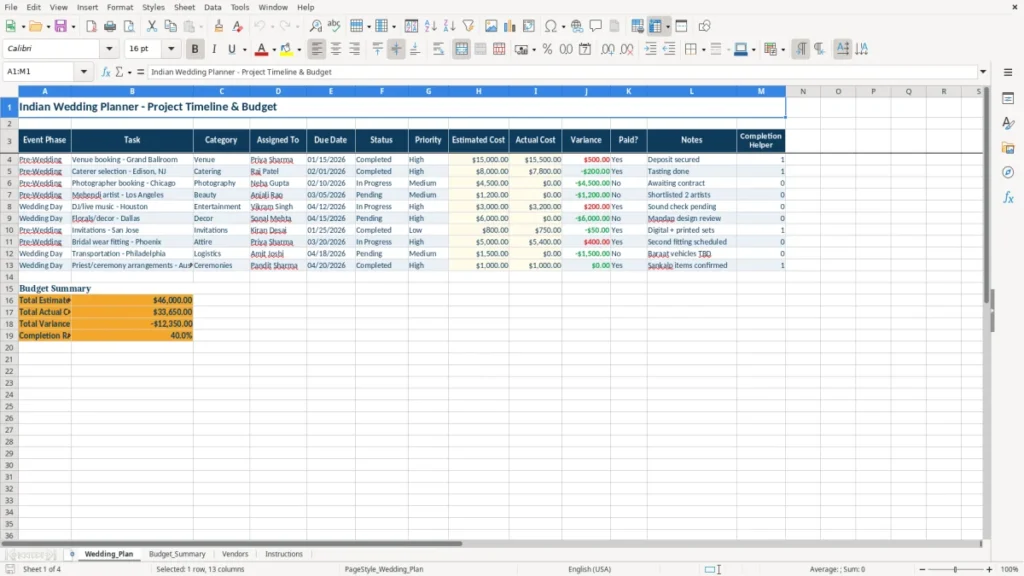
This Indian wedding planner Excel template helps you track the full event plan, vendor list, budget summary, and setup instructions in one workbook. It is built for families, planners, and anyone coordinating a multi-day wedding with tasks, dates, costs, and status updates.
The template includes four sheets: Wedding_Plan, Budget_Summary, Vendors, and Instructions. You can use it to assign tasks, watch actual spending against estimates, and keep the event moving without losing track of payments or due dates.
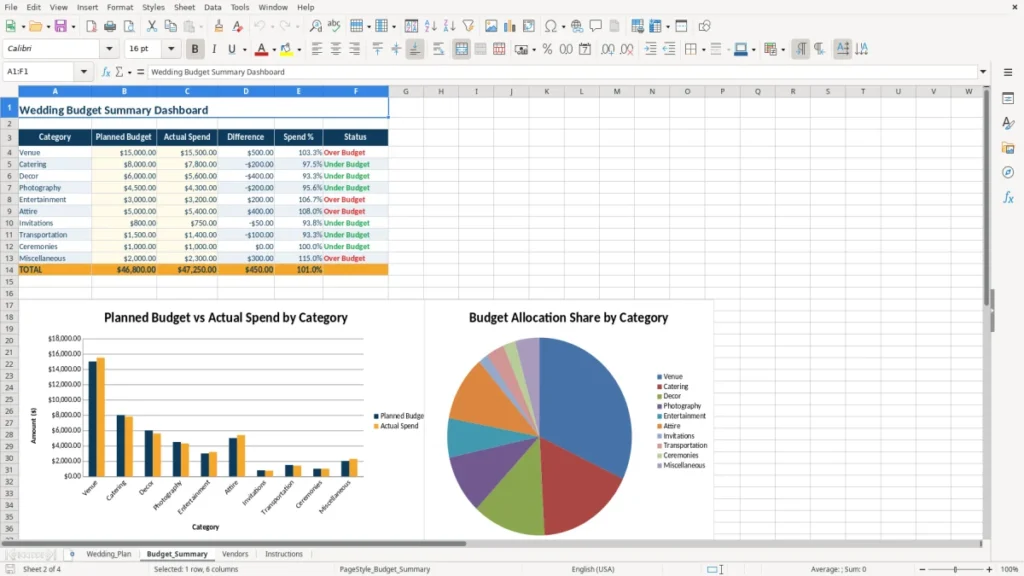
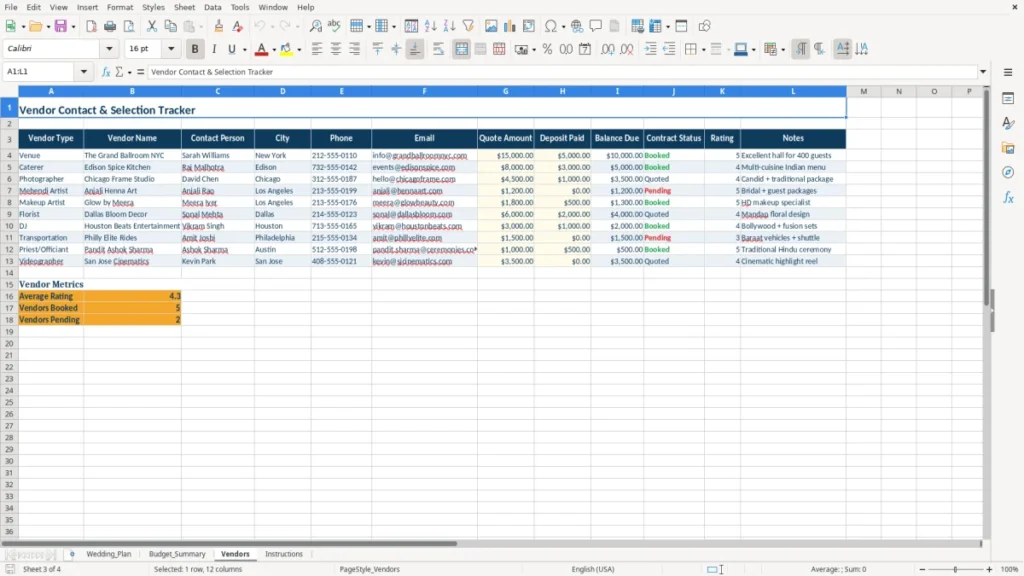
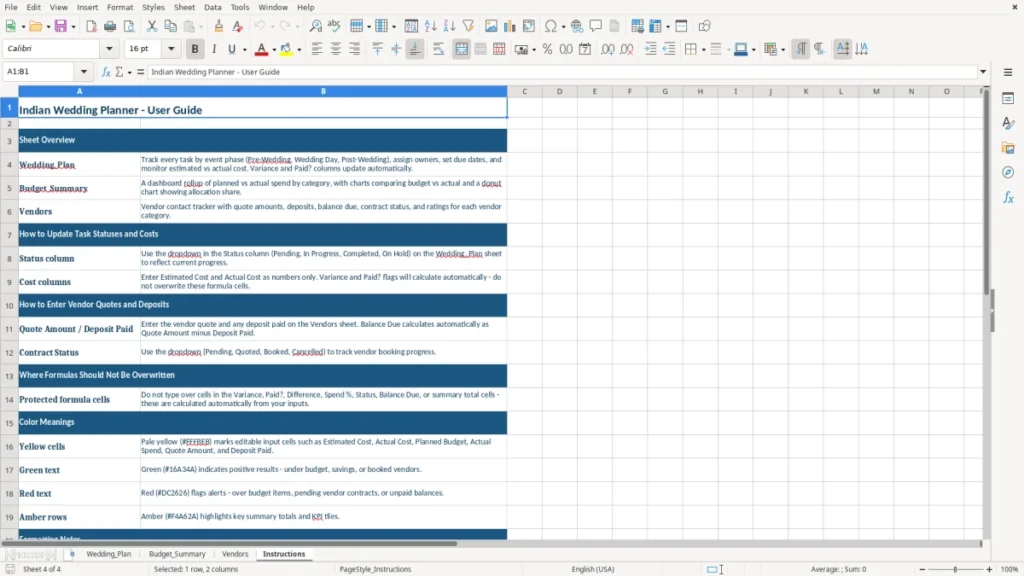
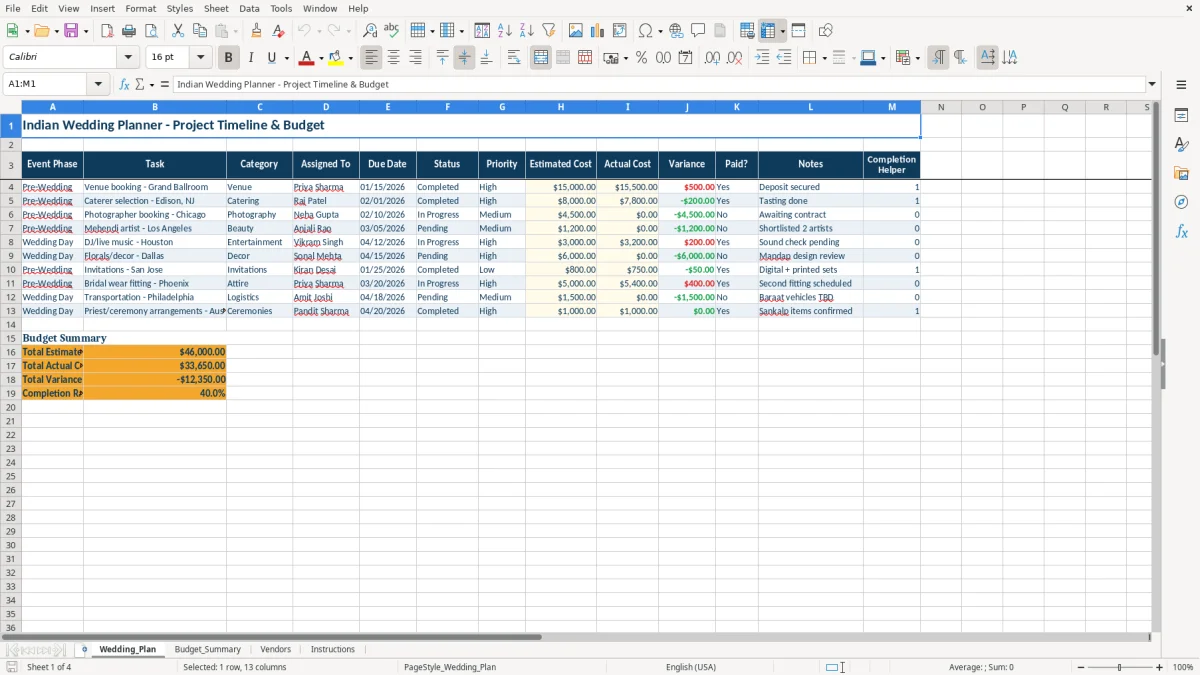
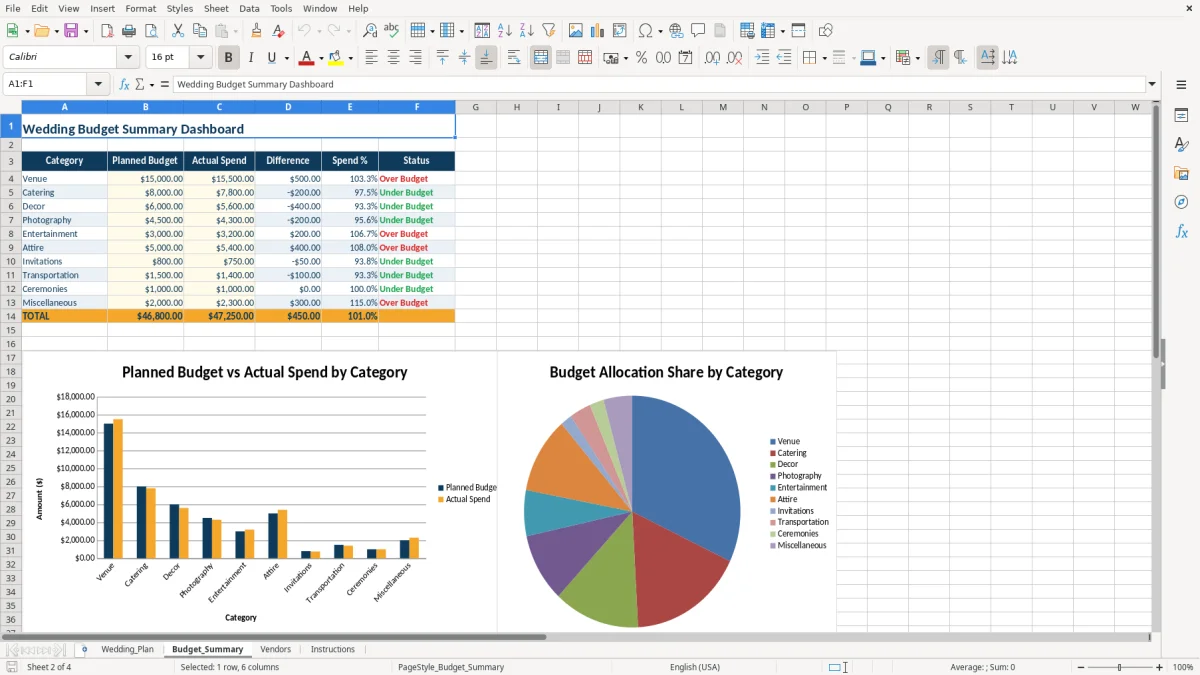
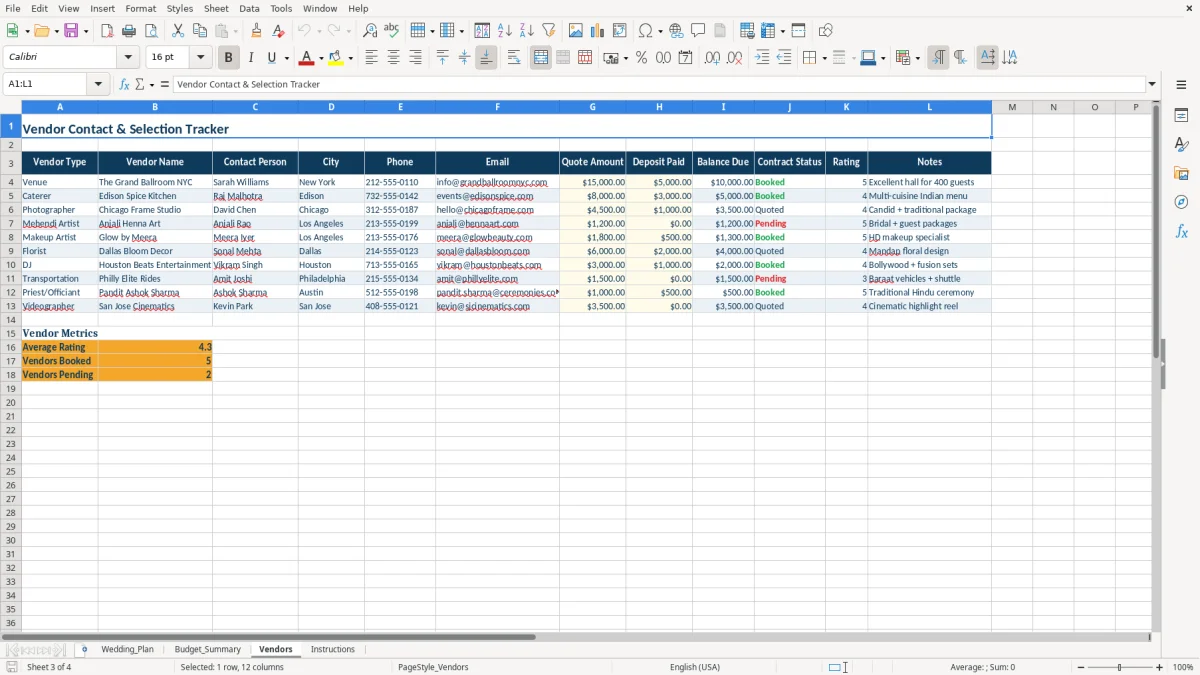
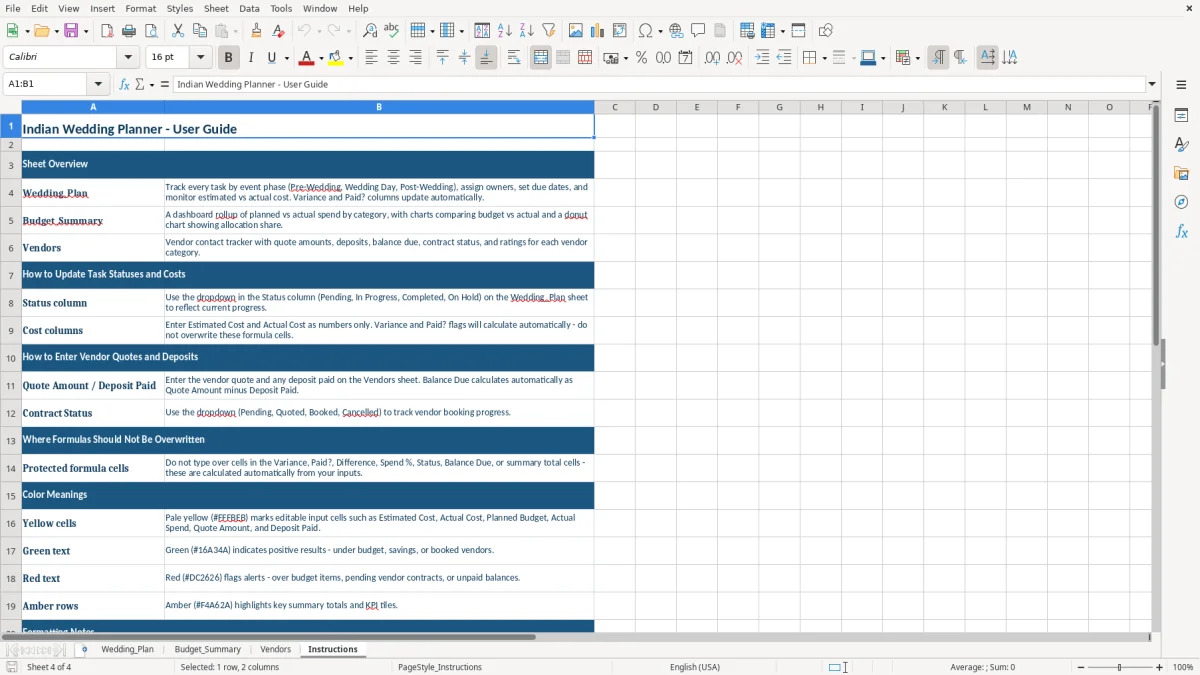
Image 1 shows the Wedding_Plan sheet with a task table, Image 2 shows the budget summary view, Image 3 lists vendors, and Image 4 explains how to use the file.
The main benefits of this Excel template
- Tracks event tasks, due dates, and status in one place so you do not rely on scattered notes or chat threads.
- Shows estimated cost, actual cost, and variance so you can spot a $500 overage before it spreads across the whole budget.
- Helps you assign each task to a person, vendor, or family member so nothing gets lost during the final 30 days.
- Separates paid and unpaid items so you can see what still needs action before deposits and final balances come due.
- Supports a multi-phase wedding plan, which is useful when you have engagement work, ceremony prep, and reception setup across different dates.
- Gives you a clean vendor record with contact details and service categories, which is easier to manage than a long phone note list.
- Keeps the planning process structured for a large event, such as a 300-guest wedding with 20 or more line items to coordinate.
Step-by-step guide
- Start with Wedding_Plan and enter each task by phase, category, assignee, due date, and expected cost. Use it for everything from venue deposits to decor setup.
- Update the Status, Paid?, and Notes fields each time a task moves forward. That gives you one live list instead of separate text messages and reminders.
- Open Budget_Summary and compare estimated cost with actual cost. If flowers were budgeted at $2,000 and came in at $2,450, you will see the $450 variance immediately.
- Use Vendors to store names, phone numbers, emails, services, and payment terms. This is the sheet you will want when 3 vendors need the same week’s follow-up.
- Read Instructions first if you want a quick setup path. It tells you how the workbook is organized so you can begin entering real data in a few minutes.
- Review the workbook every week, then more often during the final 2 weeks before the event. That is when small misses, like an unpaid balance or a missing decor item, become expensive.
What is included
Wedding_Plan sheet with 13 columns for phases, tasks, assignments, dates, costs, and notes.
Budget_Summary sheet for tracking planned spending versus actual spending across the event.
Vendors sheet for keeping supplier contact information and service details in one place.
Instructions sheet that explains the workbook structure and basic workflow.
Status and paid tracking that makes it easier to see what still needs attention.
Cost variance fields that help you compare estimated and actual wedding spending.
Built for a real planning workflow, not just a static checklist, so you can update it as deadlines change.
How families and planners use an Indian wedding planner Excel template
An Indian wedding often runs like a small project with a hard deadline, multiple vendors, and several moving parts across 2 or 3 days. This workbook is useful when you are coordinating décor, catering, photography, music, and guest logistics for a wedding with 150 to 400 guests.
A family member handling the planning can assign tasks by phase, while a professional planner can use the same sheet to track deposits, balances, and deadlines. For example, if the mandap setup is due 10 days before the event and the caterer needs a $3,000 advance, those items belong on the plan sheet, not in scattered messages.
What goes on the plan sheet
The Wedding_Plan sheet gives you columns for Event Phase, Task, Category, Assigned To, Due Date, Status, Priority, Estimated Cost, Actual Cost, Variance, Paid?, Notes, and a completion helper. That structure works well when you are managing 40 to 60 line items across venue, attire, rituals, and reception.
Why the vendor sheet matters
The Vendors sheet helps you keep names, contacts, services, and payment terms together. If you are comparing 5 decorators or 3 caterers, that one place is easier to use than digging through phone screenshots before the final payment is due.
Budget control and recordkeeping for a wedding in the US
This template is not about IRS filings, but it still follows the same discipline you would use in business bookkeeping: separate estimated cost from actual cost, and keep a clean record of what was paid. If you spend $18,000 on an event and go $1,200 over budget, that difference shows up in the budget summary instead of disappearing in memory.
For a US wedding, that matters because vendors often require deposits, partial payments, and a final balance before the event. A common setup is 30% at booking, 40% before the event, and 30% after final confirmation, so a $5,000 vendor can create three separate cash flow points you need to track.
Budget summary logic
The Budget_Summary sheet is the place to compare planned vs. actual totals so you can see overruns early. If you budget $2,500 for photography and end up at $2,900, the $400 variance is easier to manage when it appears on the sheet before the next vendor payment is due.
Why clear status tracking saves money
Missed coordination is usually what costs extra. A late decor revision, a duplicated flower order, or an unpaid balance can trigger rush fees of $100 to $500, which is exactly the kind of problem a dated task list helps you catch.
That same dated task list becomes more useful once several events are running at once, and a project status report keeps every budget, vendor issue, and deadline visible in one place.
Where wedding planning spreadsheets usually break down
The biggest failure is not the spreadsheet itself. It is letting one person hold the whole plan in their head, then discovering that the decorator, caterer, and family contact all have different versions of the schedule.
One common mistake is skipping a due date or payment date. If a $1,500 décor deposit is due on 05/15/2026 and nobody writes it down, the fallback is a rush payment, a late charge, or a weaker vendor choice because you lost negotiating time.
Hidden budget overruns
Another problem is underestimating add-ons: extra seating, generator rental, transportation, or last-minute printing. A $250 item that repeats 6 times becomes $1,500, and that is enough to knock a tight wedding budget off balance.
Task duplication and missed ownership
When two relatives both assume someone else booked the makeup artist, the result is duplicate outreach or a missed booking window. The Assigned To column prevents that by putting one name next to each task, which is much easier to enforce than a general family group chat.
How to turn the wedding sheet into a weekly planning routine
The workbook works best when you tie it to a fixed habit, not random checking. A good routine is to review Wedding_Plan every Sunday night and the Budget_Summary every time a payment is made, especially once you are inside the final 6 weeks.
Simple habits that keep it alive
- Copy the prior week’s open tasks and update dates, instead of rebuilding the list from scratch.
- Use the Status field consistently so you can sort by what is still open before each vendor call.
- Update Actual Cost immediately after each payment so a $750 deposit does not get forgotten until month-end.
- Flag late items with conditional formatting if you are 3 or more days past due.
When spreadsheet tracking is no longer enough
If you are managing 80+ tasks, multiple assistants, and daily vendor changes, a spreadsheet may start to feel too manual. At that point, event management software can be better, but for most Indian weddings this workbook covers the planning load without adding software cost.
When the task list itself starts to outgrow manual edits, a simple list template is the natural next step for keeping vendors, assistants, and daily changes in one place.
Frequently asked questions about this template
The workbook includes four sheets: Wedding_Plan, Budget_Summary, Vendors, and Instructions. Together they let you track tasks, spending, vendors, and setup steps in one file.
It works for a couple, a parent, a family organizer, or a professional wedding planner. It is especially useful when several people are sharing the coordination work across multiple dates and vendors.
You enter estimated cost and actual cost for each item, then review the variance. That makes it easy to see whether a $2,000 line item became $2,300 before the overage spreads across the rest of the plan.
Yes. The Event Phase column is built for separate stages such as pre-wedding events, ceremony day, and reception day, so you can organize 2-day or 3-day planning in the same workbook.
You can track as many rows as you need. For a wedding with 50 to 60 tasks, the sheet gives you enough structure to manage vendors, payments, and event logistics without losing detail.
Yes, this is designed as an Excel workbook. If you use Excel on desktop or Microsoft 365, you can enter data, sort the list, and keep the planning sheets updated as the wedding gets closer.
Meet the makers