
Project & Planning


Construction Site Diary Excel - Free Template
Track daily site conditions, labor, equipment, delays, safety incidents, visitors, and work performed in one construction diary.
2026-07-29
288 downloads
4.8/5
Download template
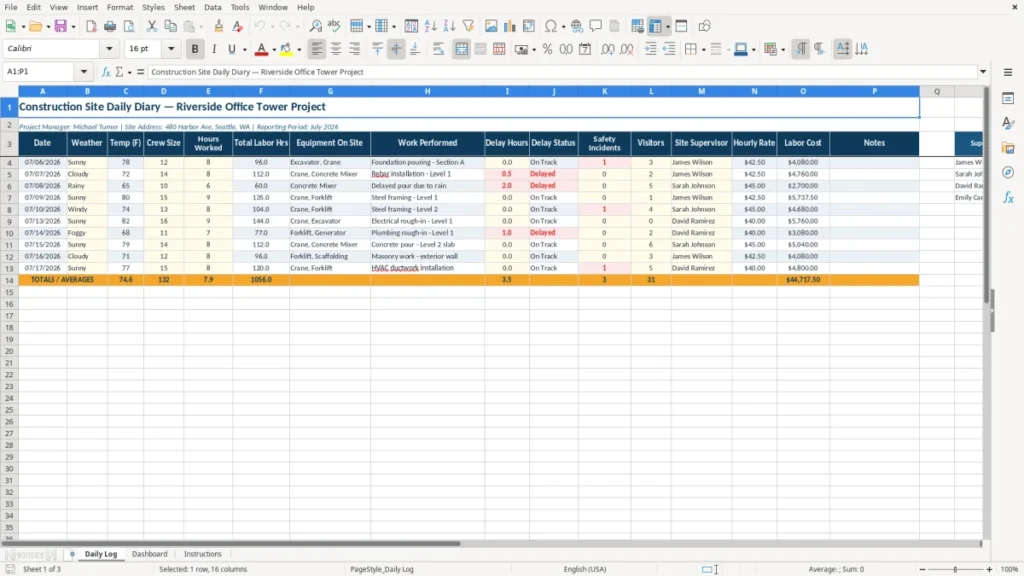
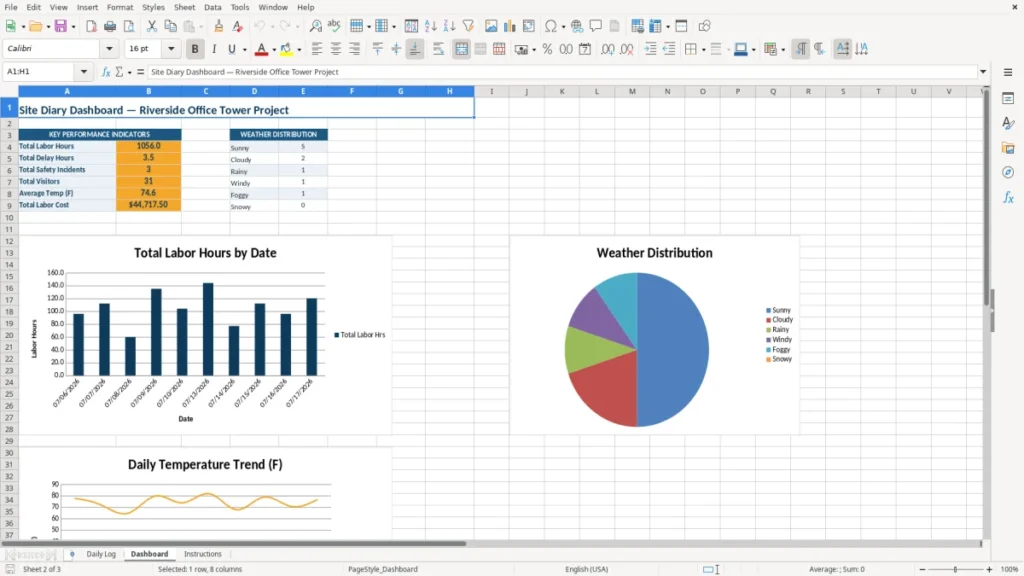
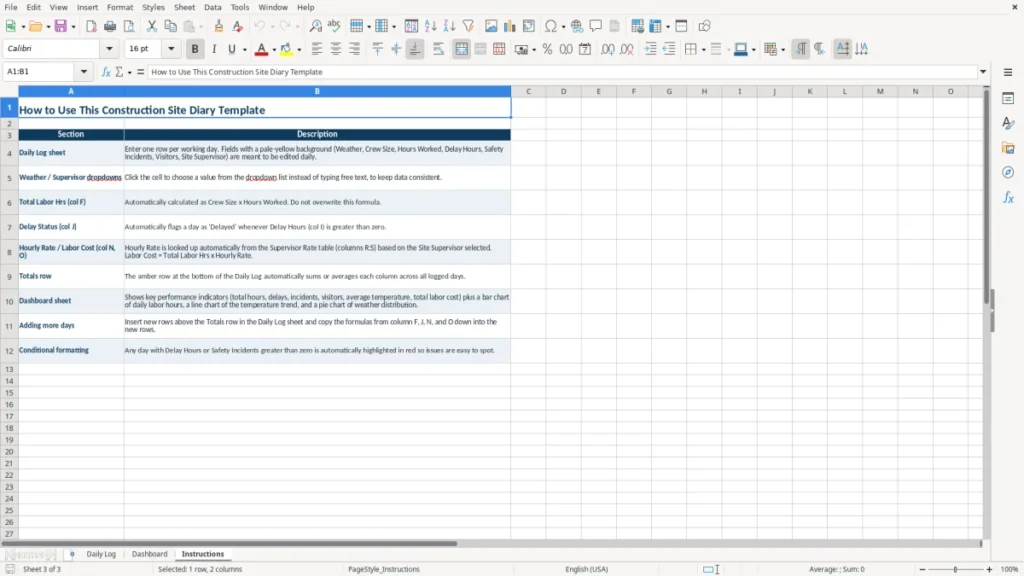
A construction site diary is a daily project record for weather, crew size, labor hours, equipment, work performed, delays, safety incidents, visitors, and notes. This Excel template puts those details into a Daily Log, with a Dashboard for review and an Instructions sheet to guide setup.
Use it as the superintendent's or project manager's end-of-day record. The Daily Log has sixteen columns, including Temp (F), Total Labor Hrs, Delay Status, Site Supervisor, Hourly Rate, and Labor Cost, so you can connect field conditions with labor activity and cost.
The example is set up for the Riverside Office Tower Project in Seattle, with a July 2026 reporting period. Replace the sample project details with your own job information, then have one person complete the log before leaving the site each day.
The main benefits of this Excel template
- Records the date, weather, temperature, crew size, and hours worked for each site day.
- Calculates or organizes Total Labor Hrs and Labor Cost using crew and rate information.
- Creates a contemporaneous record of work performed, equipment on site, delays, and delay status.
- Keeps safety incidents and visitor activity in the same daily record instead of scattered text messages.
- Gives the project manager a consistent format that subcontractors and supervisors can follow.
- Makes July 2026 project activity easier to review during a payment application, dispute, or progress meeting.
- Provides a separate Dashboard and Instructions sheet without adding another field form to your site process.
Step-by-step guide
- Open the Daily Log and replace the project title, project manager, site address, and reporting period in the top two rows.
- Enter one row for each workday, starting with the date and the day's weather and temperature in degrees Fahrenheit.
- Record the crew size and hours worked, then check that Total Labor Hrs reflects the day's labor activity.
- List equipment on site and describe the actual work performed, such as foundation pouring, framing, excavation, or concrete placement.
- Enter delay hours and select or record the relevant Delay Status. Describe the cause and effect in Notes while the facts are still fresh.
- Record safety incidents, visitors, the Site Supervisor, Hourly Rate, and Labor Cost before closing the day's entry.
- Review the Dashboard at the end of the week and read the Instructions sheet before changing the layout or adding rows.
What is included
Daily Log with sixteen fields from Date through Notes.
Project header area for the project name, project manager, site address, and reporting period.
Weather and temperature tracking with a dedicated Temp (F) column.
Labor fields for Crew Size, Hours Worked, Total Labor Hrs, Hourly Rate, and Labor Cost.
Operational fields for Equipment On Site, Work Performed, Delay Hours, and Delay Status.
Site-control fields for Safety Incidents, Visitors, and Site Supervisor.
Separate Dashboard and Instructions sheets for review and operating guidance.
Who uses a construction site diary during a project
A construction site diary is most useful to the person who knows what happened on the job before the day ends: the superintendent, general contractor's project manager, or foreman. A subcontractor can use the same format for concrete, electrical, excavation, or framing work, while the office project accountant uses the entries during the weekly cost review.
For a contractor with four employees and two equipment operators, a daily row can show whether eight people worked eight hours, whether the crane was on site, and whether the crew lost two hours waiting for a concrete truck. At a $32 average hourly rate, 8 workers working 8 hours represent $2,048 of direct labor; a two-hour delay across that crew represents $512 of unproductive labor before equipment standby or remobilization is counted.
At the end of each shift
The right time to complete the Daily Log is the last 10 minutes of the shift, not Friday afternoon. Enter the weather and temperature while they are known, describe the work by area or phase, and identify equipment that was actually present. A note such as foundation pouring - Section A is much more useful six months later than a vague entry such as concrete work.
During weekly project controls
On Friday, the project manager can compare delay hours with the work performed and review the Dashboard before the Monday coordination meeting. The sixteen-column layout keeps labor, site conditions, and operational facts together rather than splitting them between a foreman's notebook and an office spreadsheet.
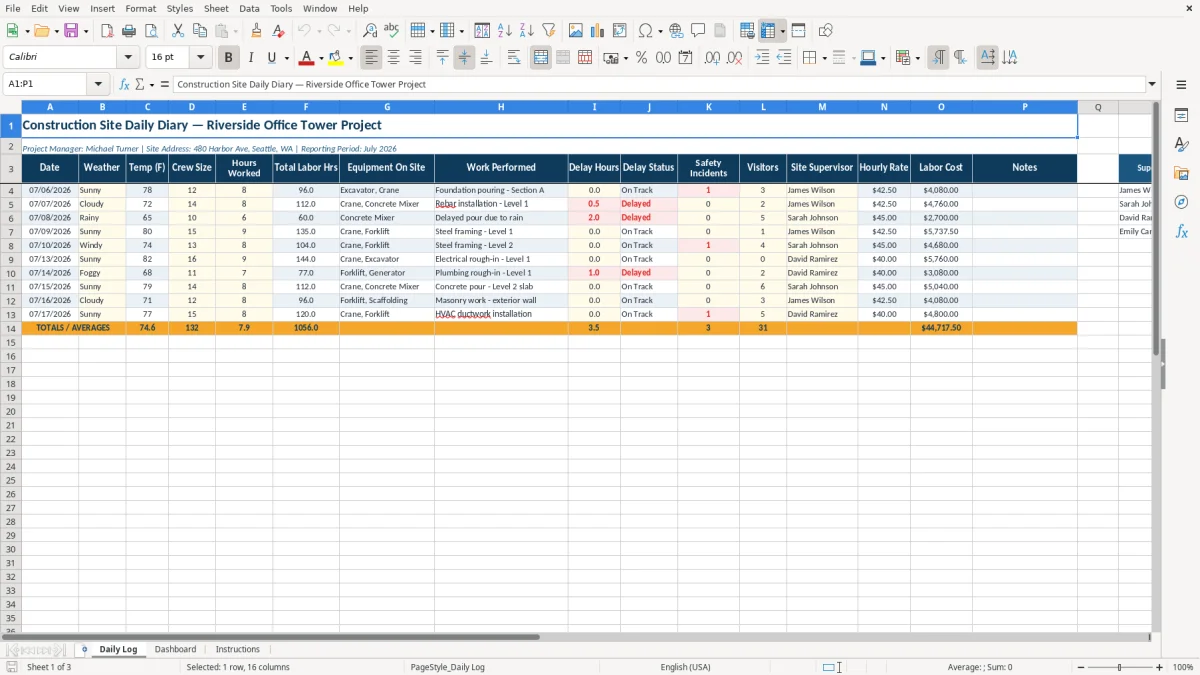
Image 1 shows the Daily Log's navy header row and wide fields for Work Performed and Notes. The project heading spans the sheet, while the yellow-toned input area and wrapped headers make the form workable on a standard laptop screen.
The OSHA and contract records behind a site diary
A site diary supports project administration, but it is not a replacement for required OSHA records. Under OSHA's construction recordkeeping rule, 29 CFR Part 1904, a covered employer generally records qualifying injuries and illnesses on OSHA Form 300, summarizes them on Form 300A, and keeps the records for five years. The Safety Incidents column is a prompt to document what happened; it does not determine whether an incident belongs on Form 300.
Severe-event reporting has specific deadlines: a work-related fatality must be reported to OSHA within 8 hours, and an in-patient hospitalization, amputation, or loss of an eye within 24 hours under 29 CFR 1904.39. A daily diary entry should therefore contain the date, people involved, location, immediate action, and a factual description, while the formal OSHA process is completed separately.
Weather, delays, and notice
Construction contracts commonly require prompt written notice for delay, differing site conditions, or owner-directed changes. The diary does not replace the contract notice, but it can establish the sequence: 2.5 inches of rain, no excavation from 10:00 a.m. to noon, 12 crew members present, and the affected activity identified in Work Performed.
That level of detail is stronger than a later estimate that the job lost a day. If the contract requires notice within 7 days, enter the issue in the diary immediately and send the separate notice within the contractual period.
Labor and payroll boundaries
Total Labor Hrs and Labor Cost are project-control figures, not a payroll register. If four employees each work 9 hours, the site has 36 labor hours; if one nonexempt employee works 45 hours in the workweek, the extra 5 hours may require overtime at 1.5 times the regular rate under the FLSA. The federal minimum wage is $7.25 per hour, although Washington and many other states require more.
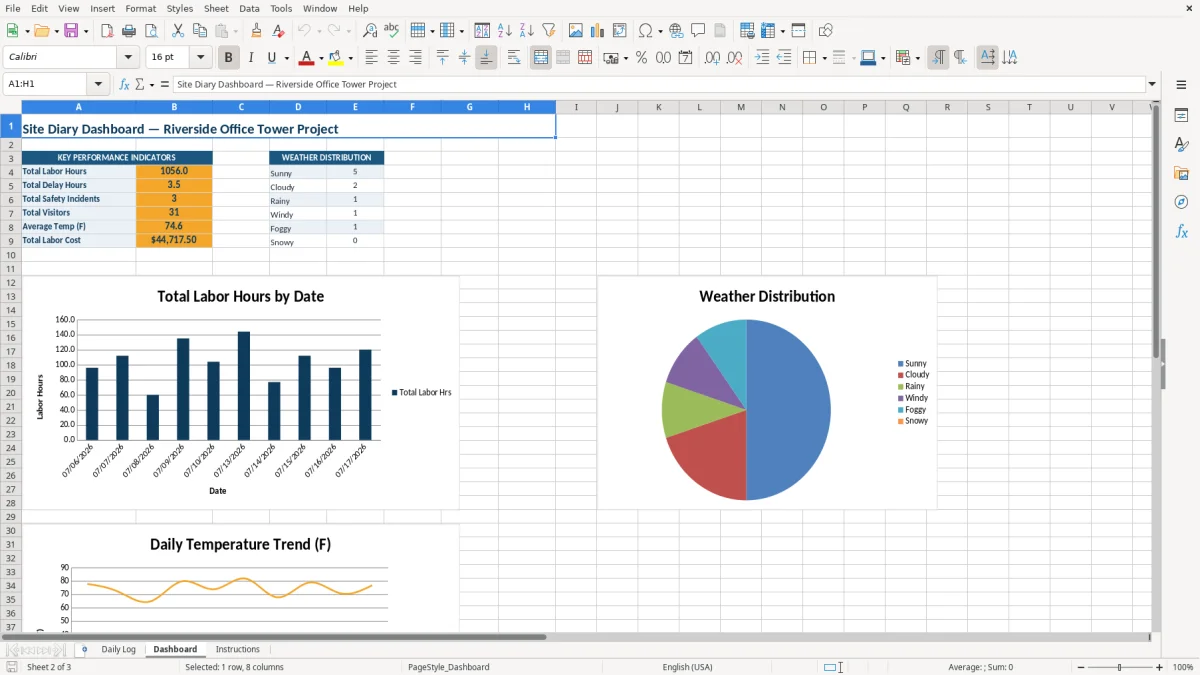
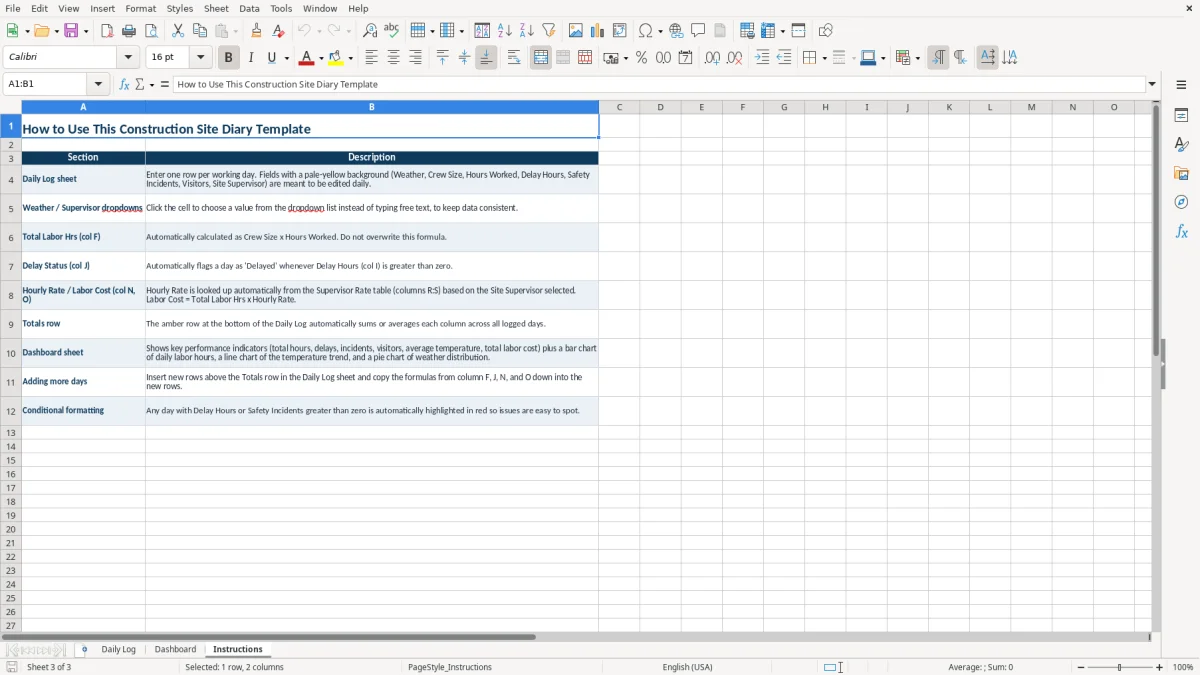
Image 2 shows the Dashboard area used for management review, while image 3 shows the Instructions sheet. Read the instructions before treating a dashboard total as a certified payroll, OSHA log, or contractual claim calculation.
That same management review should also point to the risk assessment template when the dashboard total needs to be weighed against the likelihood and impact of a quality or compliance issue.
The site diary gaps that turn into expensive disputes
The most expensive diary problem is not an ugly spreadsheet. It is a missing fact that makes a later cost or time claim difficult to prove. A foreman may remember that a crew waited for an inspection, but without a date, delay duration, affected work, and supervisor name, the project file may support only a general complaint.
Vague work descriptions
Entries such as worked on building or continued framing do not identify quantity, location, or progress. A better entry is installed 180 linear feet of wall track on Level 3, north corridor, with 10 workers for 8 hours. If the crew rate averages $30 per hour, the day represents $2,400 of labor tied to a defined activity.
Lost delay evidence
Suppose a four-person crew earns $35 per hour and spends 3 hours waiting for an unavailable lift. The direct idle labor is $420. Add a $600 equipment standby charge and the event has already cost $1,020, before a missed inspection or resequenced trade creates a second impact. Recording 0 delay hours on a busy day, or leaving Delay Status blank, hides the event when the weekly cost report is prepared.
Numbers that do not reconcile
A common field error is entering a crew size of 12 and 8 hours worked, then typing 80 in Total Labor Hrs. The expected total is 96 hours, and at a $28 hourly rate the labor cost should be $2,688 rather than $2,240. A supervisor should check the arithmetic before approving the row, especially when the information feeds a progress meeting or pay application.
Another failure is recording a safety issue only in a text message. A diary line can preserve the date and factual event, but it should not include speculation or blame. Keep photographs, witness statements, toolbox-talk records, inspection reports, and formal incident paperwork with the project file; the spreadsheet is an index and daily chronology, not the complete evidence package.
The spreadsheet is only the starting point; a root-cause worksheet can then organize the follow-up questions behind each safety issue.
How to make the diary part of your field routine
The template works best when the diary is attached to an existing handoff rather than treated as extra paperwork. Make the site supervisor responsible for the first draft by 4:30 p.m., then have the project manager review the row before the daily report or payroll information is sent to the office.
Use a fixed closeout sequence
- Take a weather and site photo at the same time as the final walk-through.
- Count the crew from the sign-in record, then compare the count with Crew Size.
- Check Hours Worked, Total Labor Hrs, Hourly Rate, and Labor Cost in that order.
- Review every nonzero Delay Hours entry and add the affected activity to Notes.
For example, a 10-minute closeout each day takes about 50 minutes over a five-day week. That is less time than reconstructing 25 rows before a monthly owner meeting, particularly when three trades and 60 workers have to be separated from one another.
Keep input clean
Use the same spelling for weather conditions and supervisors, and do not overwrite the navy header row. If you add a new status, copy the formatting from an existing row; inconsistent labels such as Rain, rain, and RAIN make filtering and dashboard review less reliable. Keep descriptions factual, use dates in MM/DD/YYYY format, and save a dated copy after the weekly review.
Know when Excel has reached its limit
This workbook is a good fit for one project with a manageable number of daily entries. Move to construction management software when several projects need simultaneous mobile entry, role-based permissions, automatic photo links, subcontractor approvals, revision history, or thousands of rows. Until then, a Friday review of the Dashboard and a locked month-end copy gives you a practical audit trail without making the field team learn a full platform.
Image 1 is the screen the supervisor should use daily; images 2 and 3 belong in the weekly review and onboarding routine. Keep the original workbook unchanged and store working copies by project and reporting period.
Frequently asked questions about this template
This template records the date, weather, temperature, crew size, hours worked, total labor hours, equipment on site, work performed, delay hours, delay status, safety incidents, visitors, site supervisor, hourly rate, labor cost, and notes. Those fields create a daily chronology of labor and site activity.
No. The Safety Incidents column helps you note an event, but OSHA Forms 300, 300A, and 301 have separate requirements under 29 CFR Part 1904. Covered employers generally retain OSHA injury and illness records for five years, and severe-event reports may be due within 8 or 24 hours.
Multiply the crew size by hours worked when every person worked the same duration. For example, 12 workers at 8 hours each equal 96 total labor hours. If workers have different schedules, record the accurate total from the sign-in or timekeeping record rather than relying on a simple multiplication.
Record the actual lost hours when weather prevents planned work, then identify the condition in Notes and connect it to the affected activity. For example, record 2 delay hours for rain that stopped excavation, rather than labeling the whole day as a weather delay when other work continued.
No. Labor Cost is a direct labor control figure based on the hourly rate entered in the Daily Log. It does not automatically include payroll taxes, workers' compensation, benefits, equipment ownership, fuel, materials, subcontractors, insurance, or overhead.
Use a separate working copy for each project and reporting period. The template's header identifies one project, manager, address, and period, so combining unrelated jobs in one log can confuse labor, delays, safety records, and management totals.
Meet the makers