
Project & Planning


Plan, track, and achieve your goals with Excel
Track goals, deadlines, owners, progress, status, and monthly targets with this practical Excel goals tracker template.
2026-08-07
336 downloads
4.8/5
Download template
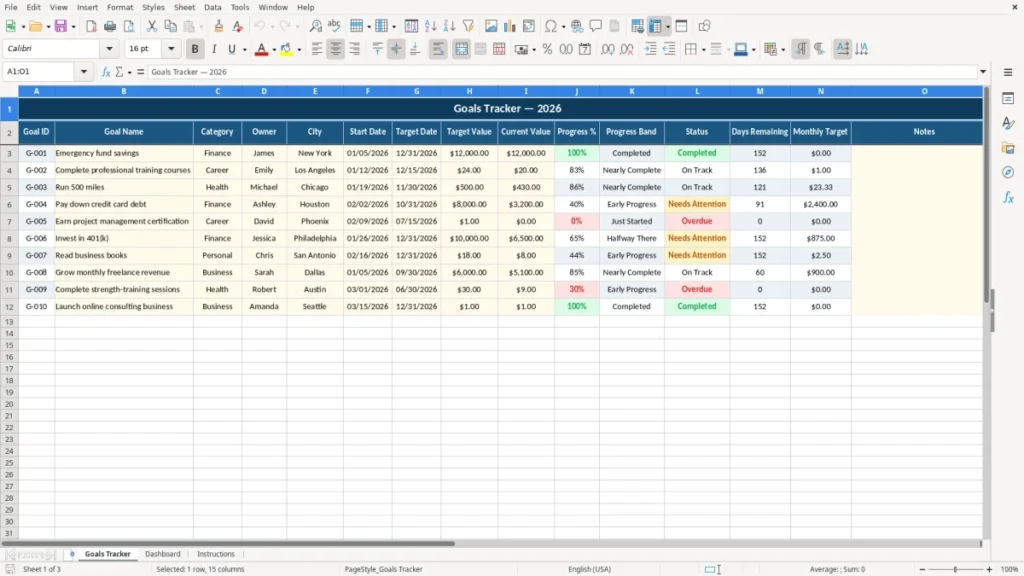
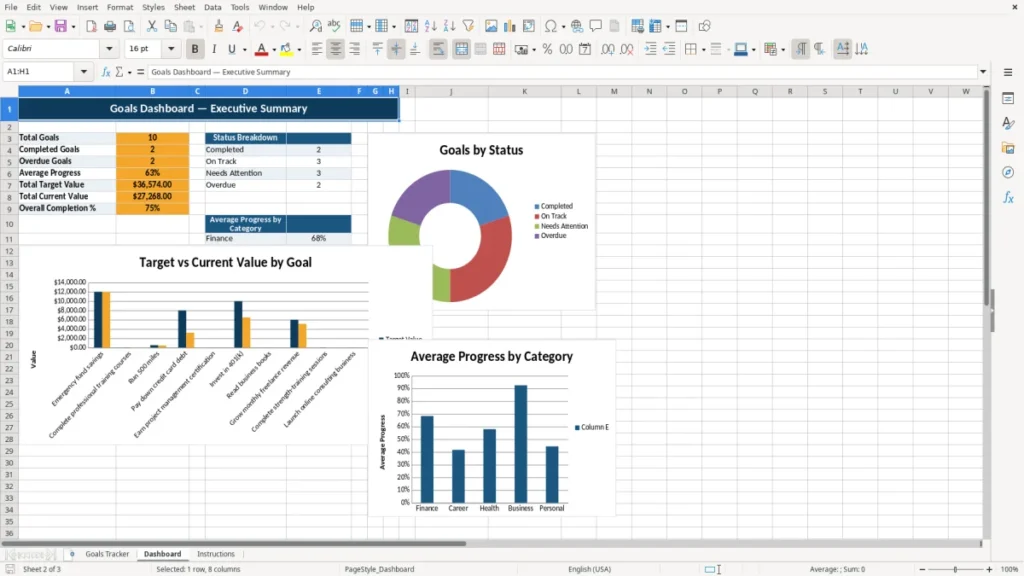
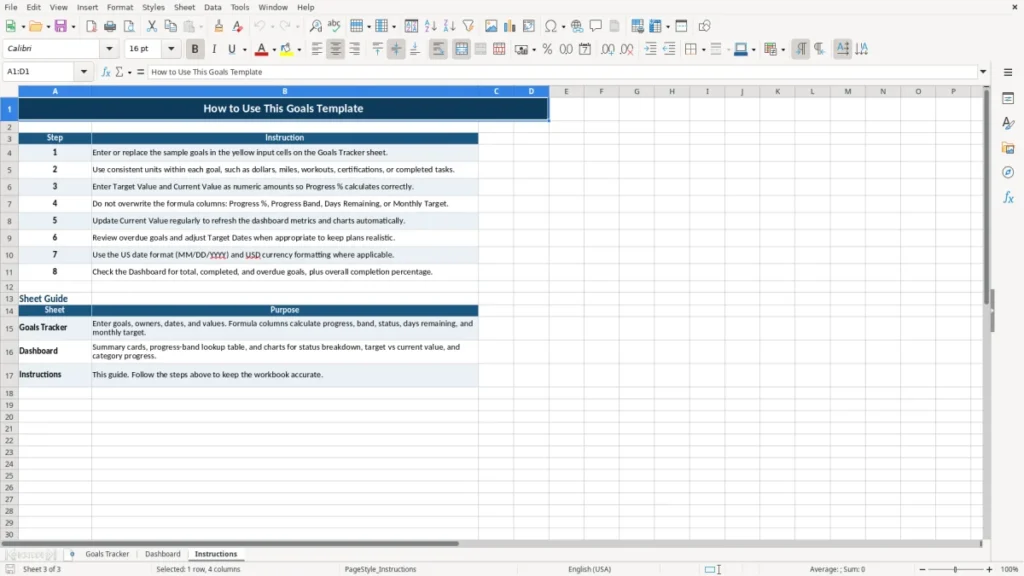
The Goals Excel Template helps you turn personal, professional, financial, and health goals into measurable action plans. Record each goal, assign an owner, set start and target dates, monitor target and current values, and review progress in one organized worksheet.
With dedicated fields for progress percentage, progress band, status, days remaining, monthly target, and notes, you can maintain a clear view of what matters most and what needs attention next.
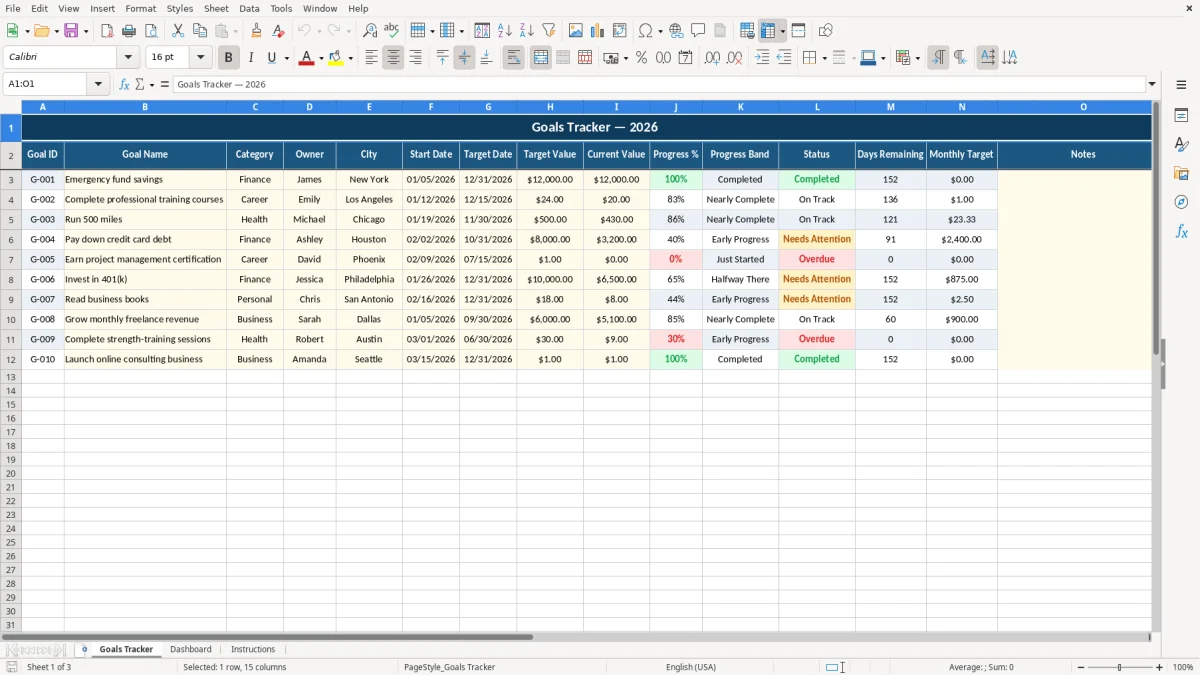
The main benefits of this Excel template
- Keep personal, team, and business goals in one organized tracker.
- Turn broad objectives into measurable targets with current and target values.
- Make ownership, deadlines, status, and remaining time easy to review.
- Break larger goals into monthly targets for consistent progress.
- Organize goals by categories such as Finance, Career, and Health.
- Add notes for strategies, milestones, reminders, and follow-up actions.
Step-by-step guide
Start by entering a unique Goal ID and a descriptive Goal Name for each objective. Select a Category, add the Owner and City where relevant, then enter the Start Date and Target Date. Define the Target Value and update the Current Value as results change.
Review the calculated Progress %, Progress Band, Status, and Days Remaining fields to understand whether each goal is on track, ahead, or behind. Use Monthly Target to divide a larger objective into manageable actions, and add notes to record context, obstacles, or next steps.
Update the worksheet regularly during weekly or monthly reviews so the tracker reflects current performance. You can also customize the sample entries, categories, owners, dates, and notes for your own planning process.
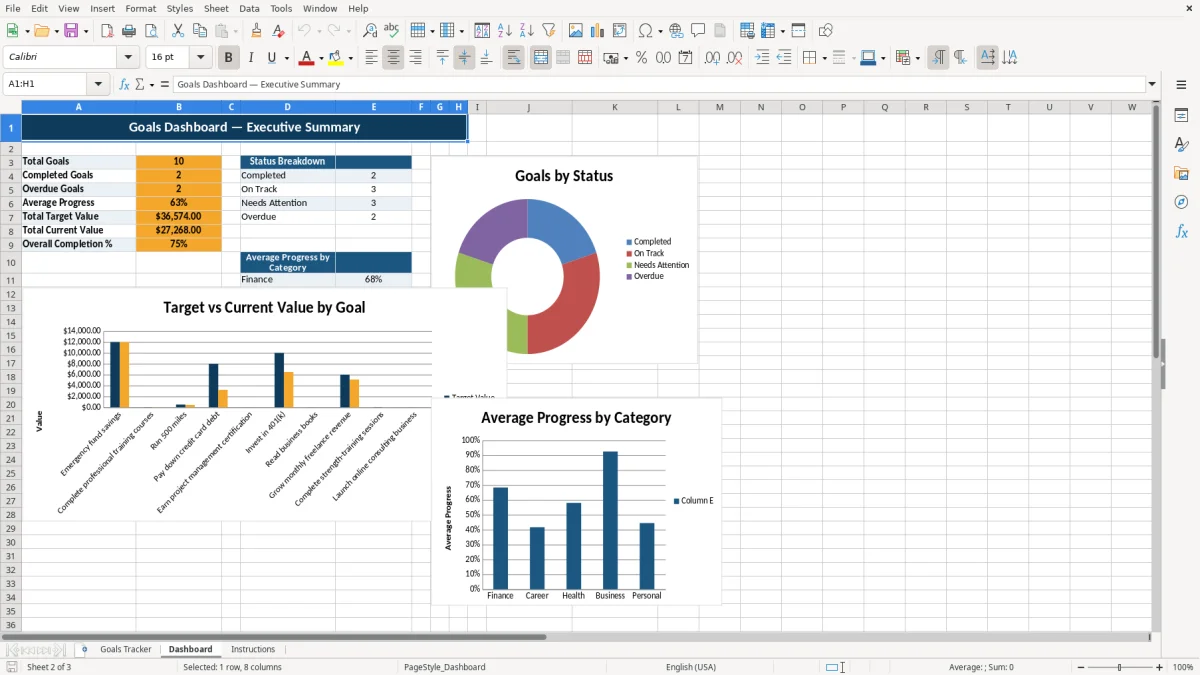
What is included
Centralized goals tracker
Measurable target and current value fields
Progress percentage and progress band tracking
Start dates, target dates, and days remaining
Goal categories and owner assignments
Monthly target planning
Notes for milestones and follow-up actions
A practical Excel template for goal planning
A goals spreadsheet gives you a simple way to move from intention to action. Instead of keeping objectives in scattered notes, messages, or separate documents, this Excel template brings them together in a structured Goals Tracker worksheet.
Each row represents one goal, making it easy to review priorities, compare results, and update information as circumstances change. The layout is suitable for annual planning, quarterly reviews, personal development, team planning, and ongoing performance management.
The template includes fields for a Goal ID, Goal Name, Category, Owner, City, Start Date, Target Date, Target Value, Current Value, Progress %, Progress Band, Status, Days Remaining, Monthly Target, and Notes. These fields provide enough structure for detailed tracking without requiring complicated project management software. You can use categories such as Finance, Career, and Health, or replace them with categories that match your own priorities.
Because the worksheet is built in Excel, it is easy to adapt. Add new rows for additional objectives, rename categories, change owners, revise deadlines, or add notes about milestones and challenges.
The familiar spreadsheet format also makes it practical for individuals, families, managers, and teams. Whether you are planning an emergency fund, professional training, fitness milestone, certification, or debt repayment plan, the template gives every objective a clear place and a measurable direction.
Use the tracker as a central planning document and review it at a consistent interval. A short weekly update can keep small actions visible, while a monthly review can help you evaluate progress against the bigger annual plan. The result is a straightforward system for organizing goals and maintaining momentum.
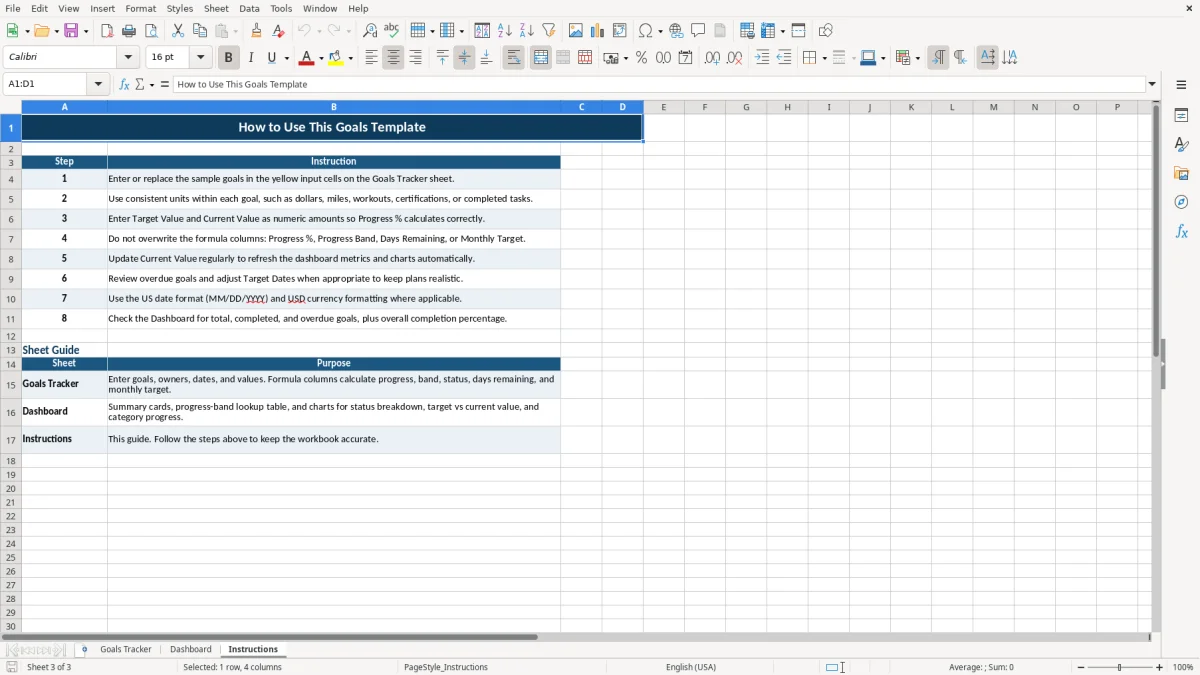
Track measurable progress and meaningful results
Effective goal tracking depends on more than writing down an objective. You also need a way to measure movement toward the desired result. The Goals Excel Template supports this process with Target Value and Current Value fields.
Enter the result you want to achieve and then update the current result as progress is made. This approach works for many types of goals, including saving money, completing courses, running a number of miles, reducing debt, earning a certification, or increasing an investment balance.
The Progress % field helps convert those values into an easy-to-read measure. The Progress Band and Status fields add another layer of interpretation, helping you quickly identify goals that are developing as expected or require a change in effort. Rather than relying on a vague feeling of progress, you can use the worksheet to review specific information and decide what action should happen next.
Numeric goals are especially useful when an outcome can be counted, measured, or compared. For example, a target of 24 completed training courses can be compared with a current value of 20.
A savings goal can show the amount already funded, while a fitness goal can compare completed miles with the intended distance. For goals that are less naturally numeric, choose a practical measurement such as completed milestones, finished tasks, or approved stages.
Update Current Value whenever a meaningful result occurs. Then review the percentage and status alongside the target date.
This creates a more complete picture: a goal may have strong progress but a close deadline, or moderate progress with plenty of time remaining. Combining measurement with timing helps you prioritize your next steps and maintain realistic expectations.
Organize goals by owner, category, and deadline
A useful goal tracker should make responsibility and timing visible. The Goals Excel Template includes Owner, Category, Start Date, Target Date, and Days Remaining fields so you can understand who is responsible, what area the goal supports, when work began, and how much time is available.
These details make the worksheet useful beyond individual planning. Families can assign savings or health goals to different members, while teams can use owners and categories to clarify responsibilities across a department or project.
Categories help you see whether your effort is balanced across important areas. Finance goals might include building an emergency fund, paying down credit card debt, or investing in a 401(k). Career goals could include completing professional training or earning a project management certification.
Health goals might include running a specific distance or completing a wellness milestone. You can also create categories for education, relationships, travel, operations, sales, or any other area relevant to your plan.
Dates make each goal more actionable. The Start Date establishes when work begins, while the Target Date defines the intended finish. Days Remaining provides a quick reminder of urgency and can help you identify objectives that need a revised plan.
When reviewing the tracker, sort or filter your thinking by deadline, owner, category, or status. This can reveal overdue work, upcoming milestones, or categories receiving less attention than expected.
For best results, avoid assigning too many unrelated goals to one person without checking available time and resources. Use the Notes field to capture dependencies, planned actions, or reasons for a deadline. Clear ownership and realistic timing make goals easier to discuss, manage, and complete.
Those notes on dependencies and planned actions also fit a continuous improvement log for tracking follow-up changes and keeping each objective moving forward.
Use monthly targets to maintain momentum
Large goals can feel distant when the final deadline is months away. The Monthly Target field helps turn an annual or long-term objective into a repeatable plan.
Instead of waiting until the end of the period to assess results, decide what amount of progress should be completed during a typical month. This creates a practical checkpoint and gives you a regular reason to update the tracker.
Monthly targets can support many different objectives. A savings goal may require a planned monthly contribution. A training goal may call for a set number of courses or study hours.
A fitness goal may be divided into a monthly distance. A debt repayment objective can be connected to a planned payment amount. The exact measure depends on the goal, but the principle is the same: use smaller commitments to support the larger result.
Review monthly performance against Current Value, Progress %, Status, and Days Remaining. If results are below the intended pace, record the reason in Notes and decide whether to increase effort, adjust the monthly target, change the approach, or revise the deadline.
If you are ahead, document what is working so the same behavior can continue. A tracker is most useful when it supports decisions, not merely record keeping.
Schedule a recurring review at the start or end of each month. Update current values, confirm dates, check owners, and add a short note about the next action.
You can replace the sample 2026 goals with your own objectives and use the same structure for another planning period. With consistent updates, the Goals Excel Template becomes a simple accountability system that keeps priorities visible and encourages steady progress toward meaningful outcomes.
That same structure also suits a list tracker for keeping priorities visible and updating action items each month.
Frequently asked questions about this template
You can track financial, career, health, personal, team, and project goals. The template works well with measurable targets such as savings amounts, completed courses, miles, units, certifications, or debt repayment amounts.
Yes. The tracker is designed to compare the Target Value with the Current Value and display progress information, including Progress %, Progress Band, Status, and Days Remaining.
Yes. The Owner column allows you to assign goals to different people, making the worksheet suitable for families, teams, departments, managers, or individual planning.
Yes. Replace the sample goals with your own objectives, edit categories, change owners and dates, update values, and use the Notes column for details specific to your planning process.
Yes. The 2026 sample layout includes start dates, target dates, progress fields, status tracking, and monthly targets, making it suitable for annual planning and recurring reviews.
Numeric targets work best because they can be compared directly with current values. Examples include money saved, debt repaid, miles completed, courses finished, certificates earned, or other countable milestones.
Meet the makers