
Project & Planning


Weighted Scoring Model Excel Template
Compare vendors, projects, and products with a customizable weighted scoring model Excel template for clearer decisions.
2026-08-05
326 downloads
4.8/5
Download template
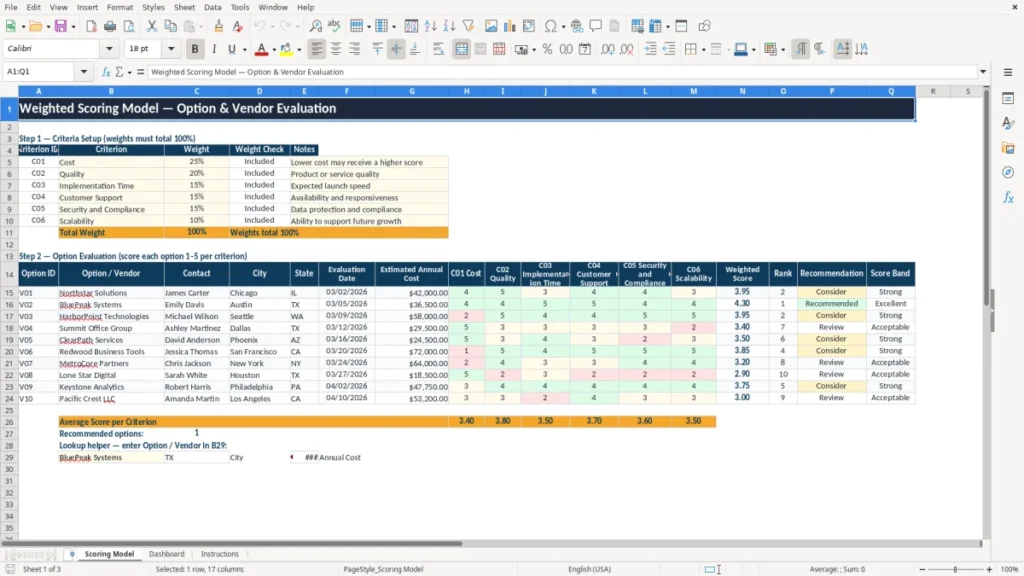
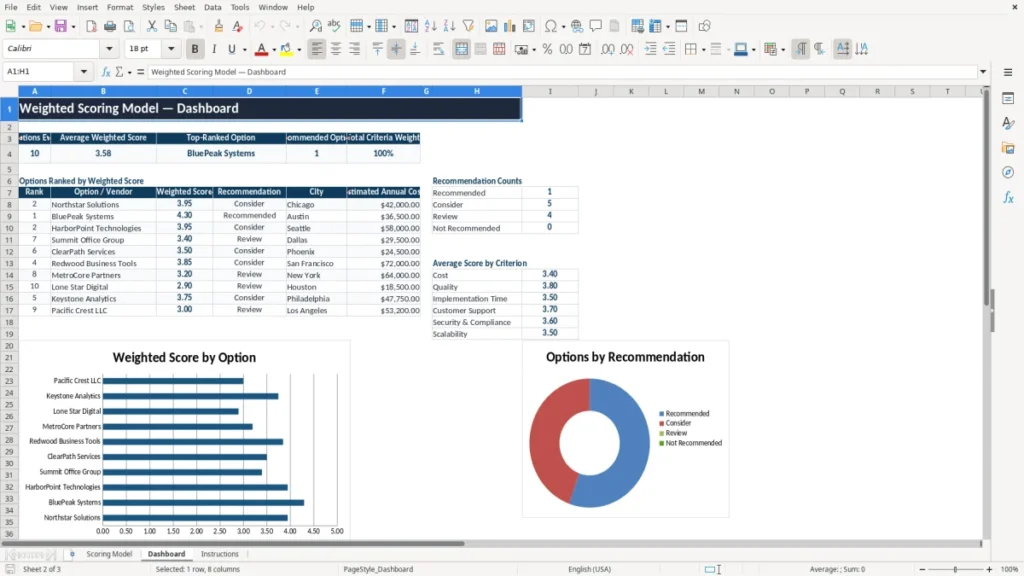
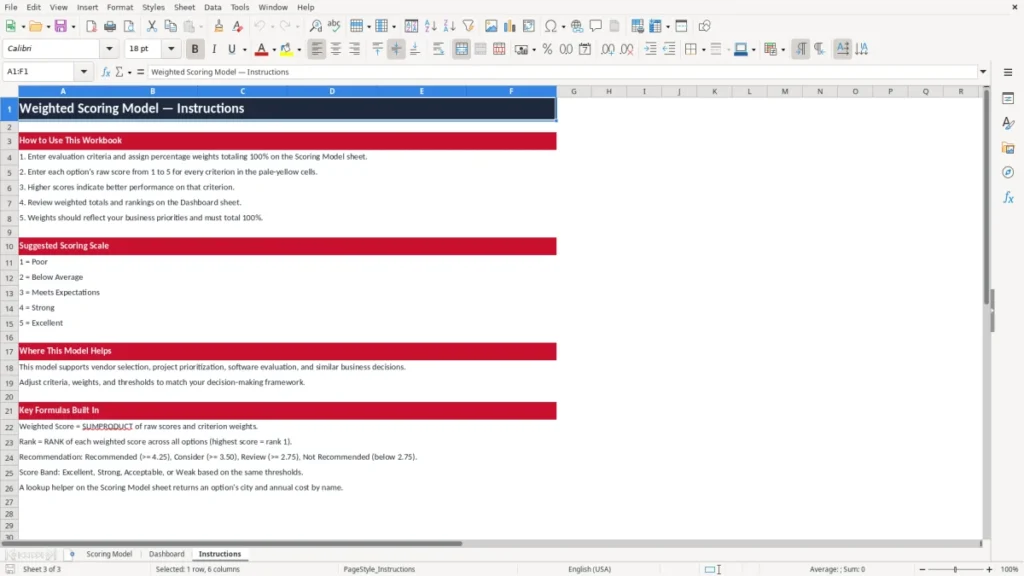
Make complex comparisons easier with a practical weighted scoring model Excel template. Define the criteria that matter, assign importance to each factor, score every option consistently, and use weighted totals to support a clear recommendation.
The template is designed for vendor selection, project prioritization, software evaluation, product comparison, hiring, procurement, and strategic planning. It provides a structured place for your assumptions, scores, notes, and decision logic so stakeholders can review the process without searching through separate documents or disconnected spreadsheets.
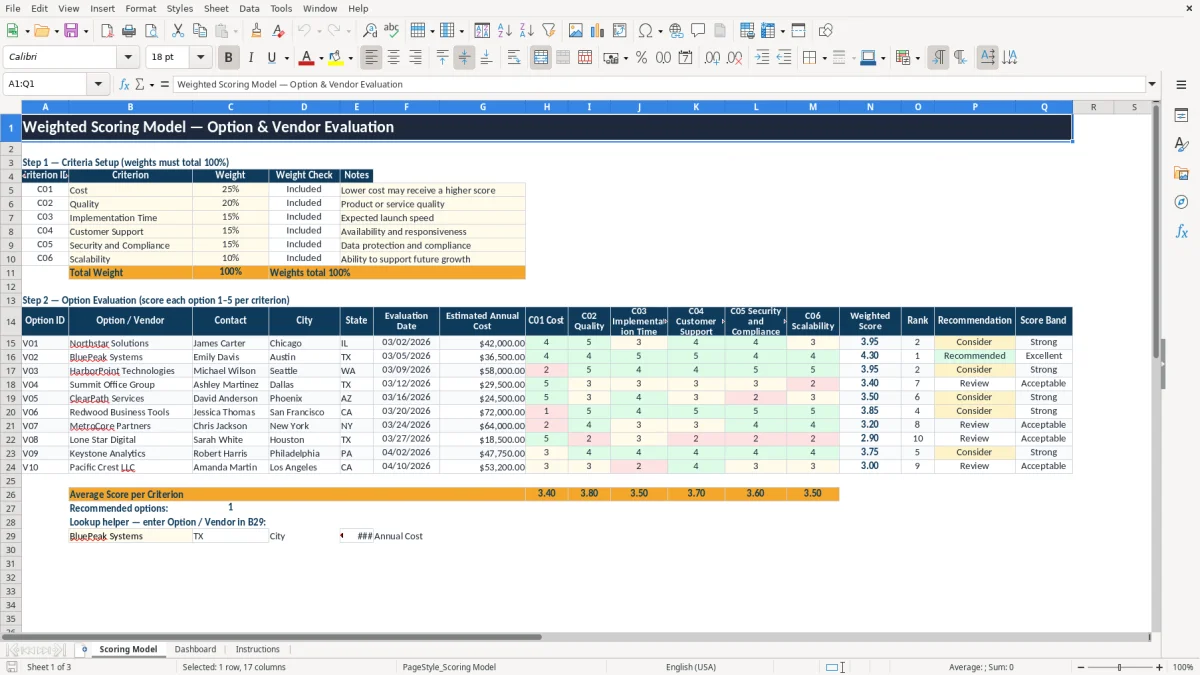
The main benefits of this Excel template
- Prioritize the criteria that matter most to your decision
- Compare alternatives using a consistent evaluation framework
- Make assumptions, scores, and supporting notes visible
- Reduce the influence of disconnected opinions and decision bias
- Create a repeatable process for future evaluations
- Present recommendations in a clear and professional format
Step-by-step guide
Start by replacing the example criteria with the factors relevant to your decision. Common examples include cost, quality, implementation time, customer support, security and compliance, and scalability. Next, assign each criterion a percentage weight based on its importance.
The weights should total 100%, and the model includes a weight check to help you confirm the calculation. Then list the options, vendors, candidates, projects, or products you want to compare. Score each alternative against every criterion using the same scoring scale, and add notes to explain unusual ratings, assumptions, or supporting evidence.
Review the weighted totals to identify the strongest overall option, then discuss the result with relevant stakeholders before making a final decision. A high total score should support judgment rather than replace it.
Consider reviewing the model for double-counted criteria, unrealistic assumptions, missing risks, or differences in the quality of available information. You can also run scenarios by changing weights to see whether the recommendation remains stable when priorities change.
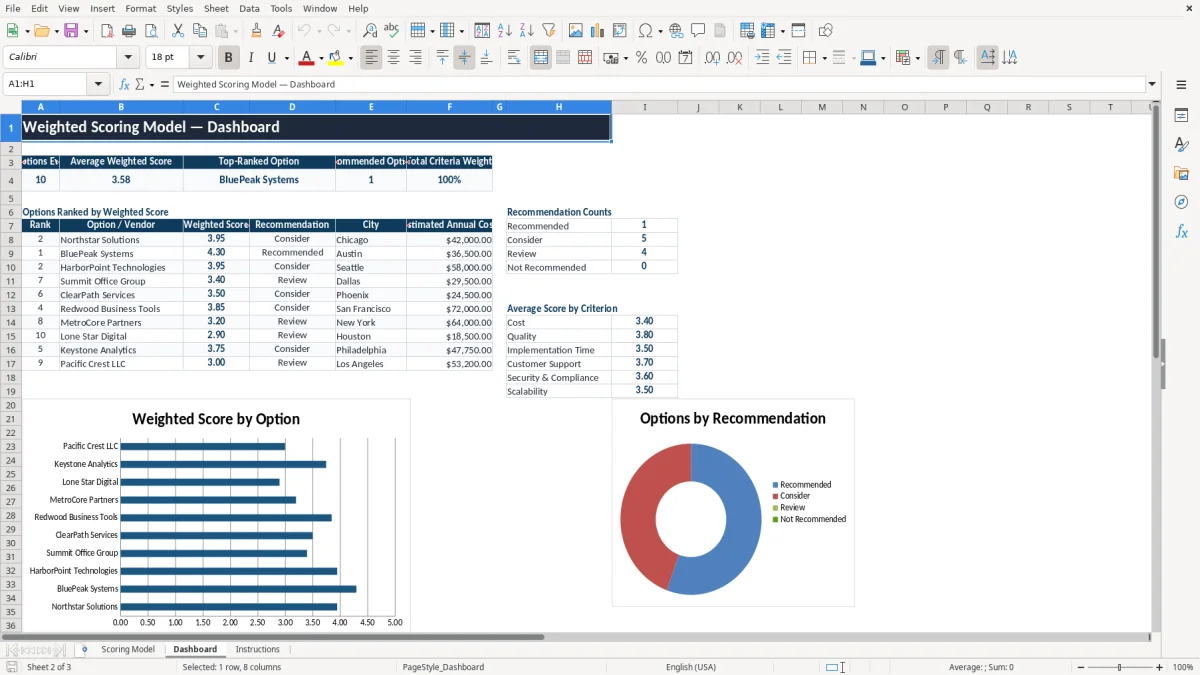
What is included
Customizable evaluation criteria and notes
Percentage-based weighting for decision priorities
Weight total check to help confirm weights equal 100%
Structured scoring for options and vendors
Weighted score calculations for comparison
Professional formatting for review and presentation
Flexible structure for procurement, projects, products, and strategy
What Is a Weighted Scoring Model?
A weighted scoring model is a decision-making framework that helps you compare several alternatives against multiple criteria. Instead of treating every factor as equally important, the model assigns a weight to each criterion.
Each option then receives a score for its performance against that criterion. The score and weight are combined to produce a weighted result, and the results across all criteria are added to create an overall total.
This approach is useful when a decision involves competing priorities. For example, a software purchase may depend on cost, security, implementation time, support, quality, and scalability.
A low-cost product may not be the best choice if it performs poorly on security or cannot support future growth. By assigning weights, the model makes those priorities explicit.
A weighted scoring model Excel template gives you a ready-made structure for this process. You can enter criteria, define percentage weights, record ratings, and document assumptions without building formulas from scratch. The result is a more transparent comparison that can be explained to managers, clients, procurement teams, or other stakeholders.
The model is not intended to eliminate professional judgment. Rather, it creates a consistent starting point for discussion and helps reveal why one alternative ranks above another. Reviewing the criteria and weights with the decision team is an important step, especially when the outcome has financial, operational, legal, or strategic consequences.
Documenting those criteria and weights in a decision record makes it easier to revisit the rationale when the choice has financial, operational, legal, or strategic consequences.
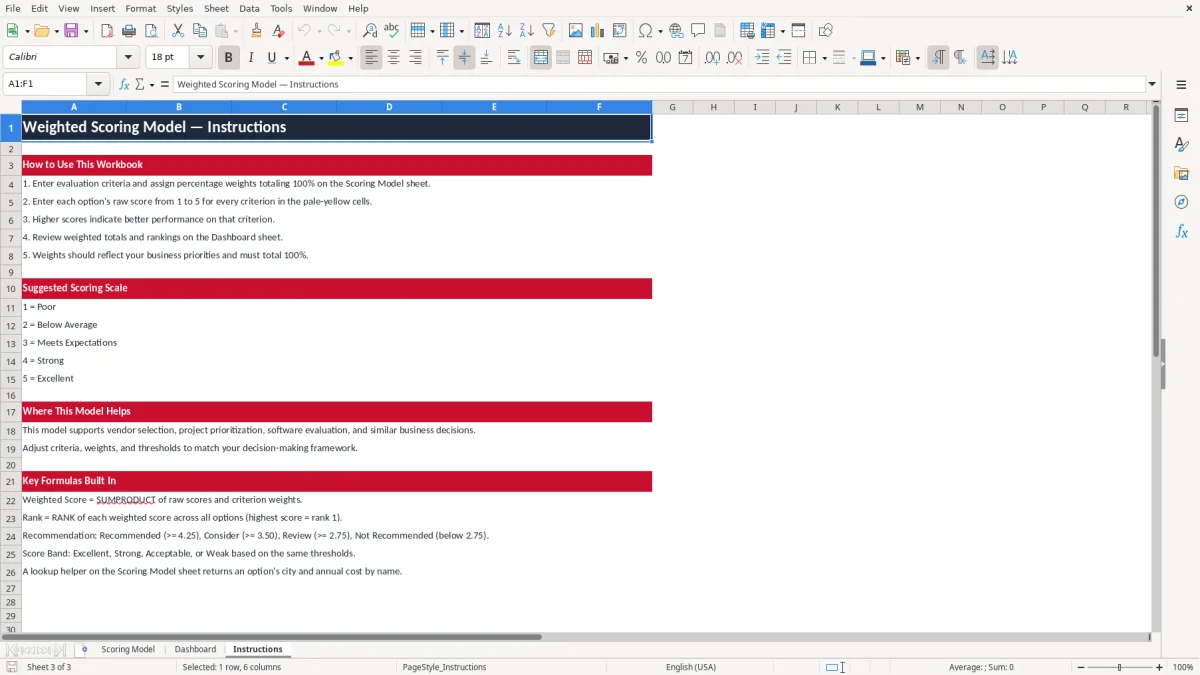
How to Build a Reliable Weighted Scorecard
A reliable weighted scorecard begins with well-defined criteria. Each criterion should describe a distinct factor that can influence the decision.
Avoid using several criteria that measure the same underlying issue, because that can unintentionally give one consideration too much influence. For example, product quality and reliability may need to be separated carefully if they overlap in your evaluation.
After defining the criteria, assign weights that reflect actual business priorities. The weights should add up to 100 percent.
A criterion with a 25 percent weight has more influence on the final result than one with a 10 percent weight. Discuss these percentages before scoring options whenever possible, because changing weights after seeing results can introduce unwanted bias.
Next, establish a consistent scoring scale. You might use scores from 1 to 5 or 1 to 10, but the scale matters less than applying it consistently.
Define what a low, middle, and high score mean so different reviewers interpret the criteria in a similar way. Add notes or evidence for ratings that may be questioned later.
Finally, review the calculated totals and test the model. Change a few weights to see whether the leading option remains strong.
Consider whether missing information, uncertainty, or a non-negotiable requirement should affect the recommendation separately. A good weighted scorecard combines numerical structure with thoughtful review, making the final decision easier to explain and defend.
Weighted Scoring Model for Vendor Selection
Vendor selection is one of the most common uses for a weighted scoring model. Procurement decisions often require a balanced review of price, capability, service, risk, and long-term value.
Looking only at quoted cost can result in a vendor that appears attractive initially but creates higher implementation, support, or compliance costs later.
With a vendor evaluation spreadsheet, you can define criteria such as total cost, product quality, implementation time, customer support, security and compliance, and scalability. Assign each criterion a weight based on the needs of your organization, then score every vendor using the same evidence-based approach. The resulting totals provide a common comparison point while the notes preserve important context.
The template can also help organize a cross-functional review. Finance may focus on cost, operations may assess implementation and support, technology teams may examine security and scalability, and business leaders may evaluate overall fit. Each group can contribute information without losing the structure of the final comparison.
Before selecting a vendor, verify that the scoring assumptions are current and that mandatory requirements are handled appropriately. A vendor should not necessarily win because of a high average if it fails a critical security, legal, or operational requirement. Use the weighted score as part of a broader due diligence process that may include references, demonstrations, contract review, risk assessment, and negotiation.
This approach creates an audit-friendly record of how the shortlist was evaluated and why the selected vendor best matched the organization’s stated priorities.
Use the Template for Projects and Strategic Priorities
A weighted scoring model is also useful for deciding which projects, initiatives, or investments deserve attention first. Organizations often have more ideas than available budget, staff, or time.
A structured prioritization model helps teams compare opportunities using consistent factors rather than selecting the most visible or most recently proposed idea.
Possible project criteria include expected business impact, strategic alignment, customer value, implementation effort, cost, risk, regulatory importance, and time to benefit. The appropriate weights depend on the purpose of the exercise. A cost-reduction program may emphasize savings and speed, while a growth portfolio may place greater weight on market opportunity, customer impact, and scalability.
To use the Excel template, list each project as an option and score it against the selected criteria. Add notes that explain estimates, dependencies, assumptions, or resource constraints. The weighted totals can help identify projects that offer strong value relative to their effort, but the results should be reviewed alongside capacity planning and delivery risk.
It can be helpful to create separate scoring rounds for different stakeholder groups and compare the results. Large differences may indicate that the criteria are unclear, the evidence is incomplete, or priorities are not aligned. Discussing those differences can be as valuable as the ranking itself.
Because priorities change, save dated versions of the model when decisions are made. This creates a useful record for future reviews and makes it easier to explain why a project was selected, deferred, or removed from consideration.
Frequently asked questions about this template
It is a framework for comparing alternatives by assigning importance to criteria, scoring each option, and combining the results into weighted totals.
A score shows how well an option performs against a criterion. A weight shows how important that criterion is compared with the others.
Yes. In a percentage-based model, the criterion weights should total 100 percent so the final results reflect the intended proportions.
A 1-to-5 or 1-to-10 scale can work well. Choose one scale and define its meaning clearly so every option is evaluated consistently.
Yes. Replace the example criteria with factors relevant to your decision, then adjust the weights, scores, and notes to match your evaluation process.
Yes. The weighted total supports judgment but does not replace due diligence. A critical security, legal, financial, or operational issue may outweigh a higher total score.
Meet the makers