
Accounting & Tax


VAT Excel - Free Template
Track sales and purchase VAT, total taxable amounts, and net VAT due with a simple register and summary sheet.
2026-07-13
377 downloads
4.8/5
Download template
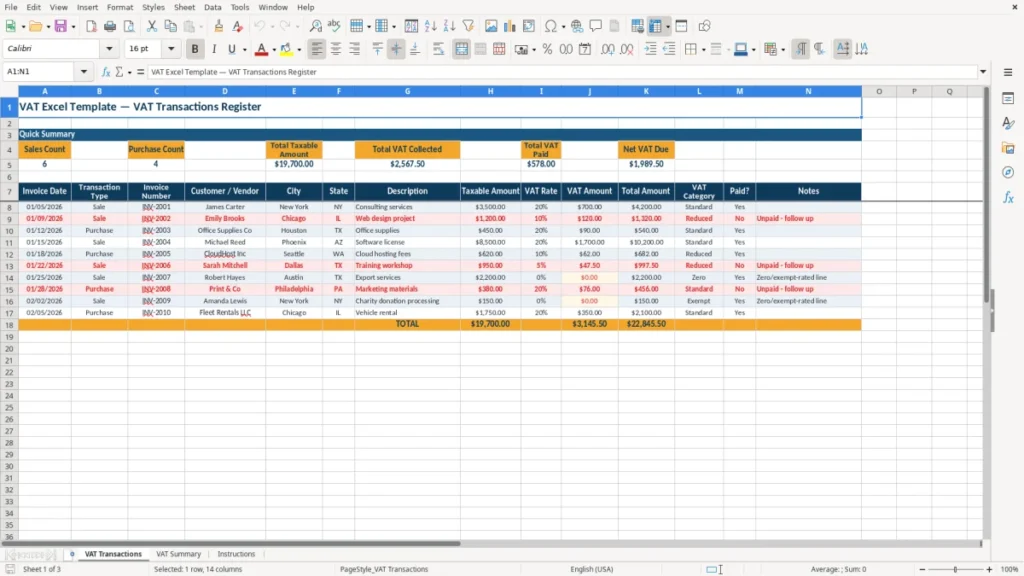
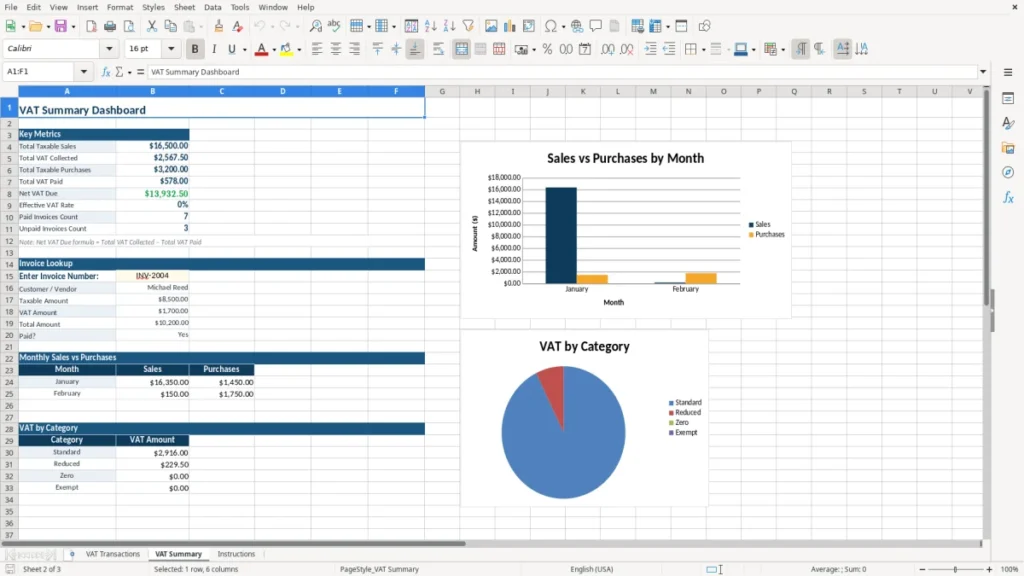
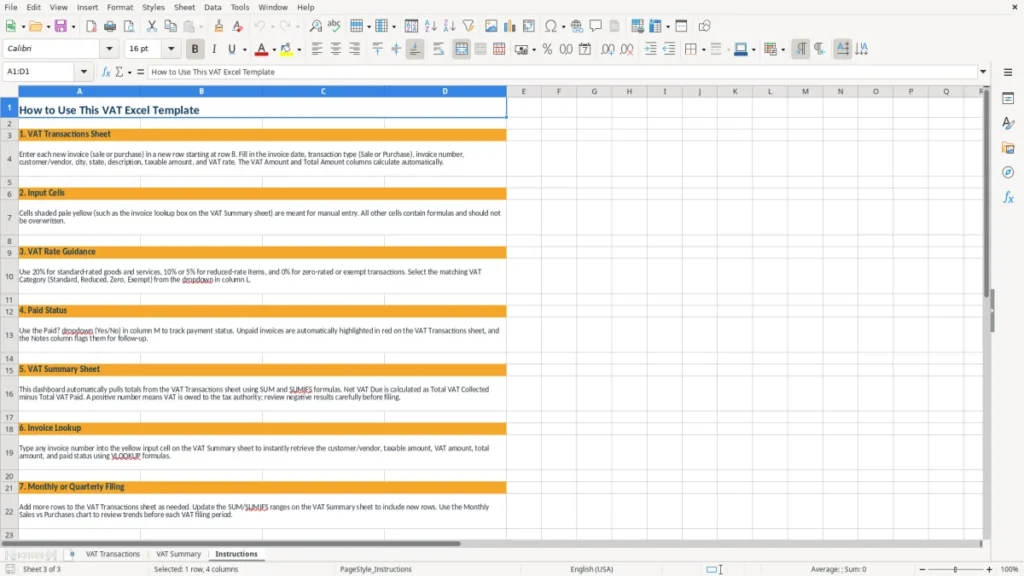
This VAT Excel template is a register for tracking sales and purchase transactions, calculating VAT collected and VAT paid, and showing net VAT due in one workbook. It includes a VAT Transactions sheet, a VAT Summary sheet, and an Instructions sheet.
Use it when you need a clean audit trail for invoices, supplier bills, and period totals. The layout is built for fast entry and quick month-end review, with summary formulas and clear input columns.
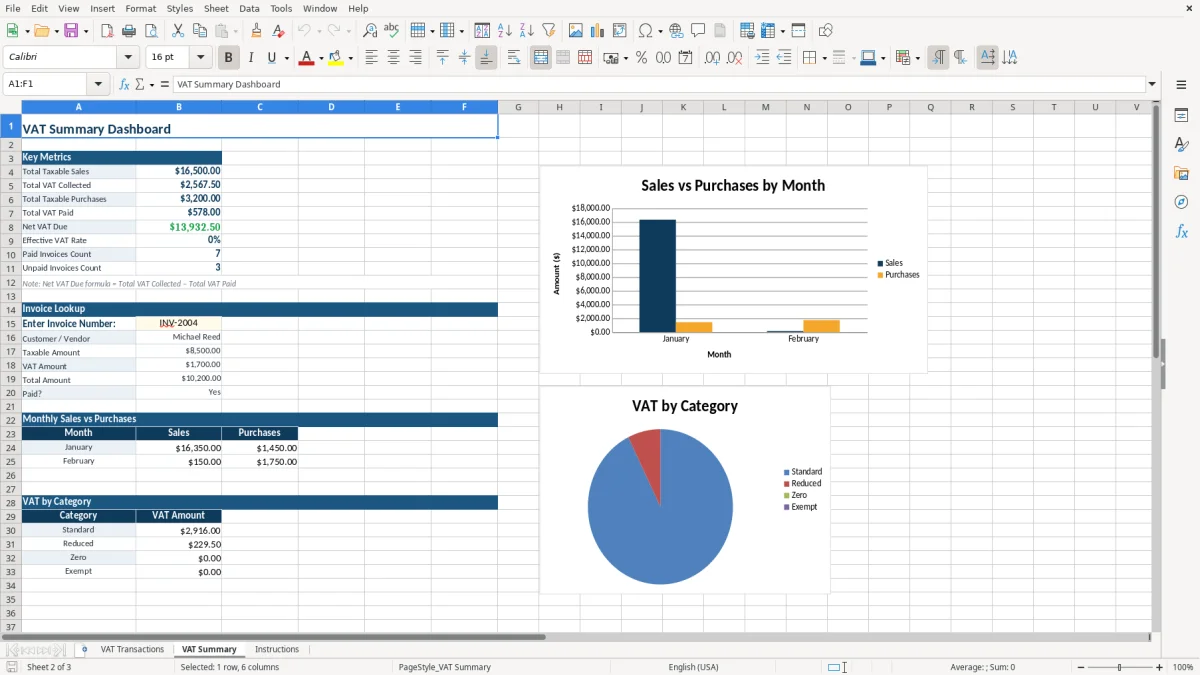
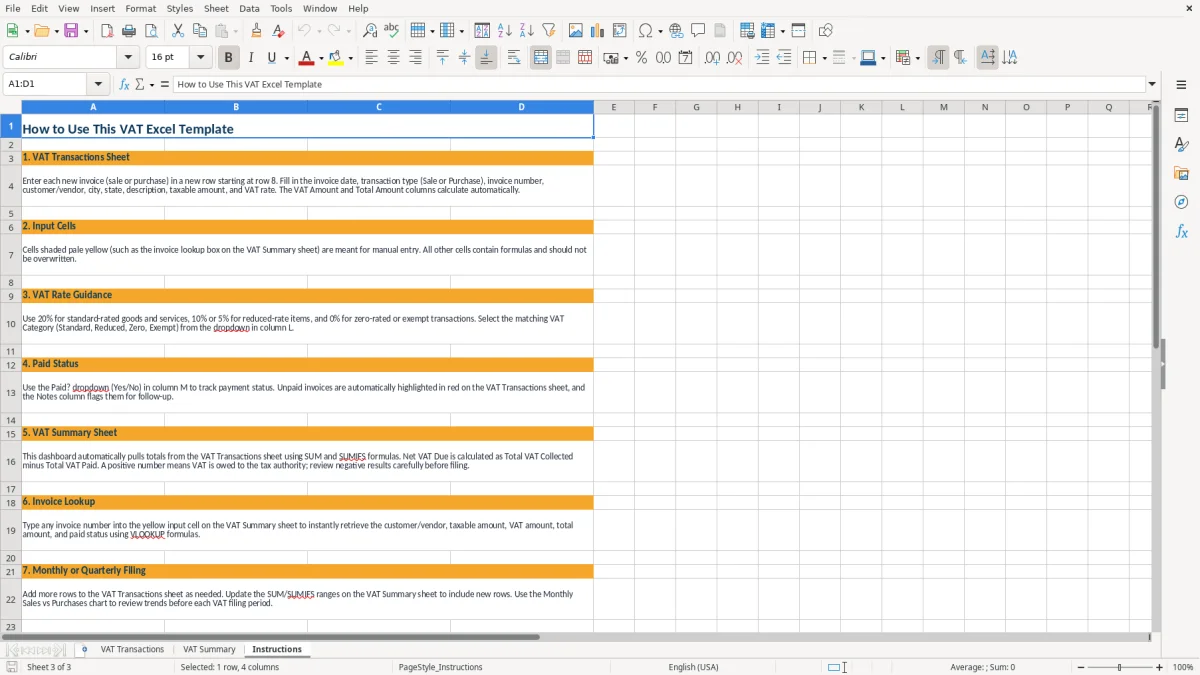
Image 1 shows the VAT Transactions sheet with a quick summary block at the top and a transaction table below. Image 2 shows the VAT Summary sheet, and image 3 shows the Instructions sheet.
The main benefits of this Excel template
- Tracks sales and purchases in one place, so you can separate VAT collected from VAT paid without juggling multiple tabs.
- Shows net VAT due instantly with SUMIFS and COUNTIF, which saves time at each filing period.
- Helps you spot missing entries before month-end, especially if you process 20 to 200 invoices per cycle.
- Gives you a simple audit trail for invoice dates, taxable amounts, and VAT amounts in one register.
- Makes review easier for a freelancer, bookkeeper, or office admin who has to close the books fast.
- Reduces calculation errors compared with manual totals, especially when the worksheet carries dozens of line items.
- Works well for quarterly reporting when you want a fast check of sales VAT, purchase VAT, and the balance due.
Step-by-step guide
- Open the VAT Transactions sheet and enter each sale or purchase on its own row. Keep the source document handy so you can copy the invoice date, taxable amount, and VAT amount correctly.
- Mark each line as Sale or Purchase. That single field drives the counts and the VAT totals in the summary block.
- Fill in the taxable amount and VAT amount for each entry. If you use a 20% VAT rate on a $500 sale, the VAT amount is $100.00 and the total invoice amount is $600.00.
- Review the Quick Summary at the top of the sheet. It shows how many sales and purchases you entered, plus total taxable amount, VAT collected, VAT paid, and net VAT due.
- Use the VAT Summary sheet to review period totals before you file or reconcile. This is the sheet to check when you want a clean month-end or quarter-end view.
- Keep the Instructions sheet nearby if someone else enters data. A short shared routine prevents mixed formats, skipped lines, and broken formulas.
What is included
Transaction register for sales and purchases with a clear split between VAT collected and VAT paid.
Quick Summary block that calculates counts and totals with COUNTIF and SUMIFS.
Separate VAT Summary sheet for a cleaner period review.
Instructions sheet for simple handoff to another person entering the data.
Currency formatting in dollars, with totals displayed to two decimals for cleaner review.
Structured layout that makes it easier to reconcile 10, 50, or 200 transactions in one file.
Built for manual entry, so you can use it without setup or formulas of your own.
How businesses use a VAT Excel template in real life
A VAT Excel template is useful when you need to log taxable sales, deductible purchases, and the net amount due before a filing date. A solo freelancer with 18 billable invoices a month can keep the register current in 10 minutes a week instead of digging through email and bank feeds at quarter-end.
Who actually uses it
Bookkeepers at an LLC, office admins at a contractor, and owners of small online stores use this kind of sheet when they want a simple paper trail. If you sell 120 orders at $45 each, that is $5,400 of sales to sort by taxable and non-taxable lines before you reconcile the period.
Why the split matters
The key is separating sales from purchases from the start. If you wait until the end of the month, a stack of 40 receipts turns into a guessing game, and one missed $300 supplier bill can change your payable balance by a meaningful amount.
How the workbook is laid out
Image 1 shows the VAT Transactions sheet with a Quick Summary block at the top and the input table below it. Image 2 is the VAT Summary sheet for period totals, and image 3 is the Instructions sheet for the person doing the entry.
What the IRS recordkeeping approach means for VAT tracking
Even though VAT is not a US federal tax, the bookkeeping discipline behind it matches what the IRS expects: keep source records, keep totals, and be able to explain every number. In practice, I would keep the underlying invoices and receipts for at least 3 years, and longer if a return, loss, or asset record needs it.
Use the workbook as your audit trail
This template gives you a dated register for each sale and purchase, which is exactly what you want when someone asks why the balance changed by $1,250 from one filing period to the next. A spreadsheet with transaction dates, amounts, and VAT columns is far easier to defend than a pile of receipts with no order.
Why formula totals beat manual totals
The summary block uses COUNTIF and SUMIFS to separate sales from purchases. That matters when you have 60 lines in a month: one manual arithmetic mistake on a $980 taxable invoice at a 20% rate changes VAT by $196.00, and the error carries into the period total.
Keep the source data clean
For US bookkeeping, the same principle applies whether the business is a sole proprietorship, an LLC, or an S-corp: one source document per line, one classification per row, and a single place to check the totals. That is how you avoid a messy balance sheet reconciliation later.
Where VAT spreadsheets usually break down
The biggest failure is mixed entry. If one row combines a sale, a refund, and a fee adjustment, the VAT total becomes hard to trust, and a 25-line month can turn into an hour of cleanup.
Wrong rates and half-finished rows
Another common problem is typing the wrong VAT amount on a line and never checking the math. If a $750 purchase should carry $150.00 of VAT and you enter $15.00 instead, your net VAT due is understated by $135.00 right away.
Late reconciliation costs time
People also wait too long to reconcile. By the time you have 90 invoices and 30 receipts, you are not reviewing a register anymore; you are reconstructing a filing period from memory, which is how small errors become a half-day cleanup.
What a clean register prevents
A simple workbook forces consistency: one line per transaction, clear sale or purchase labeling, and a quick summary at the top. That reduces the chance of double counting a $420 invoice, missing a supplier bill, or entering a net figure where a taxable figure belongs.
How to make VAT tracking part of your month-end routine
The easiest way to keep this spreadsheet alive is to tie it to a fixed routine, not to motivation. Enter transactions every Friday afternoon, or right after the payroll run if that is when your books are already open.
Simple habits that stick
- Copy the prior month’s file and clear only the transaction rows, so the structure stays the same.
- Review the Quick Summary before you close the month, especially if you entered more than 30 lines.
- Use the Instructions sheet when a second person helps with data entry, so the format stays consistent.
Use the summary as a checkpoint
If your VAT collected is $4,800 and VAT paid is $3,100, the net due is $1,700 before you file. That one number is the fastest sanity check in the workbook, and it tells you whether the register matches the period you think you are closing.
When to move beyond Excel
Once you are handling hundreds of transactions a month, multi-rate VAT, or several sales channels, spreadsheet entry starts to get slow. At that point, accounting software or an integrated tax module usually beats manual line-by-line entry.
Frequently asked questions about this template
It tracks sales and purchase transactions, taxable amounts, VAT collected, VAT paid, and the resulting net VAT due. The workbook also gives you a summary view so you can check period totals quickly.
There are 3 sheets: VAT Transactions, VAT Summary, and Instructions. The first sheet is for entry, the second is for review, and the third explains the workflow.
Yes. The layout works for monthly close or quarterly review, because the summary formulas roll up the transaction lines into one period total. If you enter 40 to 100 lines per period, the sheet stays manageable.
The workbook uses Excel formulas such as COUNTIF, SUMIFS, and SUM to total sales, purchases, and net VAT due. That keeps the summary automatic as long as the transaction rows are filled in correctly.
Yes. A freelancer, contractor, or small LLC can use it to separate taxable sales from deductible purchases without buying software. It is especially practical when you only need a straightforward register and summary.
Keep the source invoices, receipts, and any notes that explain unusual entries. A spreadsheet is strongest when each row can be traced to a document, especially if you need to review a $250 refund, a corrected invoice, or a missing supplier bill.
Meet the makers