
Accounting & Tax


Tax Return Excel - Free Template
Organize wages, 1099 income, deductions, tax estimates, and filing notes in a four-sheet 2026 tax return Excel template.
2026-07-24
298 downloads
4.8/5
Download template
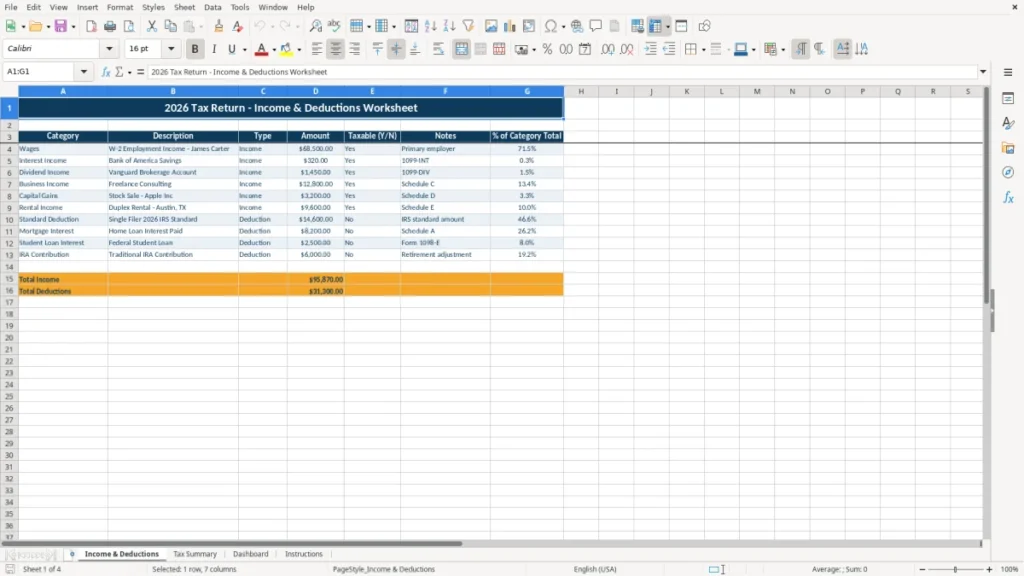
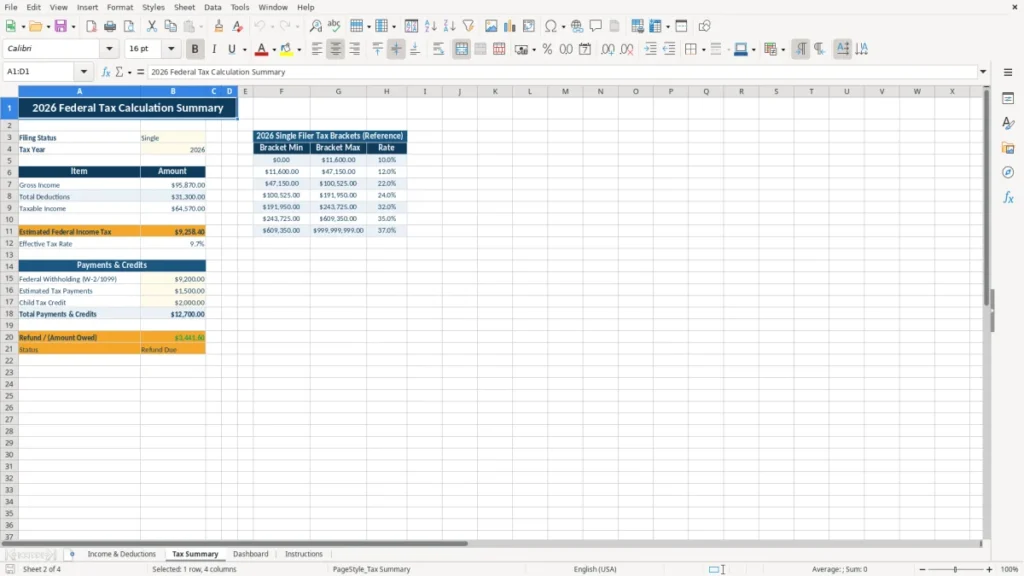
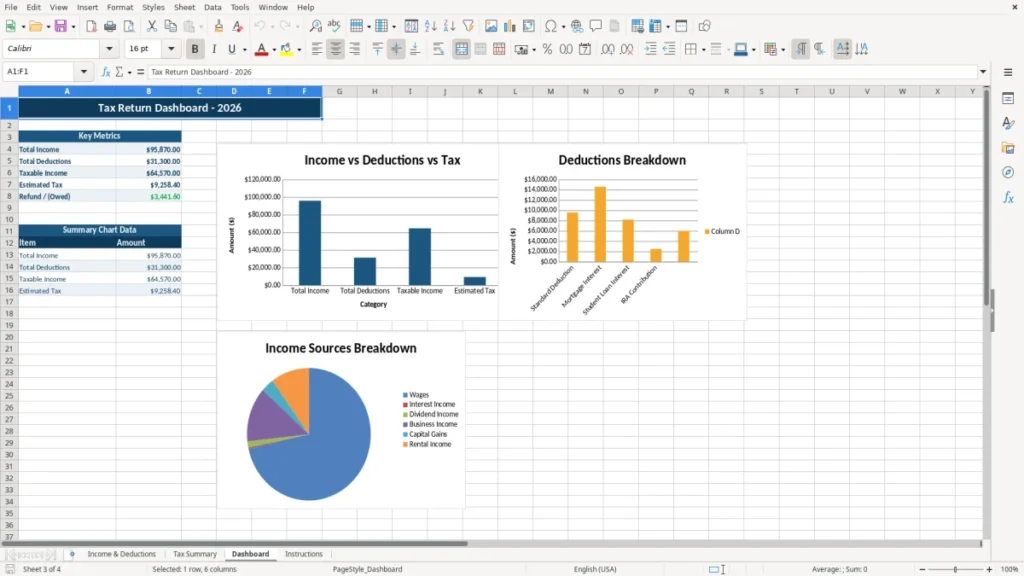
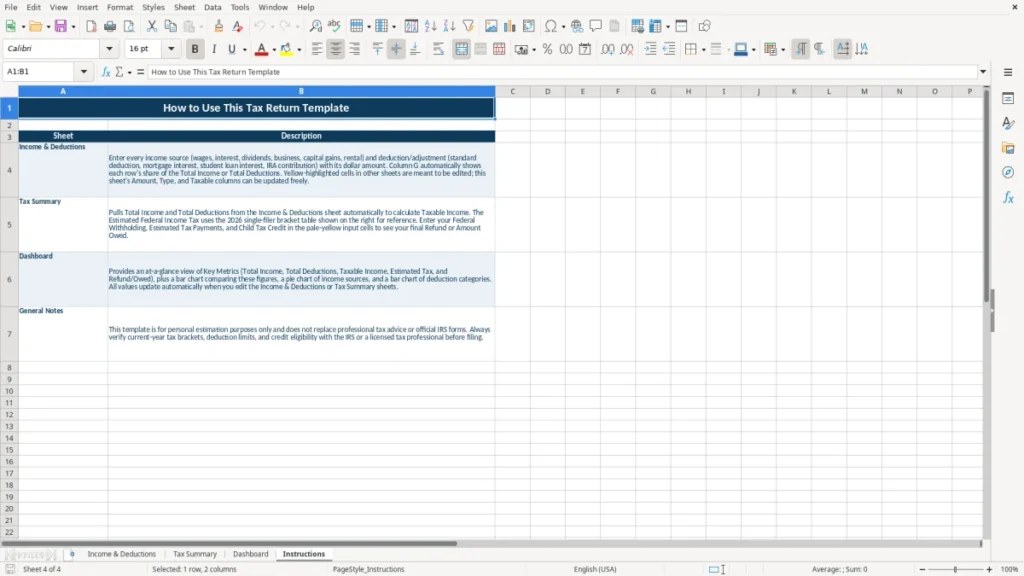
A tax return Excel template organizes your annual income, deductions, taxable amounts, and filing notes before you prepare Form 1040. This workbook contains an Income & Deductions worksheet, Tax Summary, Dashboard, and Instructions sheet so you can review categories, totals, percentages, and supporting details in one file.
Use it for a household return, a freelancer with a sole proprietorship, or an employee with wages, interest, dividends, investments, and rental income. The sample layout includes W-2 wages, 1099-INT interest, 1099-DIV dividends, Schedule C business income, Schedule D capital gains, and Schedule E rental income.
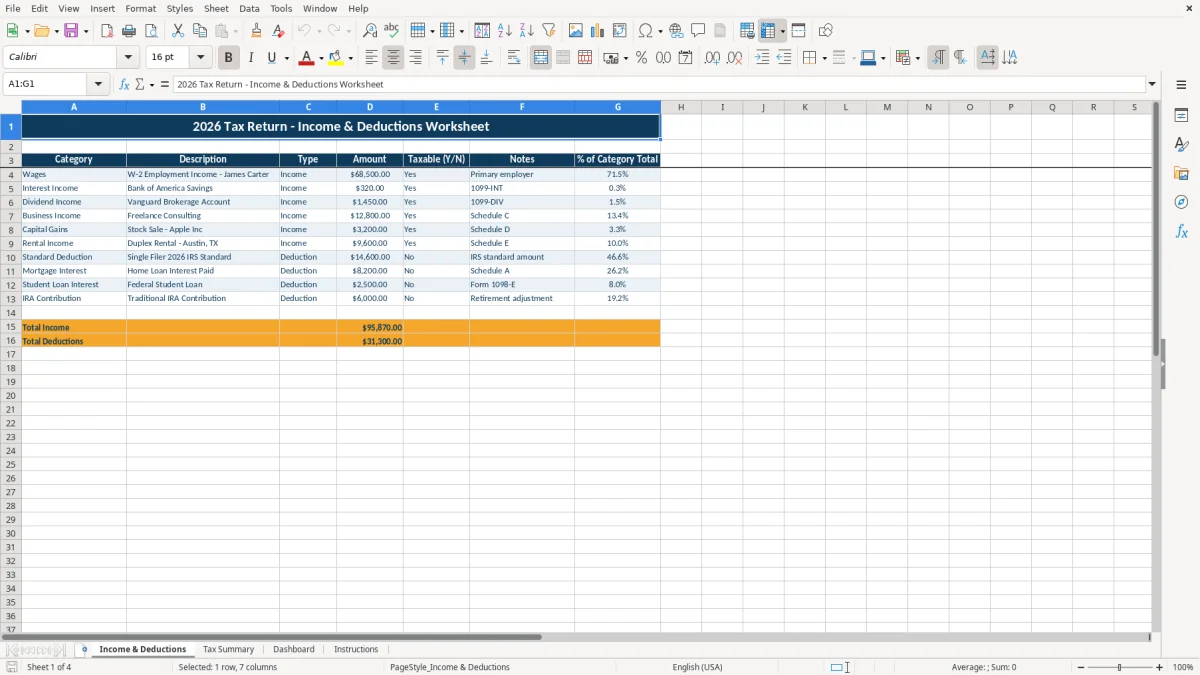
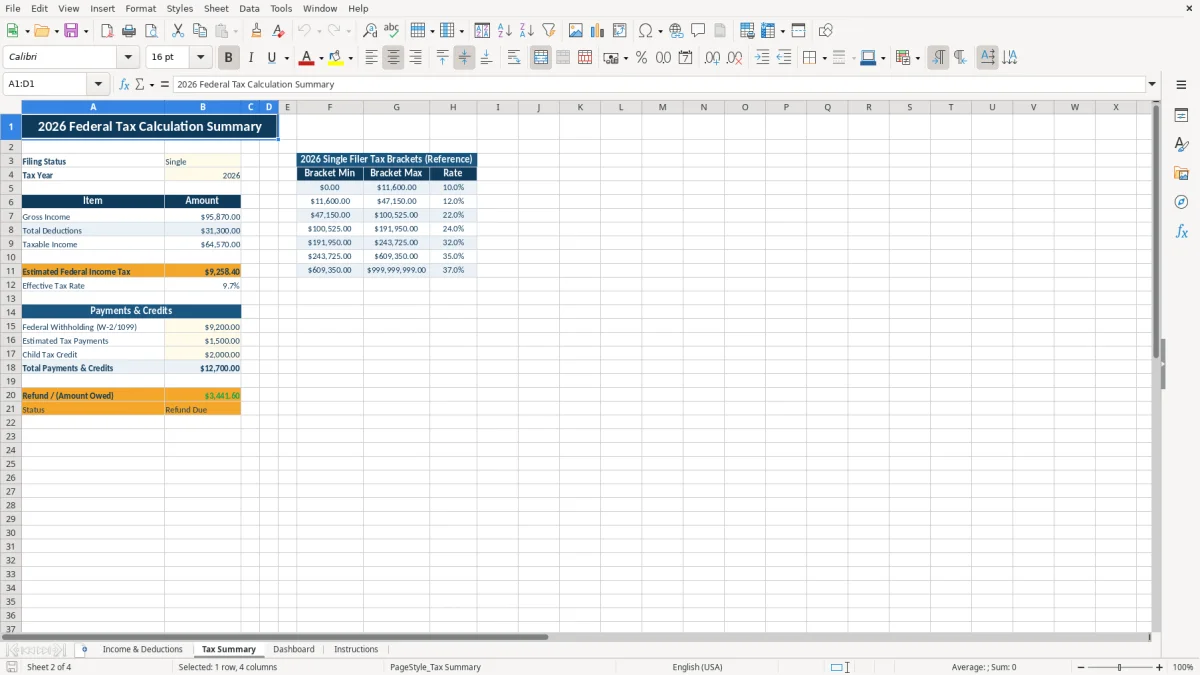
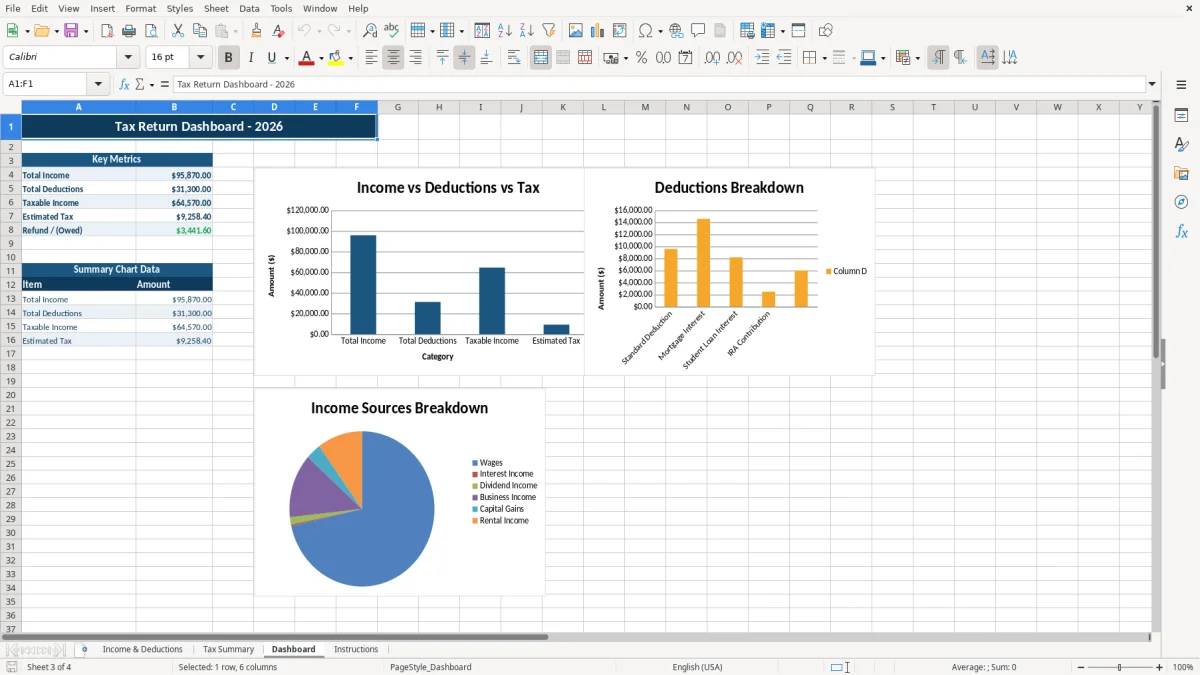
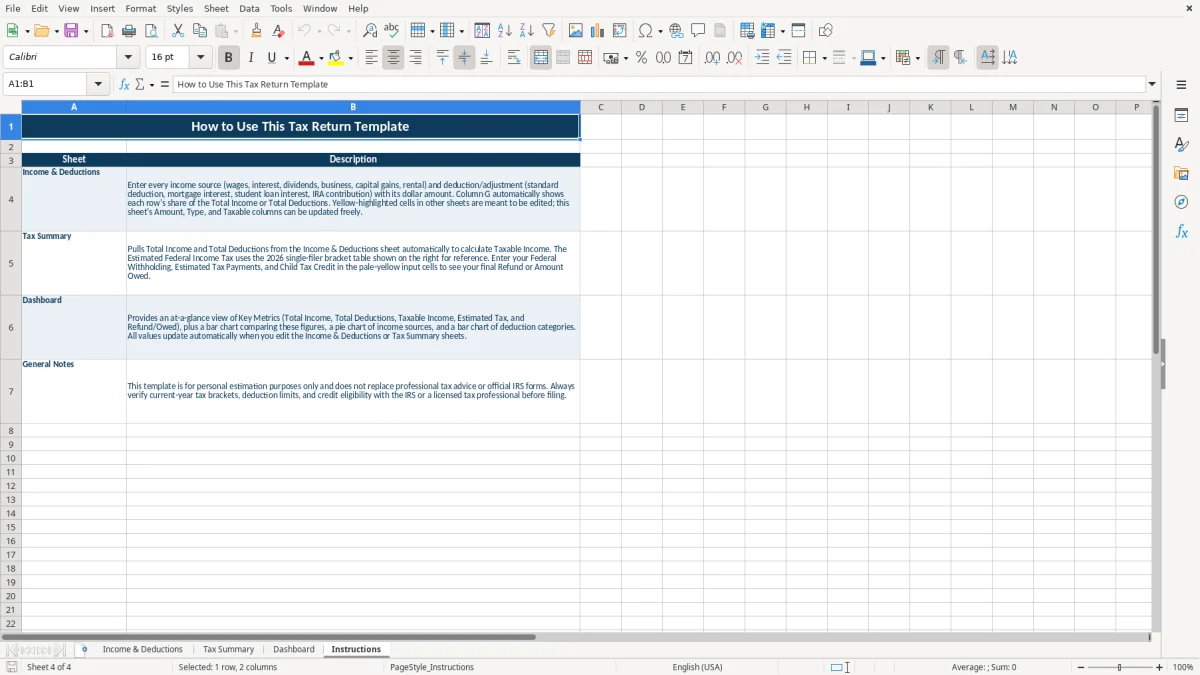
Image 1 shows the Income & Deductions sheet with seven columns: Category, Description, Type, Amount, Taxable (Y/N), Notes, and % of Category Total. Image 2 shows the Tax Summary, image 3 shows the Dashboard, and image 4 shows the Instructions sheet.
The main benefits of this Excel template
- Capture W-2 wages, interest, dividends, business income, capital gains, and rental income in one structured table.
- Separate taxable and potentially nontaxable entries with a visible Taxable (Y/N) field.
- Record supporting references such as 1099-INT, 1099-DIV, Schedule C, Schedule D, and Schedule E in the Notes column.
- Review category percentages through the % of Category Total column instead of relying only on a grand total.
- Use the Tax Summary sheet to consolidate figures before transferring them to Form 1040 or tax software.
- Spot income concentration on the Dashboard before estimating withholding or quarterly payments.
- Keep filing instructions and workbook guidance in the dedicated Instructions sheet rather than mixing them with tax data.
Step-by-step guide
- Open the Income & Deductions sheet and review the existing categories, descriptions, and sample entries before replacing them with your own records.
- Enter each income or deduction item on its own row, including the dollar amount, whether it is taxable, and a useful note such as the source form or account.
- Use consistent categories for recurring items. For example, keep all bank interest under Interest Income and record each brokerage statement separately when the descriptions matter.
- Review the Tax Summary sheet after entering your records. Compare its totals with your W-2, 1099 forms, brokerage statements, rental records, and business bookkeeping.
- Open the Dashboard to look for unusually large categories or missing income sources. A $12,800 Schedule C entry should agree with your business records, not just with a bank deposit total.
- Read the Instructions sheet before finalizing the workbook, then save a dated copy with the source documents used to support each amount.
- Transfer reviewed figures to Form 1040, the applicable schedules, or your tax preparation software. This workbook is a preparation and review tool, not an IRS filing form.
What is included
Income & Deductions sheet with Category, Description, Type, Amount, Taxable (Y/N), Notes, and % of Category Total columns.
Preformatted currency fields using a dollar format with two decimal places, such as $68,500.00 and $320.00.
Taxable-status tracking that lets you distinguish taxable entries from items needing further review.
Separate Tax Summary sheet for a consolidated review of annual figures.
Dashboard sheet with visual summaries for reviewing the composition of the return.
Instructions sheet for workbook guidance and data-entry orientation.
Color-coded layout with navy headers, amber accents, pale-yellow input cells, borders, and wrapped notes.
Who uses a tax return Excel template before filing
A tax return spreadsheet is useful when your tax information arrives from several places instead of one payroll system. A single filer may have a W-2 from an employer, a 1099-INT from a savings account, a 1099-DIV from a brokerage account, and a stock-sale statement that belongs on Schedule D.
A freelancer operating as a sole proprietorship has a different review problem. The owner may receive $12,800 from consulting, pay $2,400 for software and supplies, and need to reconcile those figures to Schedule C and the business bank account before entering anything on Form 1040.
Households with several income sources
For a household with wages of $68,500, interest of $320, dividends of $1,450, capital gains of $3,200, and rental income of $9,600, a loose folder of tax forms does not show the complete picture. Entering each source as a row makes the $83,070 of listed income easy to inspect, while the Taxable (Y/N) column highlights entries that need classification.
The Description and Notes fields are particularly useful during year-end review. You can write Vanguard Brokerage Account beside a dividend entry, note 1099-DIV as the source, and identify whether a rental amount is gross rent or a figure already reduced by expenses.
When the workbook earns its place
Use the file during January and February while tax forms arrive, then update it when a corrected 1099 or missing expense appears. It also works during a quarterly bookkeeping review for a freelancer who wants an early estimate rather than discovering $10,000 of unreserved tax at filing time.
Image 1 shows the practical input structure: seven labeled columns, centered headers, currency amounts, and wrapped notes. Image 2 is the Tax Summary for the second-pass review; image 3 provides a visual dashboard, while image 4 keeps the workbook instructions separate from the numbers.
How the workbook fits federal tax reporting rules
This workbook helps organize information for Form 1040, but it does not calculate every federal tax line or replace the IRS forms. W-2 wages generally flow from Form W-2, bank interest commonly comes from Form 1099-INT, dividends from Form 1099-DIV, business activity from Schedule C, capital transactions from Schedule D and Form 8949, and rental activity from Schedule E.
A business owner must also consider self-employment tax. The combined rate is 15.3%—12.4% for Social Security up to the annual wage base plus 2.9% for Medicare—before considering the special calculation and deductions on Schedule SE. At $12,800 of net Schedule C profit, a rough 15.3% screening estimate is $1,958.40, although the actual taxable base is not simply the gross receipts row.
Estimated payments and withholding
If withholding will not cover your liability, federal estimated payments use Form 1040-ES. The regular due dates for income earned during 2026 are April 15, June 15, September 15, 2026, and January 15, 2027, subject to weekend, holiday, and disaster-related adjustments.
Enter the underlying income and deduction amounts in the workbook rather than treating the Dashboard as a tax bill. Federal income tax uses filing status and progressive brackets, while state income tax, local tax, sales tax, and credits require separate treatment. A rental amount of $9,600 is not automatically $9,600 of taxable rental profit if deductible expenses and depreciation apply.
Records behind each number
Keep the source documents supporting the entries. The IRS generally expects tax records to be retained for 3 years after filing, with longer periods commonly relevant to property, depreciation, loss carryforwards, and unfiled or fraudulent returns.
For a freelancer, retain invoices, receipts, mileage evidence, bank statements, 1099-NEC forms, and expense classifications. For investments, keep purchase dates and cost basis; the $3,200 Apple stock gain cannot be substantiated by a deposit alone.
That same paper trail also keeps taxable purchases and input tax tied to the right period, which is where a VAT record template fits naturally.
The return-preparation errors that create expensive rework
The most expensive spreadsheet mistake is recording gross deposits as taxable profit without identifying the source. A freelancer who deposits $60,000 but includes a $15,000 client reimbursement as revenue may overstate Schedule C receipts by $15,000, while another owner may understate income by leaving a $4,000 1099-NEC off the return because the cash went into a personal account.
Mixing forms, accounts, and tax categories
Interest and dividends are not interchangeable. A $320 1099-INT entry belongs in interest income, while $1,450 of ordinary dividends and any qualified-dividend information require the brokerage statement, not a guess based on the cash transferred to checking.
Capital gains create another failure point. A $3,200 sale proceeds figure is not necessarily a $3,200 gain; the cost basis, acquisition date, holding period, and adjustments determine the result. Omitting a $2,000 basis would inflate the reported gain by $2,000 and could also change the applicable rate treatment.
Deduction and rental distortions
People often enter a full rental collection as rental profit. If a duplex collected $9,600 but had $3,000 of repairs, $1,200 of insurance, and $2,400 of depreciation, the taxable rental result is not $9,600. Treating every expense as deductible without checking its character is just as dangerous as omitting it.
A standard deduction decision can also be made too early. A household with $18,000 of potentially itemized deductions should compare that total with the standard deduction for its filing status rather than entering both. The workbook can organize the evidence, but it should not silently claim a deduction that does not belong on the return.
Why late discovery hurts
Finding a missing 1099 after filing can mean an amended return, additional tax, interest, and time spent reconstructing the original numbers. A $1,000 omission at a 22% marginal federal rate can represent about $220 of federal income tax before state tax, penalties, or self-employment tax.
Another common error is overwriting a sample formula or typing totals into a summary area. Compare the Tax Summary with source forms and bookkeeping totals, and preserve a dated copy before making final changes.
How to make the workbook part of your annual tax routine
A tax file works best when you update it at a fixed point instead of rebuilding it in April. Put a 20-minute tax review on the first Friday after each month-end, then perform a deeper check when January forms arrive and again before the first 2026 estimated-payment deadline.
Use a repeatable review sequence
- Reconcile wages to the year-to-date payroll register and the final W-2.
- Match interest and dividends to each 1099 statement, including accounts with less than $10 of interest that may still appear in your own records.
- Export business income and expenses from bookkeeping, then compare the Schedule C totals with bank activity.
- Review investment basis and rental records before changing a capital-gain or Schedule E amount.
Enter source names consistently in Description and Notes. For example, use Brokerage - Vanguard 1099-DIV rather than alternating between Vanguard, dividends, and investment income; consistent labels make the Dashboard and category review more meaningful.
Protect the input and the evidence
Keep one untouched blank copy and save working files with dates such as Tax Return Review 01-31-2026. Store the workbook with PDFs or scans of the W-2, 1099 forms, receipts, and rental statements, but remove unnecessary Social Security numbers before sharing the file.
Use the pale-yellow input areas for manual entries and avoid typing over calculated cells on the Tax Summary or Dashboard. If a category suddenly shows 80% of total income, investigate the row before assuming the result is correct.
Know when Excel is no longer enough
This workbook is a good fit for one household or a small side business with perhaps 50 to 150 annual entries. Move to bookkeeping or tax software when you have hundreds of transactions, multiple owners, inventory, payroll, foreign accounts, recurring depreciation schedules, or several rental properties that require linked records and audit trails.
Once transactions start spanning multiple owners, foreign accounts, or linked audit trails, a CBAM tracking sheet becomes the next place to organize the added compliance records.
Frequently asked questions about this template
Yes. Use it to organize figures and supporting notes before entering them on Form 1040 and related schedules. It is not an IRS form and does not replace tax software or the official schedules.
The layout includes examples for W-2 wages, 1099-INT interest, 1099-DIV dividends, Schedule C business income, Schedule D capital gains, and Schedule E rental income. Add your own descriptions and source-form notes for each row.
Do not treat the workbook as an exact tax calculator. Federal tax depends on filing status, taxable income, deductions, credits, self-employment tax, withholding, and other Form 1040 schedules; use the Tax Summary and Dashboard for organization and review.
Enter business receipts and deductible expenses separately, identify Schedule C in the Notes column, and reconcile the totals to your business bank account. Remember that net Schedule C profit may also affect self-employment tax and Form 1040-ES payments.
The IRS generally expects tax records to be kept for 3 years after filing, while property, depreciation, loss, unfiled, or fraudulent-return records can require longer retention. Keep the workbook with the source forms and receipts that support its entries.
The four sheets are Income & Deductions, Tax Summary, Dashboard, and Instructions. The first sheet contains the seven-column entry table; the other sheets support summary review, visual analysis, and workbook guidance.
Meet the makers