
Accounting & Tax


CBAM Excel - Free Template
Track shipment emissions, CBAM liability, carbon deductions, certificate prices, compliance status, and costs with this Excel workbook.
2026-07-16
262 downloads
4.8/5
Download template
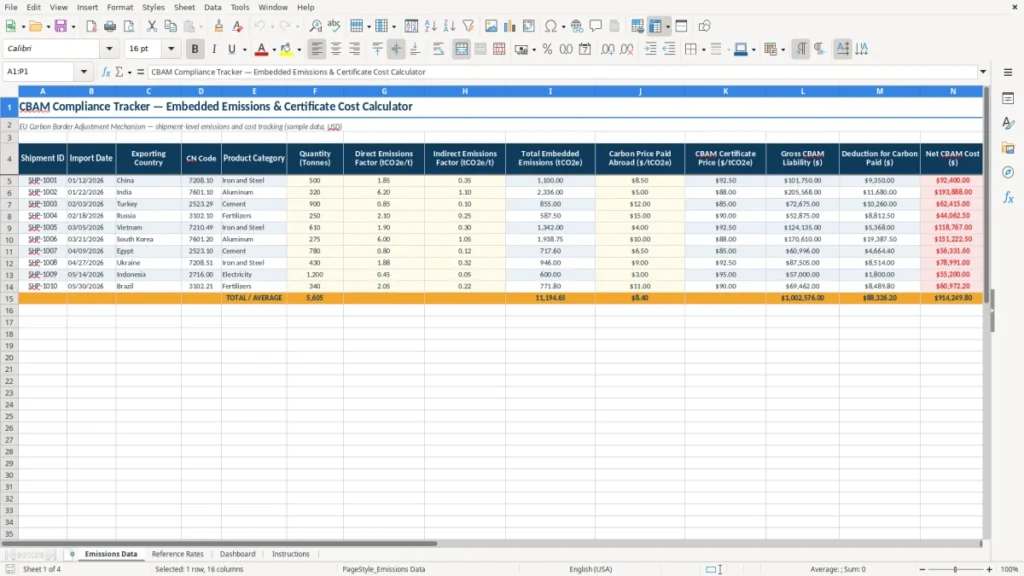
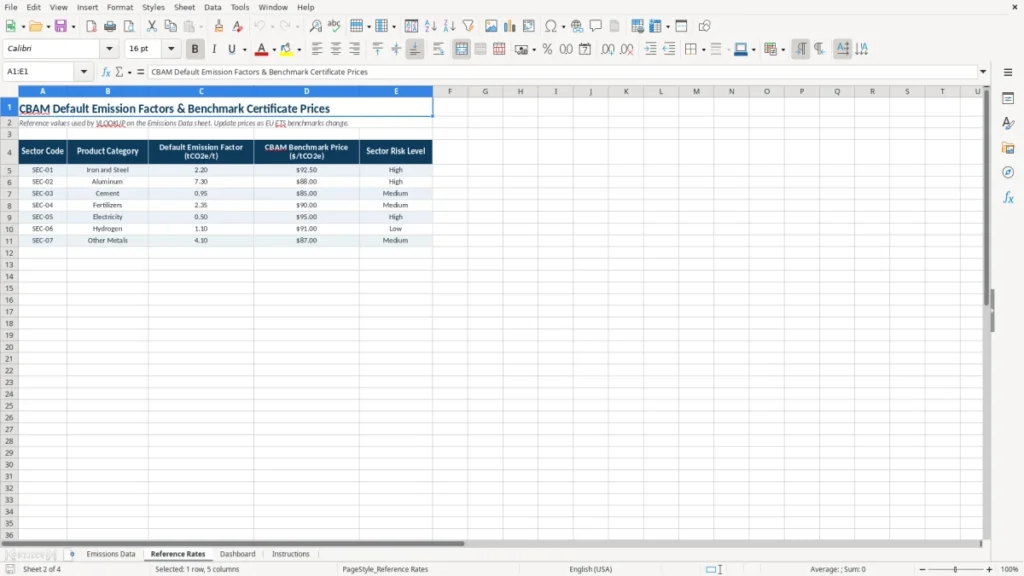
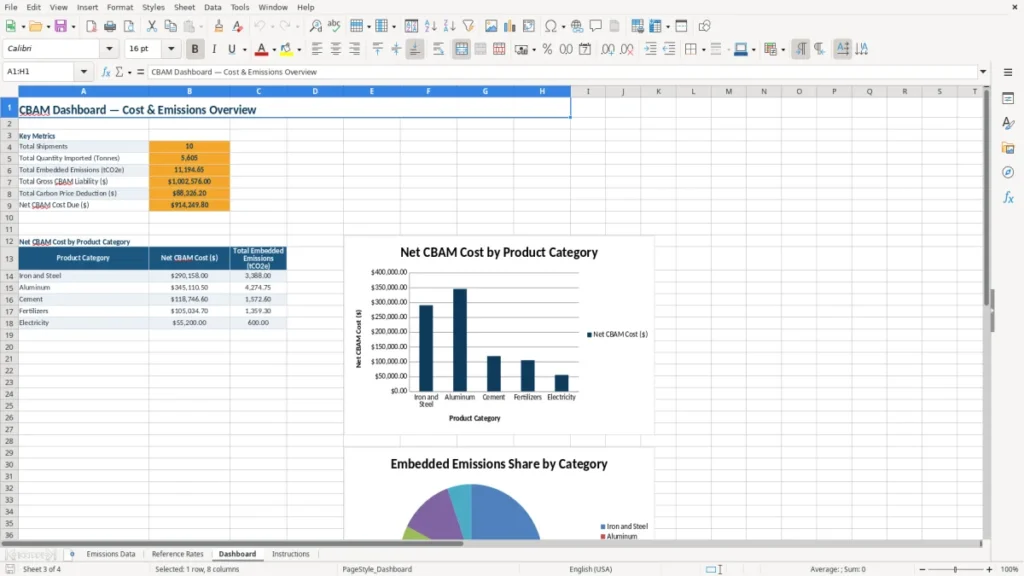
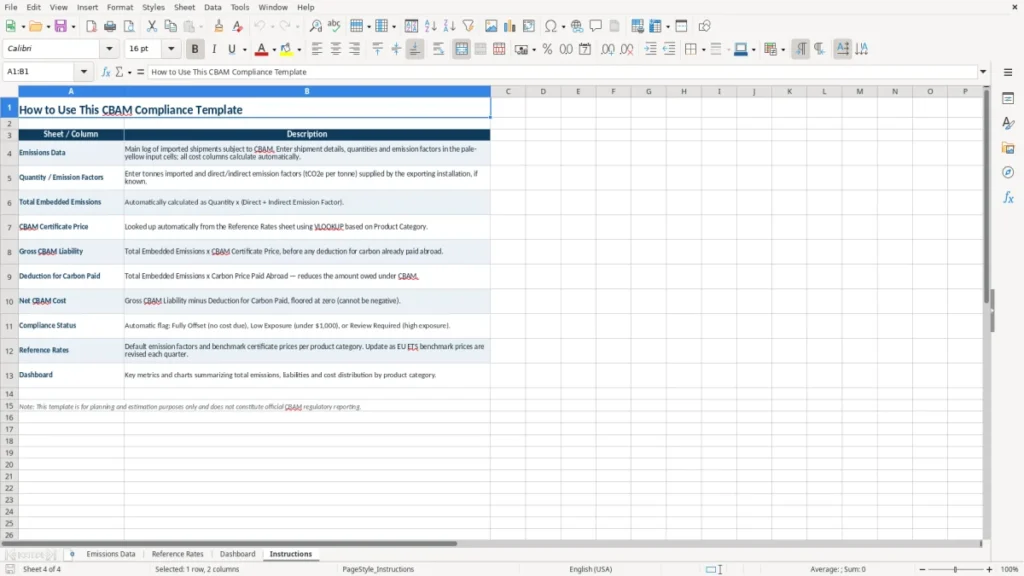
This CBAM Excel template tracks imported shipments, embedded carbon emissions, foreign carbon payments, certificate prices, and estimated net liability. It includes an Emissions Data sheet with 16 shipment-level fields, a Reference Rates sheet, a Dashboard for summary metrics, and Instructions for setup.
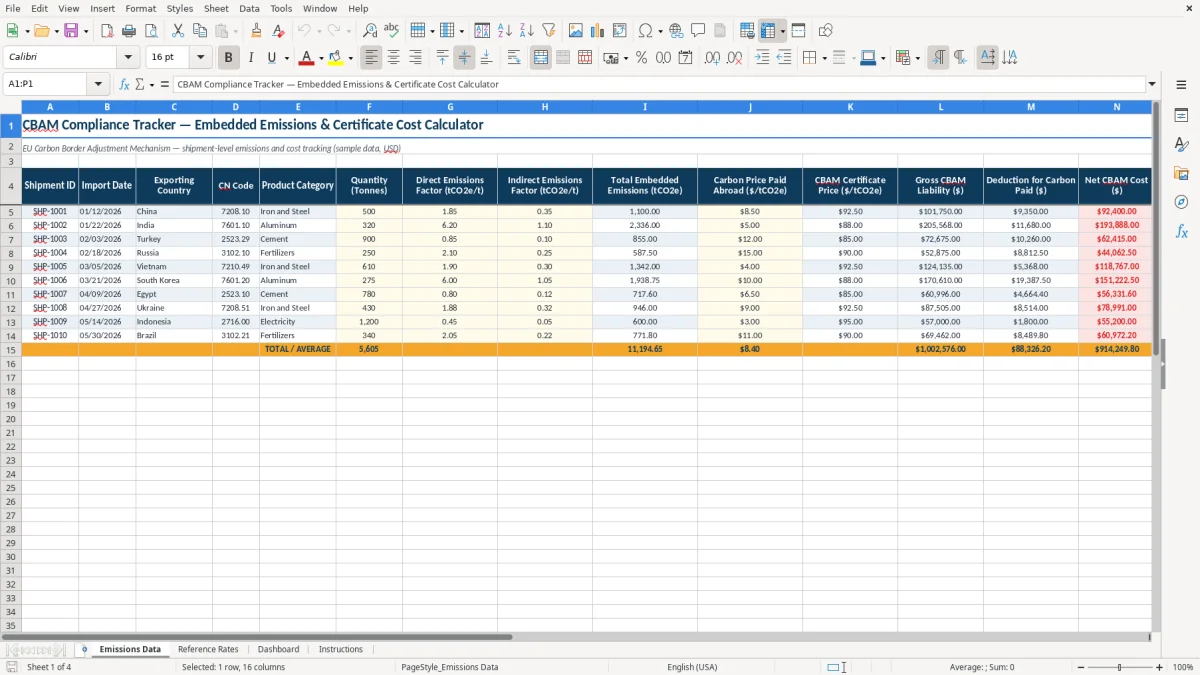
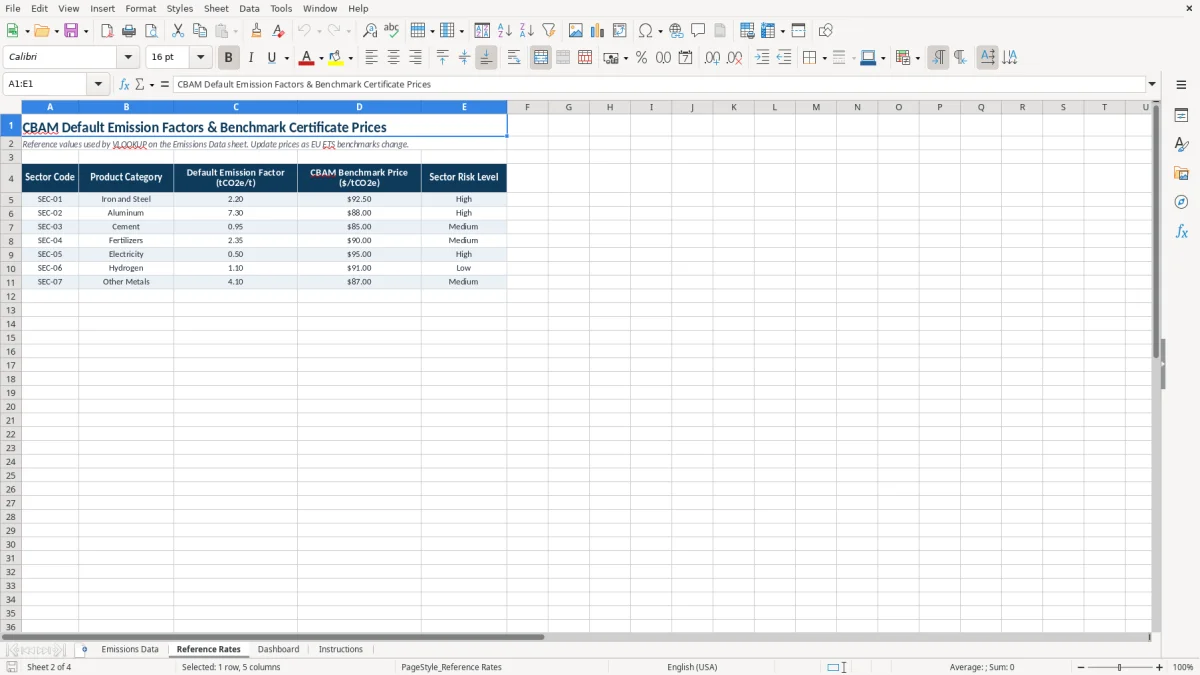
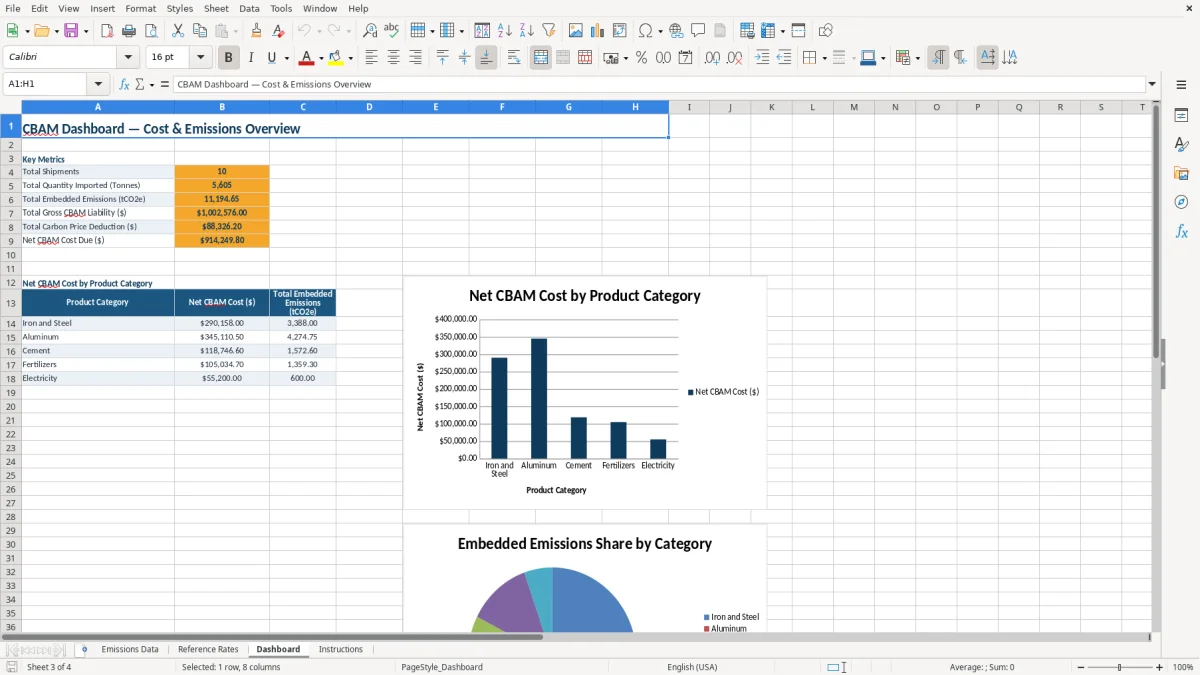
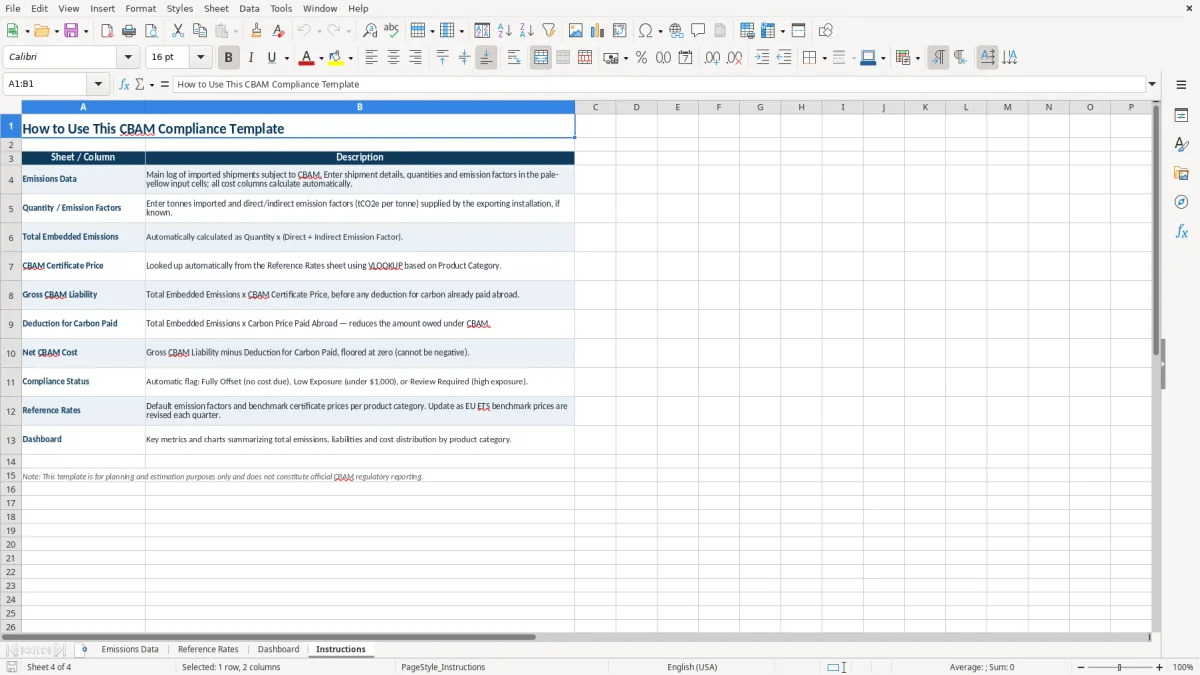
Enter one row per shipment and the workbook calculates total embedded emissions, gross CBAM liability, the deduction for carbon paid abroad, and net CBAM cost. Image 1 shows the shipment table; image 2 shows the reference-rate area; image 3 shows the dashboard; image 4 shows the instructions sheet.
The file uses sample USD data and is best treated as a calculation and review tool, not as an EU customs filing system. You still need source evidence from suppliers and the official European Commission CBAM process.
The main benefits of this Excel template
- Calculate total embedded emissions from shipment quantity and direct and indirect emissions factors.
- Estimate gross CBAM liability by multiplying embedded emissions by the certificate price.
- Subtract documented carbon prices paid abroad to arrive at an estimated net CBAM cost.
- Review shipment IDs, import dates, CN codes, countries, product categories, and notes in one 16-column register.
- Filter the Compliance Status field to find shipments needing documentation or review.
- Compare certificate exposure across shipments on the Dashboard instead of checking rows one at a time.
- Keep the assumptions behind rates and sample inputs visible on the Reference Rates and Instructions sheets.
Step-by-step guide
- Open the Emissions Data sheet and replace the sample rows with your own imports. Use one row for each shipment or other unit your compliance process consistently tracks.
- Enter the Shipment ID, Import Date, Exporting Country, CN Code, Product Category, and Quantity (Tonnes). Keep the CN Code tied to the customs documentation rather than relying on a product nickname.
- Enter the Direct Emissions Factor and Indirect Emissions Factor in tCO2e per tonne. Obtain the values from supplier communications, verified calculations, or the applicable CBAM methodology.
- Enter the Carbon Price Paid Abroad and CBAM Certificate Price in dollars per tonne of CO2e. Record the source, date, and currency treatment in Notes or in your supporting records.
- Review Total Embedded Emissions, Gross CBAM Liability, Deduction for Carbon Paid, and Net CBAM Cost. A shipment with 100 tonnes and a combined factor of 1.80 tCO2e/t represents 180 tCO2e before pricing.
- Set or update Compliance Status and investigate missing factors, missing carbon-price evidence, or unusual results. Use the Reference Rates sheet for the assumptions used in the workbook.
- Use the Dashboard for management review, then retain invoices, customs data, supplier evidence, and calculations with the workbook for the relevant reporting period.
What is included
Emissions Data sheet with shipment ID, date, country, CN code, product category, quantity, emissions factors, prices, costs, status, and notes.
Separate direct and indirect emissions factor fields measured in tCO2e per tonne.
Calculated total embedded emissions and gross liability fields for each shipment.
Separate deduction for carbon paid abroad and net CBAM cost fields.
Compliance Status column for operational follow-up and exception review.
Reference Rates sheet for the assumptions used in the calculation, including sample certificate pricing.
Dashboard and Instructions sheets for summarized review and workbook guidance.
Who uses a CBAM workbook during the import cycle
A US manufacturer or distributor does not submit the EU declaration merely because it buys goods from overseas. The immediate user is usually the EU importer, an indirect customs representative, or a compliance manager working for a non-EU supplier that sells covered goods into the EU. A US exporter may still need to provide production and emissions information so the EU customer can calculate its obligation.
The practical need appears before customs clearance and again during the quarterly review. A procurement manager may have purchase orders and tonnage, while the environmental manager holds the production data and the customs broker holds the CN code. This workbook gives those people a common shipment register instead of leaving the calculation in emails.
What belongs in a shipment row
Image 1 shows the Emissions Data sheet with 16 columns. The row starts with Shipment ID, Import Date, Exporting Country, CN Code, and Product Category, then records Quantity (Tonnes), separate direct and indirect emissions factors, and the resulting Total Embedded Emissions (tCO2e). The final fields cover prices, liability, deduction, net cost, Compliance Status, and Notes.
For example, an importer receiving 100 tonnes of steel with a direct factor of 1.50 and an indirect factor of 0.30 has 180 tCO2e of embedded emissions. At a certificate assumption of $75 per tonne, gross exposure is $13,500 before any documented deduction for carbon paid in the exporting country.
Why the reference and dashboard sheets matter
Image 2 shows the Reference Rates sheet, where you can inspect the assumptions rather than burying a price inside a formula. Image 3 summarizes the data for a management conversation: the person approving a supplier can see whether a $13,500 exposure is caused by tonnage, the emissions factor, or the certificate-price assumption.
Use the file at the start of a buying cycle, when supplier data is requested, and during month-end or quarter-end close. Image 4 shows the Instructions sheet, which is useful when a broker, bookkeeper, or new compliance analyst takes over the file.
What the 2026 CBAM rules require from importers
The Carbon Border Adjustment Mechanism entered its definitive period on 01/01/2026 after the transitional reporting phase. It covers imports into the EU of cement, iron and steel, aluminum, fertilizers, electricity, and hydrogen, together with specified products identified by their CN codes. The CN code is not an optional label: a similar commercial description can conceal a different customs classification and CBAM treatment.
For 2026, an annual de minimis threshold of 50 tonnes applies to most covered goods, excluding electricity and hydrogen. An importer below that threshold for the applicable goods is generally exempt from CBAM obligations, while an importer above it must address authorization, emissions reporting, certificate purchases, and surrender. The threshold is measured against covered imports, not against the number of invoices.
Certificates, prices, and the first surrender
CBAM certificates are priced by reference to the EU Emissions Trading System. For 2026, quarterly certificate prices are based on the average auction price for the quarter, with the European Commission publishing the applicable price after the quarter. Do not hard-code a private estimate as the final rate; update the Reference Rates sheet when the official rate is available.
Certificates for 2026 imports are purchased from February 2027 and surrendered for the 2026 annual declaration by 05/31/2027. The workbook's $/tCO2e fields therefore support forecasting and reconciliation, but the official certificate account and declaration control the legal result.
Evidence behind the deduction
A deduction for carbon paid abroad is not a general discount. It requires evidence that a carbon price was actually paid in the country of origin and that the amount relates to the embedded emissions in the imported goods. For the 180 tCO2e example above, a documented foreign carbon payment of $20 per tonne would support a $3,600 deduction, leaving $9,900 at a $75 certificate assumption.
Keep supplier emissions data, production-method records, customs declarations, quantity records, foreign carbon-payment evidence, and the calculation supporting each row. The Instructions sheet should point users to the evidence location; the spreadsheet itself should not be the only record.
Where CBAM calculations break down and create exposure
The most expensive error is often a plausible number attached to the wrong CN code. A purchasing team may classify a steel component by its product name, while customs uses a code that falls inside or outside the CBAM scope. If 300 tonnes are incorrectly treated as exempt, a later correction can affect the declaration, certificate requirement, supplier relationship, and internal cost forecast at the same time.
The factor that looks complete but is not
Users frequently enter a direct emissions factor and leave indirect emissions at zero because the supplier did not answer the second question. That is not the same as proving zero indirect emissions. At 500 tonnes, omitting 0.25 tCO2e per tonne removes 125 tCO2e from the calculation; at a $75 certificate assumption, the understatement is $9,375.
The opposite error also occurs: a supplier sends a factor in kilograms of CO2e per kilogram of product, and the user enters it as tonnes per tonne without checking units. The numerical value may look reasonable, but a unit conversion error can multiply exposure by 1,000. Put the unit in the field label, retain the supplier file, and reject unexplained estimates.
Foreign carbon payments need proof
A carbon-price invoice, tax receipt, or official payment record may support a deduction; a supplier saying carbon was included in its overhead usually does not. If the workbook subtracts $3,600 without evidence, management may budget the lower $9,900 net cost while the declaration supports only the $13,500 gross liability.
Operational failures around the spreadsheet
Late status updates are another recurring failure. A shipment marked Complete may still have no verified factor, no origin evidence, or no customs tie-out. A four-person importer can lose a full day rebuilding 40 rows before a deadline; a single duplicate shipment could also overstate 100 tonnes and add $7,500 to a $75-per-tonne forecast.
The right control is not a prettier chart. Reconcile shipment IDs and quantities to customs records, flag blank or zero factors, review large changes in net cost, and have someone other than the data-entry user approve the final status.
How to make the CBAM file part of a monthly control routine
Make the workbook part of an existing purchasing or month-end close routine rather than creating a separate environmental task that gets postponed. A practical schedule is to update new imports every Friday, reconcile the file to the customs broker at month-end, and perform a formal quarter-end review when the applicable certificate-price information is released.
Use a fixed review sequence
- Start with shipment IDs and quantities, comparing the register to customs and receiving records.
- Review CN codes and product categories before reviewing dollars. A correct price applied to the wrong scope is still a wrong result.
- Check direct and indirect factors, then investigate blank, zero, or unusually high values.
- Update the Reference Rates sheet with the official 2026 assumption and record the date and source in your supporting documentation.
- Review Net CBAM Cost and Compliance Status with the person responsible for supplier evidence.
For a 40-row monthly file, this sequence can be completed in 20 to 30 minutes once the source reports are consistent. Use Excel's filters to isolate one country, CN code, or status at a time. Keep the raw supplier report unchanged in a separate folder, because overwriting source data makes later review much harder.
Control the inputs, not just the output
Use data validation for Compliance Status and consistent date and number formats. Conditional formatting that highlights missing factors or a negative net cost is more useful than a decorative chart. Image 4 contains the workbook guidance; add your internal evidence path and reviewer initials there if several people use the file.
This template is a good fit while imports are limited and one person can reconcile the rows. Move to a compliance platform or a controlled database when you have hundreds of shipments each month, multiple legal entities, frequent CN-code changes, automated supplier feeds, or a requirement for user-level audit trails. Excel remains useful for a review extract, but it should no longer be the system of record.
Frequently asked questions about this template
It records shipment details and calculates Total Embedded Emissions, Gross CBAM Liability, Deduction for Carbon Paid, and Net CBAM Cost. The main calculation uses quantity multiplied by the direct and indirect emissions factors, then applies the price fields shown in the Emissions Data sheet.
The 2026 definitive regime covers specified imports of cement, iron and steel, aluminum, fertilizers, electricity, and hydrogen. Use the applicable CN code to determine whether a product is covered; a general product description is not enough.
No. It is a shipment-level calculation and review workbook. The authorized EU importer or customs representative must use the official CBAM Registry and submit the required declaration and certificates through the European Commission process.
Enter the applicable 2026 certificate-price assumption in dollars per tonne of CO2e and update it when the official quarterly price is published. The workbook uses the CBAM Certificate Price field for forecasting; do not treat a sample rate as the final legal price.
Yes, a documented carbon price actually paid in the country of origin can support a deduction. Enter the amount in Carbon Price Paid Abroad only when you can connect the payment to the imported goods and retain evidence such as a tax receipt, invoice, or official payment record.
Yes. A US exporter can organize shipment quantities, CN codes, origin information, and supplier emissions data for the EU importer. The exporter is not automatically the CBAM declarant, so agree with the customer on who owns the official declaration and which emissions methodology supports each factor.
Meet the makers