
HR & Payroll


Employee Sickness Record Excel Template
Track employee sickness, absence dates, documentation, absence rates, and return-to-work details with this practical Excel template.
2026-08-03
323 downloads
4.8/5
Download template
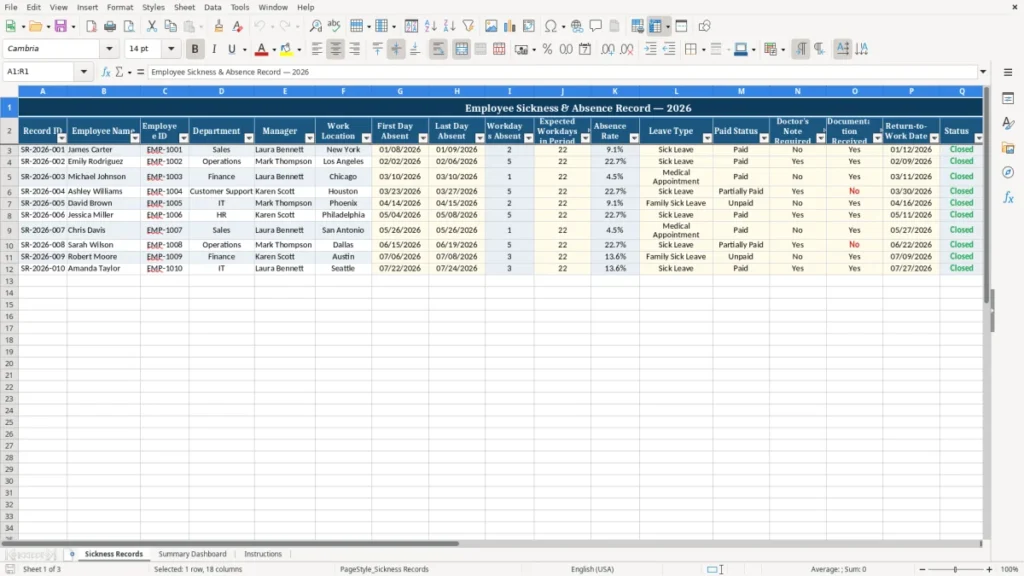
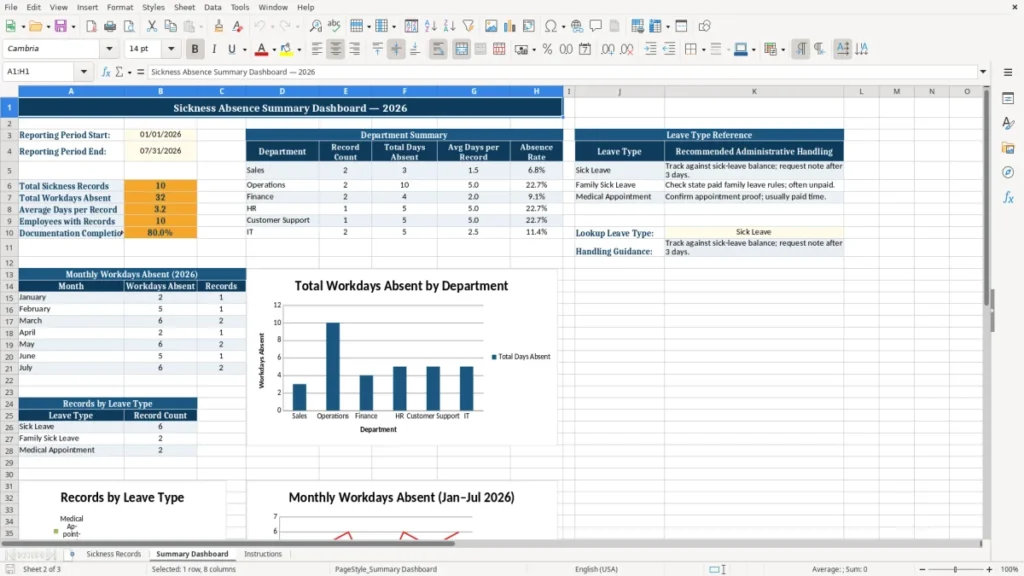
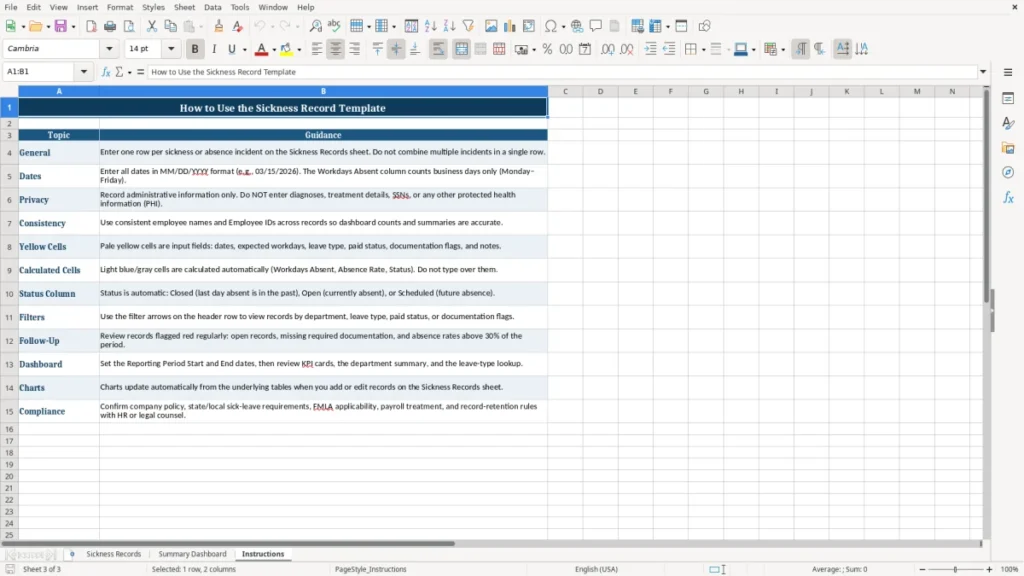
The Sickness Record Excel Template provides a practical way to organize employee sickness and absence information in one structured worksheet. It is designed for HR teams, managers, team leaders, and small business owners who need a consistent record of absence dates, workdays missed, leave details, supporting documentation, and return-to-work information.
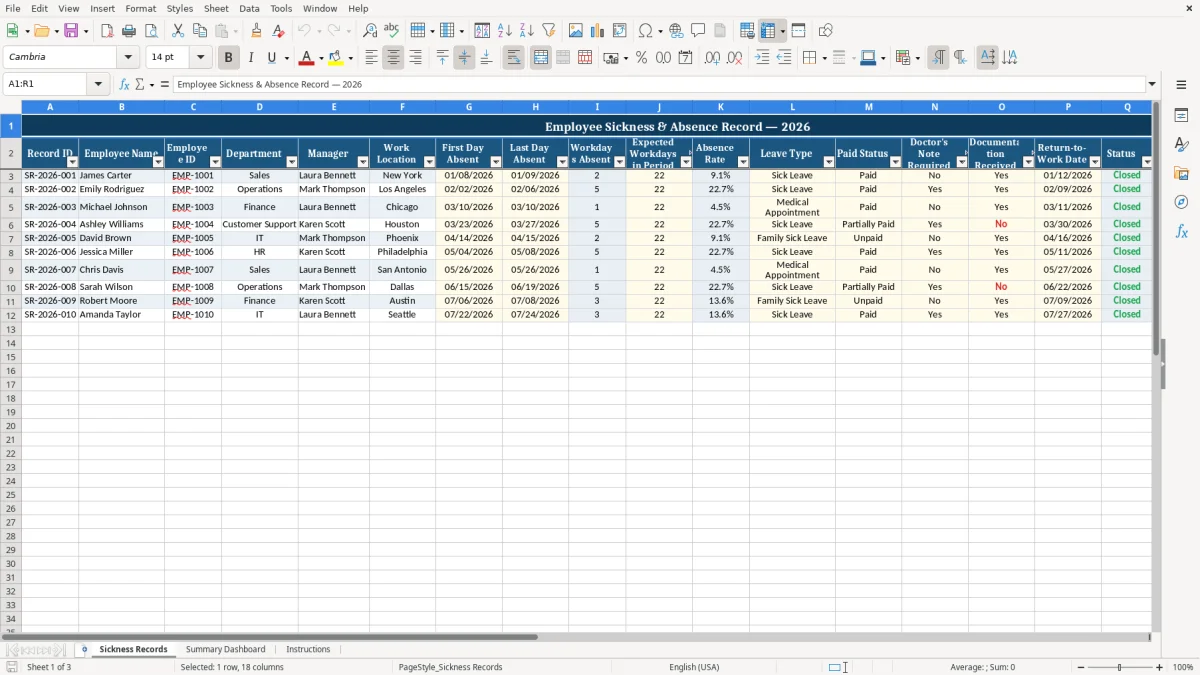
The template includes fields for employee identification, department, manager, work location, absence rate, paid status, doctor's note requirements, documentation received, current status, and notes. Sample 2026 records are included to demonstrate how the worksheet can be completed and adapted to your organization's process.
The main benefits of this Excel template
- Keep employee sickness and absence information together in one organized worksheet.
- Record first and last days absent, workdays missed, and expected workdays for the period.
- Monitor absence rates to support attendance reviews and workforce planning.
- Track whether a doctor's note is required and whether supporting documentation has been received.
- Capture return-to-work dates, status updates, and relevant absence notes.
- Use a clearly formatted layout that can be customized for different teams, departments, or business requirements.
Step-by-step guide
Open the workbook in Microsoft Excel or a compatible spreadsheet application and review the sample records first. Replace the sample information with your own employee and absence data, or add new records beneath the existing entries. Enter the record ID, employee name, employee ID, department, manager, and work location.
Add the first and last day absent, workdays absent, expected workdays in the period, absence rate, leave type, and paid status. Complete the doctor's note requirement and documentation received fields according to your absence policy. When the employee returns, enter the return-to-work date and update the status.
Use the Notes column for concise follow-up details, policy references, or other information authorized for inclusion in your records. Save the workbook securely and restrict access to people who need the information for legitimate HR or management purposes.
What is included
Record ID, employee name, and employee ID fields for consistent record keeping.
Department, manager, and work location fields for organizing absence information.
First day absent, last day absent, workdays absent, and expected workdays in the period.
Absence rate field for reviewing absence levels over a selected period.
Leave type and paid status fields for classifying the absence.
Doctor's note, documentation, return-to-work, status, and notes fields for follow-up administration.
What Is a Sickness Record Excel Template?
A sickness record Excel template is a ready-to-use spreadsheet for recording and reviewing employee sickness or absence information. Instead of keeping separate notes, emails, or informal lists, an organization can use one consistent worksheet to document each absence record.
This template includes columns for a record ID, employee name, employee ID, department, manager, work location, first day absent, last day absent, workdays absent, expected workdays in the period, and absence rate.
The worksheet also includes administrative fields that help with follow-up. Users can identify the leave type, record whether the absence is paid, indicate whether a doctor's note is required, and confirm whether documentation has been received.
A return-to-work date, status field, and notes area provide space for recording the next stage of the absence process. These details can help HR staff and managers maintain a clearer overview of open and completed records.
The included sample data uses 2026 employee absence examples to show how information may appear in the completed sheet. The sample records can be replaced, removed, or retained as a guide.
Since the workbook is built in Excel, users can adapt labels, add rows, filter records, and apply their own internal procedures. The template is suitable for small businesses, departments, and teams that want a straightforward starting point for sickness administration without building a spreadsheet from scratch.
Benefits of Tracking Employee Sickness in Excel
Consistent sickness tracking can make absence administration easier to manage. A structured Excel worksheet gives HR professionals and managers a shared place to record important information and reduces the risk of leaving key fields out of an absence record.
By using the same columns for every entry, an organization can compare records more easily and identify which information still needs to be completed.
The template supports both day-to-day administration and broader attendance reviews. First and last absence dates help establish the period involved, while workdays absent and expected workdays provide useful context for reviewing absence rates.
Department, manager, and work location fields can help users organize records for internal discussions or workforce planning. Leave type and paid status can also support a clearer understanding of how an absence has been classified under the organization's own policy.
Documentation fields provide a simple way to record whether a doctor's note is required and whether it has been received. The return-to-work date and status fields help users follow progress after an employee's absence.
Notes can be used for concise, authorized comments such as a policy-related reminder or a statement that documentation is on file. A consistent process can save time, improve handovers, and make routine updates easier to review.
Excel also offers flexibility. Users can filter, sort, print, or customize the worksheet as their requirements change. However, the template should always be used with appropriate privacy controls and in accordance with applicable employment, health information, and data-protection requirements.
How to Maintain Accurate Sickness Records
Accurate sickness records begin with a clear process for entering information. Add each absence as soon as practical and use a unique record ID so the entry can be identified without confusion.
Enter the employee name and employee ID consistently, then check the department, manager, and work location fields before saving the record. Consistent spelling and naming conventions make filtering and reviewing the worksheet more reliable.
Dates should be entered carefully. Record the first and last day absent using the same date format throughout the workbook.
Confirm the number of workdays absent and the expected workdays in the period, particularly when the absence crosses a weekend, holiday, or scheduled non-working day. If the absence rate is calculated or entered as a percentage, use the same calculation method for all records and document that method in your internal process.
Use the leave type and paid status fields according to your organization's policy. The doctor's note and documentation fields should reflect the current position, not an assumption.
If documentation is later received, update the record and add a concise note if necessary. When the employee returns, enter the return-to-work date and update the status promptly so open records can be distinguished from completed ones.
Regular reviews can help identify incomplete fields and outdated statuses. Limit access to authorized people, store the file in a secure location, and avoid adding unnecessary medical details to the Notes column. The template is an administrative tool, not a substitute for professional HR, legal, medical, or data-protection guidance.
Customizing the Sickness Absence Spreadsheet
The Sickness Record Excel Template is designed as a flexible starting point. Before using it for live records, review the included headings and compare them with your organization's absence policy.
You may want to add approved leave categories, internal status options, cost-center information, team names, or a field for the person responsible for follow-up. Unneeded columns can be hidden or removed if they are not relevant to your process.
Sample entries are included to demonstrate the intended layout and can be replaced with your own data. Create a consistent format for record IDs, employee IDs, departments, locations, and dates.
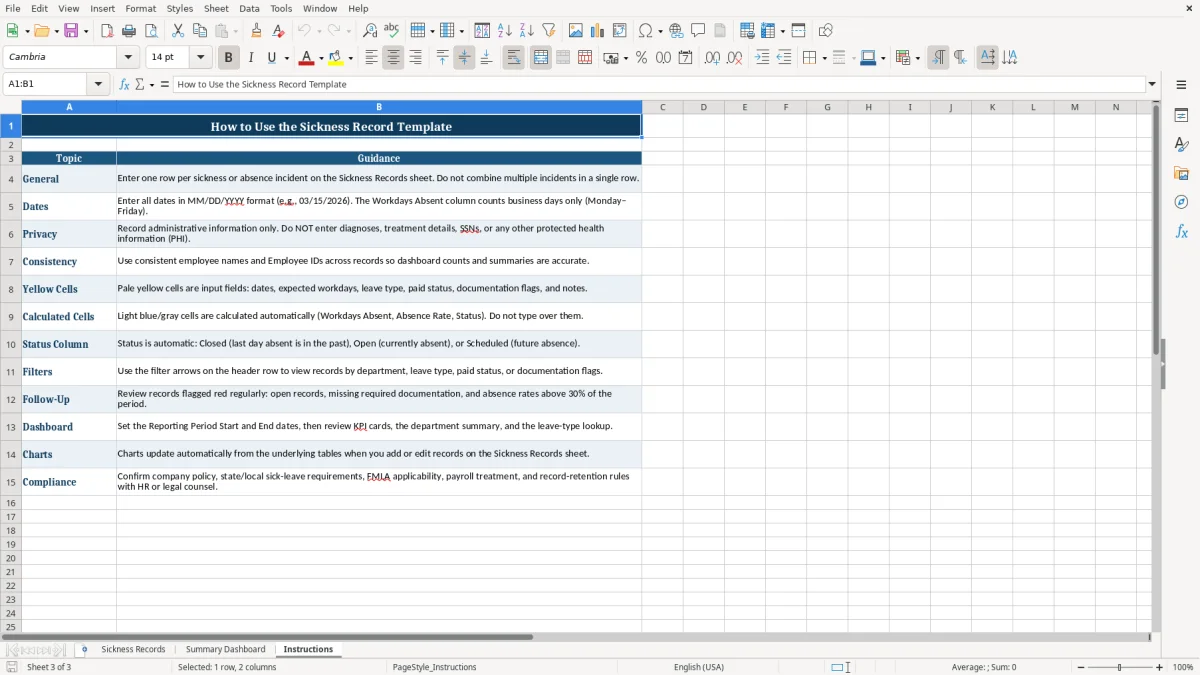
If several people will update the workbook, provide simple instructions so that everyone enters information in the same way. You can also use Excel filters and sorting tools to review records by department, manager, leave type, status, or date range.
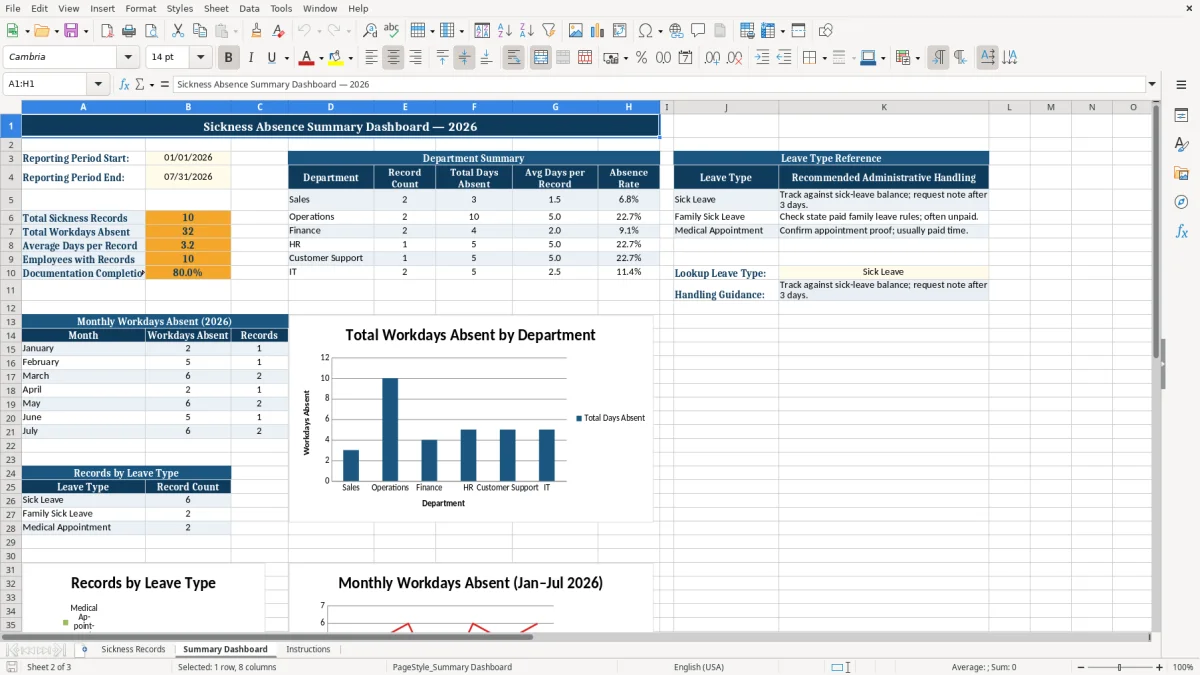
For management reporting, you may create a separate summary sheet using approved and appropriately protected information. The main worksheet already provides useful fields for reviewing workdays absent, expected workdays, and absence rates.
Any formulas, summaries, or classifications should match the definitions used by your organization. Test changes with sample records before relying on the workbook for regular reporting.
Because sickness information can be sensitive, apply suitable security measures. Save the file in an approved location, control permissions, use password protection where appropriate, and follow retention and deletion rules.
Keep notes factual and limited to the information required for administration. With these adjustments, the template can support a practical, repeatable sickness-record process for a small business, department, or wider HR team.
Frequently asked questions about this template
The template includes employee details, absence dates, workdays absent, expected workdays, absence rate, leave type, paid status, documentation fields, return-to-work date, status, and notes.
HR professionals, managers, team leaders, and small business owners can use it to organize and review employee sickness and absence records.
Yes. The workbook includes sample 2026 employee absence records to demonstrate how the worksheet can be completed.
Yes. You can add, remove, or adapt fields, labels, departments, leave types, statuses, and notes to match your organization's process.
Yes. Dedicated fields allow you to record whether a doctor's note is required and whether the relevant documentation has been received.
Yes. The worksheet includes a Return-to-Work Date field, along with Status and Notes fields for follow-up information.
Meet the makers