
Accounting & Tax


Plumbing Invoice Excel - Free Template
Plumbing invoice Excel template with invoice entry, customer records, invoice data, and summary reporting for plumbing contractors.
2026-08-25
367 downloads
4.8/5
Download template
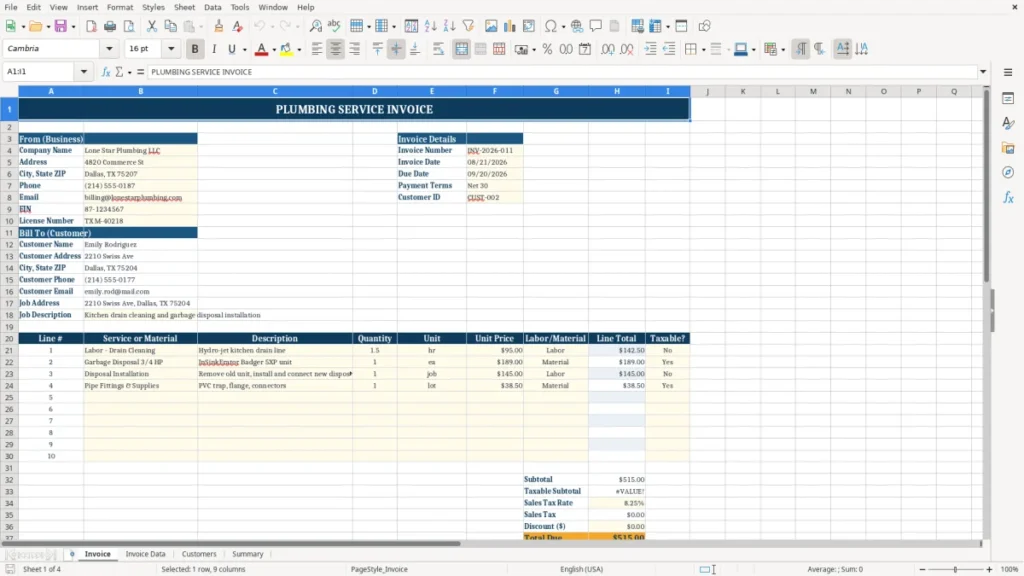
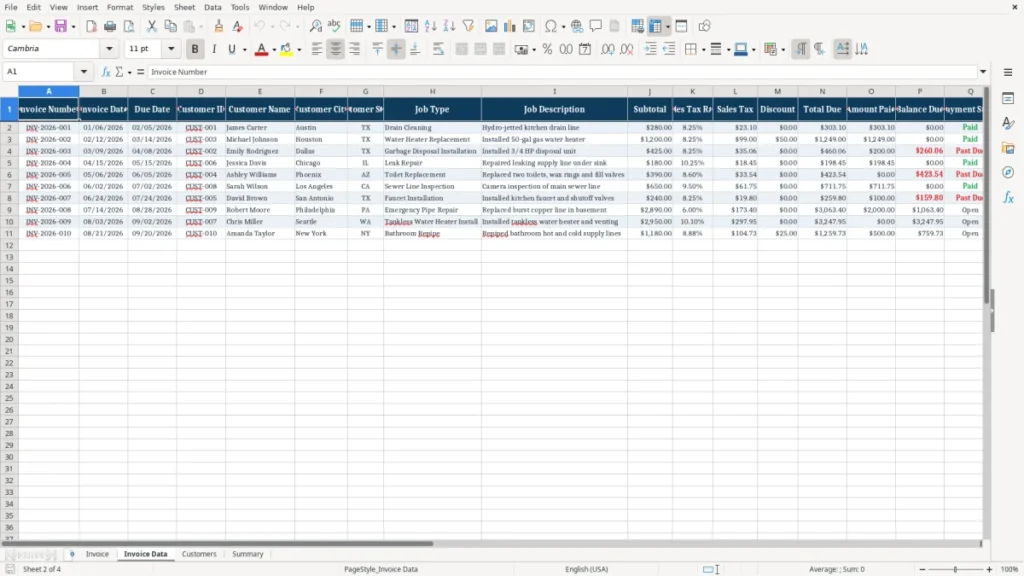
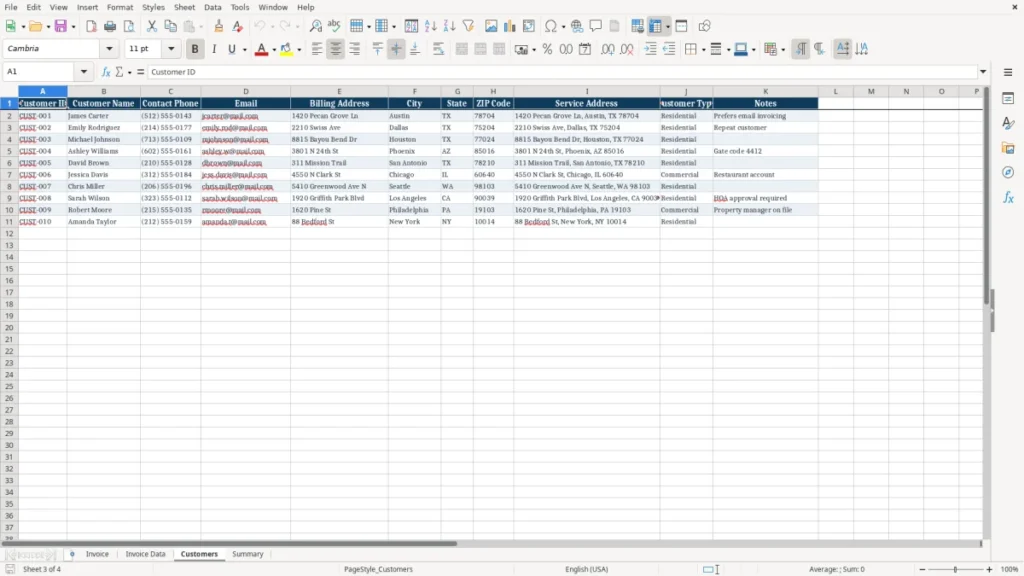
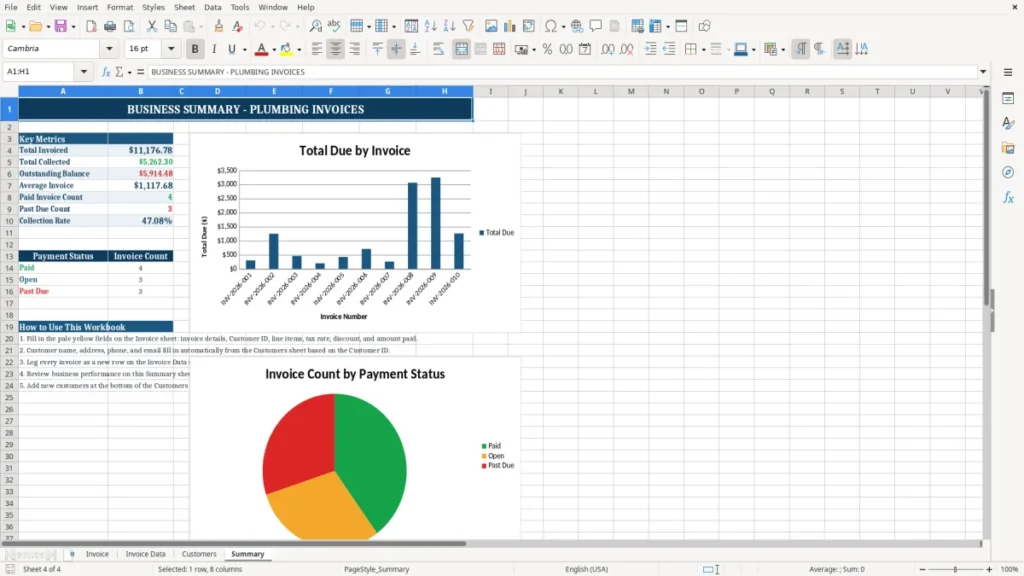
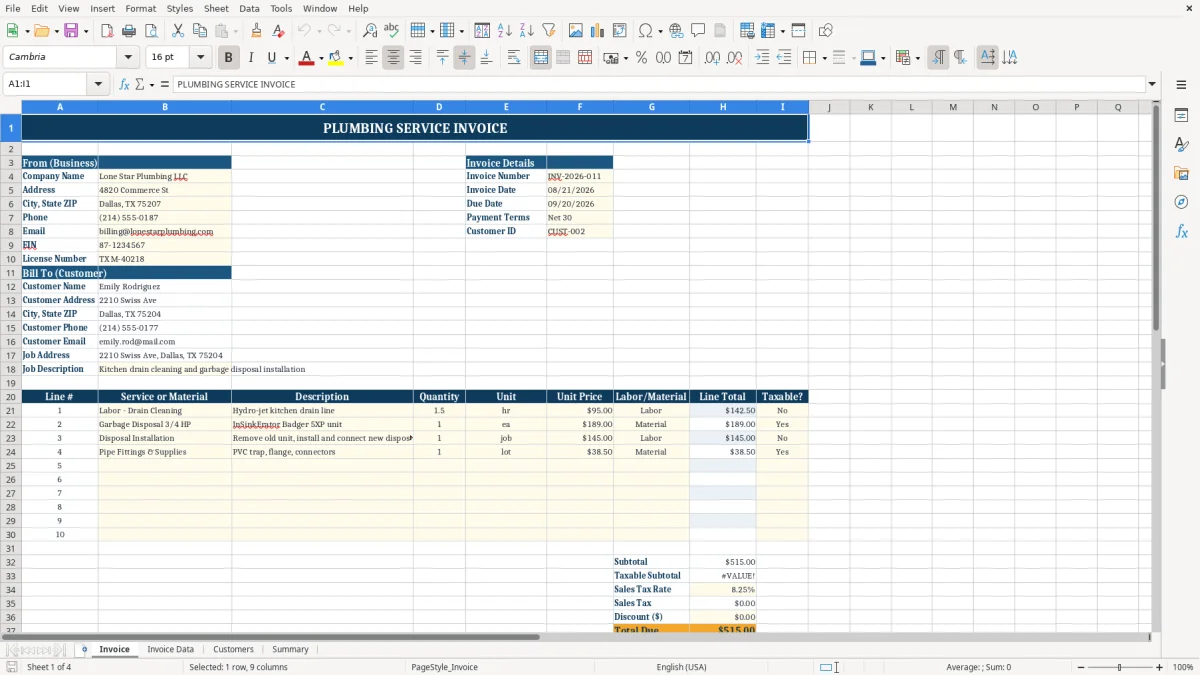
A plumbing invoice Excel template is a ready-to-use billing workbook for recording plumbing services, materials, customer details, and amounts due. It includes an Invoice sheet for the customer-facing bill, Invoice Data for stored transactions, Customers for contact records, and Summary for sales tracking.
Use it for a clogged-drain service call, water-heater installation, repiping job, or emergency repair. The workbook uses dollar formatting, highlighted input areas, customer lookup data, and a structured invoice history so you can prepare a $450 repair bill without rebuilding the layout each time.
The main benefits of this Excel template
- Prepare consistent invoices for service calls, installations, maintenance, and emergency plumbing work.
- Keep customer names, phone numbers, email addresses, billing addresses, and service addresses in one Customers sheet.
- Separate the customer-facing invoice from the underlying Invoice Data records for cleaner bookkeeping.
- Record labor and materials in a repeatable format instead of relying on handwritten job notes.
- Review invoice activity and totals in the Summary sheet before your monthly close.
- Use the existing currency and date formats to reduce entry errors on amounts and invoice dates.
- Give an office manager or bookkeeper a shared structure for billing a plumbing business with multiple technicians.
Step-by-step guide
- Open the Customers sheet and replace the sample customer records with your actual customer ID, name, phone, email, billing address, city, state, ZIP Code, service address, customer type, and notes.
- Go to the Invoice sheet and enter the invoice number, invoice date, customer information, job details, and the plumbing services or materials provided.
- Use clear descriptions such as drain cleaning, faucet replacement, copper pipe, permit fee, or water-heater labor. Enter each charge on its own line so the customer can understand the bill.
- Check the service address carefully, especially when the billing address belongs to a property manager or landlord. Confirm that the customer name and contact details match the Customers sheet.
- Review the dollar amounts, subtotal, sales tax if applicable, and final amount due before sending the invoice. Keep the invoice number unique, such as PL-2026-0047.
- Save or print the completed Invoice sheet for the customer, then preserve the transaction details in Invoice Data for your billing history.
- Review Summary at the end of each week or month to compare recorded invoices with your accounting records and outstanding collection work.
What is included
Invoice sheet with a formatted, customer-facing layout for plumbing billing.
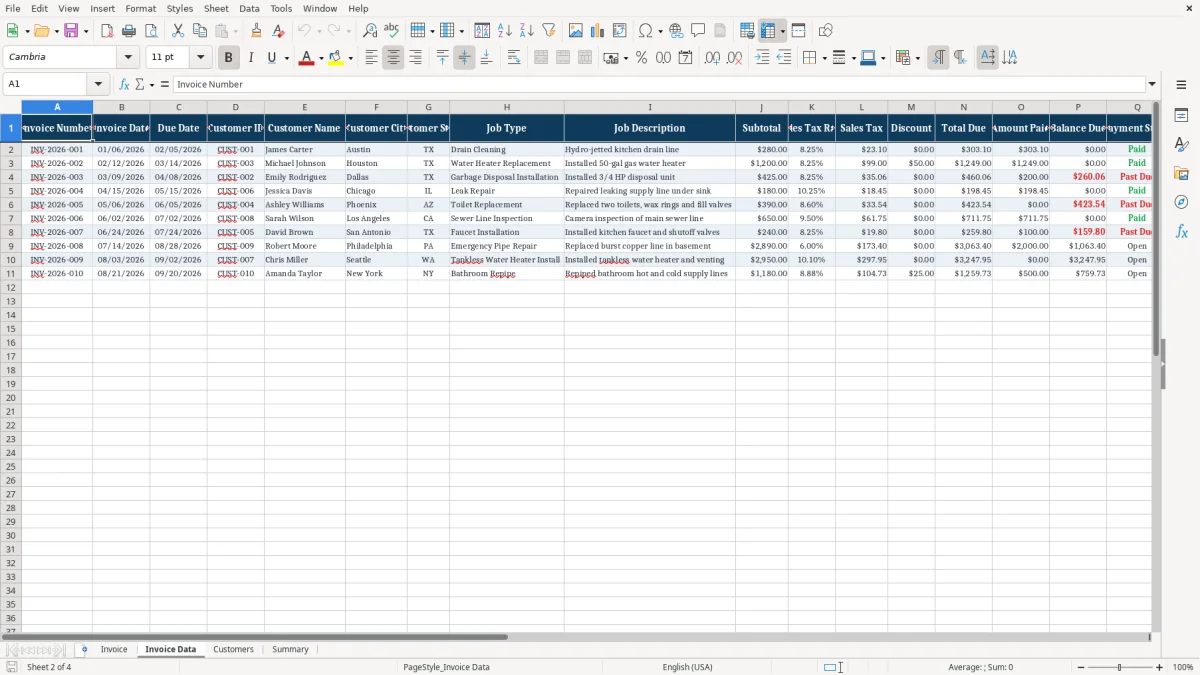
Invoice Data sheet for organizing invoice records separately from the printable invoice.
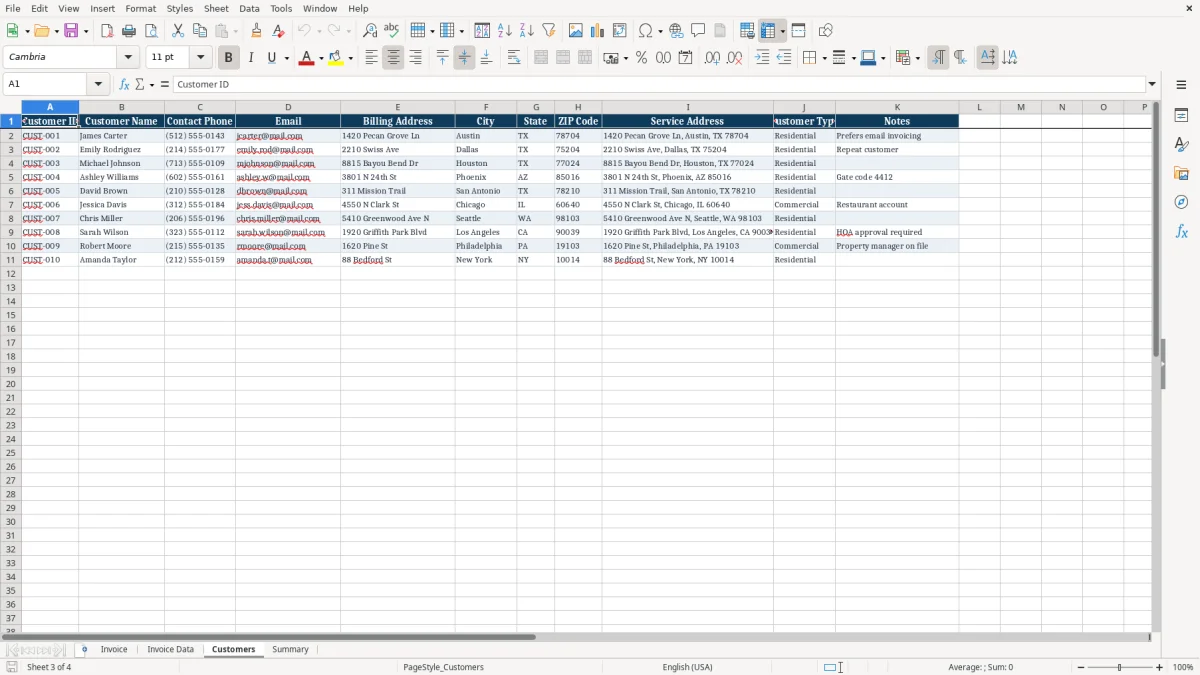
Customers sheet with fields for Customer ID, Customer Name, Contact Phone, Email, Billing Address, City, State, ZIP Code, Service Address, Customer Type, and Notes.
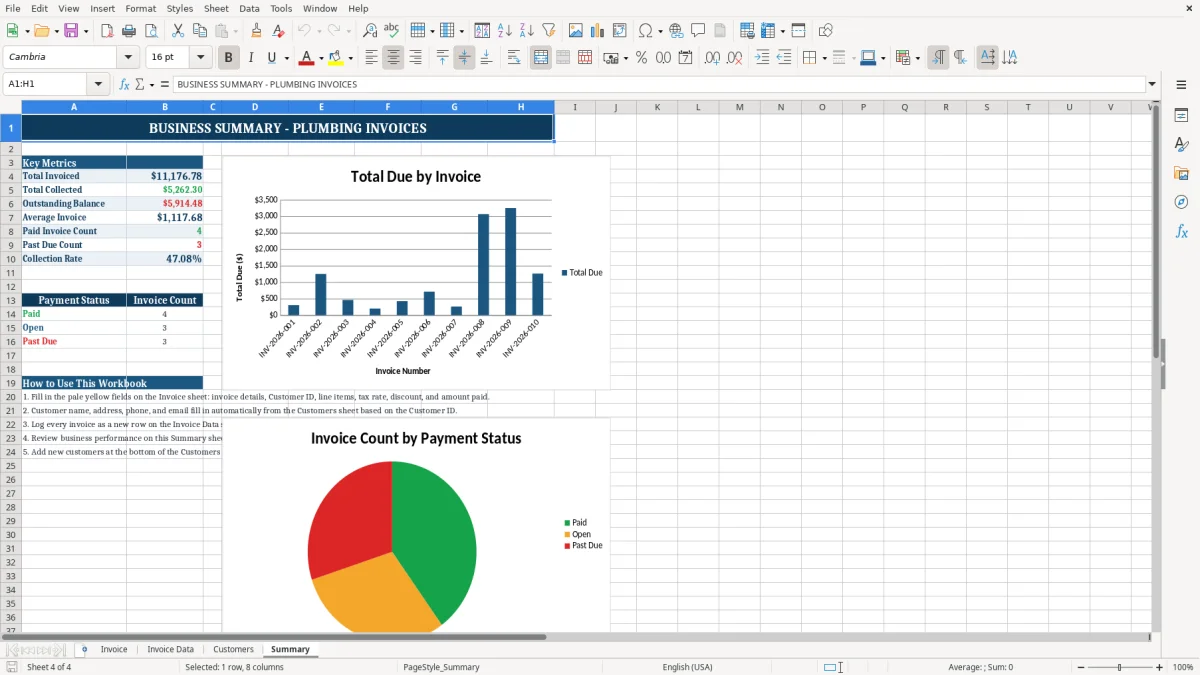
Summary sheet for reviewing invoice activity and business billing information.
Currency formatting displayed as $1,234.56 and date formatting displayed as MM/DD/YYYY.
Navy, blue, amber, white, and pale-blue formatting that separates headings, inputs, and report areas.
Structured fields for distinguishing a customer's billing location from the address where the plumbing work occurred.
Who uses a plumbing invoice Excel template during the workweek
A plumbing invoice Excel template suits a small plumbing company that needs a dependable bill after each completed service call. A sole proprietor may use it from a service van, while an office manager at an LLC can prepare invoices from job tickets submitted by four field technicians.
The need usually appears immediately after the job, not at year-end. A technician clears a blocked sewer line on Tuesday, replaces a $185 pump, and records 2.5 hours of labor at $110 per hour. The office then has enough detail to issue an invoice for $460 before adding any applicable sales tax or permit charge.
Service businesses need two addresses
Plumbing billing often involves a customer who pays from one location while the work happens somewhere else. A property manager may have a billing address in Dallas and a service address for a rental home in Fort Worth. The Customers sheet includes both Billing Address and Service Address, along with City, State, and ZIP Code, so the invoice does not send a technician or payment request to the wrong place.
That distinction matters for homeowners, landlords, general contractors, and commercial facility managers. For example, a contractor overseeing three retail locations may need invoices addressed to the company headquarters while identifying the repaired location on each bill.
Where the four sheets fit
Image 1 shows the Invoice sheet, the formatted area used for the actual bill. Image 2 shows Invoice Data, where invoice information can be kept as a separate transaction record. Image 3 shows Customers with contact and address columns, and image 4 shows Summary for reviewing the billing information.
For a business issuing 30 invoices each month, that separation is more useful than keeping every detail in one oversized printout. You can prepare the customer document on Invoice while retaining a consistent internal record for bookkeeping and follow-up.
Sales tax and invoice records for plumbing contractors
A plumbing invoice can contain both taxable and nontaxable components, depending on the state and the transaction. Sales tax is imposed by state and local jurisdictions; Alaska, Delaware, Montana, New Hampshire, and Oregon do not impose a statewide general sales tax, while other states may tax materials, labor, or bundled repair charges under their own rules.
Do not treat a blank tax line as proof that no tax is due. If a $600 water-heater installation includes $450 of equipment and $150 of labor, a state may apply tax differently from a $600 repair service. Your invoice should identify the itemized amounts and the sales-tax rate used rather than burying the charge in one vague total.
What an invoice should identify
For practical US bookkeeping, include the seller's legal business name and address, the customer's name and address, a unique invoice number, invoice date, service address, itemized services and materials, payment terms, and the amount due. An EIN may identify the business, although a sole proprietor may use an SSN when a tax form requires it; do not place an SSN on an invoice unless there is a specific reason.
Use invoice numbers such as PL-2026-0001 and PL-2026-0002 rather than resetting the sequence for every customer. A $1,200 commercial repair should remain traceable to the job ticket, deposit, payment, and accounting entry.
Connection to tax and bookkeeping
A sole proprietor generally reports plumbing income and expenses on Schedule C with Form 1040. Net profit also feeds self-employment tax, generally 15.3% before applicable wage-base and deduction calculations: 12.4% Social Security plus 2.9% Medicare. An LLC may use the same reporting approach, while an S-corp must separately manage reasonable compensation and payroll.
Keep invoice copies and supporting job records for at least 3 years under the general IRS recordkeeping period, and longer when property, losses, or other circumstances require it. The workbook helps preserve invoice detail, but it does not replace a sales-tax return, payroll system, or full general ledger.
For export-heavy businesses, that record trail may also need a CBAM compliance file to document the goods data and supporting amounts behind each shipment.
The billing failures that cost plumbing businesses money
The most expensive invoice problems are usually small omissions repeated across dozens of jobs. A plumber may write emergency repair on a bill, omit the 3 replacement valves, and lose the ability to defend a $96 materials charge when the customer questions the total.
At 20 invoices a month, an unbilled $35 supply charge on only six jobs costs $210 monthly, or $2,520 annually. That is not a theoretical margin issue; it can pay for fuel, insurance, or a software subscription that the business is currently absorbing.
Labor and materials disappear in different ways
Field notes often show 3 hours on-site, but the invoice records only 2 hours because travel or cleanup was forgotten. At a $125 hourly rate, one missing hour on five jobs removes $625 from monthly revenue. The opposite problem also occurs when a copied invoice retains the prior job's labor quantity and overbills a customer.
Material descriptions need enough detail to support the charge. Pipe, fittings, shutoff valves, disposal fees, permit fees, and equipment should not be collapsed into one unexplained line when a commercial customer requires documentation.
Customer and service addresses get mixed
A landlord may receive the bill while the tenant's home is the work location. If the invoice shows only the landlord's mailing address, the customer may not know which property generated a $780 repair. The Customers sheet's separate billing and service address fields reduce that confusion, but you still need to verify the address for every job.
Payment follow-up becomes impossible
Invoices without unique numbers create duplicate records and weak collection trails. If two bills both say Invoice 12, a customer paying $500 may be credited to the wrong job, leaving a second balance open. Use a sequential number, record the transaction in Invoice Data, and compare Summary with your bank deposits during the month-end close.
That same month-end review should also be matched against the facilities budget to confirm repair spending stays within plan.
How to make invoice entry part of the plumbing routine
The workbook works best when invoice entry is tied to a fixed event. Make the invoice the final step in closing a job: the technician submits the time and materials, the office checks the service address, and the invoice is completed before the next morning's dispatch list is prepared.
For a four-employee plumbing contractor, a 15-minute billing review after the daily dispatch meeting can prevent a Friday pileup of 18 incomplete tickets. If each missing ticket takes 8 minutes to reconstruct, that backlog consumes 144 minutes before anyone even contacts a customer.
Use a short control routine
- Assign the next invoice number before sending the bill, and never reuse a number after cancellation.
- Compare the Invoice sheet with the technician's job ticket: hours, equipment, materials, permit fees, and service address.
- Review Invoice Data every Friday and match recorded payments to the bank or accounting system.
- Open Summary at month-end and investigate any difference between billed work and deposited cash.
Keep the inputs clean
Use consistent customer names and customer IDs instead of entering James Carter, J. Carter, and Carter Plumbing in separate forms. Consistent labels make filtering and reconciliation practical when the business reaches 100 invoices or more.
Save a clean master copy before entering a new job. After completing an invoice, save the file with the invoice number or customer and date, such as PL-2026-0047-Carter-06-18-2026. Protect the master from accidental edits and store completed files in a restricted business folder because phone numbers, email addresses, and addresses are personal information.
Know when Excel is no longer enough
Excel is a reasonable choice for a small operation with one billing person and fewer than roughly 100 invoices a month. Move to dedicated field-service or accounting software when several technicians edit jobs simultaneously, recurring service agreements need automatic billing, inventory must be tracked by truck, or collections require automated reminders and payment links.
Frequently asked questions about this template
The workbook contains four sheets: Invoice, Invoice Data, Customers, and Summary. Invoice is the customer-facing billing sheet, Invoice Data stores invoice information, Customers holds customer and address fields, and Summary provides a billing overview.
Yes. Enter labor, fixtures, pipe, fittings, equipment, permit fees, disposal charges, and other job-related items as separate invoice lines. Itemizing a $220 faucet, 2 hours at $110, and a $35 disposal fee is clearer than entering one $475 repair charge.
The workbook provides a structured invoice layout and dollar formatting, but you remain responsible for entering and verifying the applicable sales-tax treatment. Tax rules differ by state and locality, and some jurisdictions treat plumbing labor and materials differently.
Yes, especially when you bill landlords, property managers, general contractors, or commercial customers. The Customers sheet includes separate Billing Address and Service Address fields so a $900 repair can be tied to the correct property.
Yes. A sole proprietor can use it to document income for Schedule C bookkeeping and maintain invoice records for customer follow-up. Keep the invoice history with job tickets, receipts, deposits, and other records; the general IRS recordkeeping period is at least 3 years.
Use a unique sequence such as PL-2026-0001, PL-2026-0002, and PL-2026-0003. Record the number in your Invoice Data history and do not reuse it for a different customer or job, even if the original invoice is canceled.
Meet the makers