
Accounting & Tax


Facilities Management Budget Excel - Free Template
Track site expenses, variances, vendors, and payment status with Budget Tracker, Summary, Lookup Lists, and Instructions.
2026-07-10
196 downloads
4.8/5
Download template
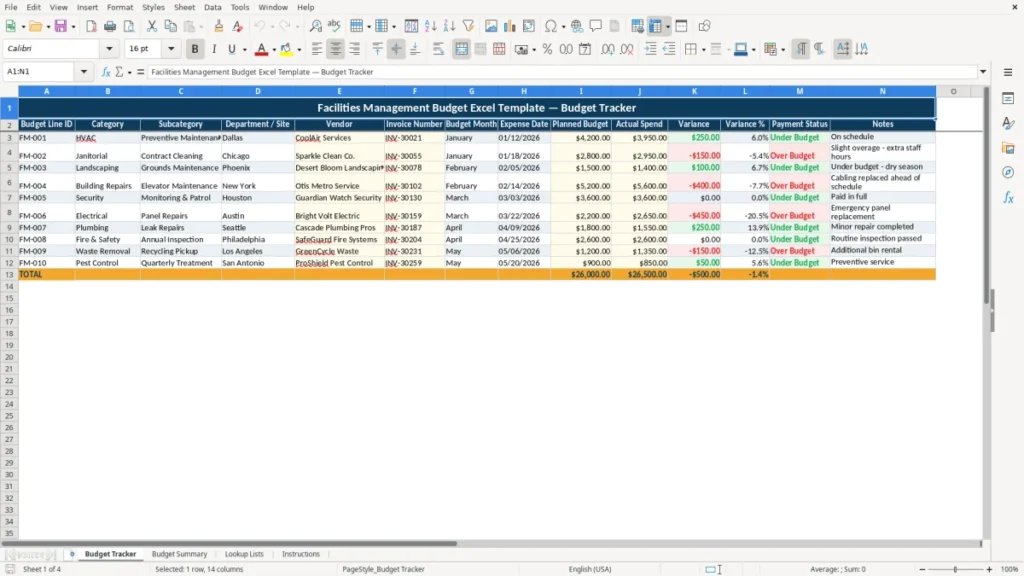
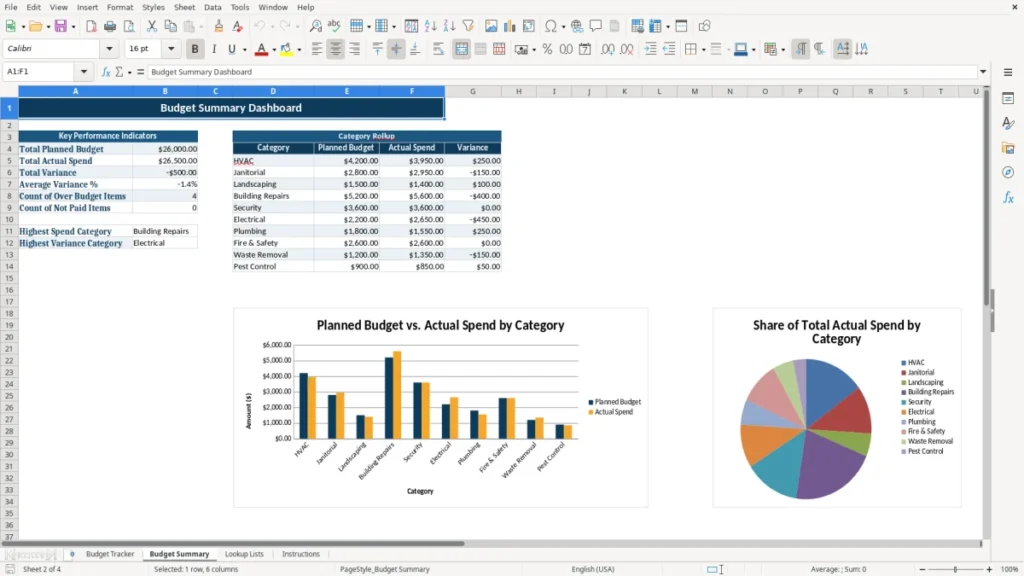
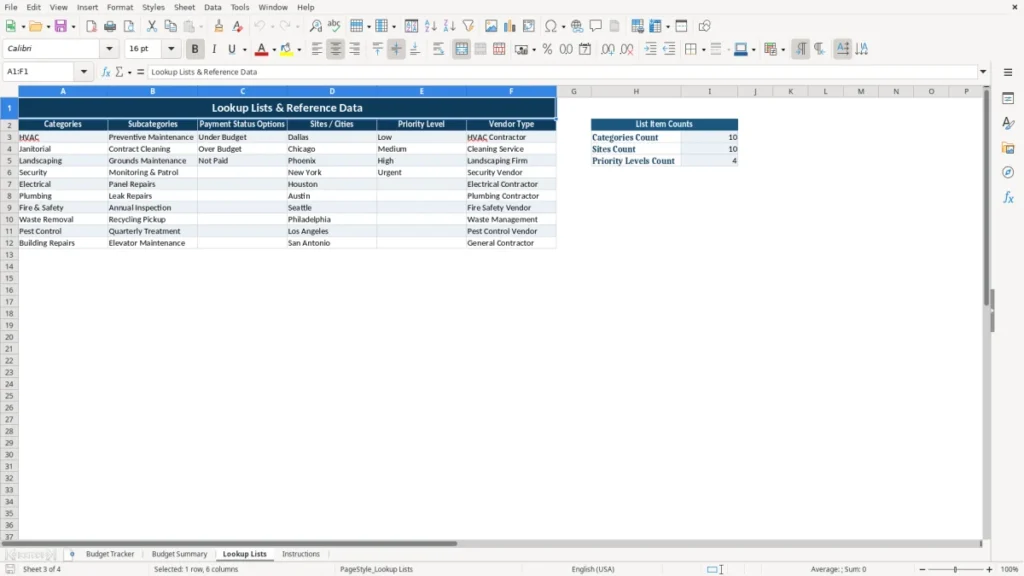
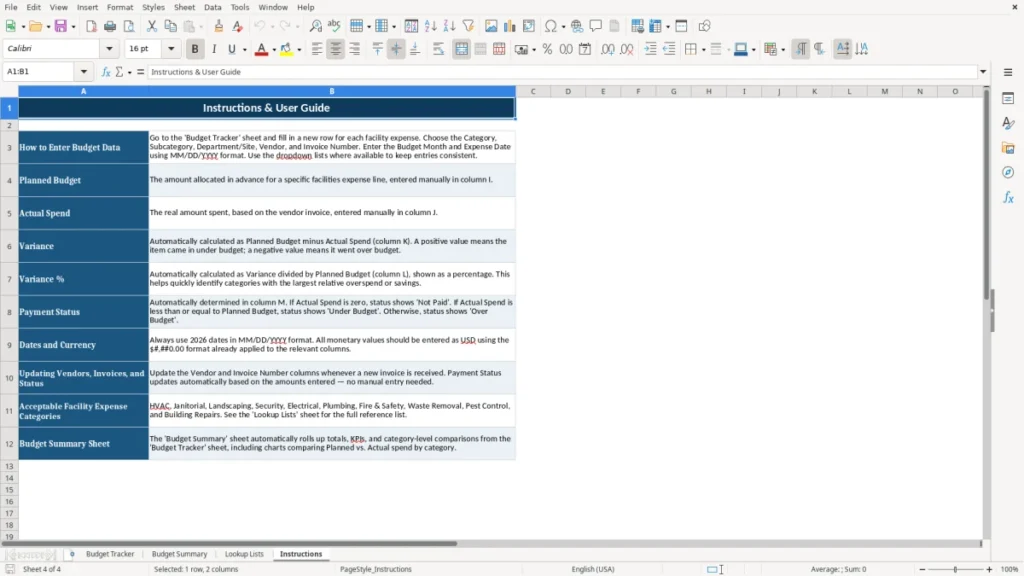
This facilities management budget Excel template helps you track planned spend, actual invoices, and monthly variances across sites, vendors, and service categories. It includes Budget Tracker, Budget Summary, Lookup Lists, and Instructions so you can keep one clean file for the year.
Use it for HVAC, janitorial, landscaping, repairs, utilities, and other recurring building costs. The tracker is built to show each line item with budget month, invoice number, payment status, and notes, so you can see where a site is running hot before month-end close.
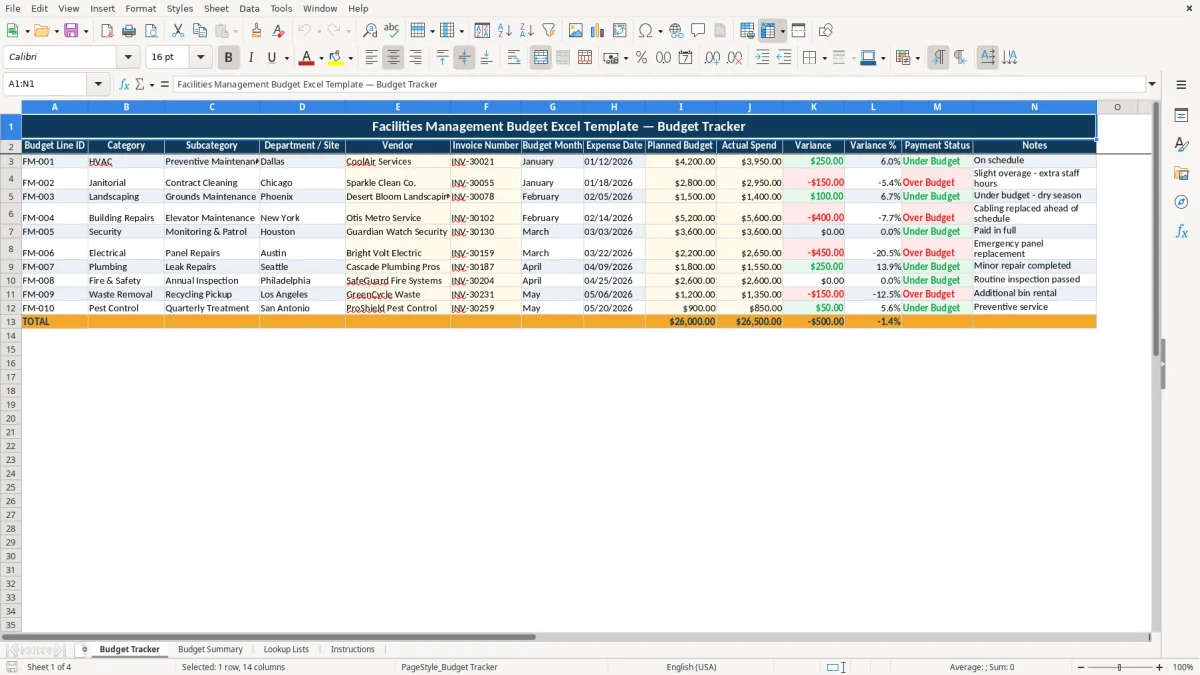
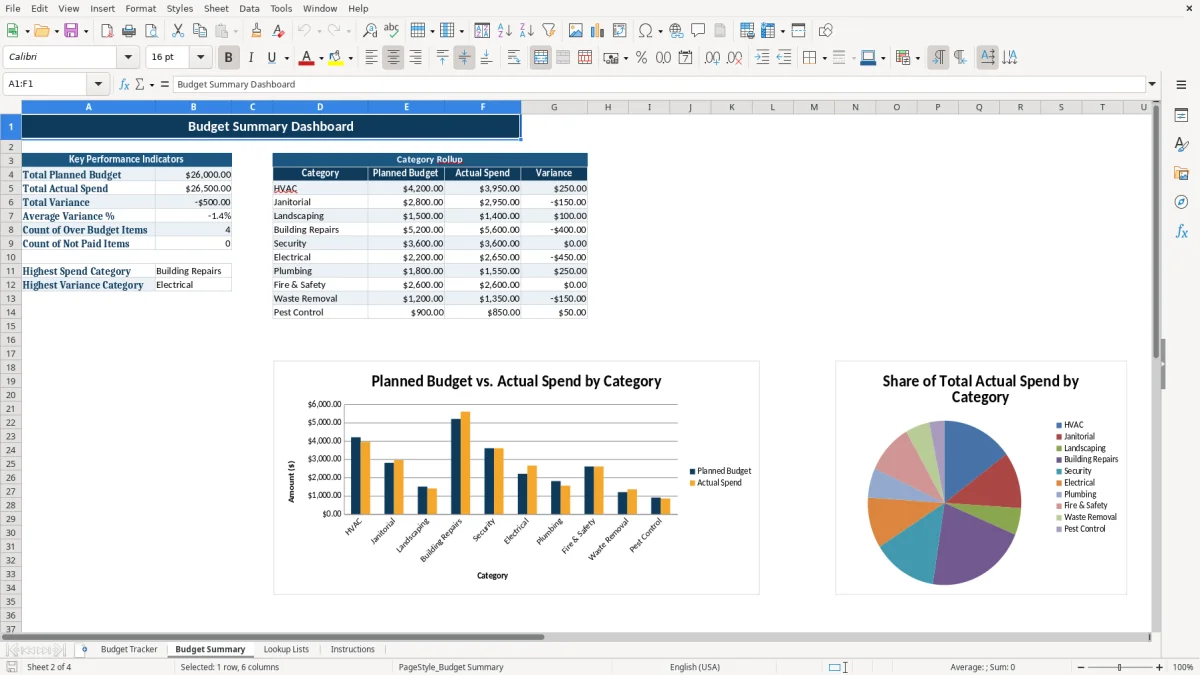
Image 1 shows the Budget Tracker sheet with the expense log. Image 2 shows the summary view that rolls the numbers up by category and site.
The main benefits of this Excel template
- Tracks planned budget against actual spend line by line, so you can spot overruns as small as $50 before they turn into a bigger month-end problem.
- Shows variance and variance % for each expense, which makes a $4,200 HVAC budget that lands at $4,950 easy to flag immediately.
- Helps you manage multiple sites in one workbook, such as a 4-building portfolio with separate budget months and vendors.
- Reduces missed invoices by linking each cost to an invoice number, payment status, and notes field.
- Gives you a clean monthly view for budget reviews, board reporting, or property manager check-ins without rebuilding the file every time.
- Makes vendor spending easier to compare, so you can see whether one cleaning contract is $300 higher than the others each month.
- Supports better cash flow planning by showing what is planned, what is already paid, and what still needs attention.
Step-by-step guide
- Start on Budget Tracker and enter each facility expense line with the site, vendor, invoice number, and month. Keep the descriptions consistent so HVAC, janitorial, and repairs roll up correctly in the summary.
- Type the planned budget and actual spend for each row. The variance fields let you see the dollar gap right away, such as a $2,800 plan versus a $3,050 actual invoice.
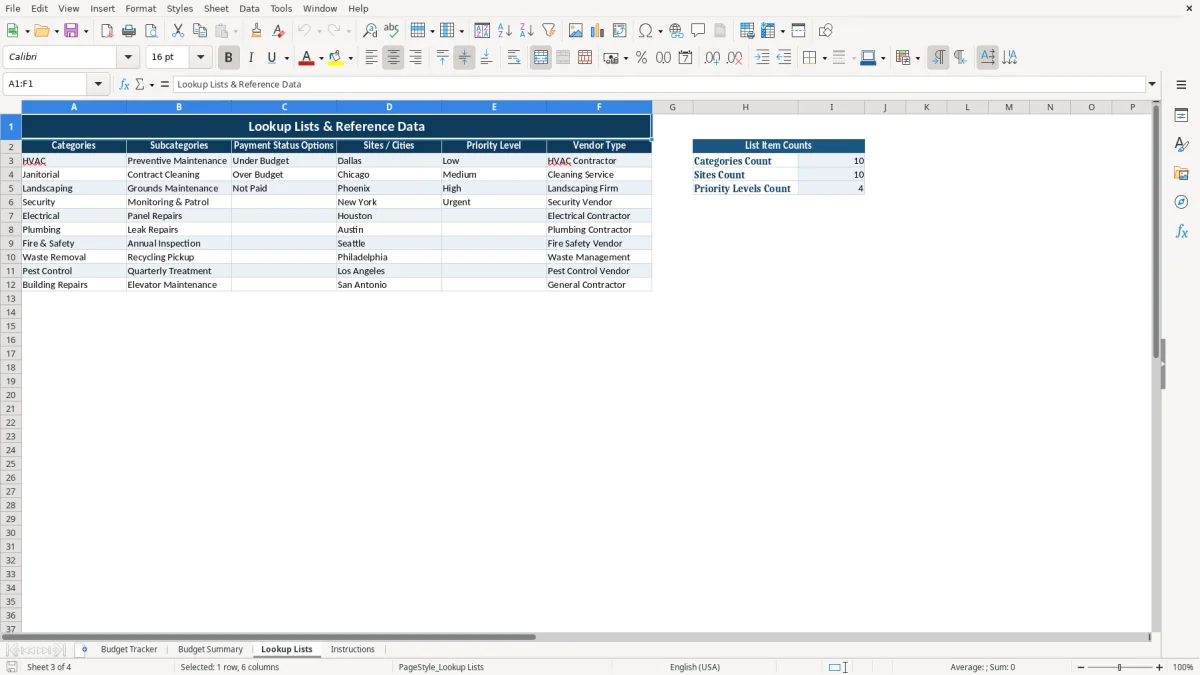
- Use Lookup Lists to keep category names, site names, and status labels standardized. This cuts down on typos that split the same expense into two different buckets.
- Check Budget Summary after you enter a full month of expenses. Use it to review totals by site or category before you present numbers to management.
- Mark payment status as open, paid, or pending review as invoices move through accounts payable. That gives you a fast view of what still affects cash flow.
- Add short notes when a charge is unusual, such as an emergency callout or one-time repair. Those notes save time when you compare this month to the next one.
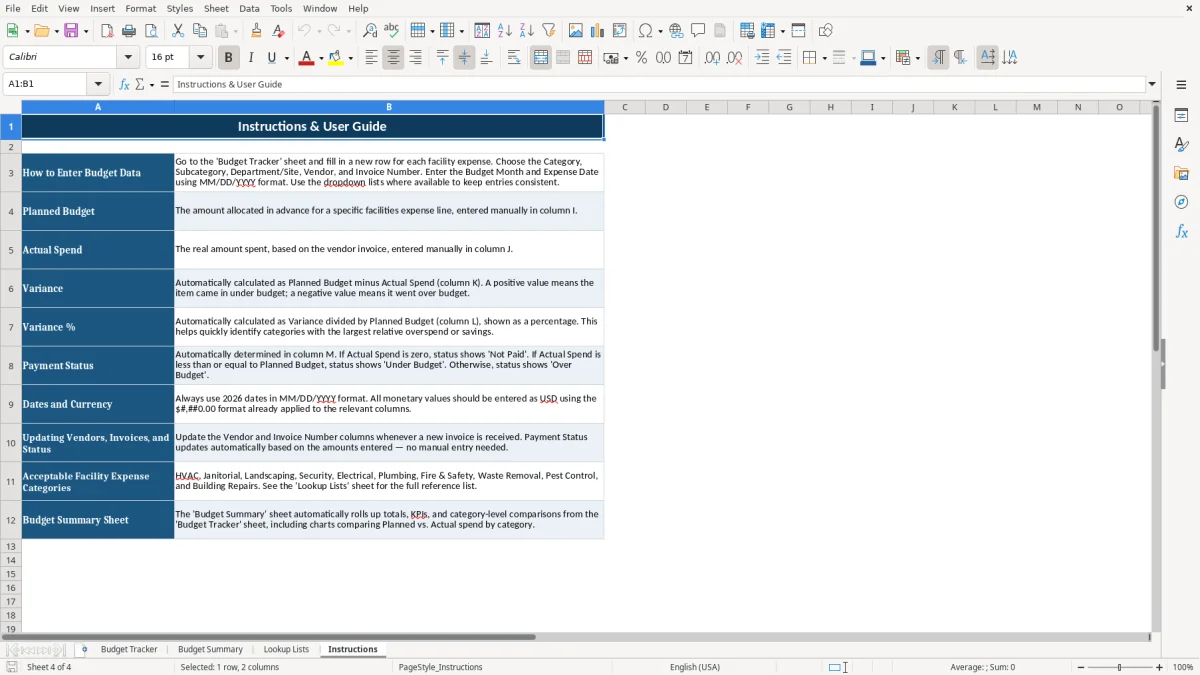
- Use Instructions when you hand the file to another person. A 2-minute walkthrough is usually enough to keep the workbook consistent from one month to the next.
What is included
Budget Tracker sheet with columns for budget line ID, category, subcategory, department or site, vendor, invoice number, month, date, planned budget, actual spend, variance, variance %, payment status, and notes.
Budget Summary sheet that condenses the workbook into a management-ready view for monthly review.
Lookup Lists sheet to support cleaner data entry and consistent category labels across the file.
Instructions sheet that explains how to enter data and keep the workbook organized.
Currency formatting for budget and spend fields, with percentage formatting for variance %.
Structured layout that works well for recurring facility costs such as HVAC, janitorial, landscaping, and building repairs.
Designed for small and midsize operations that need a practical budget control tool without full accounting software.
How facilities managers use a budget tracker during the month
Facilities teams usually feel budget pressure in the middle of the month, not at year-end. If you manage a 4-site portfolio with a $20,000 monthly operating budget, one $1,200 repair can blow up the category fast unless you log it the day the invoice arrives.
Who uses it in practice
An office manager at a contractor, a property operations lead, or a nonprofit treasurer often owns this file when there is no full ERP system. The Budget Tracker sheet is useful when you need one place for HVAC, janitorial, landscaping, and small repairs across multiple sites.
What the sheets do
Image 1 shows the line-by-line tracker with budget month, expense date, vendor, invoice number, planned budget, actual spend, variance, variance %, payment status, and notes. Image 2 shows the Budget Summary, which is the piece you can hand to a manager when they want totals by category instead of 80 individual rows.
Why the structure matters
This is not just a list of bills. The split between tracker, summary, and lookup tables keeps the workbook usable after 200+ rows, which is where sloppy naming usually starts breaking reports. A clean dropdown for site and category is faster than retyping “Dallas,” “Dallas Office,” and “DFW” as three separate versions of the same location.
The budget rules that matter for facilities spending
Facilities spending is not a tax form, but the records still need to hold up under review. The IRS generally expects you to keep business records for 3 years, and that means invoices, payment support, and budget backup should stay tied to the expense line.
Why invoice detail matters
If you pay a $3,950 HVAC invoice out of a $4,200 budget, you need the invoice number, vendor name, date, and description to explain the variance later. A vague line like “repair” is weak support when the same month also has a separate $1,800 parts charge.
Cash flow and approval control
For a small business, I usually prefer a simple budget tracker over jumping straight into accounting software when the job is under 500 monthly lines. If you are logging 40 to 150 facility invoices a month, the spreadsheet is still the better control tool because it shows planned spend and actual spend in one place.
Recordkeeping position
Use the workbook as a control file, then back it up with the real source documents. If a $600 pressure-washing charge gets coded to the wrong site, the summary can misstate one location by 3% to 5% even though the company-wide total looks fine.
That same source-document check becomes even more important when the spreadsheet is tracking a construction budget, where a single misposted charge can shift one project’s site total without changing the company-wide summary.
Where facilities budgets usually break down
The most common failure is not the math, it is the coding. One site gets entered as “Chicago,” another as “CHI,” and a third as “Chicago HQ,” then the summary shows three separate locations and the manager thinks spending is spread out when it is really all the same building.
Bad month-end comparisons
Another problem is mixing planned budget and actual spend without checking the variance column. If janitorial was budgeted at $2,800 and lands at $3,150 for three months in a row, that is a $1,050 quarter-over-quarter miss that should trigger a contract review.
Missed approvals and duplicate invoices
Facilities invoices are easy to double-pay when the same vendor sends a corrected copy. A duplicate $920 landscape invoice is annoying in isolation, but over a year that kind of mistake can easily cost $2,000 to $5,000 once you count time, reversals, and follow-up calls.
Why a notes field saves money
Short notes matter when there is an emergency callout, a one-time equipment replacement, or a seasonal cleanup. Without that detail, the next month looks inflated for no obvious reason, and the budget owner wastes time trying to reconstruct what happened from email threads.
Those short notes also make it easier to track maintenance performance over time, since one-off callouts and replacements stop distorting the month-to-month numbers.
How to turn the workbook into a monthly routine
The file works best when you tie it to a fixed moment, such as Friday invoice review or the first business day after month-end close. If you update 10 to 20 rows at a time, the workbook stays current without becoming a weekend project.
Simple habits that keep it alive
- Copy the prior month’s tab structure and clear the actual spend fields before entering the new month.
- Use dropdown lists for site, category, and payment status so entries stay consistent.
- Review variance % before you close the month, especially on categories above $1,000.
When to move beyond Excel
If you are running 20+ sites, tying budget control to purchase orders, and needing multi-user approvals, the spreadsheet will start to feel tight. At that point, software is better for workflow, but the workbook still works well as a control layer for a 1-person to 10-person operations team.
Frequently asked questions about this template
It tracks planned budget, actual spend, variance, variance %, vendor, invoice number, budget month, payment status, and notes for each facility expense line.
It works well for HVAC, janitorial, landscaping, building repairs, utilities, and other recurring site costs. A 4-site operation can keep each invoice in one workbook instead of scattered across email and notes.
Use it to review totals by category or site after you enter the month. If janitorial runs $2,800 planned versus $3,150 actual, the summary makes that overage easy to spot before you approve next month’s spend.
Lookup Lists help you keep site names, categories, and status labels consistent. That prevents the same location from showing up under three spellings and breaking your totals.
Yes. If you keep the entries updated during the year, the workbook gives you a clean record of monthly budgets, vendor charges, and variances that is easier to review at year-end close.
Move to software when you have many users, approval workflows, or 20+ sites that need live coordination. For a smaller operation, this Excel file usually handles the budget review just fine.
Meet the makers